Monitor pattern generator. Cheap & easy

Georgian2

Active member
Feedback
12 (100%)
Credits
1,785CR
Very cheap and easy pattern generator using an raspberry Pi pico.
https://github.com/sharpie7/pico-pattern
The compiled file on github is for the pimoroni Pico. Attached you can find an compiled uf2 file for the bare pico and use GPIO 10 for the push button (active low).
GPIO3 - RED
GPIO4 - GREEN
GPIO5 - BLUE
GPIO6 - Sync
GPIO10 - Button

I used an old powerbank to make it portable. Project on Github is not mine, I just found it, built it and share it. Have fun.
IMG_20231103_191101.jpg
 

Attachments

  • pico-pattern.zip
    18.9 KB · Views: 12

Macro

Active member
vacBacker
Feedback
4 (100%)
Credits
1,982CR
Nice, keep meaning to build a box with isolation xformer for monitor testing / repairs - looks like I need to bung one of these in as well (instead of a bootleg WC90!)
 

John Bennett

Senior Member
vacBacker
Feedback
10 (100%)
Credits
4,999CR
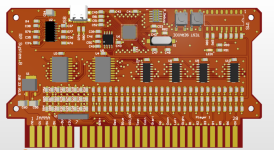
You've kinda nicked my thunder as I was about to send off for some blank PCBs for manufacture for a JAMMA testcard using the PICO RP2040 CPU.
It's not actually a lot more than what you've got - just some buffers circuitry for protection, shift registers to read in all the buttons and an audio amplifier.
1699051854312.png

Some graphics and sound stuff I've been playing with.

That CPU is great fun to play with. An 80p microcontroller where you can create your own GPU hardware using state machines, stacks of DMA you can use to throw pixels around and an 'interpolator' that accelerates Mode7 like effects. That's 15-bit colour and 15kHz audio.
I threw in a .mod player and it only uses only 4% of one of the two 133MHz cores.

Anyway I had dreams of creating something open-source that people could write their own arcade games on.
 

Georgian2

Active member
Feedback
12 (100%)
Credits
1,785CR
You've kinda nicked my thunder as I was about to send off for some blank PCBs for manufacture for a JAMMA testcard using the PICO RP2040 CPU.
It's not actually a lot more than what you've got - just some buffers circuitry for protection, shift registers to read in all the buttons and an audio amplifier.
View attachment 12097

Some graphics and sound stuff I've been playing with.

That CPU is great fun to play with. An 80p microcontroller where you can create your own GPU hardware using state machines, stacks of DMA you can use to throw pixels around and an 'interpolator' that accelerates Mode7 like effects. That's 15-bit colour and 15kHz audio.
I threw in a .mod player and it only uses only 4% of one of the two 133MHz cores.

Anyway I had dreams of creating something open-source that people could write their own arcade games on.
Nice. Would buy one.
 

Nes4life

Active member
vacBacker
Feedback
11 (100%)
Credits
1,117CR
That Jamma test card is awesome. Not only will it include pattern generator screens to fully test arcade monitors, but it's also a fully-fledged arcade games platform that people can make games for. I'll certainly be getting one when it's ready and can't wait to load new games on it as people start to make them.
 

John Bennett

Senior Member
vacBacker
Feedback
10 (100%)
Credits
4,999CR
I feel a bit guilty I've done a big hijack here, and I'd hate to put anyone off a bit of DIY. If you want to run my code on a stripboard then you'll have to change the pinout from the OP as it's 15bit (32767) colours (so you need lots of resistors).
But for a quick ugly 8-colour lashup, you could wire:
GPIO4 - RED
GPIO9 - GREEN
GPIO14 - BLUE
GPIO15 - Sync
(and obviously ground)

I usually put a resistor in-line with signals for protection (470R), but direct wiring should be alright for a quick lash-up.

The full pinout is in the .zip file with the .uf2 you drop onto the PICO board.
Worry about sound and inputs later (the .uf2 might actually have audio on pin 26). It'll just endlessly play the above demo.

I'll stick it all on GIT or something at some point, along with the Visual Studio 'simulator' I made to dev stuff on (reprogramming the PICO every time you change a line of code would drive you mad).
1699093351970.png

P.S. I realise there's a danger of me becoming notorious for never finishing stuff, but I've got a friend working on it too and we're looking into getting boards done via pick-and-place as life's too short to solder those things up by hand.
 

Attachments

  • graphics_test.zip
    143.1 KB · Views: 10
Last edited:

Sid723

Newbie
Credits
0CR
Very cheap and easy pattern generator using an raspberry Pi pico.
https://github.com/sharpie7/pico-pattern
The compiled file on github is for the pimoroni Pico. Attached you can find an compiled uf2 file for the bare pico and use GPIO 10 for the push button (active low).
GPIO3 - RED
GPIO4 - GREEN
GPIO5 - BLUE
GPIO6 - Sync
GPIO10 - Button

I used an old powerbank to make it portable. Project on Github is not mine, I just found it, built it and share it. Have fun.
View attachment 12095
I am from the United States and we use 60Hz. Is there a version of this program that can provide 60Hz? If not, is there an easy way to modify the program for 60Hz?
 

John Bennett

Senior Member
vacBacker
Feedback
10 (100%)
Credits
4,999CR
I am from the United States and we use 60Hz. Is there a version of this program that can provide 60Hz? If not, is there an easy way to modify the program for 60Hz?
Arcade monitors and games are pretty much all 60Hz, so the test pattern generators are all 60Hz rather than 50.
 

John Bennett

Senior Member
vacBacker
Feedback
10 (100%)
Credits
4,999CR
Doh, I didn't expect that. Sorry. I suppose it's a different target to arcade stuff.
Mine's 60Hz anyway, if that's of use.

I'm mildly horrified it's heading towards 2 years and I've not put any testcard PCBs out there - life and other distractions got in the way.
 

Sid723

Newbie
Credits
0CR
Doh, I didn't expect that. Sorry. I suppose it's a different target to arcade stuff.
Mine's 60Hz anyway, if that's of use.

I'm mildly horrified it's heading towards 2 years and I've not put any testcard PCBs out there - life and other distractions got in the way.
So you are saying that the pico-pattern generator runs at 50hz and it works on your 60hz monitor? If so, then maybe I will give it a try on mine to see if it works well enough.
 

Retroman839

Senior Member
vacBacker
Feedback
12 (100%)
Credits
7,318CR
Doh, I didn't expect that. Sorry. I suppose it's a different target to arcade stuff.
Mine's 60Hz anyway, if that's of use.

I'm mildly horrified it's heading towards 2 years and I've not put any testcard PCBs out there - life and other distractions got in the way.
I’m up 4 1 of your cards when ever they arrive 👍
 

Macro

Active member
vacBacker
Feedback
4 (100%)
Credits
1,982CR
I am from the United States and we use 60Hz. Is there a version of this program that can provide 60Hz? If not, is there an easy way to modify the program for 60Hz?

You would need to change the frequency of the DMA channels in cvideo.h

#define piofreq_0 5.25f // Clock frequence of state machine for PIO handling sync
#define piofreq_1_256 7.00f // Clock frequency of state machine for PIO handling pixel data at various resolutions
#define piofreq_1_320 5.60f
#define piofreq_1_640 2.80f

If those are 50hz timings you would need to make them all 50/60 times the current values and it should kick out 60 frames per second.

#define piofreq_0 4.375f // Clock frequence of state machine for PIO handling sync
#define piofreq_1_256 5.83f // Clock frequency of state machine for PIO handling pixel data at various resolutions
#define piofreq_1_320 4.66667f
#define piofreq_1_640 2.33333f

Totally untested, just following mathematic logic ...
 
Top