PC help please? Now vr twin machine ! (RESOLVED)

Ronnie Dent

Active member
vacBacker
Feedback
15 (100%)
Credits
1,194CR
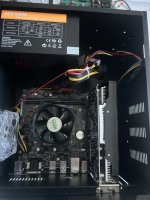
Looking for some advice to help track down why this pc is not posting, it's an Asus H110M-K mobo with one stick of 4gb ram and a Chinese GTX1650 4G graphics card
This is fitted to a 9D simulator thingy there are 2 pc's but this looks to be the main one.

Things I tried
Reseat ram
remove graphics card and tried both vga and dvi ports on the mobo no post, I know some mobo's are configured to only run with a gpu card?
Tried HDMI DVI on the graphics card no post

The pc looks brand new inside no dust or grime whatsoever, would be handy to narrow it down, there is a chance the DVI cable could be bad but thought I should get something out the other ports?

Thanks Ronnie
 

Attachments

  • IMG_7044.jpeg
    IMG_7044.jpeg
    88.7 KB · Views: 10

Ace`

PlanB contributor #1
Feedback
38 (100%)
Credits
3,844CR
As I found out recently some boards won't post with a dead cmos battery, so try replacing that first. Also maybe a silly question but have you confirmed it's got a cpu installed?

Top of the check list for me would be
Check the power supply is outputting all the correct voltages
Fit a known working cpu
Reflash the bios
not necessarily in that order.
 

Ronnie Dent

Active member
vacBacker
Feedback
15 (100%)
Credits
1,194CR
Thanks ace I did check the 5 and 12 volts, it’s never been opened so gpu will be there but no idea what flavour it is, I will check the bios battery, it’s strange both pc’s display nothing

Thanks Ronnie
 

TheDaddy

Senior Member
vacBacker
Feedback
14 (93%)
Credits
7,082CR
80% of none posting is down to bad ram or dirty ram sockets. I would remove the ram and clean the socket with IP and reseat and try again. If that fails its a matter of going through a process of swapping out each part with a known good one. If it has onboard graphics remove graphics card see if it post then , then move to the next until you have tested all the plugged in components. Its a matter of narrowing things down.

If you have tested all parts and you are left with a main board and cpu then is will most probably be a faulty motherboard. You will very rarely get a faulty CPU, A lot of the times it down to a bad North/Southbridge chip and they are BGA so a pain in the arse to reflow / reball.

Hope this helps,

Dave.
 

Ronnie Dent

Active member
vacBacker
Feedback
15 (100%)
Credits
1,194CR
80% of none posting is down to bad ram or dirty ram sockets. I would remove the ram and clean the socket with IP and reseat and try again. If that fails its a matter of going through a process of swapping out each part with a known good one. If it has onboard graphics remove graphics card see if it post then , then move to the next until you have tested all the plugged in components. Its a matter of narrowing things down.

If you have tested all parts and you are left with a main board and cpu then is will most probably be a faulty motherboard. You will very rarely get a faulty CPU, A lot of the times it down to a bad North/Southbridge chip and they are BGA so a pain in the arse to reflow / reball.

Hope this helps,

Dave.
Thanks Dave it all helps, I did reseat the ram and removed the graphics card but it did not post from the onboard graphics, as I said it looks brand new with no dust or muck inside
Thanks Ronnie
 

Ronnie Dent

Active member
vacBacker
Feedback
15 (100%)
Credits
1,194CR
So I tested the bios battery it was fine, tried ram in other socket, no joy, put ram back and reseated main power connector, now it posts and boots! fitted back the gpu card and it's all good, so not sure if it was ram contacts or the power plug,
Now I need to see if the other pc will boot, it has a smaller case, each is powering a VR headset and the 2 pc's are paired via an Ethernet tp link, at least that's what I think
Thanks for the pointers guys most appreciated

Thanks Ronnie
 

Ronnie Dent

Active member
vacBacker
Feedback
15 (100%)
Credits
1,194CR
Getting there, the 2 computers are not speaking to each other when I select a game using 2 seats I get this error message!
IMG_7046.jpeg
I then go back and select seat one it loads and plays, seat 2 computer is working and the headset displays a screensaver so I know it’s running fine just not on the network, I looked at the god player settings but it’s all in Chinese ? So there is a tp link router that has an Ethernet running to each pc and then to a control board for the hydraulics so not sure if that’s just for the movement only or it pairs the computers for the vr headsets too? Also the movement is not working either! This is all alien to me!


IMG_7047.jpegIMG_7048.jpegIMG_7049.jpeg

If anyone is in the know on this stuff please chip in

Thanks Ronnie
 

TheDaddy

Senior Member
vacBacker
Feedback
14 (93%)
Credits
7,082CR
So I tested the bios battery it was fine, tried ram in other socket, no joy, put ram back and reseated main power connector, now it posts and boots! fitted back the gpu card and it's all good, so not sure if it was ram contacts or the power plug,
Now I need to see if the other pc will boot, it has a smaller case, each is powering a VR headset and the 2 pc's are paired via an Ethernet tp link, at least that's what I think
Thanks for the pointers guys most appreciated

Thanks Ronnie

Thats good !!! Its be ram socket they are a pest.

Dave.
 

Vorbis

Active member
Feedback
6 (100%)
Credits
645CR
No, I'm mean are they connected to lan rather than wan ports on the router. I think they need to be LAN in order to talk to each other. Must admit I don't know much about this stuff but generally find I've either plugged it in the wrong port or used the wrong type of cable
 
Top