Problem Suggestions Needed on mounting Monitor to Cabinet

JohnT

Active member
vacBacker
Feedback
26 (100%)
Credits
374CR
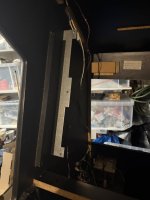
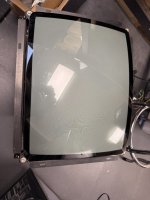
I need some of your experience on how to best mount a 25" monitor into the Cab.

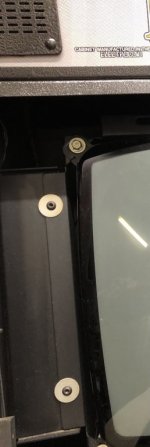
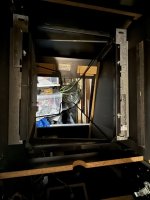
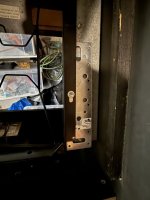
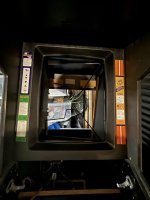
There are mounts already in the cabinet, but the frame for the monitor isn't wide enough by about 5cm to reach them.

Thoughts I've had are:
  • Create a wooden surround to attach the monitor to that can slot in - challenge here is that it would bring the monitor out a bit too much depending on the thickness of the wood
    • There are 3 'stud's on each side spaced (49cm apart for the ends and 24.5cm for the middle one). These mounts are welded as part of the bracket and only come out 12mm - could I get away with this using 8mm MDF...too flimsy?
  • Buy some steel and extend the current monitor frame and drill some holes to mount - supportive enough?
Interested to see what people think!

IMG_6014.jpg

IMG_6015.jpg


IMG_6017.jpg
 

bones

Active member
Feedback
15 (100%)
Credits
1,626CR
Could you take off the metal mounts on the cab and put a wooden spacer of 2.5cm between them and the cab and use slightly longer screws/bolts , assuming the monitor frame holes match up with the mounts. Otherwise a metal worker could make new or create a mount extender plate,want to avoid removable bolts as they a pain with heavy monitors.
 

Bods

Senior Member
vacBacker
Feedback
3 (100%)
Credits
4,697CR
The brackets already there with 3 studded bolts I can't see being the original fixings the monitor frame bolted too as it wouldn't have middle stud. So i'd expect some more metal on the sides of monitor frame or a bigger frame around whole monitor so it could be fitted Horizontal or Vertical

If it was me I'd get some thick steel to bolt on each of those brackets, using the 3 studs already and 2 more bolts further left and right of studs and in the middle of then height wise, what thickness metal though, hmm 2.5mm is thickness of metal brackets top/bottom of the 29" screens out sega drivers
 

Flyback2021

Active member
vacBacker
Feedback
35 (100%)
Credits
1,877CR
What brand / size of monitor are you fitting John ?
Do you have internal dimensions of cabinet ?
Using / modifying the existing metal mount is probably strongest .you could use an additional piece of steel or mending plate .
E7286CBD-8B2A-4AC5-A0E9-A74C1C6A5530.jpeg
 

JohnT

Active member
vacBacker
Feedback
26 (100%)
Credits
374CR
What brand / size of monitor are you fitting John ?
Do you have internal dimensions of cabinet ?
Using / modifying the existing metal mount is probably strongest .you could use an additional piece of steel or mending plate .
View attachment 32968
It's a Hanty Polo 25.
Cabinet dimensions are 55cm wide and 60cm long.
I'm actually looking at your pic and going to head to wickes to see if I can find a steel plate, or a couple of them that could bridge the gap.
With the monitor in place vertically there's only about 2.5cm each side that I need to cover and connect to those existing mount points.
 

Flyback2021

Active member
vacBacker
Feedback
35 (100%)
Credits
1,877CR
It's a Hanty Polo 25.
Cabinet dimensions are 55cm wide and 60cm long.
I'm actually looking at your pic and going to head to wickes to see if I can find a steel plate, or a couple of them that could bridge the gap.
With the monitor in place vertically there's only about 2.5cm each side that I need to cover and connect to those existing mount points.
That is what I would do, run a strip of steel the length with the needed width gain on each side . bolt - washer - nut it to the existing frame built in and mark up fixing point to polo frame.
 

JohnT

Active member
vacBacker
Feedback
26 (100%)
Credits
374CR
I couldn’t find anything that was the same
Length but Found a couple of these shorter 3mm steel plates with pre-drilled holes, test fit looks ok. Will mark up to centre and then try with the tube in, but I think this will be fine.


IMG_6035.jpeg
IMG_6036.jpeg

IMG_6037.jpeg
 
Top