Recalbox RGB Jamma

Mr_Karate

User
Feedback
1 (100%)
Credits
174CR
pretty sure it has screen rotation in the UI/config for recalbox.. How are you connecting to your screen? oled doesn't sound like typical jamma, is it VGA connector?

I meant the OLED panel built into the unit. Not that it really matters as it’ll be hidden away inside of my cabinet, but it seems weird that they expect you to connect the JAMMA harness from behind or above to have the OLED the right way up.

Also, can you specify any combo as the RetroArch hotkey? I have an extra button that is wired to Down and Start on my CP, which I use as the menu button for MiSTer. I may as well use that with the Recalbox. I know that combo can control volume down, but I will switch that off.
 

Wahoobies

Active member
vacBacker
Feedback
1 (100%)
Credits
419CR
I meant the OLED panel built into the unit. Not that it really matters as it’ll be hidden away inside of my cabinet, but it seems weird that they expect you to connect the JAMMA harness from behind or above to have the OLED the right way up.

Also, can you specify any combo as the RetroArch hotkey? I have an extra button that is wired to Down and Start on my CP, which I use as the menu button for MiSTer. I may as well use that with the Recalbox. I know that combo can control volume down, but I will switch that off.
Ohhh that's tiny. I used it literally one time total, just to see if it was booting in the correct resolution. I thought I'd need it a lot, but have had a relatively plug and play experience. The pi boots for about 30 seconds which makes you check the first couple times, but pretty much you'll never look at that.

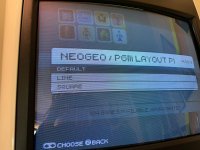
I *think* you can specify controls. I have 6button layout which is their default. it definitely lets you choose neogeo layout or profiles for fewer/more buttons/deactivate hot keys etc.

I have a reall nice mister jamma rig also- honestly I stopped using it entirely.. the UI and friendliness of recalbox was everything I wanted. I messed with input lag and couldn't tell a difference on recalbox vs mister for my twich fighters like SFA3, so I hardly ever plug it in any more.


The main advantages for me in recalbox vs the mister setup:
- every game uses same default controls, allows bluetooth controller, etc etc. consoles, arcades, whatever. it's easy
- same hotkey for volume up/down, credit, pause, config menus, exit, etc
- every resolution works and has nice modelines. it was easy to play a couple, set my screen, and never worry again
- I've only updated the cores/OS once in nearly a year. Mister was all the time
- It deals with vertical games *mostly* elegantly. Some look perfect in the letterbox mode, some look mildly squished. way better to almost always have them work without screen rotation
- I can connect it to wifi and use filezilla or etc to manage files. I messed with mister's "buildroot" linux shell to make it do these things, but was constantly re-tweaking it with updates
- recalbox has a good blank-screen screensaver. I set to one min for burn prevent.
- it will background play mp3s from a playlist. I have either ambient 80s arcade sounds (hah!) or an 80s playlist in it
- retroarch lets you go completely apeshit with custom config/video. I even have vectors looking tolerable on it
- backdrops and overlays! space invaders with the planetscape, discs of tron with the projection, etc etc
- sound samples. Q*bert swears! no missing sounds. you can choose various cores and pick/choose for perfect. I would be willing to spend hours to get the "knocker" workin on Q*Bert again too :)
- laserdisk games/daphne!
- has a "kiosk mode" for when the nephews come.. I can pin it on a particular game and disable hotkeys until I press service button after opening with key. Give them a bucket of tokens and park it on a multiplayer arcade.


My to-do list yet..
- some per-game configs for sound level. You can nicely normalize them so a few loud ones don't require volume changes.
- watching for the next update as the SDL port of apple ][ emu broke in current..
- a few more plug-in controller tweaks.. I have a spinner (discussed in this thread!) that works but not quite "dialed" in perfect
- consoles/computers.. I have more exploring to do. Do I want Dark Castle working with kbd/mouse on my jamma rig? I am dumb enough to say yes and spend hours getting it all working with a USB adapter and original single button bus mouse/kbd..

Stuff I will rarely plug Mister back in for:
- acorn archimedes
- pong!
- some more obscure computer cores like TRS-80, commodore PET, etc :)
- apple ][. Hoping they release a working binary again on recalbox soon- it worked before last update!

 

Mr_Karate

User
Feedback
1 (100%)
Credits
174CR
Ohhh that's tiny. I used it literally one time total, just to see if it was booting in the correct resolution. I thought I'd need it a lot, but have had a relatively plug and play experience. The pi boots for about 30 seconds which makes you check the first couple times, but pretty much you'll never look at that.

I *think* you can specify controls. I have 6button layout which is their default. it definitely lets you choose neogeo layout or profiles for fewer/more buttons/deactivate hot keys etc.

I have a reall nice mister jamma rig also- honestly I stopped using it entirely.. the UI and friendliness of recalbox was everything I wanted. I messed with input lag and couldn't tell a difference on recalbox vs mister for my twich fighters like SFA3, so I hardly ever plug it in any more.


The main advantages for me in recalbox vs the mister setup:
- every game uses same default controls, allows bluetooth controller, etc etc. consoles, arcades, whatever. it's easy
- same hotkey for volume up/down, credit, pause, config menus, exit, etc
- every resolution works and has nice modelines. it was easy to play a couple, set my screen, and never worry again
- I've only updated the cores/OS once in nearly a year. Mister was all the time
- It deals with vertical games *mostly* elegantly. Some look perfect in the letterbox mode, some look mildly squished. way better to almost always have them work without screen rotation
- I can connect it to wifi and use filezilla or etc to manage files. I messed with mister's "buildroot" linux shell to make it do these things, but was constantly re-tweaking it with updates
- recalbox has a good blank-screen screensaver. I set to one min for burn prevent.
- it will background play mp3s from a playlist. I have either ambient 80s arcade sounds (hah!) or an 80s playlist in it
- retroarch lets you go completely apeshit with custom config/video. I even have vectors looking tolerable on it
- backdrops and overlays! space invaders with the planetscape, discs of tron with the projection, etc etc
- sound samples. Q*bert swears! no missing sounds. you can choose various cores and pick/choose for perfect. I would be willing to spend hours to get the "knocker" workin on Q*Bert again too :)
- laserdisk games/daphne!
- has a "kiosk mode" for when the nephews come.. I can pin it on a particular game and disable hotkeys until I press service button after opening with key. Give them a bucket of tokens and park it on a multiplayer arcade.


My to-do list yet..
- some per-game configs for sound level. You can nicely normalize them so a few loud ones don't require volume changes.
- watching for the next update as the SDL port of apple ][ emu broke in current..
- a few more plug-in controller tweaks.. I have a spinner (discussed in this thread!) that works but not quite "dialed" in perfect
- consoles/computers.. I have more exploring to do. Do I want Dark Castle working with kbd/mouse on my jamma rig? I am dumb enough to say yes and spend hours getting it all working with a USB adapter and original single button bus mouse/kbd..

Stuff I will rarely plug Mister back in for:
- acorn archimedes
- pong!
- some more obscure computer cores like TRS-80, commodore PET, etc :)
- apple ][. Hoping they release a working binary again on recalbox soon- it worked before last update!
So I don’t need to worry too much about the OLED. Thanks for letting me know.

You cannot specify controls, by the looks of things. They have locked that down and you can only tell it how many buttons you have. Only the layout for MVS according to your CP can be changed.

START + BTN = HK is the specific menu option that I refer to. Does the BTN part have to be an actual button or can a joystick direction be set is what I want to know?

I have a feeling that due to START + UP/DOWN = VOLUME there will be an issue, even though volume controls can be disabled. If you don’t mind checking that for me, I can rewrite my CP before the unit arrives.
 

Wahoobies

Active member
vacBacker
Feedback
1 (100%)
Credits
419CR
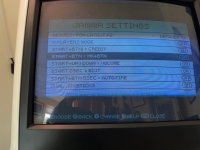
Jamma menu shows me choices for 2/3/4/5/6 buttons as "panel type"

Then all of these are toggles:

1742553873363.jpeg


plus behind the scenes I'm sure it's all editing text files, just probably a bit of R&D to find it all and learn retroarch stuff


I've messed with per-game stuff to add the spinner, for example
 

Wahoobies

Active member
vacBacker
Feedback
1 (100%)
Credits
419CR
Dual joystick: turn on for robotron/tutankahm/etc.. turn off for 2player games

can pair a bluetooth controller to it. I use a 3bitdo one for the analog stick or triggers driving games sometimes, or some of the tank games
 

Mr_Karate

User
Feedback
1 (100%)
Credits
174CR
Jamma menu shows me choices for 2/3/4/5/6 buttons as "panel type"

Then all of these are toggles:

View attachment 35776


plus behind the scenes I'm sure it's all editing text files, just probably a bit of R&D to find it all and learn retroarch stuff


I've messed with per-game stuff to add the spinner, for example

From your screen, I think that I’m going to have to rewire. My extra button is just going to turn the volume down. Thanks for the photo.

What are the commands to get into the menus? I’m assuming that there is one for the RetroArch menu and one for getting into the Recalbox menu where you select games. Maybe I can work something around either of those.
 

Wahoobies

Active member
vacBacker
Feedback
1 (100%)
Credits
419CR
when you are in system select you press p1 start to get all the config menus. This is when we are in "Recalbox"

Inside a game start plus "medium punch" on mine opens retroarch menus. From there you can do anything you can do in retroarch.. include custom resolution/controls/hotkey/etc. Then you can save to core (ie all of FBneo, or all of mame).. or just this game..

Honestly rewire seems excessive to me, you should be able to find a text file to edit mappings in. It'll be standard retroarch there- the recalbox is more a UI that runs in 15khz + launcher frontend for retroarch.

I think retroarch has a concept of a virtual controller. You map inputs to it, then that's used as defaults in all the cores. You should be able to modify this outside scope of what recalbox wants/makes easy. Recalbox was a little fiddly at first to find docs/wiki, but retroarch itself has many many docs
 

Mr_Karate

User
Feedback
1 (100%)
Credits
174CR
when you are in system select you press p1 start to get all the config menus. This is when we are in "Recalbox"

Inside a game start plus "medium punch" on mine opens retroarch menus. From there you can do anything you can do in retroarch.. include custom resolution/controls/hotkey/etc. Then you can save to core (ie all of FBneo, or all of mame).. or just this game..

Honestly rewire seems excessive to me, you should be able to find a text file to edit mappings in. It'll be standard retroarch there- the recalbox is more a UI that runs in 15khz + launcher frontend for retroarch.

I think retroarch has a concept of a virtual controller. You map inputs to it, then that's used as defaults in all the cores. You should be able to modify this outside scope of what recalbox wants/makes easy. Recalbox was a little fiddly at first to find docs/wiki, but retroarch itself has many many docs
Aha! It’s the START + MEDIUM PUNCH that I want to change to START + DOWN. If I can’t be done within the RetroArch menu then it’s probably just editing a text file like you say. Failing that, it’s just changing a wire over, so not too bothersome. Thanks for your help.

Now I just have to wait for it to arrive. Thursday is supposed to be international shipping day and I didn’t get any notification yesterday.
 

Wahoobies

Active member
vacBacker
Feedback
1 (100%)
Credits
419CR
ah ok probably that's disabling the start + up/down for volume.. honestly I use that a lot.. normalization across emulators is pretty hit/miss!
6-button panel for you?
 

Mr_Karate

User
Feedback
1 (100%)
Credits
174CR
This thing is fantastic! I can play CAVE games now and I don’t even have to rotate my screen.

Scraping doesn’t seem to save though. What do I do to keep everything?
 

Mr_Karate

User
Feedback
1 (100%)
Credits
174CR
I don’t have a hat spare. It seems to run well enough off of a fast SD card. The main issue is that it takes time to get to 5.1V before it will boot. I had to find the hidden switch as it was displaying 5.5V lowest at first and wouldn’t do anything.

I’m not sure if I prefer it to my MiSTer quite yet. You don’t seem to be able to hold down the Start button in a game, so I can’t play KOF ‘98 on it as I choose EX characters. The TATE without rotating your screen is great though.
 

Wahoobies

Active member
vacBacker
Feedback
1 (100%)
Credits
419CR
I don’t have a hat spare. It seems to run well enough off of a fast SD card. The main issue is that it takes time to get to 5.1V before it will boot. I had to find the hidden switch as it was displaying 5.5V lowest at first and wouldn’t do anything.

I’m not sure if I prefer it to my MiSTer quite yet. You don’t seem to be able to hold down the Start button in a game, so I can’t play KOF ‘98 on it as I choose EX characters. The TATE without rotating your screen is great though.
I think all the hotkeys that are pre-defined can be changed via config files.. Once you get it on wifi you can ssh in and do the linux!

varous hotkey enables etc, you can also use ESC on a usb kbd. I have a little microsoft one with a USB/not-bluetooth-but-similar wireless protocol
 

Wahoobies

Active member
vacBacker
Feedback
1 (100%)
Credits
419CR
I don’t have a hat spare. It seems to run well enough off of a fast SD card. The main issue is that it takes time to get to 5.1V before it will boot. I had to find the hidden switch as it was displaying 5.5V lowest at first and wouldn’t do anything.

I’m not sure if I prefer it to my MiSTer quite yet. You don’t seem to be able to hold down the Start button in a game, so I can’t play KOF ‘98 on it as I choose EX characters. The TATE without rotating your screen is great though.
I just power mine with the USB brick. My New Astro doesn't quite put out enough on 5v for it with the NVMe :D
 
Top