Atari Tempest Cabaret Scratch Build

qjuk

Active member
vacBacker
Feedback
50 (98%)
Credits
1,810CR
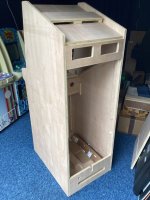
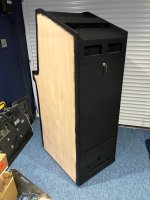
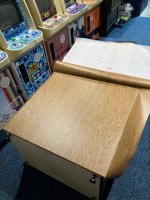
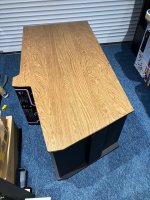
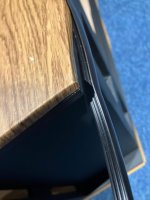
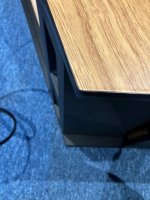
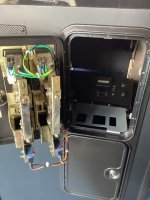
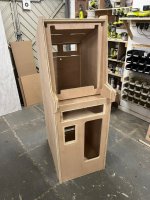
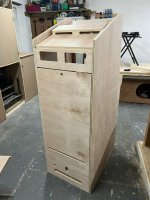
From this:-
CBD_Tempest1.jpeg

CBD_Tempest2.jpeg

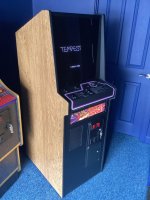
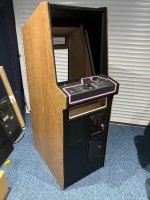
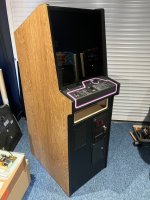
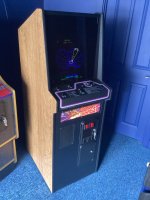
To this:-
QJ_Tempest_1.jpg

QJ_Tempest_2.jpg

Intro
Tempest was a game that I never played back in the day. I can’t ever remember seeing it in any of the arcades I used to frequent in my youth. Fast forward to 2019, I’m now fully aware of this Atari classic and I want one.

Even though I love the iconic shape and design of the upright, it’s the cabaret version I’d really love to get. The smaller compact size also means I can maximise the space in the Home Arcade. I’m also planning to get a cabaret Centipede machine as well (at some point), so they will look great side-by-side.

The Plan
My original wish was to find a complete original working machine, plug it in and be done.
Unfortunately, that’s not going to happen anytime soon. The trouble is, they are not readily available this side of the pond. Anyone who owns one is (quite rightfully) not going to let their machine go if they can help it.

The most realistic chance of getting a Tempest machine (excluding going down the Arcade 1Up route) is to find the parts and build one yourself. This is easier said than done as the biggest stumbling block is going to be the colour vector monitor. Not deterred, in 2019 I start the journey of sourcing the parts.

The first parts I obtained were an original game board, an ARII-4 and a couple of volcano buttons from AndrewB in the US. I also managed to source an original complete Tempest upright wiring harness and spinner from another member over on the KLOV forums and got them sent to Andrew’s address in the US. Andrew then fully refurbished the spinner and sent all the stuff in a box over to me. A few weeks later I then found a nice colour Atari power brick for sale on eBay in the US and I paid the hefty postage cost to ship it directly over to the UK.

By 2020 I was at the stage where I could lay the parts out, connect everything up and play Tempest blind.

Around the same time, Barry Shilmover in the US was making vector kits to convert a standard raster TV to a colour vector monitor. It’s based on the Amplifone hardware. I put my name down for a kit, waited the several months for the kits to be built, then received a kit a few weeks later in the post.

In the meantime, I’ve managed to source a reproduction cabaret control panel here in the UK which was fully populated with what looks like a new old stock spinner, new leaf switches, new volcano buttons and a brand new control panel overlay. It also came with a complete upright wiring harness as well.

I’m still without a cabinet to house the parts I’ve acuminated so far. My search for an empty Atari cabinet hasn’t proved successful to-date, so I change track slightly.


The abandoned Dinosaur King Cabinet Conversion
I had a spare Dinosaur King machine. It got me thinking, why don’t I use that cabinet shell for my Tempest build? All it meant was using Barry’s vector kit on a 14” TV screen instead and it would look nice along with my 4 other (at the time) converted Dino King cabs.

So I got to work. I took the original white Dinosaur King cabinet and metal parts to a local powder coating company to get it resprayed in black. A couple of weeks later the cabinet was ready to be collected and put back together.
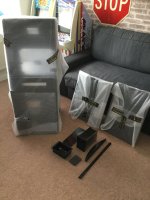
DK_black_1.JPG

To get the smoked glass effect which makes the vector colours pop, I purchased a piece of smoked coloured plexi. This fits onto the surround frame and fits perfectly behind the bezel.
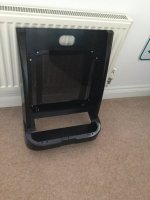
DK_black_2.JPG

I sprayed the original sun faded white plastic Dino King bezel myself in a satin black along with a clear lacquer to give it a hard wearing finish.

I managed to get all the original Atari parts neatly inside the Sega Dino cab. I cut up some plywood boards and made up some brackets to hold the main game pcb, ARII and colour brick in place. I made up the metal control panel from an old Love and Berry panel, which took some time to get perfect. Olly from Arcade Art Shop made the control panel overlay and bezel. I wired up an adapter which meant I could use the original Dino King door wiring and speaker to connect up to the original Atari harness.

The whole machine was complete and the game running with the exception of there being no monitor.

DK_black_3.JPG

Unfortunately, finding a suitable yoke to convert to the required vector windings proved unsuccessful. I went through about twelve 14” TV sets trying to find a suitable donor yoke and I wasn’t having any luck finding a yoke with windings within the required range.

It was at this point I decided to shelve the Dino King Tempest build idea. I felt that I had hit a bit of a dead end. I removed all the Tempest parts from the Dino cab and stored everything away. The black Dino cab was then repurposed and is now a fully converted and working Bomb Jack machine.
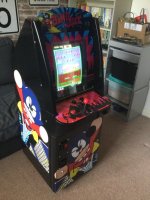
DK_Bombjack.JPG


Fast forward 4 years…..


6100 Color Vector Monitor

At the end of 2024, a conversation with fellow UKvaccer “aeroflott” lead me to an original Wells Gardner 6100 colour vector monitor. It needed a complete refurb, but it was an opportunity that I couldn’t let slip. You can read about it here

Now armed with a fully working vector monitor, the Tempest build was now back on and certain to become a reality. All I needed now is a suitable cabinet to house everything. Ideally, an empty original Atari cabaret cabinet would fit the bill. As mentioned previously, they are also hard to find and I don’t really want to butcher a Centipede or Dig Dug to convert into a Tempest. Centipede and Dig Dug Cabarets are very slightly different cabinets anyway (the rear ventilation holes spring to mind) so I might as well go for a replica.

Chris Barrie Designs

I know Chris has been making replica cabinets for a few years. He stopped for a while when Covid hit as the price of wood went crazy and he said he would have to price the cabinets at around £600-£700 due to the high material costs, a price which would be unaffordable or uneconomical for a lot of people.

Wood prices are now at more sensible levels so in February this year I got a quote from Chris to make a replica Tempest Cabaret cabinet. I opted for the build in Hardwood Ply which seems the best option to go for judging by online comments.

It took Chris around 3 weeks to make the cabinet. I drove the 520 mile round trip to pick it up in person. Here it is in the back of my car.
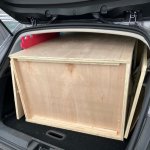
CBD_Tempest3.jpeg

(Continues in next post)...
 

qjuk

Active member
vacBacker
Feedback
50 (98%)
Credits
1,810CR
…and here it the cabinet now unloaded in my converted garage ready to be worked on.

CBD_Tempest4.jpeg

CBD_Tempest5.jpeg


Cabinet Design Accuracy

I believe Chris built the cabinet from the online designs available at Classic Arcade Cabinets (https://www.classicarcadecabinets.com/tempest-cabaret.html). The Tempest Cabaret is estimated to be 90% accurate. In my own opinion from working on this build, I’d say the accuracy is more like 80%. There quite a few errors, some are immediately noticeable:-

1. The coin door cut-out has square corners, they should be round.
2. No ventilation holes in either the back door or the lower back base where the mains inlet is.
3. Gap in the wood plinth on the rear right hand side is not wide enough to slide the main game pcb in/out.

Before Chris started work on cutting the wood, I pointed out the errors in points 1 + 2 above, and he made the correct amendments which turned out to be perfect.

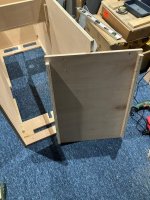
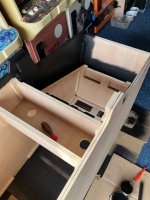
However, the main problems I had wasn’t until I started to size up and pre-fit the parts into the cabinet. The biggest error I discovered was the angle at which the monitor sits; it is wrong. If fitting an original WG6100 monitor, it will not fit in. The HV cage at the rear of the monitor hits the back of the rear vent and it still needs to go in another inch before it can lay on the baton supports. The angle is too horizontal, it needs to be more vertical. Sods law, I had already glued and screwed the side support batons on (believing it to be correct) and therefore had to break them off to correct the angle. The glue I used is quite strong and I ended up smashing the batons to bits to get them off. Thankfully the cabinet sides held up fine and I didn’t damage the wooden side panels.

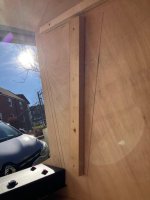
The photo below shows the original marked baton angle etched into the wood. I’ve positioned the monitor frame at the angle it needs to be set at using a new piece of wood for both sides.

TempBuild_1.jpg

I size up the monitor to check the fit. It now sits in great with about an inch clearance at the back so it doesn’t hit the rear ventilation grill.

TempBuild_2.jpg

I also had to make a slight adjustment to the roof of the cabinet as the front is slightly too low and too far forward. I needed to raise the front up a bit and slide the whole roof back about 20mm which also closes the gap at the rear of the machine. In the photo below you can see the original roof markings etched to the inside side panels. I moved the roof support batons slightly upwards (circled in red). I needed to do this so the monitor bezel frame can fit inside the machine so it can rest on the side frame bezel baton supports.

TempBuild_3.jpg

The photo below shows the gap at the rear of the machine.

TempBuild_4.jpg

Sliding the roof back by around 20mm covers the gap. I cut the rear at an angle so it is level with the back of the machine.

TempBuild_5.jpg

This looks far neater and more professional as well.

There also a design issue with the marquee light box. There no way of reaching the control panel latches via the coin door due to the wooden light “box” blocking access. In my case this was not an issue as the reproduction control panel I’ve got never had the panel locking latches welded onto it, so I couldn’t use latches anyway. I had to work out another way to hold the panel down when it is closed.

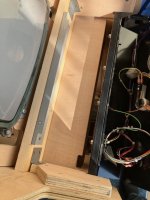
It took me a while to work out the best way to lock the control panel without drilling into the front and ruining the artwork. I placed an angled piece of metal onto a rear support baton at the bottom of the monitor. The angled bracket has 2 screw nut holes in it. There will be an “L” shaped angle bracket fitted to the back of the control panel as well. When you close the panel, the two holes will line up and you hold it down by screwing in 2 bolts. The smoked screen bezel will then sit on top of the “L” control panel bracket (which is added later) which in turn will hide everything nicely.

TempBuild_6.jpg

Another issue was that the wooden base and baton supports at the bottom of the cabinet were upside-down (you may have noticed it from the photo of the machine laying my car). To be fair, Chris probably would not have known that these Atari cabinets have the baton supports inside the machine, not underneath. It was easy enough for me to rectify as I wanted to remove the front panel from the machine anyway. All that needed to be done was to reverse the base panel, re-glue it and screw it back in.

TempBuild_7.jpg

TempBuild_8.jpg

(Continues in next post)...
 
Last edited:

qjuk

Active member
vacBacker
Feedback
50 (98%)
Credits
1,810CR
Size up Everything

One thing I’m learning quickly from this build, is to size up your existing parts with the cabinet to make sure they fit in nicely before starting the main fit-out. This way you can make adjustments early if necessary. I’ve found out overall that this cabinet is approximately 2mm-3mm wider than an original Cabaret. I could tell when I placed the screen bezel retaining bar at the top and by the control panel, there’s a very slight gap either side. As long as you position things centrally then you really don’t notice this at all.

Front Kick Panel

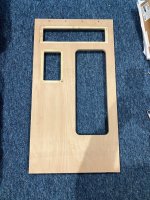
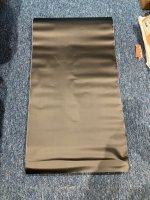
Now that I know that the parts are going to fit correctly, it’s time to start getting this machine looking like an original. I’m going to start with the front. I’m using a Matte Black vinyl wrap (same stuff used on cars) to create the black laminate front look.

It’s easier to remove the whole front panel to do this. I’ll tuck the overhang from the side down the side edges to keep it neat and to potentially stop the vinyl lifting/peeling at the edges.

TempBuild_9.jpg

TempBuild_10.jpg

TempBuild_11.jpg

TempBuild_12.jpg

The vinyl was easy to apply, it went straight onto the smooth bare wood. A nice sharp utility blade was used for the cut outs. I folded the vinyl about 10mm around each side edge so when the front kick panel is stuck back in, the vinyl shouldn’t peel.

I used a smooth metal plate to gently push the vinyl down into the groove recesses, so when the marquee and speaker grill are fitted it will look really neat.

Up and Over Coin Door

A long time ago I purchased a single coin entry up and over coin door unit from a member on here.

CoinDoor_Temp1.jpg

Rust is setting in so the whole thing will need stripping down and repainting. These Cabarets also have dual coin entries so I need to purchase a double entry top door. I like to set all my machines to US Quarters if I can, so I go hunting again in the States for a twin entry door. A few weeks later I end up with this.

CoinDoor_Temp2.jpg

It looks a bit rough but there’s nothing a bit of elbow grease can’t sort out. It’s basically complete including 2x 25cent coin validators and the housings, so it should be a fairly straight-forward job to restore this.

At first I use Nitromors paint stripper to try and get rid of the old paint from the doors. It is a green gel which you brush on, but it seems pretty useless. Even though I followed the instructions, it basically didn’t remove a great deal. It’s a complete waste of £17 in my opinion.

CoinDoor_Temp3.jpg

Time for some manual labour and wire brushes attached to my drill to remove the old paint. It takes a while but I get there in the end.

CoinDoor_Temp4.jpg

Note that I also stripped down the single top coin door as well. It will not be needed for this project but thought I’d do it anyway, incase I use it for a future restore.

The up and over outer frame is actually in very good condition. It is also made of thick aluminium so I won’t be stripping the paint off it, just a light rub down with some sandpaper to provide a key will suffice.

I’m going to be using black Hammerite spray paint (Hammered finish) to repaint the doors and the frame. The good thing with Hammerite is that you don’t need to use a separate primer. I did 4 coats in total (front and back). Hammerite does take longer to dry compared to normal rattle can spray paints, so it takes a while between coats and I had to leave to dry for 24 hours before spraying the opposite side.

CoinDoor_Temp5.jpg

(Continues in next post)...
 
Last edited:

qjuk

Active member
vacBacker
Feedback
50 (98%)
Credits
1,810CR
Speaker Cover

Takeman over on KLOV is the go-to person for metal part reproductions. Even though his run of the Atari grille covers finished a while ago, he did have a spare speaker cover and top rear vent cover to sell to me (the rear vent was already shown in a couple of previous photos). Sadly he didn’t have the screen bezel retainer bar. The reproductions were quite pricy, however they are excellent quality and look the part. I secured the speaker cover by drilling 4 holes into the front kick panel wood and used some black rounded bolts to secure it.

4ohm Speaker

These Cabarets use a single 6x9 inch 4ohm speaker. Finding an original Atari speaker was not as easy as I first thought. I put out a wanted post to ask if anyone had one to sell. About two months later fellow UKvaccer “69er” on here contacted me saying he had a couple and would sell me one. We agreed a deal and he promptly sent one in the post. During the time looking for a speaker, I have discovered that Mini Cooper car speakers are exactly the same size and are also 4ohm. The 4 mounting holes are also in exactly the same place as the Atari ones! Basically, the Mini Cooper speakers are drop in replacements – handy to know for future reference.

Marquee

At the time of asking, Olly from Arcade Art Shop didn’t reproduce the Tempest Cabaret marquee. My only options were to get one from Phoenix Arcade in the US or ask Mikonos in Spain if he reproduced them. Trying to order from Phoenix Arcade is difficult, I never had a reply to my question about International shipping via his website and he only accepts PayPal (which means I can’t ship it to my US forwarding address as my payment details are registered in the UK). I eventually got Phoenix to list the marquee on his eBay store which meant I could then forward it to my US address, however the price was a lot higher on his eBay store compared to his website. This in turn meant I’d pay even higher import VAT. I estimated that a $65 marquee would end up costing me over £100 to get it shipped via the eBay and MyUS route.

I also reached out to Mikonos (Zona Arcade). He can print the marquee as a reversible sticker for a reasonable price, I just needed to get a blank piece of plexi cut for it. I went for Mikonos’ artwork and it arrived pretty quick and is of top quality.

I had the piece of clear Perspex cut to the size of the marquee from Trent Plastics here in the UK. Mikonos kindly supplied me with the marquee hole measurements so I could drill the 6 mounting holes.

Marquee_Temp1.jpg

Marquee_Temp2.jpg

Marquee_Temp3.jpg

It wasn’t until after I received the marquee sticker that Mikonos said that he can actually supply the marquee complete already printed on Perspex as well. Nevermind, it all worked out good in the end.


Making Progress

With all the parts for the front kick panel now prepped and ready, I place the front panel in situ to see how it looks.

TempBuild_13.jpg

Looking lovely so far I think. I’m going to need to paint the back of the machine (including the rear door) and all around the T-molding grove areas first before I can glue and secure the front panel back in.

Cabinet Levelling Feet

Before I start painting, I want to put some levelling feet on the bottom of the cabinet. I use 4x M10 adjustable feet levellers (purchased from Amazon). I drill a 12mm hole and knock in the supplied T-nut threads in with a hammer. The feet then screw into the T-nuts so you can adjust the height. An easy job and the feet seem pretty sturdy.

TempBuild_14.jpg

Painting the Cabinet

Parts of the cabinet will need to be painted black. I’m following Tony Temple’s recommendation and I’m going to paint it using Rustoleum’s Chalkboard Paint. I’ve got to admit, this paint is fantastic. It goes on really well and fairly thick, it also dries quite quick as well.

TempBuild_15.jpg

TempBuild_16.jpg

As you can see, I’m painting the inside surface between the monitor and bezel with the black paint as there will be no cardboard bezel sitting around the monitor. The smoked coloured bezel will hide the area anyway so I don’t think a cardboard bezel is necessary (I’ve never seen one or a reproduction for sale anyway).

TempBuild_17.jpg

Just two coats are needed for it to look great. Since the paint dries fast, the whole paint job was done in an afternoon. I’ve now also fitted the rear door lock and put the rear top vent back in.

Side Panel Wood Grain

Following another tip from our friend Mr Temple, I’m going to be using “Wild Oak” vinyl wrap from DC Fix for the wood grain side look. The sides are 1.55 meters long, the vinyl is sold by the meter, so I am going to have to order 4 meters of the stuff.

TempBuild_18.jpg

TempBuild_19.jpg

(Continues in next post)...
 
Last edited:

qjuk

Active member
vacBacker
Feedback
50 (98%)
Credits
1,810CR
Just like the black vinyl wrap, this goes on quite easily. If you take your time starting from the bottom, sticking it down an inch at a time by smoothing out any air bubbles as you go along, it goes on neatly and looks great. Again, as with the black vinyl, I leave an extra 10mm around the edges so I can fold it over so the T-Molding will hold it down firmly. This way it will not start to peel and lift at the edges.

TempBuild_20.jpg

The side wrap is now finished and the front kick panel is glued and screwed back in. The Up and Over coin door is fully assembled and put in its cut out housing. T-molding is up next!

Side T-Molding

By mistake, I originally ordered ¾ inch T-Molding. It wasn’t until I checked it for a third time that I realised that I am actually going to need 11/16” molding. It’s no big deal as I’m sure the ¾ inch will come in handy for a future project.

After a few weeks, the T-Molding arrives from T-Molding.com in the US.

TempBuild_21.jpg

You have to order in it in multiples of 20 foot lengths. You need approximately 15 foot for each side of an Atari Cabaret machine, so I’m going to need around 30 feet in total, so a 40 foot length from T-Molding will cover it.

TempBuild_22.jpg

A rubber mallet is used to knock the T-Molding into the grooves. It goes in easy with no issues. I start the molding from the middle of the underneath of the machine and go around the entire machine edge to end back at the bottom again. That way you cannot see the join when the machine is standing up.

TempBuild_23.jpg

TempBuild_24.jpg

Cut outs to the inside molding are needed to go around the sharp corners. Slits to the inside molding are needed to go around the curved bends.

TempBuild_25.jpg

TempBuild_26.jpg

It’s amazing how much better a machine looks with some nice new T-Molding on.

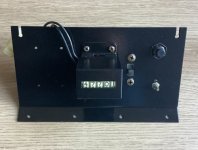
Utility Panel

I manage to pick up an original Atari utility panel from “itruk” who is another fellow UKvaccer member on here. As with previous parts, this is also going to need some TLC to get it looking nice again.

TempBuild_27.jpg

After stripping it down, cleaning and repainting, it’s now ready to be fitted to the machine.

TempBuild_28.jpg

TempBuild_29.jpg

The panel will be mounted on top of the coin box inside the top coin door. My original intention was to get an original wide and long Coin Controls coin box that Atari used, however I encountered a problem if I went down that route. I realised that using an original coin box meant that I would have an issue fitting the ARII in the back of the machine (more on this later). I therefore went down the route of using a standard Happ coin box which is narrower and shorter. The Happ box fits perfectly and lines up with the mounting bolts/lugs on the Coin Controls Up & Over door frame.

(Continues in next post)...
 
Last edited:

qjuk

Active member
vacBacker
Feedback
50 (98%)
Credits
1,810CR
Top Screen Bezel Retaining Bar

The only place I could find one of these was an eBay seller in the US. They are reproductions and the one I received was of very good quality. The only thing is that it did not come already painted or powder coated, so I had to do it myself (which I did with the Hammerite Smooth spray paint along with the Utility Panel)

Smoked coloured front Glass/Perspex

The size of the screen bezel will have to be custom made since the control panel locking bolts mean it will need to be slightly shorter as it will not fit as deep compared to an original machine. The nearest shade for the smoked/tinted effect Perspex I could find was the Neutral 923 Dark Grey Perspex. I purchased mine from Trent Plastics in Gainsborough. If you purchase direct from their website, it is far cheaper than via their eBay store.

TempBuild_30.jpg

It fits perfectly. At least I got the measurements right. You can also see the painted bezel retainer bar sitting on the top of the machine. (Note, photo was taken just before I put the T-Molding on)

As mentioned previously, I’ve now added an “L” shaped bracket to the back of the control panel and stuck down some 10mm strip foam to which the bottom of the screen bezel will sit on. When you close the control panel the 2 bolt holes will line up. Screw in the bolts and the screen bezel then fits on the top, cushioned by the foam.

TempBuild_31.jpg

Marquee Light

I’m going to keep this simple. I’m using a small LED baton light for the marquee light box. As it is 240v input only, it will need to be wired directly before the Atari power brick. A straight-forward job and doesn’t take very long to fit.

TempBuild_32.jpg


Wiring Fix

I’m now at the stage where I can start putting in the main wiring harness, power supply, door switches and pcb boards.

Upright Harness in a Cabaret machine

I’ve got a couple of complete Tempest wiring harness, however they are both from the upright machines. I originally thought an upright harness wouldn’t be a problem because it is a taller and a wider machine, however I’ve since discovered that the upright harness is actually smaller/shorter than a Cabaret harness! The majority of the electrical parts in an upright machine are all near each other in the bottom of the machine, the only thing longer is an extension cable that goes up to the top marquee light and speaker. In a Cabaret, the ARII is mounted high up on the left side of the machine (looking in from the back), therefore the wiring is quite a bit longer. I always thought it was odd for Atari to mount the ARII high up next to the vector monitor, both generate a lot of heat so why did Atari do that? I believe the reason is because of the Coin Controls cash box. Since the box is so long and wide there’s no space to fit the ARII near the bottom as the box gets in the way. The ARII itself is quite a long board, so the only place Atari could fit it in was to mount it high up.


There’s no way I can put my ARII in the same position without extending the wiring (or making up an extension loom) if I’m using an upright harness. Ideally, I don’t want to make any changes at all to the upright harness, I’d rather plan the layout of the parts so I don’t have to make any alterations.

I plan and size up to work out where everything will fit. I cut the cable ties on the harness so it is easier to route the wiring. I’m trying to stick as close as I can to the original layout of the Cabaret within the constraints of the upright harness.

I’ve found a layout which will work, the only thing I need to do is extend just 1 wire (it happens to be a ground wire between the ARII and the game board).

TempBuild_33.jpg

I need to cut the wire circled in red and extend it by approximately half a meter to follow the harness marked in light blue. I make the modification using a wire of the same colour and gauge wiring from an old scrap Atari harness.

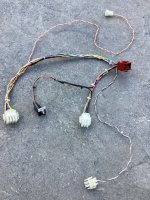
Another thing, the upright harness has a completely different connector for the coin door. Also, the upright has the volume and test switch on a small bracket, where-as the Cabaret uses the utility panel with it’s own different Molex connector.

The solution to this is to simply make up a conversion loom that I can plug into the upright harness to convert it into Cabaret connectors. Here it is.

TempBuild_34.jpg

You may have spotted a small push button as part of the loom. This is the Slam switch (which is essential to be able to step through the Tempest Test Menu). At the time of writing I still need to find a proper Slam switch, so this is a make-shift solution I can use in the meantime.

Final layout fix

Since I’m using a Happ coin box it means I have room to mount the ARII at the bottom of the machine (which I need to do due to the short length of the wires). Personally I think this is a better solution anyway, keeping as much direct heat away from the vector monitor and closer to the existing air vents at the bottom of the machine.

TempBuild_35.jpg

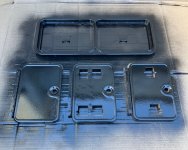
Speaking of vents, I used an ABS plastic honeycomb mesh grille to go over the vent hole at the very bottom of the machine and for the vent at the bottom of the rear door. The mesh was stapled to the inside wood. Since the vents are close to mains electric, I used plastic rather than metal mesh for safety.

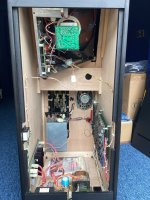
This is now everything secured and wired up inside the machine.

TempBuild_36.jpg

There is just one thing left I still need, and that’s a bracket that holds the bottom of the vector monitor to the left side panel of the machine (looking in from the rear).

Tempest Lives up to its Reputation (for being unreliable)

Tempest is often mentioned for breaking down. During the later stages of the build I would power up the machine and have a couple of quick games, making sure that everything I had done to-date is working and I’ve not messed up any wiring etc.,

I go and turn on the machine one evening and in typical Tempest fashion, the machine doesn’t power up. The spot killer LED is lit on the deflection board, the coin meter is randomly clicking over and occasionally weird sounds come from the speaker. My game has crapped out on me before I even had the chance to finish the build!

The build is paused whilst I look at the board (and monitor) to get them fixed. The repair thread is here

Monitor Support Bracket

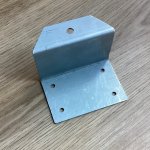
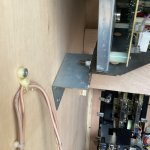
With the game and monitor now fixed and working again, I turn my attention back to finding a monitor support bracket. Unfortunately, I didn’t have any luck finding one, so I made one up myself!

Many thanks to forum member “1bradders” here for supplying me with the measurements and photos of his bracket, so I could try and copy it.

Here is what I made.

TempBuild_37.jpg

Fits a treat inside the cabinet…

TempBuild_38.jpg

TempBuild_39.jpg

(Continues in next post)...
 
Last edited:

qjuk

Active member
vacBacker
Feedback
50 (98%)
Credits
1,810CR
Rear Door and finishing up

Normally the rear door would have a thin piece of wood strip on the inside at the bottom to hold it into place. I’ve opted for two metal plates instead which are specifically designed for this purpose as I had a few of them spare laying around in my toolbox.

TempBuild_40.jpg

Now for a couple of extra photos.

This picture is a shot showing the rear of the monitor and the clearance to the back of the machine near to the top grille.

TempBuild_41.jpg

The following shows the Utility panel inside the coin door. Some beady eyed readers may have noticed that there is now a knob on the volume pot!

TempBuild_42.jpg

A shot of the Bezel Retainer Bar.

TempBuild_43.jpg


The finishing Line

The build has now finally been finished!

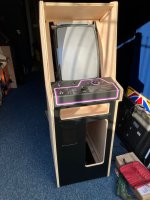
This is now what I’ve ended up with :cool:

TempBuild_44.jpg

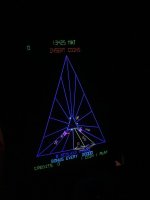
The vectors really are lovely. I’ve captured a few shots of them here.

TempBuild_45.jpg

TempBuild_46.jpg

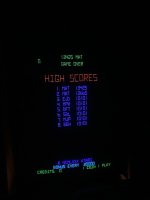
Yes, I know I need to work on the high scores!

Conclusion

This project has taken me over 6 years to finally come to fruition.
It’s taken me around 6 years to source all the parts needed and just a few months to actually put it all together.
The journey has definitely been worth it.
I can honestly say I think it has turned out better than I originally thought.

Thanks

Firstly, my thanks to Chris Barrie for the fantastic cabinet he’s made in his workshop. I think it is of excellent quality. The CNC cuts are spot on and the whole cabinet is solid. His communication is fantastic and I would certainly recommend him if anyone else was thinking of building their own machine. I also want to thank Chris for allowing me to use a couple of his photos in this write-up as well.

Second, my thanks to “itruk” for allowing me the use of one of his photos. In my haste, I’d forgotten to take a ‘before’ picture – so needed to use the one he took :)

Third, to all those other members who have helped me out with getting the parts or provided various information to make this build a reality. It’s been a massive help (y)

Fourth, to all those who have spent the time reading this write-up all the way through. I thank you for your time and hope you have enjoyed it.
 
Last edited:

Mr20to5

Active member
vacBacker
Feedback
1 (100%)
Credits
1,344CR
Amazing. 6 years but hugely worth it now. That's a stunning scratch build. Brilliant write up too.
Fantastic project, now get some very much deserved games in.
Awesome game, meticulous build. Thanks for sharing.
 
Top