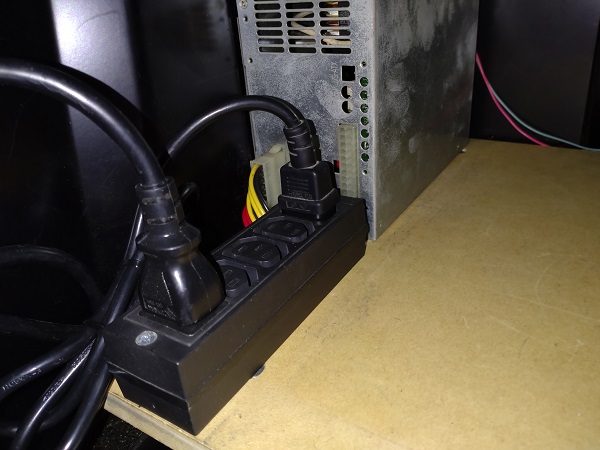
Best socket/backbox to install inside a cab?

Karmabass

Newbie
Feedback
1 (100%)
Credits
3CR
My Chewlix has a Chinese 220v outlet inside the cab that the monitor is plugged into. I want to replace this with a UK outlet, but not sure which would be the best socket/backbox combination. Done plenty of looking online but can only seem to find ones designed to be installed inside a wall.

Anyone got a recommendation?
 

FrancoB

Active member
Feedback
17 (100%)
Credits
1,040CR
Power strips get my vote too, I've installed them in a few cabs.

I recently put some in my Vewlix's.

i-ZSmbZxq-L.jpg


i-F25dt33-L.jpg


I've put these in the back of the cab and piggy baked them them from the filter. This means the power strip switches on and off with the cab when the internal power switch is flipped.

I've also just recently added an additional 'always on' socket:

i-4tNZ2xp-L.jpg


Amongst other things I run a Nintendo Switch in each of the cabs. Due to running CFW I don't like to power them down fully, however, as I rarely get time to actually turn the cabs on (go figure!) the Switches have often ran out of battery when I do seldom go to play a game. I've piggy backed these plugs to the IEC inlet to the cabs so they receive power as soon as the mains power to the cab is turned on as they are wired in before the cab power switch.

Both of my cabs run from a single stepdown so I've added a smart plug to this and set a schedule so that the stepdown turns on between 8-9am which then tops up the Nintendo Switches without turning the whole cab on.
 

FrancoB

Active member
Feedback
17 (100%)
Credits
1,040CR
You can certainly use the control panel I would feel a bit of numpty sat at the cab with joycons
smiley9.gif
smiley36.gif


I'm using [Brook UFBs] which support/interface XBOX SERIES X|S, Xbox One, Xbox 360, PS4, PS3, Wii U PC, Switch, NEOGEO mini, PS Classic and MD mini.

They're a bit expensive for what they are, especially when you need to buy multiple ones.

Another option available that has a bit less console support but a lot easier on the pocket is the [The Pico Fighting Board]

There's some more details on my wiring setup etc for them [here].
 

jerryspaghetti

Active member
vacBacker
Feedback
38 (100%)
Credits
1,998CR
FrancoB said:
You can certainly use the control panel  I would feel a bit of numpty sat at the cab with joycons 
smiley9.gif
 
smiley36.gif


I'm using [Brook UFBs] which support/interface XBOX SERIES X|S, Xbox One, Xbox 360, PS4, PS3, Wii U PC, Switch,  NEOGEO mini, PS Classic and MD mini.?

They're a bit expensive for what they are, especially when you need to buy multiple ones.?

Another option available that has a bit less console support but a lot easier on the pocket is the [The Pico Fighting Board]

There's some more details on my wiring setup etc for them [here].

Amazing! why am i only hearing this!

Sorry to hijack the thread, carry on!
 

Karmabass

Newbie
Feedback
1 (100%)
Credits
3CR
Thanks for all the tips folks. @FrancoB, I was planning to wire in a socket and then plug the power strip into one side of the socket. Gives me some flexibility to e.g. turn the cab off but leave the PC on (similar idea to your nintendo switch charging solution). Do you think it's better to just cut the plug off the power strip as you've done?

To whoever was asking about getting the Nintendo Switch hooked up to a cab, as an alternative to two brooks UFB (nearly £200) I came up with my own solution based on wiring up two raspberry picos to a JAMMA edge connector. Parts cost is about £30 total, I can show you how to do it (dead easy, just needs a bit of soldering) or potentially sell you one if you don't fancy soldering it. The picos are recognised as a controller on pc, switch, PS3, mister etc. Just not newer playstation and Xbox controllers.Karmabass2022-11-02 15:54:42
 

Karmabass

Newbie
Feedback
1 (100%)
Credits
3CR
@FrancoB I've just looked more closely at your "always on" socket. I think that's exactly what I'm looking for. What is the blue thing the socket is mounted to, and how have you attached it to your cabinet? Sorry, I'm not that knowledgeable about working with mains voltage.Karmabass2022-11-02 15:56:47
 

FrancoB

Active member
Feedback
17 (100%)
Credits
1,040CR
Pete said:
I used these similar to what you sometimes find in cabs oem from the factory:

They look nice and compact Pete. I presume you use C14>C14 IEC cables with them? If the sockets were individually switched it would be ideal.

Karmabass said:
@FrancoB I've just looked more closely at your "always on" socket. I think that's exactly what I'm looking for. What is the blue thing the socket is mounted to, and how have you attached it to your cabinet? Sorry, I'm not that knowledgeable about working with mains voltage.

The lower side panels are bolted on from the inside so I used those. I printed some mounts for the sockets and bolted them on with CSK bolts.

i-t3z9hTV-L.jpg


i-wNMzt9b-L.jpg


FrancoB2022-11-02 16:38:22
 

Karmabass

Newbie
Feedback
1 (100%)
Credits
3CR
Thanks @FrancoB I skipped the socket idea and got a power strip wired to the IEC input and all working well now. Just wondering did you ground the chassis of your cab to the ground pin?
 

FrancoB

Active member
Feedback
17 (100%)
Credits
1,040CR
Glad to hear you have it working
smiley20.gif


The Vewlix's cab bodies are already grounded so I didn't need to do anything there. Is your Chewlix not grounded?
 
Top