
Donkey Kong missing colour?

corn

Active member
Feedback
26 (100%)
Credits
231CR
I think my newly acquired DK machine is missing a colour:
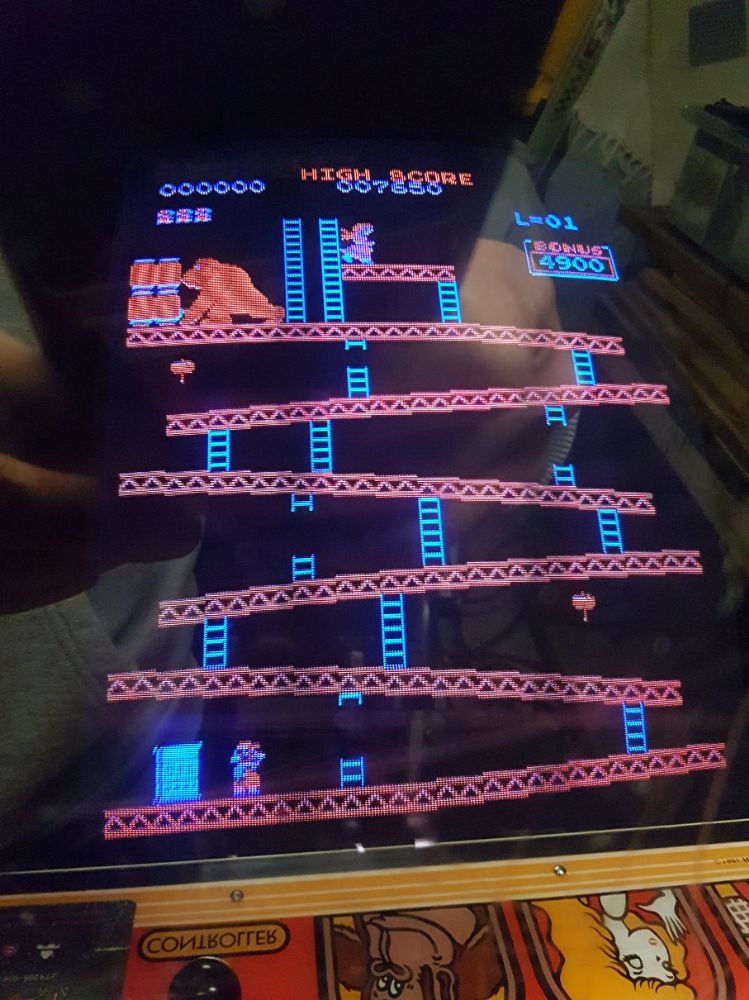
dkcolour.jpg


I've managed to adjust it up so it no longer has retrace lines and I've fiddled with the colours on the neckboard , however, this is the best I can seem to get it. I'm thinking the green is missing? I've turned the pot on the neckboard as far as it will go for green - still not great :-(

I can't see any lose wires, any other suggestions (other than a trip to Grant!)?

corn2017-03-14 20:49:44

 

GadgetFreak

Active member
vacBacker
Feedback
7 (100%)
Credits
963CR
Does your DK Video board have the video inversion components on it?
If it does there will be 3 trim pots side by side on the board towards the jamma connector which adjust red, green & blue.
 

corn

Active member
Feedback
26 (100%)
Credits
231CR
GadgetFreak said:
Does your DK Video board have the video inversion components on it?
If it does there will be 3 trim pots side by side on the board towards the jamma connector which adjust red, green & blue.

Hmmm, I'm guessing this is where the pots you are referring to would be?

2017-03-14_23.12.30.jpg
 

obcd

Active member
Credits
3,830CR
Are you sure the game board is outputting green?

Maybe you could exchange the red and green color wires and see if you are able to get green like that.
 

corn

Active member
Feedback
26 (100%)
Credits
231CR
Yep, its a Sanyo chassis.

I did consider trying to swap the colours around on the board. However, the only cable I can see going from the board to the monitor chassis looks to be flat ribbon type cable. Not sure how easy it would be to swap the pins over?

Unfortunately, I don't have another board to test with and don't know of anyone locally with a DK I could test my board in.

Sounds like I could be in for some fun with this one!?
 

Ronnie Dent

Active member
vacBacker
Feedback
15 (100%)
Credits
1,206CR
What I did with the ribbon on the board side is remove the pins with a flat blade screwdriver by pushing in the tabs on the slot at the side of the plug, you need to push in and pull out the wire whilst pushing the tab, bit fiddly but can be done. when you need to put the wires back proper you need to pull the tabs out before inserting in the plug otherwise they will fall out again!
 

Ace`

PlanB contributor #1
Feedback
40 (100%)
Credits
4,040CR
If you've got a logic probe you could connector it to the board and probe the green pin while it's running to see if it's pulsing. Chances are it's a monitor problem rather than a board problem though.
 

corn

Active member
Feedback
26 (100%)
Credits
231CR
Thanks for the suggestions chaps. I'll have a go at swapping the pins over on the board side and see where that takes me. Will report back with my progress
 

corn

Active member
Feedback
26 (100%)
Credits
231CR
Finally got around to swapping the red and green over. Here is the result:

2017-05-26_11.42.19.jpg


Decided to swap the red and green back, and now all I see is a scrambled screen:

2017-05-26_11.47.09.jpg


I've tried the usual... double checked the sync wire is connected ok, adjusted the sync, checked ribbon cables seated ok. All to no avail.

Given the monitor displayed green, am I correct in saying the PCB is likely to be the culprit? If so, can you recommend anyone for repairs?
 

corn

Active member
Feedback
26 (100%)
Credits
231CR
3 years on.. I'm still not much further with this Machine :-(.

I had the monitor checked over some time back by Gunblade (its fine) and swapping the red and green over suggests a PCB problem.

I've just cleaned and re-seated all the socketed chips but don't see any change.

Any suggestions?
 
Top