

PCB Repair - Taito Elevator
Action x2
Board Set 1
Game: Original Taito 4-board pcb set (converted to
Elevation Action).
Purchase Description: Complete and working.
Fault on Receipt: Game plays, but has red line graphic glitches
and partial missing sounds.
Board Set 2
Game: Original Taito 4-board pcb set (converted to
Elevation Action).
Purchase Description: Complete and working.
Fault on Receipt: Game plays, but has a minor graphic
glitch and partial missing sounds.
I purchased both of these board sets as fully working to
replace an already faulty original EA 5-board stack (which was also sold as
working). Sadly both of these 4-board stacks arrived with issues so that means
I’ve now received 3 faulty board sets, and not got a fully working game

The aim here is to try and make at least one fully
working game from these 2 sets, then hopefully repair the second set as a
back-up spare.
Both these board sets have been converted from another
Taito game, probably something like a Jungle King or Wild Western, but I genuinely
have no idea what they were previously. All I know is that both stacks are
using unencrypted/bootleg Elevator Action eproms so they can run on the
original Taito pcbs, thus eliminating the need for the 5[sup]th[/sup] security
pcb.
The advantage of having two of the same board stacks is
that I can swop boards between them and try to eliminate where the issues are.
I know that sound issues are related to the larger top pcb, so both top boards
on both sets will need looking at, however the graphic problems could be
anywhere so my first job is to try and track down which board is causing what
problem. Here is what I’ve discovered:-
Board Set 1
Eprom pcb – Fully Working.
Top pcb – Missing game sounds but background music fine,
plus causing red line graphic glitches.
Middle pcb – Fully Working.
Bottom pcb – Fully Working.
Board Set 2
Eprom pcb – Fully Working.
Top pcb – Game sounds effects would disappear after a few
minutes but background music fine.
Middle pcb – Fully Working.
Bottom pcb – Causing an extra “D” character above the
word “CREDIT”.
I made up a new stack set using the 3 known good boards and
the top (Game Board) pcb from the second set. The sound disappearing issue was
caused by two of the four AY-3-8910 sound chips being faulty. I’ve not got any
spare AY3’s but do have some YM2149F chips which are a drop in replacement. So
I fitted 2 of these which fixed the sound issue. I now have one fully working
EA board set!
Now onto repairing the second board set.
Missing sounds
Having already checked the four AY-3-8910 sound chips by
swopping around with the first board set, I know these are good. The next
likely suspect is probably a dead Op Amp. On the EA board there are three
LM3900 Op Amps (at IC1, IC8 and IC17). The Amp at IC1 had already been
previously replaced and soldered directly into the board. Since I had no idea
which amp/s could be potentially faulty, I decided to remove all three. I
fitted new sockets and three new LM3900’s. This fixed the missing sound issue.
It turned out it was just the one Op Amp at IC1 that was dead (the one that was
previously replaced). It’s a shame the previous repairer didn’t socket it, Op
Amps are common parts to die so it’s worth socketing these. It would have certainly saved me some time as
I could have easily checked that first. Never-mind, time to move on…
Extra “D” character above the word “CREDIT”
This is a bit of a weird one. All I know is that this
problem is definitely on the bottom (CPU) board.

I asked for some ideas on the UKVac Tech forum and one of
the suggestions was to check for ram. Since my board set is part of the 5 board
system (but not using the 5[sup]th[/sup]
Security Board due to the unencrypted /bootleg version roms), there’s three
2016 rams at IC14, IC56, IC57. I borrowed the three rams from the first working
board set stack (which happened to actually have 6116 rams) and tried them on
this board, it cured the problem! It was
probably just one of the 2016 rams that was being funky, but since I didn’t
want to mix 2016 and 6116 ram, I simply replaced all three 2016’s for three
brand new 6116 rams.
Red line graphic glitch
After the pcb set has been powered on for a quite a few
minutes, the following red lines start appearing onscreen…
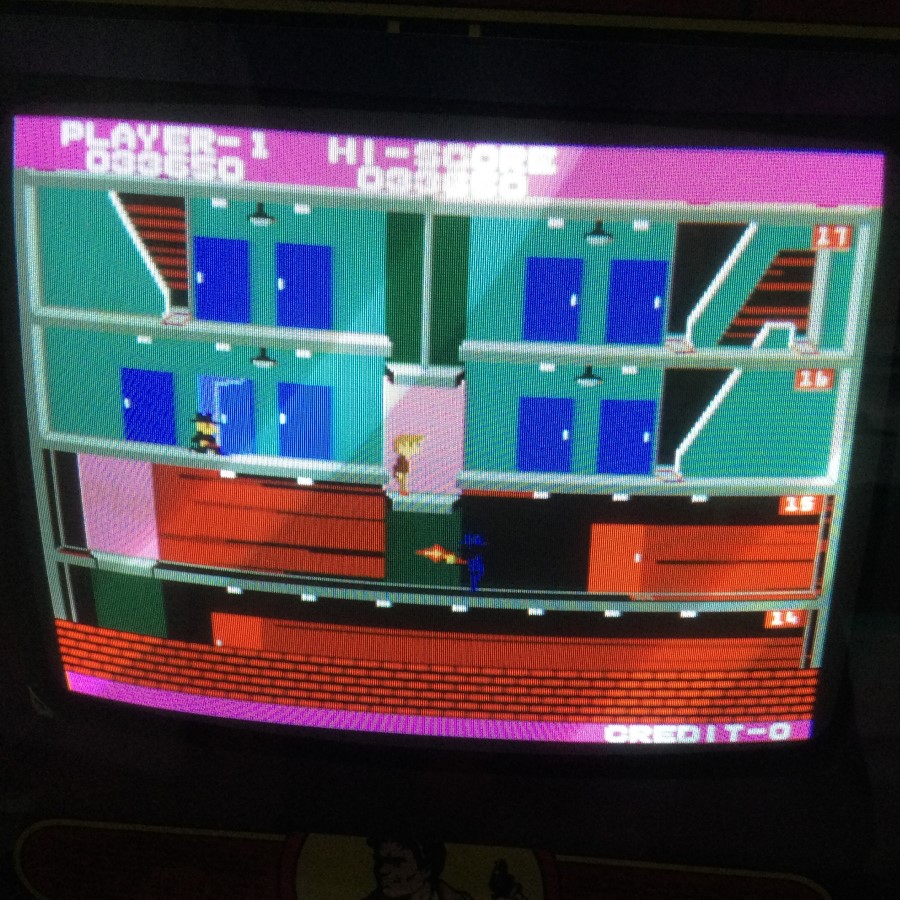
The red line issue only seems to happen on a black
background.
My initial thought was that maybe this is another ram
issue. There’s a N82S09N bi-polar ram chip (labelled as 93419 at IC67 on the
schematics) which is part of the colour circuit. The chip is socketed so I
borrow the one from the first board set to test it and it makes no difference.
I then put the original ram chip back in and move on.
Knowing this issue is definitely on the top (Game Board)
pcb, I thought I would take a closer inspection of the board. I noticed a 270
ohm resistor at R164 is badly burnt…
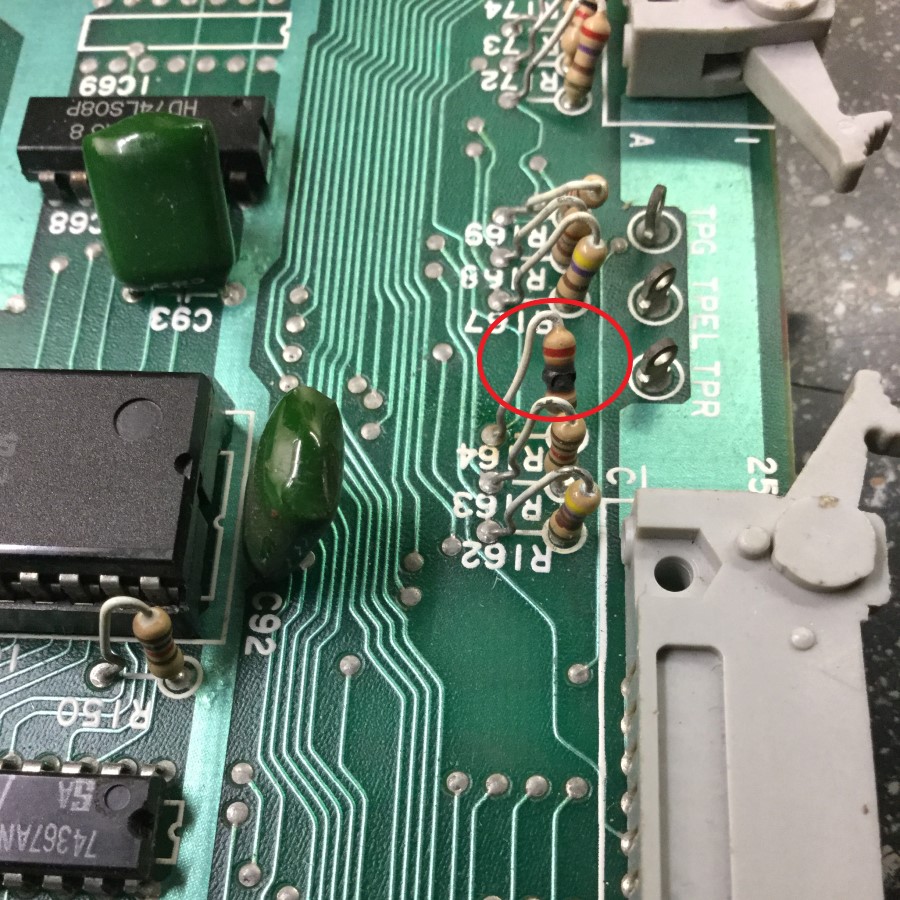
The 470 ohm resistor at R162 also has some minor burn, so
I replace them both. It made no difference.
I’m curious to see what part of the circuit this resistor
is connected to. I get out the schematics and have a look around. I find
something interesting, the burnt resistor is part of the red colour circuit and
is the only resistor connected to a 7474 flip-flop at IC44.
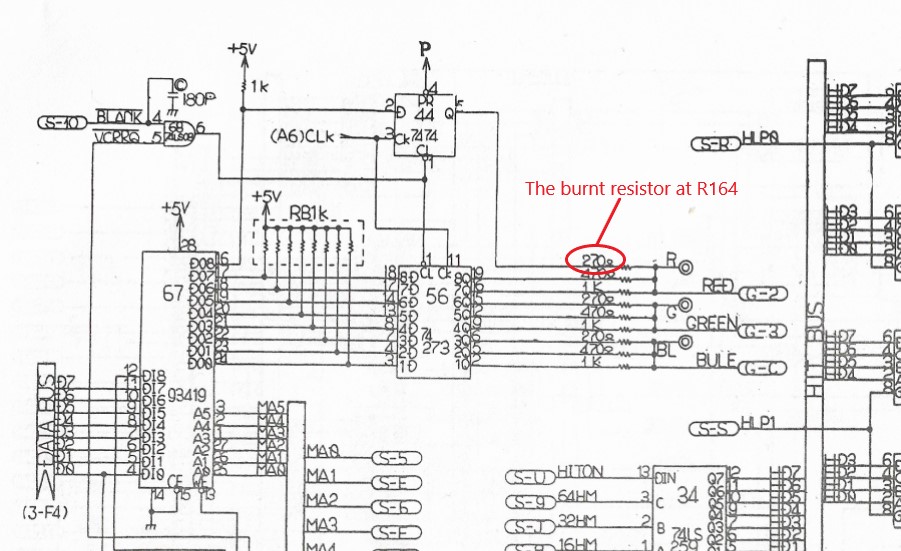
This red line problem only happens after the board has
warmed up and I wonder if this IC is the likely culprit which caused the
resistor to burn out in the first place?
I removed the 7474 and put it in my tester…

It fails! I solder a brand new 7474 chip into IC44 and power up the board,
it fixes the red line problem
 . At this point I’m thinking the board is now
fully repaired and everything seems to be running nicely

Then about 30 minutes
into soak testing the board set I get this…

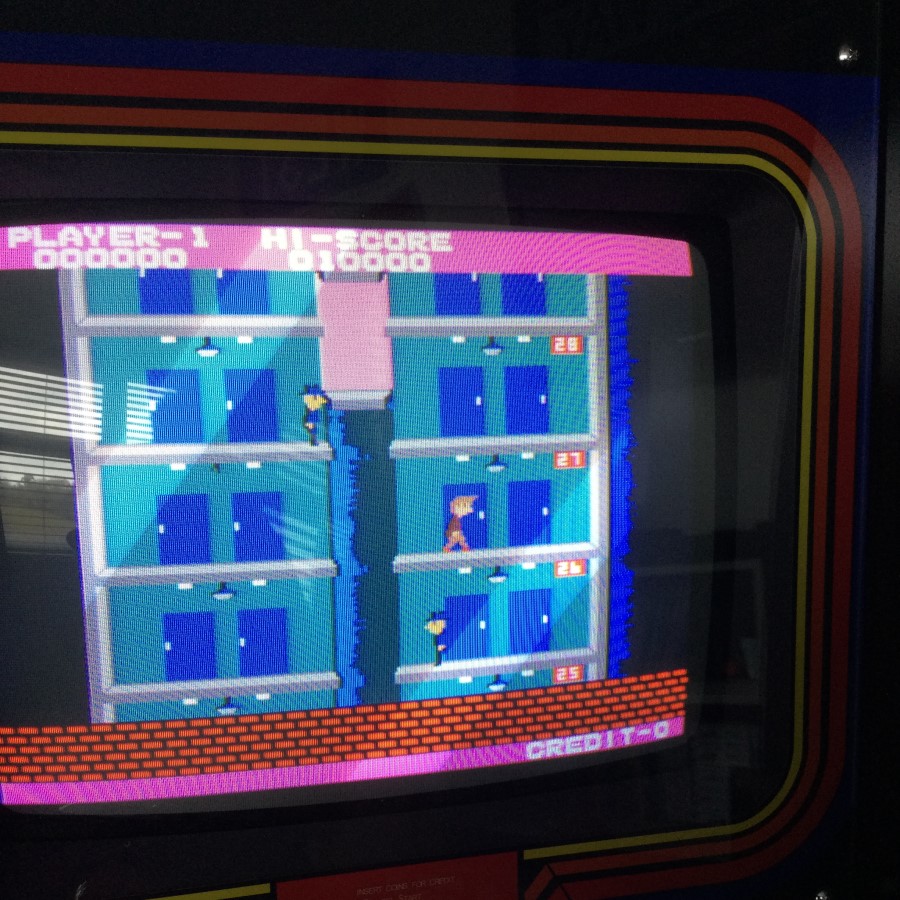
I have now got blue colour issues
 . I take a look at the schematics
again, I’m now thinking maybe the 47273 flip-flop at IC67 has gone bad
too. I pull the 74237 and check it in my tester, it passes fine so it looks
like that’s not the issue. The only other thing I’m thinking is that maybe the
N82S09N bi-polar ram has now decided to go bad on me. This time I rob a N82S09N
chip from a non-working Wild Western stack, it fixes the blue issue! Just to
make sure it’s not some sort of connection/socket issue, I put the old N82S09N chip
in again and the blue comes back, put in the Wild Western N82S09N donor chip
and the problem disappears.
These are the chips in the colour circuit that I replaced
and checked…
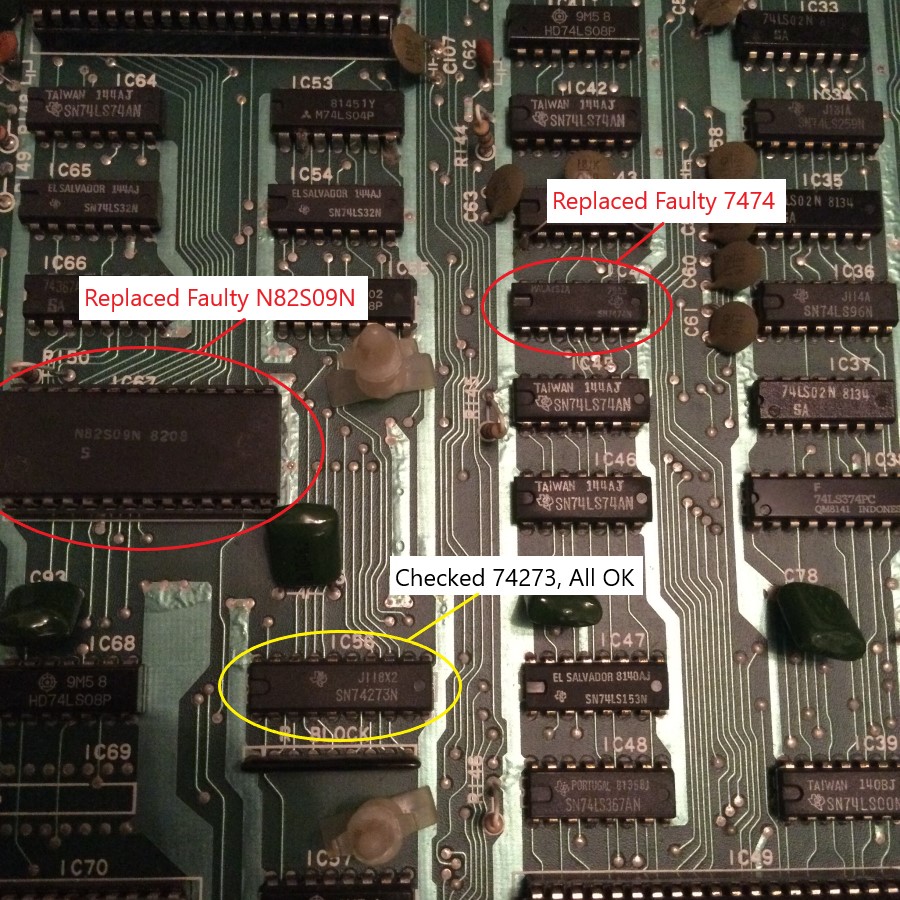
The board set has been powered for several hours now (with
a few obligatory game plays in-between
) and everything seems to be working
great. I think I’m now at the point where I can call this repair done

Parts needed for this repair:-
·
1x 270 ohm resistor
·
1x 470 ohm resistor
·
1x LM3900 Op Amp
·
1x 7474 Dual D Flip-Flop
·
1x N82S09N bi-polar ram
·
2x YM2149F sound IC (direct replacement for the
AY-3-8910)
·
3x 6116 ram (direct replacement for the
TMM2016P)
Action x2
Board Set 1
Game: Original Taito 4-board pcb set (converted to
Elevation Action).
Purchase Description: Complete and working.
Fault on Receipt: Game plays, but has red line graphic glitches
and partial missing sounds.
Board Set 2
Game: Original Taito 4-board pcb set (converted to
Elevation Action).
Purchase Description: Complete and working.
Fault on Receipt: Game plays, but has a minor graphic
glitch and partial missing sounds.
I purchased both of these board sets as fully working to
replace an already faulty original EA 5-board stack (which was also sold as
working). Sadly both of these 4-board stacks arrived with issues so that means
I’ve now received 3 faulty board sets, and not got a fully working game
The aim here is to try and make at least one fully
working game from these 2 sets, then hopefully repair the second set as a
back-up spare.
Both these board sets have been converted from another
Taito game, probably something like a Jungle King or Wild Western, but I genuinely
have no idea what they were previously. All I know is that both stacks are
using unencrypted/bootleg Elevator Action eproms so they can run on the
original Taito pcbs, thus eliminating the need for the 5[sup]th[/sup] security
pcb.
The advantage of having two of the same board stacks is
that I can swop boards between them and try to eliminate where the issues are.
I know that sound issues are related to the larger top pcb, so both top boards
on both sets will need looking at, however the graphic problems could be
anywhere so my first job is to try and track down which board is causing what
problem. Here is what I’ve discovered:-
Board Set 1
Eprom pcb – Fully Working.
Top pcb – Missing game sounds but background music fine,
plus causing red line graphic glitches.
Middle pcb – Fully Working.
Bottom pcb – Fully Working.
Board Set 2
Eprom pcb – Fully Working.
Top pcb – Game sounds effects would disappear after a few
minutes but background music fine.
Middle pcb – Fully Working.
Bottom pcb – Causing an extra “D” character above the
word “CREDIT”.
I made up a new stack set using the 3 known good boards and
the top (Game Board) pcb from the second set. The sound disappearing issue was
caused by two of the four AY-3-8910 sound chips being faulty. I’ve not got any
spare AY3’s but do have some YM2149F chips which are a drop in replacement. So
I fitted 2 of these which fixed the sound issue. I now have one fully working
EA board set!
Now onto repairing the second board set.
Missing sounds
Having already checked the four AY-3-8910 sound chips by
swopping around with the first board set, I know these are good. The next
likely suspect is probably a dead Op Amp. On the EA board there are three
LM3900 Op Amps (at IC1, IC8 and IC17). The Amp at IC1 had already been
previously replaced and soldered directly into the board. Since I had no idea
which amp/s could be potentially faulty, I decided to remove all three. I
fitted new sockets and three new LM3900’s. This fixed the missing sound issue.
It turned out it was just the one Op Amp at IC1 that was dead (the one that was
previously replaced). It’s a shame the previous repairer didn’t socket it, Op
Amps are common parts to die so it’s worth socketing these. It would have certainly saved me some time as
I could have easily checked that first. Never-mind, time to move on…
Extra “D” character above the word “CREDIT”
This is a bit of a weird one. All I know is that this
problem is definitely on the bottom (CPU) board.
I asked for some ideas on the UKVac Tech forum and one of
the suggestions was to check for ram. Since my board set is part of the 5 board
system (but not using the 5[sup]th[/sup]
Security Board due to the unencrypted /bootleg version roms), there’s three
2016 rams at IC14, IC56, IC57. I borrowed the three rams from the first working
board set stack (which happened to actually have 6116 rams) and tried them on
this board, it cured the problem! It was
probably just one of the 2016 rams that was being funky, but since I didn’t
want to mix 2016 and 6116 ram, I simply replaced all three 2016’s for three
brand new 6116 rams.
Red line graphic glitch
After the pcb set has been powered on for a quite a few
minutes, the following red lines start appearing onscreen…
The red line issue only seems to happen on a black
background.
My initial thought was that maybe this is another ram
issue. There’s a N82S09N bi-polar ram chip (labelled as 93419 at IC67 on the
schematics) which is part of the colour circuit. The chip is socketed so I
borrow the one from the first board set to test it and it makes no difference.
I then put the original ram chip back in and move on.
Knowing this issue is definitely on the top (Game Board)
pcb, I thought I would take a closer inspection of the board. I noticed a 270
ohm resistor at R164 is badly burnt…
The 470 ohm resistor at R162 also has some minor burn, so
I replace them both. It made no difference.
I’m curious to see what part of the circuit this resistor
is connected to. I get out the schematics and have a look around. I find
something interesting, the burnt resistor is part of the red colour circuit and
is the only resistor connected to a 7474 flip-flop at IC44.
This red line problem only happens after the board has
warmed up and I wonder if this IC is the likely culprit which caused the
resistor to burn out in the first place?
I removed the 7474 and put it in my tester…
It fails! I solder a brand new 7474 chip into IC44 and power up the board,
it fixes the red line problem
fully repaired and everything seems to be running nicely
Then about 30 minutes
into soak testing the board set I get this…
I have now got blue colour issues
again, I’m now thinking maybe the 47273 flip-flop at IC67 has gone bad
too. I pull the 74237 and check it in my tester, it passes fine so it looks
like that’s not the issue. The only other thing I’m thinking is that maybe the
N82S09N bi-polar ram has now decided to go bad on me. This time I rob a N82S09N
chip from a non-working Wild Western stack, it fixes the blue issue! Just to
make sure it’s not some sort of connection/socket issue, I put the old N82S09N chip
in again and the blue comes back, put in the Wild Western N82S09N donor chip
and the problem disappears.
These are the chips in the colour circuit that I replaced
and checked…
The board set has been powered for several hours now (with
a few obligatory game plays in-between
great. I think I’m now at the point where I can call this repair done
Parts needed for this repair:-
·
1x 270 ohm resistor
·
1x 470 ohm resistor
·
1x LM3900 Op Amp
·
1x 7474 Dual D Flip-Flop
·
1x N82S09N bi-polar ram
·
2x YM2149F sound IC (direct replacement for the
AY-3-8910)
·
3x 6116 ram (direct replacement for the
TMM2016P)


