

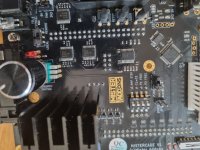
I have a Mistercade v1.0, which has been working great for a while with a DE10Nano Mister in one of my JAMMA cabs.
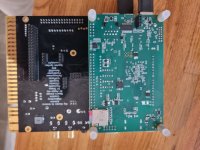
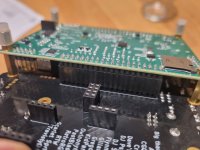
I have just acquired one of the new MisterPi Rev1.6 boards (actually I have two MisterPi 1.6's) and was expecting they would just work exactly the same when I connected them up to the Mistercade board and plugged it in to my JAMMA cabinet.
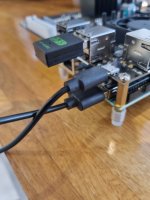
The Misterpi is connected up to the Mistercade using a USB to Micro USB lead instead of the Micro USB bridge connector that I was using for the DE10Nano to Mistercade (because of the standard USB port on the MisterPi, where the DE10 Nano has a Micro USB port).
I have read of folks suggesting that this will work, but I can't actually find any evidence of anyone actually doing it successfully.
I don't believe the setup in the mister.ini has anything to do with it, because I am using the exact same SD card that works perfectly with the DE10Nano/Mistercade setup.
The card will boot the Mister fine and I am getting it booting into the last core played when using the MisterPi/Mistercade combination. I have the image onscreen, but then the controls are not being recognised.
Also, if I plug a keyboard into any of the USB ports on the Mistercade, this is also not recognised like it would be if plugged into the DE10Nano.
This is the same on both Misterpi's that I have tried connecting to the Mistercade.
I have tried 3 different USB to Micro USB cables and all do exactly the same. Nothing.
In fact the results are identical if I don't plug in a USB to Micro USB cable at all. Video still works, but not controls.
I haven't adjusted any other switches on the Mistercade.
I am really hoping I can get this working - as I have 2 Mistercade v2.0's on the way that I want to use with the MisterPi's.
I have contacted MisterAddons and they have stated the the Mistercade should work fine with the MisterPi boards. They also said that all I need is a USB to Micro USB lead.
I have tried connecting external power to the MisterPi (via the USC C power port), but this still made no difference. Though I don't think this should be necessary, as the DE10Nano is powered directly from the Mistercade/JAMMA edge.
Also, if I connect up both Misterpi's to a standard TV using the I/O board and USB Hub, the controls work perfectly. It's just when I connect to the Mistercade that they don't.
Anyone know what else I can do to get the controls/USB ports on the Mistercade working?
Is there a specific type of USB to Micro USB lead that I need?
I have just acquired one of the new MisterPi Rev1.6 boards (actually I have two MisterPi 1.6's) and was expecting they would just work exactly the same when I connected them up to the Mistercade board and plugged it in to my JAMMA cabinet.
The Misterpi is connected up to the Mistercade using a USB to Micro USB lead instead of the Micro USB bridge connector that I was using for the DE10Nano to Mistercade (because of the standard USB port on the MisterPi, where the DE10 Nano has a Micro USB port).
I have read of folks suggesting that this will work, but I can't actually find any evidence of anyone actually doing it successfully.
I don't believe the setup in the mister.ini has anything to do with it, because I am using the exact same SD card that works perfectly with the DE10Nano/Mistercade setup.
The card will boot the Mister fine and I am getting it booting into the last core played when using the MisterPi/Mistercade combination. I have the image onscreen, but then the controls are not being recognised.
Also, if I plug a keyboard into any of the USB ports on the Mistercade, this is also not recognised like it would be if plugged into the DE10Nano.
This is the same on both Misterpi's that I have tried connecting to the Mistercade.
I have tried 3 different USB to Micro USB cables and all do exactly the same. Nothing.
In fact the results are identical if I don't plug in a USB to Micro USB cable at all. Video still works, but not controls.
I haven't adjusted any other switches on the Mistercade.
I am really hoping I can get this working - as I have 2 Mistercade v2.0's on the way that I want to use with the MisterPi's.
I have contacted MisterAddons and they have stated the the Mistercade should work fine with the MisterPi boards. They also said that all I need is a USB to Micro USB lead.
I have tried connecting external power to the MisterPi (via the USC C power port), but this still made no difference. Though I don't think this should be necessary, as the DE10Nano is powered directly from the Mistercade/JAMMA edge.
Also, if I connect up both Misterpi's to a standard TV using the I/O board and USB Hub, the controls work perfectly. It's just when I connect to the Mistercade that they don't.
Anyone know what else I can do to get the controls/USB ports on the Mistercade working?
Is there a specific type of USB to Micro USB lead that I need?
Attachments


Last edited:
