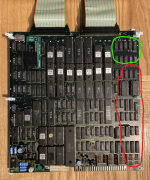
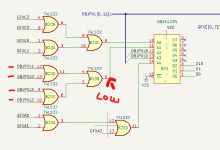
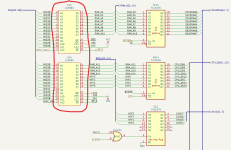
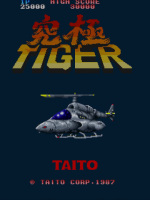
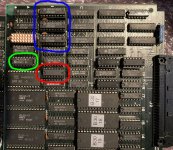
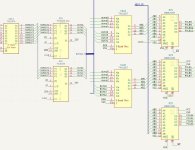
Got this broken K Tiger board recently, it's pretty minty aside from a few past repairs.
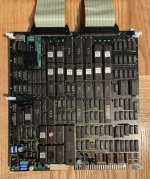
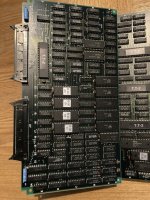
It was missing the GXC-03 custom so I replaced it with one from Caius, hoping it'd be an easy fix, but it booted up to a black screen, no signs of life at all.
The microcontroller I'm using in the GXC repro had a slightly different latency rating to the one in Caius' images on his site, so I tried it in my Sky Shark board just to check it was all working fine, and it was.
Went through the usual checks next: reseated and swapped the ribbons, and the voltages, socketed chips and roms were all fine, aside from 2 program roms which had the Twin Cobra data on them? Swapped them out for the proper 1P K Tiger roms.
Spotted a few dodgy looking traces on the underside of the board too but they were all electronically fine.
Also found a logic chip near the Z80 that was missing a leg? not sure how that happened! I bodged a component leg onto it (you could call it a prosthetic leg!) and it actually tested fine, but I replaced it anyway just to be safe.
Started logic probing from here, a black screen on this hardware is a real pain to troubleshoot (I'll get to that in a bit), since almost anything can cause it.
Started by logic probing the ram chips, all seemed fine so I then started probing the rom chips just to double check that they were all connected up fine.
And then of course whilst probing, my hand had to slip whilst going over the one chip where there were 2 pins connected to 5V and ground right next to each other
My power supply's protection kicked in instantly, but it still knocked out the board's sync signal, and on further inspection the clock signals to the processors, so I took a break from it for a few days (which I think is always a good idea if you screw something up like this)
Luckily it was a simple fix when I came back to it, traced the clock signal to a 74LS163, which divides the clock signal up for each of the processors, and it was scalding hot, with stuck outputs (measured it at 70 degrees C!). Replaced it, and all was back to normal.
Next I wanted to look into the games startup sequence, came across this great thread on KLOV detailing a repair of a black screened Sky Shark (Sky Shark uses the same mame driver as K Tiger, they both run on very similar hardware).
From that, and a bit of messing around with the mame debugger, I was able to verify that this board has the exact same bug in the self test as Sky Shark, where the game just hangs if any of the self tests fail!
Incredible.
To be specific, if the board is working fine, after the ram tests the main 68K turns on the Z80 sound processor, and then waits for a value at a certain ram address (where the Z80 signals that it's done with its tests). But if any of the tests fail, the code to turn on the Z80 gets skipped, and both chips get stuck waiting for each other!
Diagnosing this isn't helped by the fact that the game doesn't turn the screen on until all of the ram tests are done (unlike later Toaplan games).
Now I'm not a programmer, so this is all new to me, but after poking about a bit more in the debugger, I found a few bytes that could be changed to make the game turn on the screen immediately on boot, but now that the roms were changed it'd fail the rom checksums tests. But I also found a place to bodge in a jump instruction (somewhere around where it starts drawing the ROM ERROR text), and I found a spot where I could jump to and get the game to bypass that check and boot up.
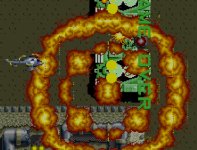
I burned the hacked roms, put them in the board and this is what I got:
I was very happy to see that the audio and the game itself was running fine, clearly major issues with all of the graphics though, and it's doing a similar thing to that Zero Wing board I fixed last year where the colours are completely different on every boot.
So there's no sprites at all, foreground tiles seem fine (e.g. the big boat that carries you in at the start of the game), and background tiles are mostly fine, minus a little bit of corruption like you can see in the sea.
This is where I'm at with it right now, and to be honest, I'm not sure where to go next! (which is partly why I'm writing all this up)
Judging from the mame source code, the daughter board handles sprites (and maybe the area around roms 6, 7, and 8 on the main board?), whilst roms 9-12 handle background tiles, and 13-16 handle foreground tiles.
I'm sure the palette ram circuitry is also dead, but I don't think mame can tell me exactly which ram chip does what, so that'll involve some more probing/piggybacking.
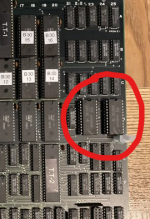
Although if I had to guess, I think these two 4016 chips are probably the ones, as they're in a similar spot on the board to the palette rams on Zero Wing, and they're the same capacity as well.
These 2 chips were already socketed, and they test fine out of circuit, but there could still be an issue in the logic surrounding them (or wherever the palette circuitry is).
Now, if the game's self test actually worked, that would make all of this a lot easier, as judging by screenshots from that KLOV thread it should give you a good bit of info on what's failing.
The guys in that thread did actually create a fixed self test rom, but I highly doubt it'll work on this board since the memory addresses in the code are different.
Fixing the original code looks to be a real pain (my main issue so far has just been trying to get the dumped assembly code from mame to recompile!), but part of me is tempted to look into this further, as it'd be a great thing to have available as this is such a popular game. Or maybe building a simple diagnostic rom from the ground up would be "easier"?
to be continued... but hopefully I'll have this working soon!
It was missing the GXC-03 custom so I replaced it with one from Caius, hoping it'd be an easy fix, but it booted up to a black screen, no signs of life at all.
The microcontroller I'm using in the GXC repro had a slightly different latency rating to the one in Caius' images on his site, so I tried it in my Sky Shark board just to check it was all working fine, and it was.
Went through the usual checks next: reseated and swapped the ribbons, and the voltages, socketed chips and roms were all fine, aside from 2 program roms which had the Twin Cobra data on them? Swapped them out for the proper 1P K Tiger roms.
Spotted a few dodgy looking traces on the underside of the board too but they were all electronically fine.
Also found a logic chip near the Z80 that was missing a leg? not sure how that happened! I bodged a component leg onto it (you could call it a prosthetic leg!) and it actually tested fine, but I replaced it anyway just to be safe.
Started logic probing from here, a black screen on this hardware is a real pain to troubleshoot (I'll get to that in a bit), since almost anything can cause it.
Started by logic probing the ram chips, all seemed fine so I then started probing the rom chips just to double check that they were all connected up fine.
And then of course whilst probing, my hand had to slip whilst going over the one chip where there were 2 pins connected to 5V and ground right next to each other
My power supply's protection kicked in instantly, but it still knocked out the board's sync signal, and on further inspection the clock signals to the processors, so I took a break from it for a few days (which I think is always a good idea if you screw something up like this)
Luckily it was a simple fix when I came back to it, traced the clock signal to a 74LS163, which divides the clock signal up for each of the processors, and it was scalding hot, with stuck outputs (measured it at 70 degrees C!). Replaced it, and all was back to normal.
Next I wanted to look into the games startup sequence, came across this great thread on KLOV detailing a repair of a black screened Sky Shark (Sky Shark uses the same mame driver as K Tiger, they both run on very similar hardware).
Toaplan/ROMSTAR Sky Shark TP-007, Black Screen
Working on a Sky Shark that only shows a black screen. I picked up a few of the Repro GX-xx Chips from @caius and tried replacing C-01 and no change. Here is the board: The board draws a bit of power, not sure if it's normal or not, but considering the amount of stuff on the board I would...
forums.arcade-museum.com
From that, and a bit of messing around with the mame debugger, I was able to verify that this board has the exact same bug in the self test as Sky Shark, where the game just hangs if any of the self tests fail!
Incredible.
To be specific, if the board is working fine, after the ram tests the main 68K turns on the Z80 sound processor, and then waits for a value at a certain ram address (where the Z80 signals that it's done with its tests). But if any of the tests fail, the code to turn on the Z80 gets skipped, and both chips get stuck waiting for each other!
Diagnosing this isn't helped by the fact that the game doesn't turn the screen on until all of the ram tests are done (unlike later Toaplan games).
Now I'm not a programmer, so this is all new to me, but after poking about a bit more in the debugger, I found a few bytes that could be changed to make the game turn on the screen immediately on boot, but now that the roms were changed it'd fail the rom checksums tests. But I also found a place to bodge in a jump instruction (somewhere around where it starts drawing the ROM ERROR text), and I found a spot where I could jump to and get the game to bypass that check and boot up.
I burned the hacked roms, put them in the board and this is what I got:
I was very happy to see that the audio and the game itself was running fine, clearly major issues with all of the graphics though, and it's doing a similar thing to that Zero Wing board I fixed last year where the colours are completely different on every boot.
So there's no sprites at all, foreground tiles seem fine (e.g. the big boat that carries you in at the start of the game), and background tiles are mostly fine, minus a little bit of corruption like you can see in the sea.
This is where I'm at with it right now, and to be honest, I'm not sure where to go next! (which is partly why I'm writing all this up)
Judging from the mame source code, the daughter board handles sprites (and maybe the area around roms 6, 7, and 8 on the main board?), whilst roms 9-12 handle background tiles, and 13-16 handle foreground tiles.
I'm sure the palette ram circuitry is also dead, but I don't think mame can tell me exactly which ram chip does what, so that'll involve some more probing/piggybacking.
Although if I had to guess, I think these two 4016 chips are probably the ones, as they're in a similar spot on the board to the palette rams on Zero Wing, and they're the same capacity as well.
These 2 chips were already socketed, and they test fine out of circuit, but there could still be an issue in the logic surrounding them (or wherever the palette circuitry is).
Now, if the game's self test actually worked, that would make all of this a lot easier, as judging by screenshots from that KLOV thread it should give you a good bit of info on what's failing.
The guys in that thread did actually create a fixed self test rom, but I highly doubt it'll work on this board since the memory addresses in the code are different.
Fixing the original code looks to be a real pain (my main issue so far has just been trying to get the dumped assembly code from mame to recompile!), but part of me is tempted to look into this further, as it'd be a great thing to have available as this is such a popular game. Or maybe building a simple diagnostic rom from the ground up would be "easier"?
to be continued... but hopefully I'll have this working soon!