Monitor issue - please help!

Howdoken

Newbie
Credits
1CR
Hey guys,

Noob here. Just built a new MAME PC to hook up to an Astro City and have hit a stumbling block. I bought the Astro City while in Japan. It had already been gutted and turned into a (crappy) MAME machine. I got the feeling some of the parts had been exchanged from their original config.

Set-up[/b]
  • ArcadeVGA 5000 / ATI Radeon HD4980+CRT Emudriver
  • Win7 x64
  • Toei TC-AX293 (Trisync?)
  • Orion A68KTB359X028 tube
Monitor spec:http://web.archive.org/web/20020718200115/http://www.toeitsushin.co.jp/display/tc-ax293.htm

Issue[/b]
  • I get a perfect Windows desktop at 640x480 61Hz, SF4 runs fine.
  • At any other res the horizontal image is way off centre and wraps around the screen causing a layering effect (see image below).
  • Vertically the image seems perfect.
  • The image is completely stable with no rolling or other movement.
  • No amount of fiddling with the H POS and H SIZE pots will fix it.
  • The issue is evident on the PC boot screens, on the Windows desktop and in MAMEUI64 when set to the recommended AVGA config.
  • I also tried CRT Emudriver with a recommended card but it didn't help.
Noob Theories[/b]
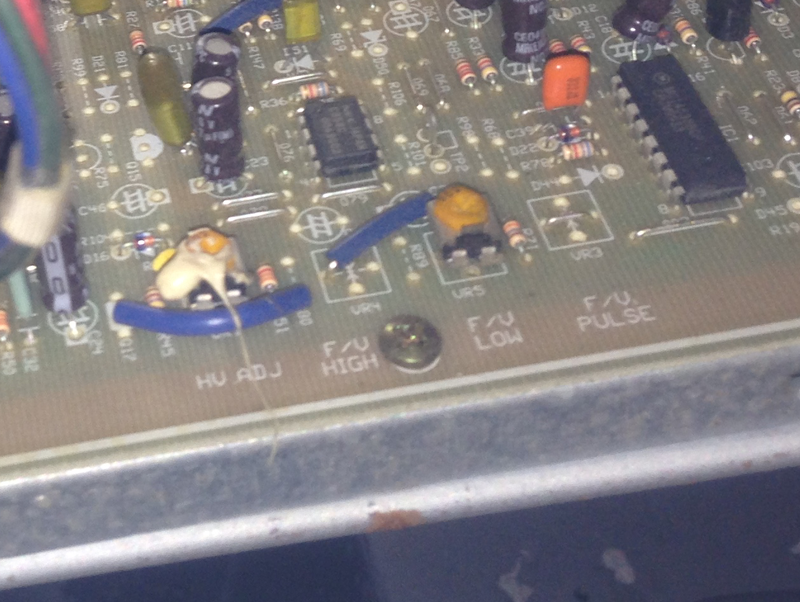
  • On the chassis I spotted a pot labeled V/F HIGH, wired to an area marked V/F LOW. This pot isn't mentioned in the spec. I was wondering if it might be a manual switch to low frequency mode but I don't want to fiddle without some advice first.
  • Andy from Ultimarc has suggested it might be caused by incorrect sync polarity. I'm not sure what that means or what I can do about it.
If anyone can shed any light on this issue, or give any hints or workarounds I would be extremely grateful. Thanks for reading!
smiley1.gif


metal_slug.png
win7_640x288.png
 

Howdoken

Newbie
Credits
1CR
That would certainly make sense. I had assumed the monitor could handle lower resolutions based on something I read on a Japanese forum, plus the fact that at low resolutions the picture was so close to being correct.

Is there any way to be sure the monitor only supports VGA? The spec quotes the resolution as:

H: 640 Dots / V: 480 Line

but it also says the scanning frequency is:

H: 15.2~35KHz / V: 45~80Hz

which I read as supporting the trisync theory?
 

terminator2k2

Active member
Feedback
1 (100%)
Credits
327CR
it does support 15khz, 25khz and 35khz which is tri-sync

not to be confused with tri-mode which supports cga-ega-vga

but the resolution is a completely different kettle of fish...

it might not like anything less than its native resolution 640 x 480

but im not that knowledgeable on monitors , so I could be wrong

terminator2k22015-05-30 20:51:59
 

Howdoken

Newbie
Credits
1CR
I didn't even realise there was a difference between tri-mode and tri-sync. I thought 15/25/35 = CGA/EGA/VGA
smiley5.gif


Is it possible a tri-sync monitor won't support anything less than VGA? Wouldn't that defeat the object?

I'm getting thoroughly confused here
smiley1.gif


If I were to replace the monitor, would it be better to get a 15khz and rely on the Arcade VGA to give me the full range of resolutions? Between tri-syncs/modes, Arcade VGA, Soft15khz and CRT Emudriver I'm at a loss as to how to proceed!
 

joe34

Active member
Credits
448CR
I havnt used this type of monitor, a manual would be handy but I dont know if one is available? but anyway some random thoughts then: when you run a 15khz game eg. metal slug, is the monitor actually switching to 15khz mode eg. can you hear the monitor make a sound as it switches or does anything happen on the screen (eg. screen flicks into the 15khz mode), or does it seem like the monitor is running everything in one mode (ie. medium/hi res)..

> On the chassis I spotted a pot labeled V/F HIGH, wired to an area marked V/F LOW
does this look like something eg. a hobbyist has hacked in or does it look like something which might have been done at the factory? perhaps post a pic to show what's going on

> Andy from Ultimarc has suggested it might be caused by incorrect sync polarity. I'm not sure what that means or what I can do about it.
download this zip file:
http://www.geocities.ws/podernixie/htpc/Modeline.zip
boot up your mame pc, then at the desktop, extract the files in the above .zip into a folder somewhere, then run modeline.exe

paste the modelines you have here (copy/paste all of them)
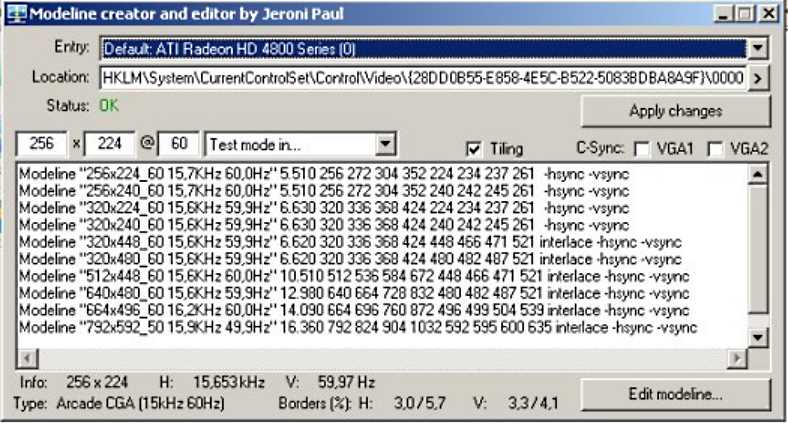
example pic below of the list of modelines of somebodys windows setup:

wml4.jpg
 

Howdoken

Newbie
Credits
1CR
Hey, thanks for your reply!

> when you run a 15khz game eg. metal slug, is the monitor actually switching to 15khz mode

There is a fizzing sound as the monitor presumably switches resolutions that I don't get when MAME isn't set to switch, so yes I'm pretty sure it's running at the right resolution. Plus vertically the graphics look perfect.

> does this look like something eg. a hobbyist has hacked in or does it look like something which might have been done at the factory?

I'd guess it's definitely a factory job as the the pot matches all the others on the board. However it is positioned on the right hand side of the chassis (looking from the back) so I guess it wasn't designed to be easily accessible like the basic pots on the back.

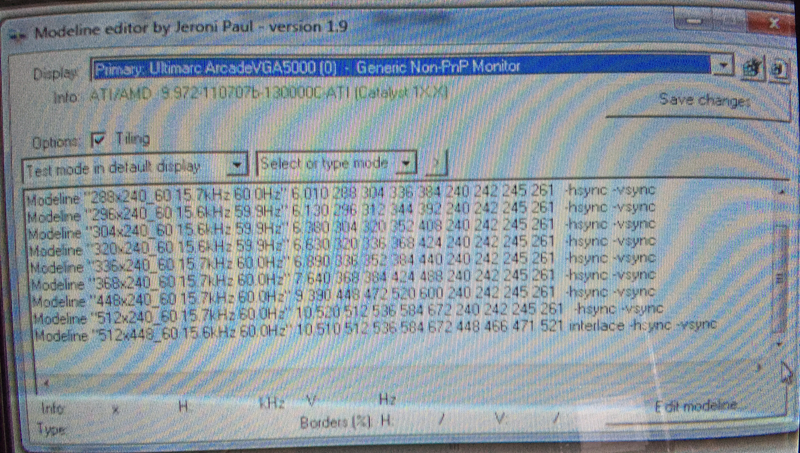
> paste the modelines you have here (copy/paste all of them)

Modeline "240x240_60 15.7kHz 60.0Hz" 5.010 240 256 280 320 240 242 245 261 -hsync -vsync

Modeline "256x240_60 15.7kHz 60.0Hz" 5.510 256 272 304 352 240 242 245 261 -hsync -vsync

Modeline "288x240_60 15.7kHz 60.0Hz" 6.010 288 304 336 384 240 242 245 261 -hsync -vsync

Modeline "296x240_60 15.6kHz 59.9Hz" 6.130 296 312 344 392 240 242 245 261 -hsync -vsync

Modeline "304x240_60 15.6kHz 59.9Hz" 6.380 304 320 352 408 240 242 245 261 -hsync -vsync

Modeline "320x240_60 15.6kHz 59.9Hz" 6.630 320 336 368 424 240 242 245 261 -hsync -vsync

Modeline "336x240_60 15.7kHz 60.0Hz" 6.890 336 352 384 440 240 242 245 261 -hsync -vsync

Modeline "368x240_60 15.7kHz 60.0Hz" 7.640 368 384 424 488 240 242 245 261 -hsync -vsync

Modeline "448x240_60 15.7kHz 60.0Hz" 9.390 448 472 520 600 240 242 245 261 -hsync -vsync

Modeline "512x240_60 15.7kHz 60.0Hz" 10.520 512 536 584 672 240 242 245 261 -hsync -vsync

Modeline "512x448_60 15.6kHz 60.0Hz" 10.510 512 536 584 672 448 466 471 521 interlace -hsync -vsync

fv_high_low.png
modelines.png
 

Howdoken

Newbie
Credits
1CR
As you can see in the image in my first post, when not running the exact VGA res, the Windows desktop looks great vertically but wraps and overlaps horizontally.
 

joe34

Active member
Credits
448CR
because I have never used an arcadevga or a trisync monitor, im not sure what happens regarding how modelines/resolutions are chosen/used.
using quickres, when you test each of the modelines (resolutions) stored in your registry, do they all have that problem of the text wrapping?
 
Feedback
2 (100%)
Credits
75CR
terminator2k2 said:
I would say its because your driving the monitor with a resolution it doesn't support....don't forget the monitor only supports 640 x 480

By looking at the pic I'm sure it's this too. I've had the same issues with an Amiga monitor and adjusting the resolution sorted it
 

obcd

Active member
Credits
3,830CR
Maybe the monitor supports the 3 frequencies, but not automatically. Some monitors require to exchange some plugs to change the frequency. More pictures of the monitor pcb might shine a light.
 

Howdoken

Newbie
Credits
1CR
Ok here are some pics of the chassis. Apologies for the volume, I tried to reduce their size as much as possible without losing clarity.

IMG_5587.jpg
IMG_5588.jpg
IMG_5605.jpg
IMG_5629.jpg
IMG_5644.jpg
IMG_5649.jpg
IMG_5653.jpg
IMG_5715_2.jpg
 
Top