
You are using an out of date browser. It may not display this or other websites correctly.
You should upgrade or use an alternative browser.
You should upgrade or use an alternative browser.
More Sega Problems
- Thread starter simon_m74
- Start date

Hi all
I think the colour problem is down to the RGB converter card.. as I tried a couple others and it seems to be different after being on for a while.
Other cards seem more stable.
All cards were bought from Ebay as untested.. but I thought they all worked, but it seems not.
I have the problem now that it seems like its missing textures, the output seems quite bright, or that the road texture is missing, and just bright white.
When the texture changes to a shadow road ( under a bridge ), it seems ok.
I am still unsure why the system wont work on a TV, but only a monitor?
Please - any suggestions!
Simon
I think the colour problem is down to the RGB converter card.. as I tried a couple others and it seems to be different after being on for a while.
Other cards seem more stable.
All cards were bought from Ebay as untested.. but I thought they all worked, but it seems not.
I have the problem now that it seems like its missing textures, the output seems quite bright, or that the road texture is missing, and just bright white.
When the texture changes to a shadow road ( under a bridge ), it seems ok.
I am still unsure why the system wont work on a TV, but only a monitor?
Please - any suggestions!
Simon

What set-up are you using? Arcade video levels are normally 0-5V P-P whereas TVs generally run around 0-0.75V P-P.
So it's quite likely your composite converter (I assume you're feeding this arcade RGB and using it to modulate to a composite signal?) is being over-driven.
Video is a bit more complex than 0V = black, 5V = full intensity. You have white and black levels that are expected to be at specific voltages - see below. If your levels are off then you'll get washout and the part you mention about being in shadow and able to see the darker colours suggests this is what's happening.
You could drop the levels going into the composite card by placing resistors in line with your RGB & sync lines. Maybe try 480 Ohm and see how it looks.
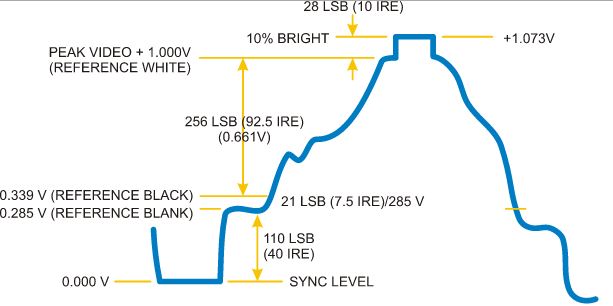
So it's quite likely your composite converter (I assume you're feeding this arcade RGB and using it to modulate to a composite signal?) is being over-driven.
Video is a bit more complex than 0V = black, 5V = full intensity. You have white and black levels that are expected to be at specific voltages - see below. If your levels are off then you'll get washout and the part you mention about being in shadow and able to see the darker colours suggests this is what's happening.
You could drop the levels going into the composite card by placing resistors in line with your RGB & sync lines. Maybe try 480 Ohm and see how it looks.
thanks guys,
I will try another Tv - though this one worked fine with the same converter with my VR machine.
As for the converter, its a GBS-8108.
The converters I`m using for the VGA monitor, are GBS-8200 / 8220 - I have tried both types - difference is just the number of VGA outputs as far as I know.
I will try the resistors,
Do you mean, a 480 ohm, on each of the RGB, not the sync ?
so output Red -> 480ohm -> converter. - same for Green & Blue.
Do you also think that this may cure the lack of TV use issue - I really need to sort this one, as I have a spare 25" inch Tv to use, so I cant justify having to buy a 25" monitor, also I doubt very much I can get any display device that size that is not widescreen.
thanks
Simon
I will try another Tv - though this one worked fine with the same converter with my VR machine.
As for the converter, its a GBS-8108.
The converters I`m using for the VGA monitor, are GBS-8200 / 8220 - I have tried both types - difference is just the number of VGA outputs as far as I know.
I will try the resistors,
Do you mean, a 480 ohm, on each of the RGB, not the sync ?
so output Red -> 480ohm -> converter. - same for Green & Blue.
Do you also think that this may cure the lack of TV use issue - I really need to sort this one, as I have a spare 25" inch Tv to use, so I cant justify having to buy a 25" monitor, also I doubt very much I can get any display device that size that is not widescreen.
thanks
Simon
The docs for the GBS-8108 contain no useful information so I can't tell what input amplitude it's expecting. The mention of it being for arcade would imply 0-5V P-P but relying on a Chinese product description is, well not sensible 
I can't find a tech manual for the -8200 so I don't know how that one functions. It's a bit easier to go from 15k RGBS to 31.5k VGA RGBS though which probably explains the difference in results.
Yup, resistors inline with each signal. So game PCB output - 480R - input to converter on each of red, green & blue. If your sync is stable then leave it alone, but you may want to try adding a resistor there too to see if it improves.
I've just checked and the Model 2 is a medium resolution device, so it's outputting 24k video. Do your encoder devices support medium resolution??? I would expect you to have bad times feeding med res to standard TVs other than perhaps some older plasmas.
I can't find a tech manual for the -8200 so I don't know how that one functions. It's a bit easier to go from 15k RGBS to 31.5k VGA RGBS though which probably explains the difference in results.
Yup, resistors inline with each signal. So game PCB output - 480R - input to converter on each of red, green & blue. If your sync is stable then leave it alone, but you may want to try adding a resistor there too to see if it improves.
I've just checked and the Model 2 is a medium resolution device, so it's outputting 24k video. Do your encoder devices support medium resolution??? I would expect you to have bad times feeding med res to standard TVs other than perhaps some older plasmas.
Tim
the 8200 ( VGA ) has a menu with it to select screen res, as well as other settings. I have played with a few of them to try to get the screen display better.
on the 8108, it has no menu - its just plug in and go, I guess due to the composite signal being a standard ?
Both these systems worked fine on the VR system, but that is, as you know, not a general arcade system.
I am assuming its a frequency issue on the TV ? as the grey lines do seem to `respond` to the different images on the screen.

I will add the resistors tomorrow night to the RGB, but do you have any suggestions what to do about my TV problem ?
thanks!
the 8200 ( VGA ) has a menu with it to select screen res, as well as other settings. I have played with a few of them to try to get the screen display better.
on the 8108, it has no menu - its just plug in and go, I guess due to the composite signal being a standard ?
Both these systems worked fine on the VR system, but that is, as you know, not a general arcade system.
I am assuming its a frequency issue on the TV ? as the grey lines do seem to `respond` to the different images on the screen.
I will add the resistors tomorrow night to the RGB, but do you have any suggestions what to do about my TV problem ?
thanks!
Hi
The VGA scaler is digitising the image and then re-sampling to convert between varying horizontal and vertical frequencies, so it won't likely be bothered by a 24kHz h-freq input.
The composite encoder is just munging the signals so it's unable to do frequency conversion. I'm not sure if there's anything clever in there that regenerates the clock or whether it just encodes whatever it's fed but you're not going to be able to run Model 2 med-res through a simple encoder and have it work on a TV that's expecting 15kHz unfortunately.
The TV is showing that mess because it's trying to sync to a signal way outside of its spec; I'm surprised it's not whistling!
Your options for the Model 2 video are either VGA encoder or pick up a med-res monitor but they're pretty scarce now.
cheers
tim
ps The reason the Virtuality worked with the comp encoder is because the Amiga and TI boards would be outputting a standard 15kHz signal. Can't remember whether they're 0-0.75V P-P or 0-5V P-P tho.
The VGA scaler is digitising the image and then re-sampling to convert between varying horizontal and vertical frequencies, so it won't likely be bothered by a 24kHz h-freq input.
The composite encoder is just munging the signals so it's unable to do frequency conversion. I'm not sure if there's anything clever in there that regenerates the clock or whether it just encodes whatever it's fed but you're not going to be able to run Model 2 med-res through a simple encoder and have it work on a TV that's expecting 15kHz unfortunately.
The TV is showing that mess because it's trying to sync to a signal way outside of its spec; I'm surprised it's not whistling!
Your options for the Model 2 video are either VGA encoder or pick up a med-res monitor but they're pretty scarce now.
cheers
tim
ps The reason the Virtuality worked with the comp encoder is because the Amiga and TI boards would be outputting a standard 15kHz signal. Can't remember whether they're 0-0.75V P-P or 0-5V P-P tho.
AndyGeezer
Active member
Take a photo, some model 2b boards (virtua striker) do not display correct texture colours in Indy 500.
Mark at retroclinic should know the ic as he discovered when burning Indy ROMs in 2002 or 2003.
Mark at retroclinic should know the ic as he discovered when burning Indy ROMs in 2002 or 2003.
If I was to change the VGA output on the working set-up to RGB-Scart for the TV - I guess I would get the same problem as the composite ?
I will try another TV, that is a little newer than the one I currently use, so worth a try ?
thanks guys
Andy : The board I have had Indy 500 on it, with the other games ( that are for sale on this forum )
the seller showed me a video of it working with Indy.
I also think when I did the first test before I built it into a cab - all textures where there - just colour problems.
everything does seem very bright, and the only texture that seems to be `missing` is the road surface, when not in shadow - its just white, but not pure white..
Hence I think brightness.
I will add the resistors, and see what happens, if no change, I`ll grab a pic.
I will try another TV, that is a little newer than the one I currently use, so worth a try ?
thanks guys
Andy : The board I have had Indy 500 on it, with the other games ( that are for sale on this forum )
the seller showed me a video of it working with Indy.
I also think when I did the first test before I built it into a cab - all textures where there - just colour problems.
everything does seem very bright, and the only texture that seems to be `missing` is the road surface, when not in shadow - its just white, but not pure white..
Hence I think brightness.
I will add the resistors, and see what happens, if no change, I`ll grab a pic.
I'm not sure what you mean by
If you mean configure the VGA scaler to take the M2 video and output a 15kHz RGB signal suitable for SCART then that would probably fix your line frequency problem, assuming the VGA scaler can produce that output.
If my assessment of your description of M2 to VGA brightness/darkness/missing textures problem is accurate then it's very very likely to be a signal level problem so I'd add the in-line resistors before spending much more effort troubleshooting it. This is a common issue when your black-ref and white-ref levels are screwed.
Good luck!
simon_m74 said:If I was to change the VGA output on the working set-up to RGB-Scart for the TV - I guess I would get the same problem as the composite ?
If you mean configure the VGA scaler to take the M2 video and output a 15kHz RGB signal suitable for SCART then that would probably fix your line frequency problem, assuming the VGA scaler can produce that output.
If my assessment of your description of M2 to VGA brightness/darkness/missing textures problem is accurate then it's very very likely to be a signal level problem so I'd add the in-line resistors before spending much more effort troubleshooting it. This is a common issue when your black-ref and white-ref levels are screwed.
Good luck!
Hi Tim
I mean if I use the GBS-8200 for RGB to VGA, then use the rgb output pins on the vga d-sub, and connect it up to RGB on a scart, for the TV? I guess the frequency will still be an issue?
I may be able to configure the Hz on the GBS-8200 as it does have a menu, but I`m not sure of all of its features off the top of my head.
Some how, I just need to get it on a TV really, unless I can somehow come across a compatible VGA system for very cheap! ( cos I already have the TV! )
I think you are right about the required resistors, as the picture seems to be just very bright in general. The Indy 500 logo, is bright too, as well as everything in general. I was thinking missing textures - but it only seems to be the road surface, that is quite light to start with, it currently just seems almost glowing, and the grass verges graphics look like the grass is glowing in the dark lol.
I have tried to play with the PP voltage on the monitor ( it has 2 options 1v & 0.75v I think ), I have also played with the colour temperature as well as brightness and contrast, and I cant seem to get a comfortable setting - so to me, resistors seem a good idea!
Should I just go for 480ohm ? or put some potentiometers in line ? about 1K ?
typing this has JUST made me remember that the GBS-8200 and the 8108 both have RGB adjust pots just after the input. Maybe I`ll just play with them first ?
I mean if I use the GBS-8200 for RGB to VGA, then use the rgb output pins on the vga d-sub, and connect it up to RGB on a scart, for the TV? I guess the frequency will still be an issue?
I may be able to configure the Hz on the GBS-8200 as it does have a menu, but I`m not sure of all of its features off the top of my head.
Some how, I just need to get it on a TV really, unless I can somehow come across a compatible VGA system for very cheap! ( cos I already have the TV! )
I think you are right about the required resistors, as the picture seems to be just very bright in general. The Indy 500 logo, is bright too, as well as everything in general. I was thinking missing textures - but it only seems to be the road surface, that is quite light to start with, it currently just seems almost glowing, and the grass verges graphics look like the grass is glowing in the dark lol.
I have tried to play with the PP voltage on the monitor ( it has 2 options 1v & 0.75v I think ), I have also played with the colour temperature as well as brightness and contrast, and I cant seem to get a comfortable setting - so to me, resistors seem a good idea!
Should I just go for 480ohm ? or put some potentiometers in line ? about 1K ?
typing this has JUST made me remember that the GBS-8200 and the 8108 both have RGB adjust pots just after the input. Maybe I`ll just play with them first ?
Hi Simon,
If you can get the GBS-8200 to clock down as far as 60Hz vertical, 15.25kHz horizontal and output 0-0.75V P-P then that should work ok. I'm not overly optimistic that their video encoder will let you go that low on H-sync but it's worth a bash.
If you explain your plan for this then it might help us figure out the best solution. If you're making a M2 driver then how about picking up a boardless cab for it? It's an arcade spec medium resolution monitor that will make all your problems go away most easily.
The monitor P-P won't make a huge amount of difference because the PCB is pushing out 5V so will be saturating the input. Colour temp and the brightness/contrast will be useful once the signal has been attenuated to something that's not frying the image pathway.
I'd just stick some 470R in there. You may even need to drop down to 220R if the image is too dull with 470R. Have a play with the RGB adjust pots - not sure whether they're gain adjust but it's worth a try!
If you can get the GBS-8200 to clock down as far as 60Hz vertical, 15.25kHz horizontal and output 0-0.75V P-P then that should work ok. I'm not overly optimistic that their video encoder will let you go that low on H-sync but it's worth a bash.
If you explain your plan for this then it might help us figure out the best solution. If you're making a M2 driver then how about picking up a boardless cab for it? It's an arcade spec medium resolution monitor that will make all your problems go away most easily.
The monitor P-P won't make a huge amount of difference because the PCB is pushing out 5V so will be saturating the input. Colour temp and the brightness/contrast will be useful once the signal has been attenuated to something that's not frying the image pathway.
I'd just stick some 470R in there. You may even need to drop down to 220R if the image is too dull with 470R. Have a play with the RGB adjust pots - not sure whether they're gain adjust but it's worth a try!