

Game: Original Bally/Midway Pac-Man pcb.
Purchase Description: Non-Working/Parts and Repair.
Fault on Receipt: Missing all masked proms (apart from 1), no custom IC’s/daughter cards and no Z80 CPU. Unable to test “as is”.
I recently picked up a few original Pac-Man pcbs. All of them have missing parts and are in various states, all are in need of repair. This particular pcb is missing all the masked proms (except the one at 6J), both the custom daughter boards and the Z80 CPU. There are bodged solder wires to the edge connector and it is clear that the only remaining marked prom is suffering from the usual leg rot which is common on these GL branded chips. On the plus side all 4 of the smaller proms are present, and so are all 6 of the 2114 rams.
The bodge wires to the edge connector will need removing and some of the edge connector pins are partially burnt and crumbled away…

Also, looking closely at the board, you can see broken remains from the legs of the masked proms that have been removed and some of the legs have snapped off in the sockets…
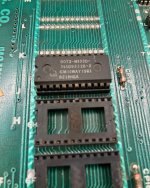
First job will be to remove all 6 of the old prom sockets, replace them with new 24-pin dual wipe sockets, sort out the edge connector mess, fit replacement daughter card pcbs, re-program a set of Pac-Man game roms onto new Eproms, fit a new Z80 processor and test the 6 socketed 2114 rams.
I’m going to try and salvage the remaining masked prom, so I spray all the legs of the chip whilst it’s still sitting in the socket with WD40, then leave it to soak for 36 hours before trying to remove the chip. However, despite me being careful trying to remove the chip, 4 legs still break off. I can still repair the broken legs though. I used to use “donor” legs from dead IC’s to repair them, but it’s normally quite a fiddly job. I’ve since found it easier (and neater) to simply use thick wires to repair broken legs instead (eg., from capacitors).
Picture of the broken masked prom and the refurbished edge connector…
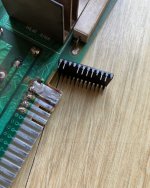
I manage to repair the broken legs on the masked prom, put it into a spare 24 pin socket to support the weak legs and tested it in a working Pac-Man board, it works great. All the 2114 rams test good as well which is a nice bonus.
With replacement custom daughter pcbs fitted, replacement Eproms burnt and another visual check to the pcb, it’s now in a state where I can finally power it up…
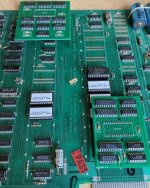
Now for the big switch on. Was it a case of just replacing the missing parts and a tidy up to the edge connector? Far from it, upon power up, I’m greeted with a garbled red screen, a nasty loud buzzing/popping sounds through the speaker and the coin play meter in my cabinet is incrementing like crazy…
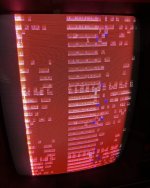
There is a clock on pin 6 of the CPU and the board is watchdogging.
My gut instinct is telling me there is an issue with the 161 counters around the 2S/2R/3S and 3R area. I get the logic probe out and there is plenty of activity on all the pins, however I want to take a closer look so I get out the SLICE.
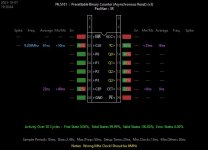
I take a sample reading from the 74LS161 at 3R, it passes, however I note the clock frequency is wrong, it’s running at 9.208MHz and it should be around 6MHz.
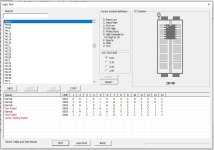
The 6MHz clock signal is generated from the 74LS107 at 8A and the 74LS368 at 8B. Both chips on this board are factory socketed and my guess here the culprit is going to be the 107. I pull the 107, put it in my chip tester, and sure enough it fails…
With a new 74LS107 fitted, the game now powers up to static garbage with a red background.
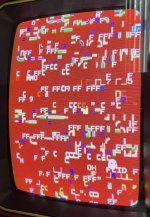
It looks like to me like a CPU processor issue or sync buss problem. Also, the red background looks like it could be a further issue with the colour proms. The Z80 processor is brand new and the plug-in sync buss controller has been tested on another PacMan pcb which works perfectly, so I’m suspecting perhaps the sockets are an issue. I get out my multimeter and beep out every pin connection on the eprom, sync buss and Z80 sockets. I soon find there’s a short between pins 11 and 13 (D2 and D3) on the eprom sockets that I’ve just replaced.
As a general rule, I usually take a photo of the area when I’ve removed sockets before fitting new replacements. In this case, it proved valuable as I could see where the issue was before undoing my previous work. Looking closely at the photo, I noticed a blob of solder next to pin 13 touching a wire track on the socket at 6E….
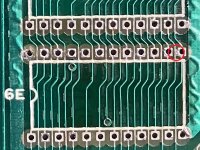
Rogue solder blob is circled in red. I de-soldered the socket at 6E, wiped off the excess solder with the hot iron to get rid of it. Re-checked continuity between the pins and re-soldered the socket back in.
With the eprom back in and the board ready to power up again, the game finally boots and the game is running…
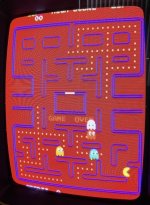
However, the background is still red and there is no sound (just a continuous loud static buzzing /popping noise through the speaker).
As previously mentioned, I strongly suspect the red background is an issue with one or both of the colour proms. I swop both of them (4A and 7F) with 2 known working proms from another working PacMan board. The one at 7F is faulty so I will need to get another replacement.
The only thing left to fix is the sound problem. One of the first things I do with sound issues is to adjust the volume pot to see if the volume goes up and down. In this case the static garbage sound never changed, so that suggested to me the problem is probably after the volume pot. The sound amp can be checked by running your finger over the resistors next to the LM377 amp at 10A, if the chip is good you should get a bassy loud hum through the speaker, which I did get. The likely suspects are probably the electrolytic capacitors. There’s 2 for the sound circuit; the 4.7uF at C48 under the sound amp heat sink and the 330uF at C51.
The last time I replaced sound caps on a PacMan the small 4.7uF was bad and the 330uF one was good. So I thought I’d start with the 4.7uF under the heat sink. I de-soldered it and checked it with the Fluke’s capacitor test. It tested good and still well within spec so I put it back on the board. The 330uF however, was completely shot. I replaced it with a brand new cap and it completely fixed the sound issue.
So that’s PacMan board number 1 now fixed
I’ve got 2 other PacMan pcbs to look at so it should keep me busy for a while....
Summary
* Fitted new Z80.
* Fitted and burnt 5 new HN462532G Eproms.
* Fitted reproduction 284 Video Ram Addresser custom pcb.
* Fitted reproduction 285 Z80 Sync Buss Controller custom pcb.
* Bad 74LS107 at 8A causing a incorrect MHz clock signal.
* Bad 7603/N82S123 bi-polar colour prom at 7F, causing a red background.
* Bad 330uF electrolytic capacitor at C51 causing a constant static sound issue.
* Replaced all 6 socketed 24 pin Eprom sockets.
Parts needed for this repair
* 7x IC Sockets (including 1 that was used as an extra to protect the old mask prom chip legs)
* Replacement 284 V-Ram Addresser daughter board
* Replacement 285 Sync Buss Controller daughter board
* 1x Z80 CPU chip
* 5x HN462532G Eproms
* 1x 74LS107 chip
* 1x N82S123N colour prom
* 1x 330uF/10v electrolytic capacitor
Purchase Description: Non-Working/Parts and Repair.
Fault on Receipt: Missing all masked proms (apart from 1), no custom IC’s/daughter cards and no Z80 CPU. Unable to test “as is”.
I recently picked up a few original Pac-Man pcbs. All of them have missing parts and are in various states, all are in need of repair. This particular pcb is missing all the masked proms (except the one at 6J), both the custom daughter boards and the Z80 CPU. There are bodged solder wires to the edge connector and it is clear that the only remaining marked prom is suffering from the usual leg rot which is common on these GL branded chips. On the plus side all 4 of the smaller proms are present, and so are all 6 of the 2114 rams.
The bodge wires to the edge connector will need removing and some of the edge connector pins are partially burnt and crumbled away…
Also, looking closely at the board, you can see broken remains from the legs of the masked proms that have been removed and some of the legs have snapped off in the sockets…
First job will be to remove all 6 of the old prom sockets, replace them with new 24-pin dual wipe sockets, sort out the edge connector mess, fit replacement daughter card pcbs, re-program a set of Pac-Man game roms onto new Eproms, fit a new Z80 processor and test the 6 socketed 2114 rams.
I’m going to try and salvage the remaining masked prom, so I spray all the legs of the chip whilst it’s still sitting in the socket with WD40, then leave it to soak for 36 hours before trying to remove the chip. However, despite me being careful trying to remove the chip, 4 legs still break off. I can still repair the broken legs though. I used to use “donor” legs from dead IC’s to repair them, but it’s normally quite a fiddly job. I’ve since found it easier (and neater) to simply use thick wires to repair broken legs instead (eg., from capacitors).
Picture of the broken masked prom and the refurbished edge connector…
I manage to repair the broken legs on the masked prom, put it into a spare 24 pin socket to support the weak legs and tested it in a working Pac-Man board, it works great. All the 2114 rams test good as well which is a nice bonus.
With replacement custom daughter pcbs fitted, replacement Eproms burnt and another visual check to the pcb, it’s now in a state where I can finally power it up…
Now for the big switch on. Was it a case of just replacing the missing parts and a tidy up to the edge connector? Far from it, upon power up, I’m greeted with a garbled red screen, a nasty loud buzzing/popping sounds through the speaker and the coin play meter in my cabinet is incrementing like crazy…
There is a clock on pin 6 of the CPU and the board is watchdogging.
My gut instinct is telling me there is an issue with the 161 counters around the 2S/2R/3S and 3R area. I get the logic probe out and there is plenty of activity on all the pins, however I want to take a closer look so I get out the SLICE.
I take a sample reading from the 74LS161 at 3R, it passes, however I note the clock frequency is wrong, it’s running at 9.208MHz and it should be around 6MHz.
The 6MHz clock signal is generated from the 74LS107 at 8A and the 74LS368 at 8B. Both chips on this board are factory socketed and my guess here the culprit is going to be the 107. I pull the 107, put it in my chip tester, and sure enough it fails…
With a new 74LS107 fitted, the game now powers up to static garbage with a red background.
It looks like to me like a CPU processor issue or sync buss problem. Also, the red background looks like it could be a further issue with the colour proms. The Z80 processor is brand new and the plug-in sync buss controller has been tested on another PacMan pcb which works perfectly, so I’m suspecting perhaps the sockets are an issue. I get out my multimeter and beep out every pin connection on the eprom, sync buss and Z80 sockets. I soon find there’s a short between pins 11 and 13 (D2 and D3) on the eprom sockets that I’ve just replaced.
As a general rule, I usually take a photo of the area when I’ve removed sockets before fitting new replacements. In this case, it proved valuable as I could see where the issue was before undoing my previous work. Looking closely at the photo, I noticed a blob of solder next to pin 13 touching a wire track on the socket at 6E….
Rogue solder blob is circled in red. I de-soldered the socket at 6E, wiped off the excess solder with the hot iron to get rid of it. Re-checked continuity between the pins and re-soldered the socket back in.
With the eprom back in and the board ready to power up again, the game finally boots and the game is running…
However, the background is still red and there is no sound (just a continuous loud static buzzing /popping noise through the speaker).
As previously mentioned, I strongly suspect the red background is an issue with one or both of the colour proms. I swop both of them (4A and 7F) with 2 known working proms from another working PacMan board. The one at 7F is faulty so I will need to get another replacement.
The only thing left to fix is the sound problem. One of the first things I do with sound issues is to adjust the volume pot to see if the volume goes up and down. In this case the static garbage sound never changed, so that suggested to me the problem is probably after the volume pot. The sound amp can be checked by running your finger over the resistors next to the LM377 amp at 10A, if the chip is good you should get a bassy loud hum through the speaker, which I did get. The likely suspects are probably the electrolytic capacitors. There’s 2 for the sound circuit; the 4.7uF at C48 under the sound amp heat sink and the 330uF at C51.
The last time I replaced sound caps on a PacMan the small 4.7uF was bad and the 330uF one was good. So I thought I’d start with the 4.7uF under the heat sink. I de-soldered it and checked it with the Fluke’s capacitor test. It tested good and still well within spec so I put it back on the board. The 330uF however, was completely shot. I replaced it with a brand new cap and it completely fixed the sound issue.
So that’s PacMan board number 1 now fixed
I’ve got 2 other PacMan pcbs to look at so it should keep me busy for a while....
Summary
* Fitted new Z80.
* Fitted and burnt 5 new HN462532G Eproms.
* Fitted reproduction 284 Video Ram Addresser custom pcb.
* Fitted reproduction 285 Z80 Sync Buss Controller custom pcb.
* Bad 74LS107 at 8A causing a incorrect MHz clock signal.
* Bad 7603/N82S123 bi-polar colour prom at 7F, causing a red background.
* Bad 330uF electrolytic capacitor at C51 causing a constant static sound issue.
* Replaced all 6 socketed 24 pin Eprom sockets.
Parts needed for this repair
* 7x IC Sockets (including 1 that was used as an extra to protect the old mask prom chip legs)
* Replacement 284 V-Ram Addresser daughter board
* Replacement 285 Sync Buss Controller daughter board
* 1x Z80 CPU chip
* 5x HN462532G Eproms
* 1x 74LS107 chip
* 1x N82S123N colour prom
* 1x 330uF/10v electrolytic capacitor

