

Game: Original Bally/Midway Pac-Man pcb.
Purchase Description: Non-Working/Parts and Repair.
Fault on Receipt: Missing all masked proms/eproms, no custom IC’s/daughter cards and no Z80 CPU. Unable to test “as is”.
This is the third and last board from a small batch of PacMan pcbs that I recently picked up.
Spoiler Alert: This pcb was a bit of a basket case to get working, however I got there in the end
On first inspection of this board, I could see that two extra eprom sockets had been added to row 6, there were some jumper wires on the back of the board and my initial thought was that this board was a conversion to run MS PacMan without the AUX board.
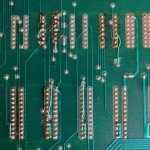
However, on closer inspection the jumper wires were actually repairs to badly replaced sockets where some of the tracks had either been lifted or damaged. Thankfully there were no cut traces on the back of the board and the two added eprom sockets actually did nothing. My guess was that someone started to convert this to MS PacMan and then gave up. After checking out the previous repair work, all the connections were fine and it became clear it was still very much an unmodified original PacMan board.
Just like the previous other two PacMan boards I’ve recently fixed, this pcb also has all 4 of the small bi-polar proms present and all 6 of the 2114 rams. Incredibily, just like the 2 previous boards, all 6x 2114 rams also test good.
After fitting 2 reproduction daughter custom boards, a set of PacMan eproms and a brand new Z80, it was time to power it up.
Switch on…….it’s DEAD! Just a blank black screen of absolutely nothing.
First up, check the sockets. Someone in the past has also previously replaced the 6D socket (for the Sync Buss Controller) for a newer dual wipe. It checks out good and so does every other socket for continuity with the multi-meter.
Secondly, check for a clock. All good here, a nice pulse on pin 6 and the reset is being held high on pin 26 of the Z80.
Thirdly, check the counters. The first counter is the 74LS161 at 3R (which is often factory socketed on Pac-Man pcbs), then the 3 other counters at 3S, 2R and 2S. Using a logic probe, there seems to be activity on all the outputs on all 4 chips.
Still with the logic probe in hand, I move onto the 74LS42 decoder at 7N. This chip selects the 4 game eproms in row 6, however the output is constantly high on two of the outputs. The chip has been previously replaced and socketed so I can at least test the chip in my tester and it tested good. I swop it with a spare LS42 “just incase” and it makes no difference. I check the LS139 at 7M with the probe too since pin 6 feeds pin 12 of the LS42, but I can’t find anything that looks or sounds odd.
Time to get out the SLICE kit. I’m wanting to have a closer look at the counters again at 3R. I clip the SLICE test clip onto the 74LS161 chip and as soon as I start running a sample test on the chip, the game then boots up! What the….?!? Anyway, this is the screen I get…
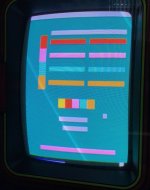
There are no sprites or text, just blocks. If I take off the SLICE test clip then after a few seconds the game stops running and goes back to the blank black screen. Weird
I cannot get the game to boot up without the SLICE test clip attached and powered, so I’m going to have to find out exactly what’s causing this.
In the meantime, I know for sure I’ve got a sprite issue so it’s time to do a bit of reading through the ‘Pac-Man Trouble Shooting Logic Board Guide 1’. I’ve put a link to this guide at the end of my repair log.
There’s a section in the guide that describes what happens when a particular chip is removed. This bit seems to describe exactly the sprite issue I’ve got:-
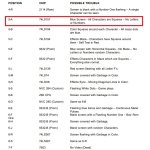
I remove the 157 chip from the board and sure enough the chip is confirmed as bad.
With a new LS157 chip fitted at 5A, I power up the board again. It gives me the following white screen with an orange/pink coloured flashing square in the top left corner of the screen…
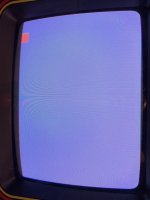
The game is now not booting at all (even with the SLICE clip fitted).
I’m now checking the area of the schematics after the counters. The 74LS74 flop-flop at 3N is giving errors on pin 5 when checking with SLICE. I replace the chip and now the game boots to this…
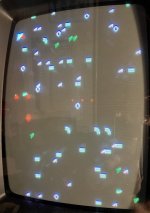
A load of random garbage which changes every few seconds. It’s failing to do the self test boot-up sequence.
I carry on looking and next find a faulty 74LS86 at 2H. I replace it and now the board boots to a completely black screen, with an occasional quick flash on the screen of a random letter or number, but mainly just a blank screen. I feel like I’m going backwards with this repair
After more investigation with the logic probe and SLICE, I find more bad chips at: 3E (74LS20), 4H (74LS245), 4F (74LS86), 5L (74LS139), 5M (74LS74) and 7J (74LS138). I know that a lot of these chips were working originally when I first powered up this board, however after a few hours of power it seems like they’ve given up on life.
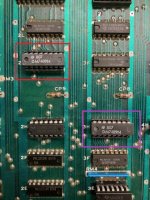
Also, I note that two of the four 7489 rams at 2K, 2L, 3F, 3H are stone cold when you touch them. After a few minutes of operation, it’s normal for these chips to get quite warm, so it’s obvious 2 of them are dead. I remove the chips and replace them. The chip marked in a red rectangle (2K) is part of the sound circuit, the one marked in a purple rectangle (3H) controls the movement of the characters.
I’ve now gone over pretty much every chip on the board and I think I’ve now routed out and replaced every bad chip, however the board is now booting to a completely blank black screen with no signs of life If you activate the Test switch to the game, you get a “BAD V RAM-0” error on the screen. According to the manual, a bad V Ram-0 error is an error with the ram at location 4K.
I know the Ram is definitely good, I’ve checked the continuity a couple of times now to all the 2114 ram sockets, so to err on the side of caution I replace all the ram sockets anyway. No difference!
Maybe the game eproms are the problem? I replace them and fit all new sockets and still the game is not booting.
Now I’m clutching at straws a bit, perhaps the capacitors are causing some sort of interference that is stopping it from booting? So I replace them and the game still refuses to boot.
When I received this board, two of the logic chips had previously been removed, socketed and had replacement chips fitted. A 74LS42 at 7N and a 74LS02 at 7L. Both of these chips have already previously been tested in my tester and both passed. I’ve previously already swopped in a known good 74LS42 at 7N, however I didn’t swop out the 74LS02 (because it looked brand new and had previously passed the chip test). I decided to take a closer look anyway, I note it’s a Chinese branded chip…
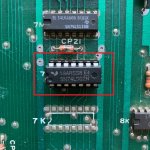
Just out of curiosity, I swop out the LS02 chip for one of my Motorola branded LS02 chips. Guess what happened? The game booted right up!!!....
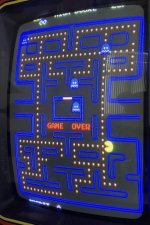
Unbelievable, the amount of time I spent unnecessary changing the sockets and caps, and it turns out to be a cheap logic chip I re-test the Chinese chip in my tester and it still passes. I guess Pac-Man just doesn’t like this brand of IC.
Anyway, there’s still one more thing to fix, the sound. I am getting the sounds, however the pitch is all wrong at times, especially when Pac-Man is eating the dots. It sounds scratchy and very metallic.
This is where the excellent Lawnmowerman’s Pac-Man Guide comes in handy. (Link below at the bottom of this log)
The part highlighted is very similar to the problem I am having…
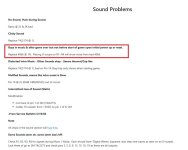
I’m confident here that my 4066 Bilateral Switch at 1N is also faulty, so I remove it and fit a new chip. Sound problem is now cured
Finally, Pac-Man board number 3 is now completed and fixed
Links to useful Pac-Man Repair information:-
Pac-Man Troubleshooting Guide - Part 1
Pac-Man Trouble Shooting Guide Part 2
Lawnmowerman's Repair and Troubleshooting Guide
Summary
* Fitted new Z80.
* Fitted and burnt 6 new HN462532G Eproms.
* Fitted reproduction 284 Video Ram Addresser custom pcb.
* Fitted reproduction 285 Z80 Sync Buss Controller custom pcb.
* Bad 74LS157 at 5A causing no sprites or text.
* Bad 74LS74 at 3N causing non-boot garbage graphics.
* Bad 74LS86 at 2H causing the board to boot to a black screen.
* Bad 74LS20 at 3E (died after a few hours of being powered up).
* Bad 74LS245 at 4H (died after a few hours of being powered up).
* Bad 74LS86 at 4F (died after a few hours of being powered up).
* Bad 74LS139 at 5L (died after a few hours of being powered up).
* Bad 74LS74 at 5M (died after a few hours of being powered up).
* Bad 74LS138 at 7J (died after a few hours of being powered up).
* Dead 7489 ram at 3H (causes character movement issues).
* Dead 7489 ram at 2K (causes sound problems).
* Bad 7066 at 1N causing sound pitch to be wrong.
* Replaced Chinese branded 74LS02 chip at 7L causing non-booting problem.
Parts needed for this repair
* Replacement 284 V-Ram Addresser daughter board
* Replacement 285 Sync Buss Controller daughter board
* 1x Z80 CPU chip
* 6x HN462532G Eproms
* 2x 7489 ram chips
* 2x 74LS74 chips
* 2x 74LS86 chips
* 1x 74LS157 chip
* 1x 74LS20 chip
* 1x 74LS245 chip
* 1x 74LS138 chip
* 1x 74LS139 chip
* 1x 74LS02 chip
* 1x CD4066B chip
Purchase Description: Non-Working/Parts and Repair.
Fault on Receipt: Missing all masked proms/eproms, no custom IC’s/daughter cards and no Z80 CPU. Unable to test “as is”.
This is the third and last board from a small batch of PacMan pcbs that I recently picked up.
Spoiler Alert: This pcb was a bit of a basket case to get working, however I got there in the end
On first inspection of this board, I could see that two extra eprom sockets had been added to row 6, there were some jumper wires on the back of the board and my initial thought was that this board was a conversion to run MS PacMan without the AUX board.
However, on closer inspection the jumper wires were actually repairs to badly replaced sockets where some of the tracks had either been lifted or damaged. Thankfully there were no cut traces on the back of the board and the two added eprom sockets actually did nothing. My guess was that someone started to convert this to MS PacMan and then gave up. After checking out the previous repair work, all the connections were fine and it became clear it was still very much an unmodified original PacMan board.
Just like the previous other two PacMan boards I’ve recently fixed, this pcb also has all 4 of the small bi-polar proms present and all 6 of the 2114 rams. Incredibily, just like the 2 previous boards, all 6x 2114 rams also test good.
After fitting 2 reproduction daughter custom boards, a set of PacMan eproms and a brand new Z80, it was time to power it up.
Switch on…….it’s DEAD! Just a blank black screen of absolutely nothing.
First up, check the sockets. Someone in the past has also previously replaced the 6D socket (for the Sync Buss Controller) for a newer dual wipe. It checks out good and so does every other socket for continuity with the multi-meter.
Secondly, check for a clock. All good here, a nice pulse on pin 6 and the reset is being held high on pin 26 of the Z80.
Thirdly, check the counters. The first counter is the 74LS161 at 3R (which is often factory socketed on Pac-Man pcbs), then the 3 other counters at 3S, 2R and 2S. Using a logic probe, there seems to be activity on all the outputs on all 4 chips.
Still with the logic probe in hand, I move onto the 74LS42 decoder at 7N. This chip selects the 4 game eproms in row 6, however the output is constantly high on two of the outputs. The chip has been previously replaced and socketed so I can at least test the chip in my tester and it tested good. I swop it with a spare LS42 “just incase” and it makes no difference. I check the LS139 at 7M with the probe too since pin 6 feeds pin 12 of the LS42, but I can’t find anything that looks or sounds odd.
Time to get out the SLICE kit. I’m wanting to have a closer look at the counters again at 3R. I clip the SLICE test clip onto the 74LS161 chip and as soon as I start running a sample test on the chip, the game then boots up! What the….?!? Anyway, this is the screen I get…
There are no sprites or text, just blocks. If I take off the SLICE test clip then after a few seconds the game stops running and goes back to the blank black screen. Weird
I cannot get the game to boot up without the SLICE test clip attached and powered, so I’m going to have to find out exactly what’s causing this.
In the meantime, I know for sure I’ve got a sprite issue so it’s time to do a bit of reading through the ‘Pac-Man Trouble Shooting Logic Board Guide 1’. I’ve put a link to this guide at the end of my repair log.
There’s a section in the guide that describes what happens when a particular chip is removed. This bit seems to describe exactly the sprite issue I’ve got:-
I remove the 157 chip from the board and sure enough the chip is confirmed as bad.
With a new LS157 chip fitted at 5A, I power up the board again. It gives me the following white screen with an orange/pink coloured flashing square in the top left corner of the screen…
The game is now not booting at all (even with the SLICE clip fitted).
I’m now checking the area of the schematics after the counters. The 74LS74 flop-flop at 3N is giving errors on pin 5 when checking with SLICE. I replace the chip and now the game boots to this…
A load of random garbage which changes every few seconds. It’s failing to do the self test boot-up sequence.
I carry on looking and next find a faulty 74LS86 at 2H. I replace it and now the board boots to a completely black screen, with an occasional quick flash on the screen of a random letter or number, but mainly just a blank screen. I feel like I’m going backwards with this repair
After more investigation with the logic probe and SLICE, I find more bad chips at: 3E (74LS20), 4H (74LS245), 4F (74LS86), 5L (74LS139), 5M (74LS74) and 7J (74LS138). I know that a lot of these chips were working originally when I first powered up this board, however after a few hours of power it seems like they’ve given up on life.
Also, I note that two of the four 7489 rams at 2K, 2L, 3F, 3H are stone cold when you touch them. After a few minutes of operation, it’s normal for these chips to get quite warm, so it’s obvious 2 of them are dead. I remove the chips and replace them. The chip marked in a red rectangle (2K) is part of the sound circuit, the one marked in a purple rectangle (3H) controls the movement of the characters.
I’ve now gone over pretty much every chip on the board and I think I’ve now routed out and replaced every bad chip, however the board is now booting to a completely blank black screen with no signs of life
If you activate the Test switch to the game, you get a “BAD V RAM-0” error on the screen. According to the manual, a bad V Ram-0 error is an error with the ram at location 4K.I know the Ram is definitely good, I’ve checked the continuity a couple of times now to all the 2114 ram sockets, so to err on the side of caution I replace all the ram sockets anyway. No difference!
Maybe the game eproms are the problem? I replace them and fit all new sockets and still the game is not booting.
Now I’m clutching at straws a bit, perhaps the capacitors are causing some sort of interference that is stopping it from booting? So I replace them and the game still refuses to boot.
When I received this board, two of the logic chips had previously been removed, socketed and had replacement chips fitted. A 74LS42 at 7N and a 74LS02 at 7L. Both of these chips have already previously been tested in my tester and both passed. I’ve previously already swopped in a known good 74LS42 at 7N, however I didn’t swop out the 74LS02 (because it looked brand new and had previously passed the chip test). I decided to take a closer look anyway, I note it’s a Chinese branded chip…
Just out of curiosity, I swop out the LS02 chip for one of my Motorola branded LS02 chips. Guess what happened? The game booted right up!!!....
Unbelievable, the amount of time I spent unnecessary changing the sockets and caps, and it turns out to be a cheap logic chip
I re-test the Chinese chip in my tester and it still passes. I guess Pac-Man just doesn’t like this brand of IC.Anyway, there’s still one more thing to fix, the sound. I am getting the sounds, however the pitch is all wrong at times, especially when Pac-Man is eating the dots. It sounds scratchy and very metallic.
This is where the excellent Lawnmowerman’s Pac-Man Guide comes in handy. (Link below at the bottom of this log)
The part highlighted is very similar to the problem I am having…
I’m confident here that my 4066 Bilateral Switch at 1N is also faulty, so I remove it and fit a new chip. Sound problem is now cured
Finally, Pac-Man board number 3 is now completed and fixed
Links to useful Pac-Man Repair information:-
Pac-Man Troubleshooting Guide - Part 1
Pac-Man Trouble Shooting Guide Part 2
Lawnmowerman's Repair and Troubleshooting Guide
Summary
* Fitted new Z80.
* Fitted and burnt 6 new HN462532G Eproms.
* Fitted reproduction 284 Video Ram Addresser custom pcb.
* Fitted reproduction 285 Z80 Sync Buss Controller custom pcb.
* Bad 74LS157 at 5A causing no sprites or text.
* Bad 74LS74 at 3N causing non-boot garbage graphics.
* Bad 74LS86 at 2H causing the board to boot to a black screen.
* Bad 74LS20 at 3E (died after a few hours of being powered up).
* Bad 74LS245 at 4H (died after a few hours of being powered up).
* Bad 74LS86 at 4F (died after a few hours of being powered up).
* Bad 74LS139 at 5L (died after a few hours of being powered up).
* Bad 74LS74 at 5M (died after a few hours of being powered up).
* Bad 74LS138 at 7J (died after a few hours of being powered up).
* Dead 7489 ram at 3H (causes character movement issues).
* Dead 7489 ram at 2K (causes sound problems).
* Bad 7066 at 1N causing sound pitch to be wrong.
* Replaced Chinese branded 74LS02 chip at 7L causing non-booting problem.
Parts needed for this repair
* Replacement 284 V-Ram Addresser daughter board
* Replacement 285 Sync Buss Controller daughter board
* 1x Z80 CPU chip
* 6x HN462532G Eproms
* 2x 7489 ram chips
* 2x 74LS74 chips
* 2x 74LS86 chips
* 1x 74LS157 chip
* 1x 74LS20 chip
* 1x 74LS245 chip
* 1x 74LS138 chip
* 1x 74LS139 chip
* 1x 74LS02 chip
* 1x CD4066B chip
Last edited:
