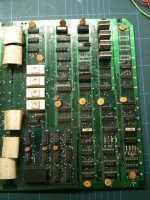
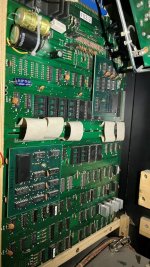
Game: Original* Namco Puckman pcb.
Purchase Description: Untested/Assumed Repair Needed.
Fault on Receipt: Not running - Boots to a white screen.
* I’ve been following the debate over the years on whether this pcb is an original Namco or a bootleg. My own conclusion is that there is a lot of evidence to suggest this is a genuine Namco board or was at least authorised by Namco.
I’ve always previously worked on Midway Pac-Man boards, so I was kind of excited to finally get my hands on what I consider to be a genuine Namco version. I believe this particular pcb was originally used in the Bell-Fruit cabinets here in the UK. I note there are few differences between this board and the Midway pcbs, so I’ll briefly mention them below:-
1. This board is designed to be cut in two if necessary. There are 5 hard soldered ribbon cables in the middle of the board which connect the 2 “halves” of the pcb.
2. Two of the four corner edges on the main pcb are chamfered (angled).
3. The NVC284 and NVC285 daughter boards have a different layout compared to the Midway pcbs (although the logic chips are identical and are interchangeable with the Midway ones).
4. The IC at 7K (a CD4099) is used instead of a 74LS259 at 8K on the Midway board.
5. The sound circuit is different. This board uses a Fujitsu MB3712 audio amp instead of a LM1877 (which is the chip with the large aluminium heat sink on the top) and there are different components in the sound circuit.
This particular board also has all the original Toshiba branded TMM333P masked game proms present.
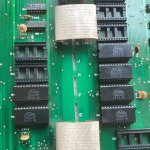
For reference the masked proms are fitted in the following locations:- 6E – 3810, 6F – 3811, 6H – 3812, 6J – 3813, 5E – 3814 and 5F – 3815
Picture of the masked Toshiba TMM333P proms fitted to the board…
The game board is also marked with the following part numbers:
22021017 – Main pcb Board
22021018 – V-Ram Addresser (NVC284) Custom daughter pcb
22021019 – Sync Buss Controller (NVC285) Custom daughter pcb.
Giving the board a visual inspection, I immediately notice that there’s a static ram chip missing at 2A. I currently do not have any spare of these chips spare so I am going to have to order some in (AM93425PC’s are drop-in replacements). The 4 static ram chips between 2A to 2D are for the colour of the characters. The game will boot up and run without them so it will not hold up the repair. Interestingly, these 4 static ram chips are factory socketed and have ceramic chips installed. All Bally/Midway boards I’ve seen have these ram chips soldered directly into the board.
I also note this board is peppered with Fujitsu logic chips, so I’m thinking I might be in for a long repair!
Time to power the board up; I’m greeted with a blank white screen and nothing appears to be running. I get my logic probe out and check to see if there’s a clock on pin 6 of the Z80 CPU. Oddly, there is a clock but my logic probe is pulsing only low (not high/low). I check the reset on pin 26 of the Z80, it seems completely dead. I check the +5v pin on various chips; absolutely nothing on the Hi of my probe. Voltage on the board is confirmed to be good with the Multi-meter, so it looks like my Logic Probe has suddenly gone faulty
Whilst I wait for a replacement Logic Probe to arrive, I might as well test the socketed chips. From the information printed in the excellent Pac-Man Trouble Shooting Guides (links below), faulty Bi-Polar proms at 4A or 7F can cause no video or a dead board so this is a good starting point. I pull both the 4A and 7F and test them in a known good working Midway Pac-Man board. I soon discover 4A is dead. I fit a replacement 4A chip (82N129N) and now the board boots up to a garbage screen…
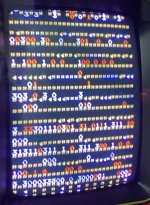
My initial thought is perhaps one (or more of the rams) are faulty. The rams in row 4K to 4R are all ceramic (and all factory soldered directly into the board). Ceramic rams are usually very reliable, so I rule them out for the time being. I carry on checking the rest of the socketed chips. The Z80 and the other 2 Bi-Polar proms all work fine, however 2 of the 6 Toshiba masked proms turn out to be bad (the proms at 6E and 6H ). I burn two HN462532 eproms to replace them and the game now boots up!
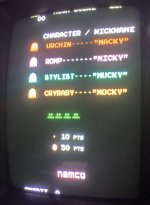
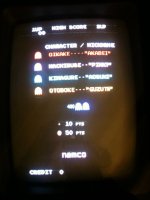
Interestingly, the ghost characters have English names, whereas I was (sort of) expecting the Japanese names with it being the Namco rom set installed.
The character names are altered by adding a solder blob to a jumper pad next to the dip switches. I take another look at my board and sure enough, this board has had the solder blob link done, therefore changing the ghost names from Japanese to English.
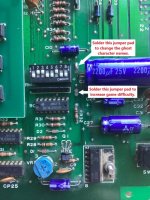
Incase anyone is curious; if you solder a blob to the change to the alternative ghost names using the Midway Pac-Man game roms, you get this…
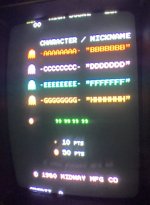
(Ignore the green ghosts/eyes, this is because the 2A ram chip is still missing).
I was kind of hoping that Midway might have put the Japanese names in as the alternate name set, but it looks like they simply didn’t bother using anything.
OK, so putting back in the Namco Puckman game roms (the only difference between the Namco rom set and the Midway set is the rom at 6J) and booting up the game again, I also realise that there is no sound at all.
I run my finger along the pins of the MB3712 sound amp to see (hear) if I get any buzz/hum through the speaker. I’m getting absolutely nothing. I suspect the amp is dead, so I de-solder it and replace it with a brand new MB3712. After booting up the game again, I’m still not getting any sound whatsoever, not even a tiny hum/crackle through the speaker. It’s almost like if the speaker is disconnected.
The connection to my speaker is definitely good (I tried another pcb to check), so I’m thinking perhaps there’s a broken track under the board or something. I take a closer look underneath the pcb, everything looks in good condition with no damage. I look around the sound circuit and then realise that it doesn’t connect to pins F and H on the edge connector like it does on a Midway Pac-Man board. After consulting the German NSM Puckman manual, I soon discover the the speaker out pin is different on Puckman compared to Pac-Man. The +Speaker wire is actually connected to Pin 18 and the –Speaker wire needs to be connected to GND.
I hold my hands up here, it’s a bit of a schoolboy error, I should have checked beforehand rather than automatically assume that Puckman and Pac-Man have identical pinouts.
I’m going to have to quickly make up a Puckman to JAMMA adapter to take in consideration the different audio pinouts as my stock Pac-Man adapters do not have the option to re-map the audio pins. Anyway, after knocking up an adapter (and double checking the connections!), I can confirm that sound is fully restored and with no problems in the audio.
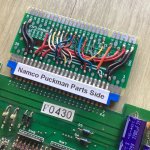
The batch of AM93425PC static rams which I ordered have now finally arrived, so I fit one into the vacant socket at 2A and all colours/graphics are now correct.
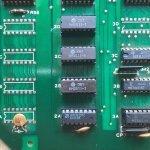
If you look closely on the top of the the original ceramic Hitachi HM2511-1 ram chips (2B-2D), you can see some glue residue. I assume these chips originally had heatsinks on top of them previously, so I’ll probably put 4 new heatsinks on them at a later date to round off the repair.
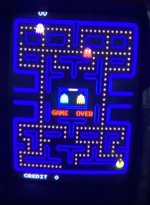
Anyway, the game is now fully working 100% (apologies for the slightly blurry image)
Overall, it was a fairly straight-forward fix. I didn’t even need the logic probe in the end. I really was expecting a bunch of bad Fujitsu logic chips to give me a bit of grief, but guess I got lucky.
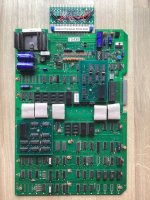
Here’s a final picture of the now fully working and repaired board.
Links to useful Pac-Man Repair information:-
Pac-Man-Troubleshooting-Guide-Part1.pdf (classicgaming.cc)
Pacman-Mspacman-Troubleshooting-Guide-Part2.pdf (arcade-museum.com)
Pac-man Repair & Troubleshooting Information - At Rotheblog.com
Summary
* Replaced Bi-Polar color prom at 4A, causing a non-booting white screen.
* Replaced 2x masked game proms at 6E and 6H causing static garbage numbers/graphics on screen .
* Replaced a missing HM2511 static ram at 2A causing incorrect and missing colours to game characters.
* Used the correct pinout JAMMA to Puckman adapter for the speaker sound.
Parts needed for this repair
1x 82N129N Bi-Polar Prom.
2x HN462532 eproms.
1x AM93425PC static ram.
Purchase Description: Untested/Assumed Repair Needed.
Fault on Receipt: Not running - Boots to a white screen.
* I’ve been following the debate over the years on whether this pcb is an original Namco or a bootleg. My own conclusion is that there is a lot of evidence to suggest this is a genuine Namco board or was at least authorised by Namco.
I’ve always previously worked on Midway Pac-Man boards, so I was kind of excited to finally get my hands on what I consider to be a genuine Namco version. I believe this particular pcb was originally used in the Bell-Fruit cabinets here in the UK. I note there are few differences between this board and the Midway pcbs, so I’ll briefly mention them below:-
1. This board is designed to be cut in two if necessary. There are 5 hard soldered ribbon cables in the middle of the board which connect the 2 “halves” of the pcb.
2. Two of the four corner edges on the main pcb are chamfered (angled).
3. The NVC284 and NVC285 daughter boards have a different layout compared to the Midway pcbs (although the logic chips are identical and are interchangeable with the Midway ones).
4. The IC at 7K (a CD4099) is used instead of a 74LS259 at 8K on the Midway board.
5. The sound circuit is different. This board uses a Fujitsu MB3712 audio amp instead of a LM1877 (which is the chip with the large aluminium heat sink on the top) and there are different components in the sound circuit.
This particular board also has all the original Toshiba branded TMM333P masked game proms present.
For reference the masked proms are fitted in the following locations:- 6E – 3810, 6F – 3811, 6H – 3812, 6J – 3813, 5E – 3814 and 5F – 3815
Picture of the masked Toshiba TMM333P proms fitted to the board…
The game board is also marked with the following part numbers:
22021017 – Main pcb Board
22021018 – V-Ram Addresser (NVC284) Custom daughter pcb
22021019 – Sync Buss Controller (NVC285) Custom daughter pcb.
Giving the board a visual inspection, I immediately notice that there’s a static ram chip missing at 2A. I currently do not have any spare of these chips spare so I am going to have to order some in (AM93425PC’s are drop-in replacements). The 4 static ram chips between 2A to 2D are for the colour of the characters. The game will boot up and run without them so it will not hold up the repair. Interestingly, these 4 static ram chips are factory socketed and have ceramic chips installed. All Bally/Midway boards I’ve seen have these ram chips soldered directly into the board.
I also note this board is peppered with Fujitsu logic chips, so I’m thinking I might be in for a long repair!
Time to power the board up; I’m greeted with a blank white screen and nothing appears to be running. I get my logic probe out and check to see if there’s a clock on pin 6 of the Z80 CPU. Oddly, there is a clock but my logic probe is pulsing only low (not high/low). I check the reset on pin 26 of the Z80, it seems completely dead. I check the +5v pin on various chips; absolutely nothing on the Hi of my probe. Voltage on the board is confirmed to be good with the Multi-meter, so it looks like my Logic Probe has suddenly gone faulty
Whilst I wait for a replacement Logic Probe to arrive, I might as well test the socketed chips. From the information printed in the excellent Pac-Man Trouble Shooting Guides (links below), faulty Bi-Polar proms at 4A or 7F can cause no video or a dead board so this is a good starting point. I pull both the 4A and 7F and test them in a known good working Midway Pac-Man board. I soon discover 4A is dead. I fit a replacement 4A chip (82N129N) and now the board boots up to a garbage screen…
My initial thought is perhaps one (or more of the rams) are faulty. The rams in row 4K to 4R are all ceramic (and all factory soldered directly into the board). Ceramic rams are usually very reliable, so I rule them out for the time being. I carry on checking the rest of the socketed chips. The Z80 and the other 2 Bi-Polar proms all work fine, however 2 of the 6 Toshiba masked proms turn out to be bad (the proms at 6E and 6H ). I burn two HN462532 eproms to replace them and the game now boots up!
Interestingly, the ghost characters have English names, whereas I was (sort of) expecting the Japanese names with it being the Namco rom set installed.
The character names are altered by adding a solder blob to a jumper pad next to the dip switches. I take another look at my board and sure enough, this board has had the solder blob link done, therefore changing the ghost names from Japanese to English.
Incase anyone is curious; if you solder a blob to the change to the alternative ghost names using the Midway Pac-Man game roms, you get this…
(Ignore the green ghosts/eyes, this is because the 2A ram chip is still missing).
I was kind of hoping that Midway might have put the Japanese names in as the alternate name set, but it looks like they simply didn’t bother using anything.
OK, so putting back in the Namco Puckman game roms (the only difference between the Namco rom set and the Midway set is the rom at 6J) and booting up the game again, I also realise that there is no sound at all.
I run my finger along the pins of the MB3712 sound amp to see (hear) if I get any buzz/hum through the speaker. I’m getting absolutely nothing. I suspect the amp is dead, so I de-solder it and replace it with a brand new MB3712. After booting up the game again, I’m still not getting any sound whatsoever, not even a tiny hum/crackle through the speaker. It’s almost like if the speaker is disconnected.
The connection to my speaker is definitely good (I tried another pcb to check), so I’m thinking perhaps there’s a broken track under the board or something. I take a closer look underneath the pcb, everything looks in good condition with no damage. I look around the sound circuit and then realise that it doesn’t connect to pins F and H on the edge connector like it does on a Midway Pac-Man board. After consulting the German NSM Puckman manual, I soon discover the the speaker out pin is different on Puckman compared to Pac-Man. The +Speaker wire is actually connected to Pin 18 and the –Speaker wire needs to be connected to GND.
I hold my hands up here, it’s a bit of a schoolboy error, I should have checked beforehand rather than automatically assume that Puckman and Pac-Man have identical pinouts.
I’m going to have to quickly make up a Puckman to JAMMA adapter to take in consideration the different audio pinouts as my stock Pac-Man adapters do not have the option to re-map the audio pins. Anyway, after knocking up an adapter (and double checking the connections!), I can confirm that sound is fully restored and with no problems in the audio.
The batch of AM93425PC static rams which I ordered have now finally arrived, so I fit one into the vacant socket at 2A and all colours/graphics are now correct.
If you look closely on the top of the the original ceramic Hitachi HM2511-1 ram chips (2B-2D), you can see some glue residue. I assume these chips originally had heatsinks on top of them previously, so I’ll probably put 4 new heatsinks on them at a later date to round off the repair.
Anyway, the game is now fully working 100% (apologies for the slightly blurry image)
Overall, it was a fairly straight-forward fix. I didn’t even need the logic probe in the end. I really was expecting a bunch of bad Fujitsu logic chips to give me a bit of grief, but guess I got lucky.
Here’s a final picture of the now fully working and repaired board.
Links to useful Pac-Man Repair information:-
Pac-Man-Troubleshooting-Guide-Part1.pdf (classicgaming.cc)
Pacman-Mspacman-Troubleshooting-Guide-Part2.pdf (arcade-museum.com)
Pac-man Repair & Troubleshooting Information - At Rotheblog.com
Summary
* Replaced Bi-Polar color prom at 4A, causing a non-booting white screen.
* Replaced 2x masked game proms at 6E and 6H causing static garbage numbers/graphics on screen .
* Replaced a missing HM2511 static ram at 2A causing incorrect and missing colours to game characters.
* Used the correct pinout JAMMA to Puckman adapter for the speaker sound.
Parts needed for this repair
1x 82N129N Bi-Polar Prom.
2x HN462532 eproms.
1x AM93425PC static ram.