Recalbox Jamma + Sega New Astro City notes

Wahoobies

Active member
vacBacker
Feedback
1 (100%)
Credits
418CR
Hi guys,

I learned a couple interesting things getting RecalBox Jamma working nicely in a Sega New Astro city, thought I'd post a few details.

My new astro came from JCL in china. I recommend them- probably some of the finest customer service I've ever had, but that's a different subject honestly.
I had a few unexpected challenges getting RecalBox working inside a real CRT/Jamma box, plus a few things that were much easier than expected.

One thing I found after lots of searching.. the power supplies on sega candies usually need maintenance, and even after that they aren't reputed as super reliable. Mine was sending out 4.8 on the 5v rail.. I could adjust the screw with the tinest touch and it woudl jump to 5.2 or so. Getting this working happily with a Raspberry pi wanting to boot from cabinet power was interesting. Too low and you get a pop-up warning that takes forever to go away about undervoltage. Too high and you risk sending too much power to the Pi and or other components.

You can disable the overvolt cutoff on the recalbox board- it's just under the notch of the jamma connector as shown here. In my case, I managed to tweak to about 5.15v on boot, which dips to 5.0 under load. This satisfies the rasberry pi which seems not to mind the very short over-volt on boot-up.

Here's the little dip switch:
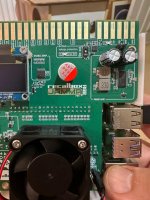
1731784283865.jpeg
 
Last edited:

Wahoobies

Active member
vacBacker
Feedback
1 (100%)
Credits
418CR
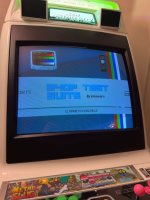
Next is the Shop Test Suite that you can add to the build. These have been super-helpful.. previously I was relying on my neo-geo operator mode

1731784443775.jpeg

1731784458689.jpeg


1731784470767.jpeg
 

Wahoobies

Active member
vacBacker
Feedback
1 (100%)
Credits
418CR
The dreamcast image is the most helpful.. every test pattern you can think of, great way to walk through the guide for setting up the MS9-29 screen on an Egret II here. Same monitor/controls/remote!
 
Last edited:

Wahoobies

Active member
vacBacker
Feedback
1 (100%)
Credits
418CR
Next up, I joined the build to Wifi. It's pretty easy, but easier to add a keyboard dongle to the pi and just type in the SSID & PW.
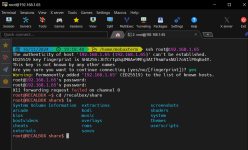
Here's me using mobaxterm to connect. you get a default root PW of "recalboxroot" that you can change.

Once your in, /recalbox/share is where all the good stuff goes. You can browse, vim configs, etc. recalbox is build using an embedded linux disto called "buildroot". it combines compiling the kernel & a busybox image for the rest of the distro. recalbox is a very well-designed build overall, the seamless RGB resolutions is SOO much easier than this used to be with advancemame and etc back in the early times.

1731784765742.png
 

Wahoobies

Active member
vacBacker
Feedback
1 (100%)
Credits
418CR
Next up, I had to do an NVMe hack. Raspberry pi can boot from an NVMe drive with the right add-on.. in this case you really want a Pi5 with an NVMe hat. There are a couple out there, I chose the pimoroni one.

The NVMe drive will boot up and simply work faster.. The hack isn't awful but just a bit fiddly.

Installing Recalbox to the NVM drive
1) build a normal raspberry Pi OS image first. Just choose defaults for pi5 and write to a 32g or so SD card
2) copy the recalbox install image to a USB stick
3) boot the pi with NVMe attached (it's a single ribbon cable to set up the PCI connection!)
4) run raspberry pi imager *on the pi*, and install the recalbox image to the NVMe

Next, we ditch SD card and boot from NVMe:

Setting Pi to boot from NVMe
1) get a small microSD, and boot up your raspberry pi imager on windows, mac, whatever..
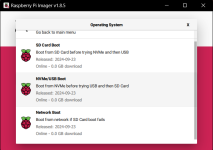
2) select "choose OS", then "misc utility images"
1731785115473.png
3) choose "Bootloader (Pi5 Family)", then NVMe/USB boot
1731785153386.png

3) burn to your small SD card.
4) boot the pi with this card in, just headless.. not connected to any screen, or the recalbox board..
5) it takes 30 seconds or so- you'll see the little LED start blinking green when it's done.
6) remove the utility SD card and boot from NVMe.. enjoy the fastness and greater write reliability/lifespan!

Now adding the NVMe drive might introduce a *new* problem.. it draws more voltage. With my NVMe drive, I'm using external power to the pi. I'm torn, but I think I will set my cabinet power supply to send as-close-as-possible to correct DC to the CRT, and have an extra power plug on a power strip for the Pi. This gets me the NVMe drive and no worries about pushing to hard on other components to get it working happily with the power supply.
 
Last edited:

Wahoobies

Active member
vacBacker
Feedback
1 (100%)
Credits
418CR
The recalbox Jamma plastic case does not have room for an NVMe hat.. I tried a couple options

You can just mount directly to the breadboard with standard standoff feet.

Or you can do this process..
1) dremel cut a little extra slot next to the SD card slot on bottom of the recalbox case. This is for PCI ribbon cable
2) drill with m2.5 bit through the existing holes in case- those look like unimplemented mount points for internal screws. There are 2 of these..
3) tap with m2.5 tap
4) use small m2.5 screw-in-standoffs on bottom of plastic to fit the NVMe drive under the recalbox case :)
 

Wahoobies

Active member
vacBacker
Feedback
1 (100%)
Credits
418CR
It's tempting to mildly overlclock the Pi5 too.. you can easily get 2800 out of it.. though i'd recommend attaching some little heatsink stick-on for the main chips.

Recalbox jamma has a fan blowing right at naked CPU/GPU, but a little passive heatsink really helps too.

Depending on your Pi5, you can get 3GHz with minimal effort, though some top out at 2800.

2800 is enough for nice N64 emulation.. and nothing else really needs more CPU that doesn't also need a better GPU/hi res.. so 2800 is the sweet spot I found!
 

Wahoobies

Active member
vacBacker
Feedback
1 (100%)
Credits
418CR
A couple more notes on the version current as of Nov 16 2004..

- Apple ][ emulation uses LinApple. It's broken at the moment. Older builds work nicely!
- Dumping MP3s into the music folder (/recalbox/share/music) makes a very nice random-play jukebox option. Mine's filled with 80s music and a long ambient arcade background noise clips from archive.org :)

Samples and artwork were tricky to find. I found using mame2003plus set was very helpful..

For mame:
/recalbox/share/roms/mame/mame2003plus/samples

for FBNeo:
/recalbox/share/roms/fbneo/samples

Artwork:
/recalbox/share/bios/mame2003
(adds backdrops to vector games, some raster games like "Frogs", space invaders etc..)

Getting into retroarch configs..
start plus button 2 (medium punch on my layout).

Things you can do:
- remove nag notices
- modify input keys/combos (add a service mode hotcombo etc)
- high score saving
- change / stretch displays.. space invaders for example- you can get full planet reflection artwork and "Gels" for colors, then stretch the game to look just perfect on that..
 
Last edited:

Wahoobies

Active member
vacBacker
Feedback
1 (100%)
Credits
418CR
Hidden in recalbox menus, and oddly not defaults..

themes have many sub-choices for 240p that you really want to find and activate. The default theme is good, but game lists default to unreadable. You pretty much want the 240p settings everywhere!

You can set the P2 joystick as "Second joystick" in another menu.. this helps robotron, crazy climber etc, but breaks P2.. so good to find & remember.

Start plus "light punch" is credit. More fun to drop tokens in the coin slot, but if you don't have a working one...
 

Wahoobies

Active member
vacBacker
Feedback
1 (100%)
Credits
418CR
Kodi is an intertesting inclusion. You can put your 4:3 video in the /recalbox/share/kodi/movies folder. You have to navigate kodi menus to add this as a source too.

Long ago I digitized some cartoons that seem to work just right at the resolution/aspect! I'm not sure I'll spend much/any time watching them, but it was fun to set up.
 

Wahoobies

Active member
vacBacker
Feedback
1 (100%)
Credits
418CR
A bit more on the cabinet itself..

The speakers that jamma connects to are by default Mono, of course. They also are pretty shite. I looked into a lot of drop-in replacements. Realistically you want them to minimally be *shielded* so they don't screw up your colors etc from magentism.

I considered just replacing the black grilles with stock from Ali express (not hard to find stuff you can cut to fill the gap). In the end I got a 2:1 set and made tiny mounts on the wall next to the cabinet. No internal modifcations.. despite seeing some quite complex ones with amps and switches to change source of input.. honestly just use the 1/8" plug out from the recalbox to a reasonably cheap 2:1 set and mount the speakers somewhere off cabinet!

The "Flat Square 29" marquee and "New Astro City" light up panels I have both are quite patina'd. The rest of the cabinet was powder coat at an automotive spray booth + replacement decals/stickers etc.

I was briefly tempted to source an odd LCD panel for the marquee between the speakers to make a dynamic marquee hack. I thought I could do a hi-res scan of the mojo'd original logos etc, but in the end I decied to leave it!

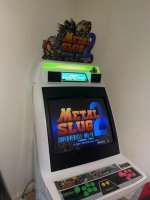
I have a xingothx topper on my NAC. It's a Metal Slug 2 one. He makes a lighting kit as well now for these, so you can just slip a toppper in and have a nice custom look to it. Here's the example "Before" lighting kit

1731786915416.jpeg
 

Georgian2

Active member
Feedback
12 (100%)
Credits
1,754CR
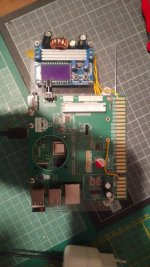
This is how I did it in order to protect the raspberry from my dodgy power supplys.
I power it using the usb C and tap in the 5V rail and boost it to 12V using an step up converter. Works fine with an 5V 2,4A mobile phone charger. it needs mroe amps if big speakers are used. I have a smal one and volume is quite low so it works perfect.
recalbox.jpeg
 

Wahoobies

Active member
vacBacker
Feedback
1 (100%)
Credits
418CR
This is how I did it in order to protect the raspberry from my dodgy power supplys.
I power it using the usb C and tap in the 5V rail and boost it to 12V using an step up converter. Works fine with an 5V 2,4A mobile phone charger. it needs mroe amps if big speakers are used. I have a smal one and volume is quite low so it works perfect.
View attachment 28502
This is interesting.. I have a external Pi brick on a power strip. I boot it with this first, then turn on the cab. I *think* it's taking from just the Pi brick- it would report undervoltage from the jamma 5v otherwise...

New Astro PSU will give reasonable 100v but 5v will show a higher v on boot and drop soon after. If I tweak the 5v to be right I worry I have too much on the 100, so hence my external power...
 
Top