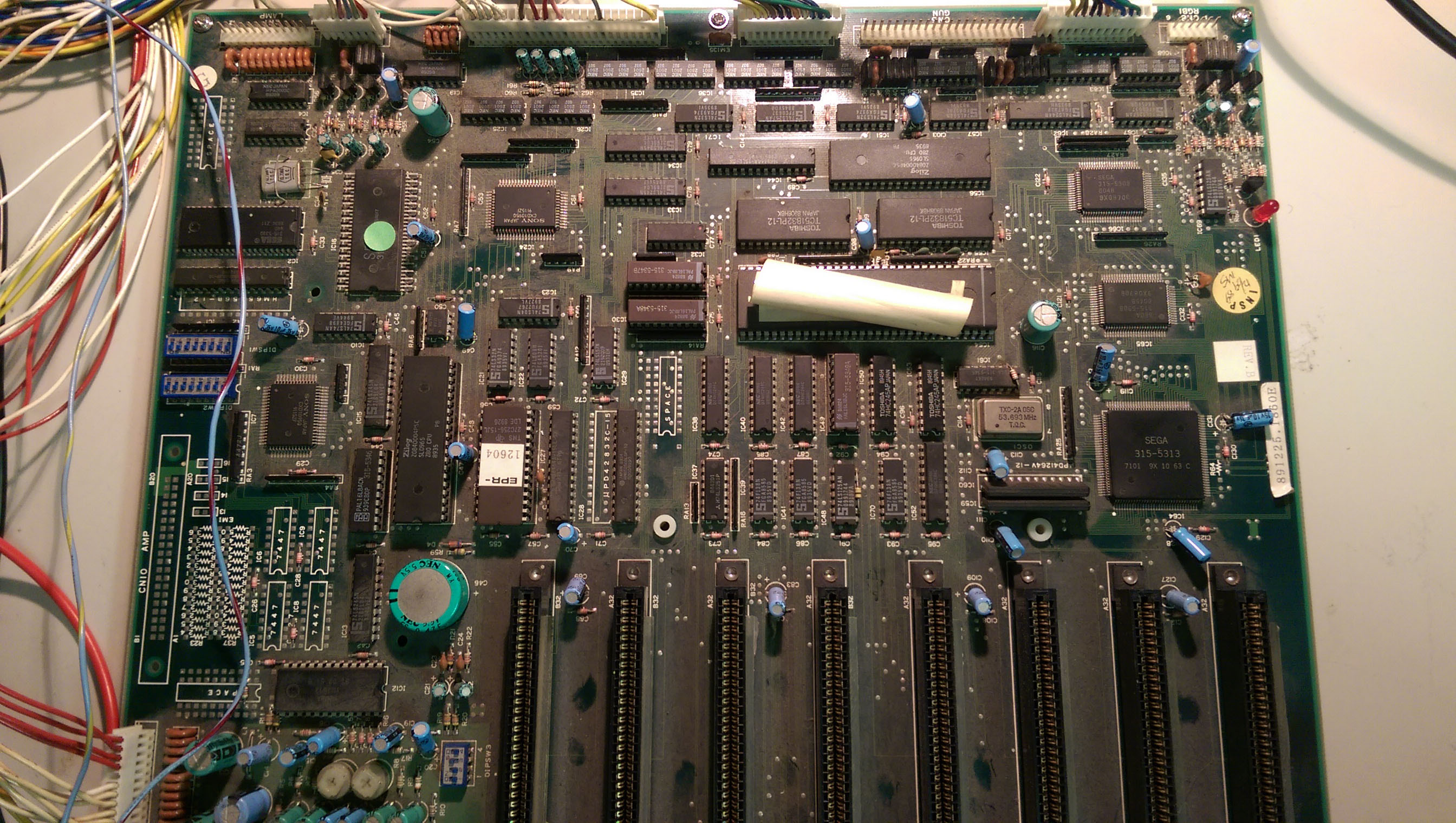
sega megatech repair (fixed)

madmax8

User
Credits
67CR
Finally got my hands on a rare megatech pcb.
But unfortunately it's not working. It was sold working but meh :(

I need help repairing. I asked retro games party as the seller wanted me to ask them but unfortenately no answer from them so i need to get it repaired myself or by someone else.
The other option was to send it back but i hate to send it back and have no pcb at all since they are so darn hard to get a hold of.

i made up a jamma plug from a schema i found online.
The board powers up but then does nothing. No screen output or whatever.
I probed the 68k cpu and the reset line is held low all the time. No pulsing when power off and on.
Does anyone ahve a clue?

madmax82017-05-26 14:07:28

 

Nes4life

Active member
vacBacker
Feedback
11 (100%)
Credits
1,100CR
Megatech are rare but also a real pain to repair. Contact Ace' as he's after a particular chip from the Megatech to repair his pcb and knows a little about how they work. So all may not be lost. If it's too far gone I'd sell it to Ace' as a spare and hold out for a worker. Nes4life2017-04-30 19:33:17
 

Ace`

PlanB contributor #1
Feedback
35 (100%)
Credits
3,614CR
Don't sell it to me, I've already got one I cannot get going (although it's a little less dead now).
smiley36.gif
Have you tried hooking up the video to the second monitor output? you should get video for the top screen even if the 68000 isn't running. My guess is you'll get a top screen video but it won't see your cart(s) which is why it isn't running or displaying anything on the main video screen. This seems to be the most common problem with these things.
 

Nes4life

Active member
vacBacker
Feedback
11 (100%)
Credits
1,100CR
Zebow converted his to MAME after his pcb died I think. The top monitor was used to display marquees etc. It's pretty tasteful if you limit it to Sega games of a particular age. There's a video or two on you tube. Getting a working pcb is very tricky.
 

madmax8

User
Credits
67CR
i hooked up monitor 2 and i can see it's giving a slightly blue tinted screen but no menu.
I'll check the Z80 tonight to see what it's doing.
 

madmax8

User
Credits
67CR
both Z80's are running. lines are togling and halt and reset are high.
but no screen output on both connectors.

anyone an idea?
 

Ace`

PlanB contributor #1
Feedback
35 (100%)
Credits
3,614CR
You mean both cpus? there's only one Z80, speaking of which Nes4life has a good tip unplug the riser daughter board and plug the z80 directly into the socket. That's one unnecessary and possible problem removed, also check the transistors just before the video connectors there's a thread on j+ about these failing.
 

Ace`

PlanB contributor #1
Feedback
35 (100%)
Credits
3,614CR
Looks like the daughter board has already been removed, have you checked the bios eprom? very strange to not even get a top screen output. Also swap out the z80 if you have a known worker, I am forever replacing them.
 

madmax8

User
Credits
67CR
already burned another bios but makes no difference. I'll check for a working z80 might have one.
The daughter board is that the one which requires -12v?
 

madmax8

User
Credits
67CR
BTW can i test it by simply connecting the power plug CN6 and CN9 RGB2 ? or do i have to connect all the wires to get a test menu?

replaced the z80 no difference.
Checking the transistors later.
madmax82017-05-02 19:11:31
 

Ace`

PlanB contributor #1
Feedback
35 (100%)
Credits
3,614CR
The daughter board is just a small pcb that goes in the z80 socket to
add some extra functionality I am guessing for sega to do tests when
they were first made. I don't think there's a -12v any where on the
board? if there is it isn't required.

To get a display on the top screen all you need is CN6 and CN9 connected, you don't even need a cartridge. If you're using the same connector for CN6 as CN8 (bottom screen) make sure it's lined up properly as for some reason the bottom screen connector has an extra unused pin.
 

madmax8

User
Credits
67CR
probed a little around.
the SEGA 315-5246 has the RGB signals low. So output is never there.
Could it be this one is failing? Is there a pinout or something what is supposed to be doing?
I can see the pins toggling on my megaplay which is working. Just don't know what inputs it should be getting.
madmax82017-05-03 09:39:53
 

madmax8

User
Credits
67CR
i need some more help please :(
I can't get any further.
I probed the 315-5246 and this is what i got.
Is there anyone that can compare it to a working pcb?

there is 1 pin that's suspect. pin 5 which goes to D4 on the z80 is low.
pin 27, 28 and 29 are low but on my megaplay pcb pin 27 is toggling. Since the menu is shown in green i would suspect at least pin 28 toggling.
Also pin 58 which is the WR pin that is connecting to the Z80 is toggling. not sure if this is correct.
Naamloos.png


madmax82017-05-09 19:50:14
 

madmax8

User
Credits
67CR
This is what my Z80 is doing.
I swapped it with another one from a working pcb but nothing changes.
z80a.png

madmax82017-05-09 15:23:56
 

madmax8

User
Credits
67CR
did some probing to see how the connections are.

Dataline 4 on the databus is stuck low. I guess that's the problem here.
For it to work all datalines should be toggling.

These are the components connected to dataline 4

pin 7 IC17 Z80
pin 5 IC16 SEGA custom 315-5246
pin 16 IC20 (27c256 bios eprom)
pin 16 IC27 Fujitsu MB8464A-15LL RAM
pin 16 IC28 Hitachi HM65256BLSP-10 RAM
pin 36 IC24 Sony CXD1095Q

The sony CXD1095Q chip should be the datalatch right?
Could that be the component which is causing the problem? or should i focus on the rams?
 

Ace`

PlanB contributor #1
Feedback
35 (100%)
Credits
3,614CR
Comparing your notes to a working board 315-5246 pin 5 should be pulsing as you know, also pins 10 and 11 are high. Z80 pin 7 is the only difference on the Z80.

There's a good chance your IC24 CDX1095 is bad, this is a common failure on these boards. I had to order a couple from China, from someone on aliexpress if I remember correctly.
 
Top