This is my first repair log, I'm terrible at documenting what I've done but hopefully it makes sense...
A big fan of Ikari Warriors I was drawn to having a go at repairing a Time Soldiers by SNK ROMSTAR
After visual inspection of this non working board I wrongly thought it was going to be an easy repair. The game would not pass the pre boot test screen giving a Sprite RAM 2 error and displaying a red screen.
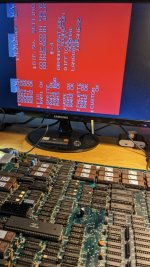
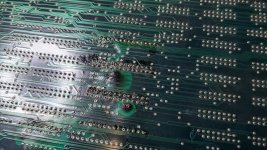
Inspecting the back of the board I wrongly assumed that the burned areas along with scruffy socket installation would be the issue but amazingly all the traces passing through two area of burning gave continuity so that wasn't the issue. I did find a damaged trace as part of this work but it didn't have any effect on booting. Oddly the burning is on the back of the board no sign of it at the front under the RAM.
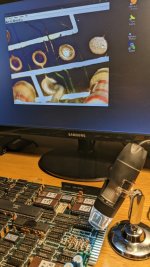
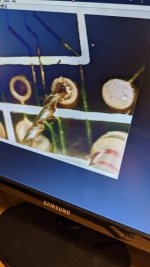
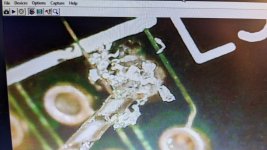
I pulled the two socketed sprite rams to find a bent pin. Surely it was it but unfortunately not! I replaced the main board cap and some obviously broken and missing resistors still without effect. At this point I also pulled cleaned and verified all the socketed roms, all good! I replaced the iffy looking sprite ram sockets and also two bad looking maincpu sockets. I know this board also has a custom rom so I was beginning to worry that this could be an issue so I popped a heatsink on it as a precaution. At this point I sought some help from Caius a well known repair expert on Arcade Projects forum who encouraged me to check my work and inspect the board again closely. To help with this I purchased a small USB hand held microscope which has been a revelation. It was cheap so I wasn't expecting much but it really turned the corner on the repair. To cut a very long story short this board had multiple damaged traces in crucial areas like the CPU and also the sprite ram area. I couldn't see any of these initially as they were either close to or under the edge of sockets and ic's. The traces in the sprite ram error where slightly hidden behind a resistor so I'll excuse myself that omission. Below is some of the trace damage picked up with the microscope. The final fix was the four long vertical traces running from the bottom of the board up to the sprite ram area. This damage must have been done when the previous owner was working on socketing the sprite ram?

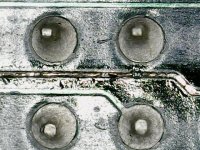
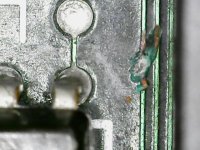
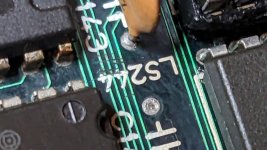
Just a selection of trace damage to be repaired.
This board also uses some large custom control input IC's (ALPHA-INPUT87) located in the bottom corners of the PCB and I was informed that if these fail they would also prevent a boot. They were very lose on the board having been bent backwards and forwards many time. I took the decision to remove them and add some turned pin connectors to make them easy to replace in future if damaged. Some easily snapped off so I carefully re-pinned them and remounted them back into the board. I used old capacitor wire crimped flat at the ends to give a good area to solder back to the IC.
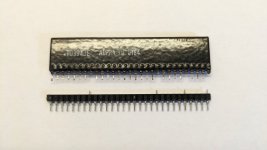
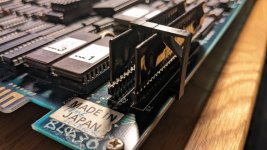
I designed and printed some simple 3d printed clips to prevent the IC's bending and being damaged in storage again.
After all this it was trace damage that was the ultimate killer of this board. A lot of it very difficult to spot without the use of the microscope. One other thing I struggled with the board was the ground plane, it was impossible to remove pins from the board without further damage so I had to come up with some creative methods mostly cutting and leaving a ground pin in place and soldering to it to make life easier. I've worked on many boards but this one was really difficult.
Finally I got the blue post boot screen and the game sprang to life.
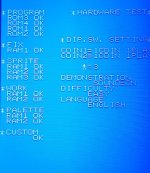
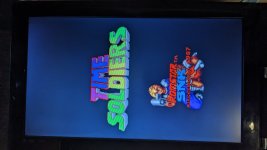
A bit of a condensed log of a repair which took a long time but I learned a lot from it and it was worth the effort put in and I hope it may help others.
Inspection, inspection, inspection...
A big fan of Ikari Warriors I was drawn to having a go at repairing a Time Soldiers by SNK ROMSTAR
After visual inspection of this non working board I wrongly thought it was going to be an easy repair. The game would not pass the pre boot test screen giving a Sprite RAM 2 error and displaying a red screen.
Inspecting the back of the board I wrongly assumed that the burned areas along with scruffy socket installation would be the issue but amazingly all the traces passing through two area of burning gave continuity so that wasn't the issue. I did find a damaged trace as part of this work but it didn't have any effect on booting. Oddly the burning is on the back of the board no sign of it at the front under the RAM.
I pulled the two socketed sprite rams to find a bent pin. Surely it was it but unfortunately not! I replaced the main board cap and some obviously broken and missing resistors still without effect. At this point I also pulled cleaned and verified all the socketed roms, all good! I replaced the iffy looking sprite ram sockets and also two bad looking maincpu sockets. I know this board also has a custom rom so I was beginning to worry that this could be an issue so I popped a heatsink on it as a precaution. At this point I sought some help from Caius a well known repair expert on Arcade Projects forum who encouraged me to check my work and inspect the board again closely. To help with this I purchased a small USB hand held microscope which has been a revelation. It was cheap so I wasn't expecting much but it really turned the corner on the repair. To cut a very long story short this board had multiple damaged traces in crucial areas like the CPU and also the sprite ram area. I couldn't see any of these initially as they were either close to or under the edge of sockets and ic's. The traces in the sprite ram error where slightly hidden behind a resistor so I'll excuse myself that omission. Below is some of the trace damage picked up with the microscope. The final fix was the four long vertical traces running from the bottom of the board up to the sprite ram area. This damage must have been done when the previous owner was working on socketing the sprite ram?
Just a selection of trace damage to be repaired.
This board also uses some large custom control input IC's (ALPHA-INPUT87) located in the bottom corners of the PCB and I was informed that if these fail they would also prevent a boot. They were very lose on the board having been bent backwards and forwards many time. I took the decision to remove them and add some turned pin connectors to make them easy to replace in future if damaged. Some easily snapped off so I carefully re-pinned them and remounted them back into the board. I used old capacitor wire crimped flat at the ends to give a good area to solder back to the IC.
I designed and printed some simple 3d printed clips to prevent the IC's bending and being damaged in storage again.
After all this it was trace damage that was the ultimate killer of this board. A lot of it very difficult to spot without the use of the microscope. One other thing I struggled with the board was the ground plane, it was impossible to remove pins from the board without further damage so I had to come up with some creative methods mostly cutting and leaving a ground pin in place and soldering to it to make life easier. I've worked on many boards but this one was really difficult.
Finally I got the blue post boot screen and the game sprang to life.
A bit of a condensed log of a repair which took a long time but I learned a lot from it and it was worth the effort put in and I hope it may help others.
Inspection, inspection, inspection...