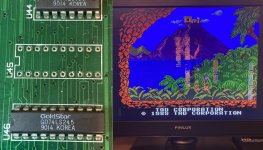
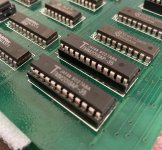
This journey started (briefly) back in November 2024 when I picked this up from ebay for around £20 ...
It was the first ever pcb I bought with possible repair in mind, the thinking being even if I couldn't fix it, it has around 30 eproms, I could always re-use on other stuff .....
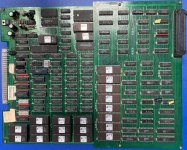
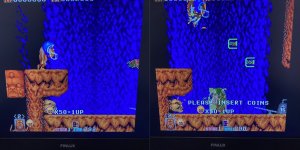
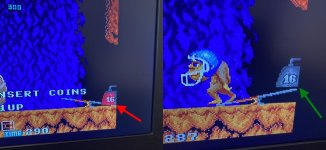
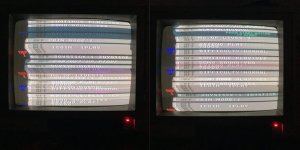
It was listed on ebay as an 'untested' Snow Bros ... and being new to all this at the time, I didn't realise until a while later it wasn't a Snow Bros, it was actually a Toki .... or the Japanese rom version in this case - Juju Densetsu ... The main reason I didn't know it wasn't Snow Bros was because when I received it and powered it up with my supergun all I got was this ...
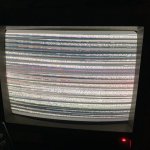
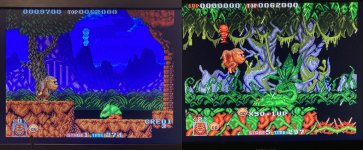
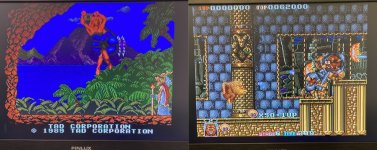
Didn't have much of a clue what that was all about and where to even start, so it got put away for a few months I think, until I needed a some eproms for something else and thought I'd use some off this board ... by then I had gathered a few pieces of test equipment, one being a programmer, so before I wiped the eproms I thought I'd read one, and got surprised when it identified as Juju Densetsu Had never heard of it !! So did a bit of research and realised what had happened and it felt like I had acquired a new game ! So I powered it up again and got the same as the picture above (which I'd learnt in the meantime was just bad sync) but also after about 60 seconds or so, music and sound effects kicked in so I knew the game was running ! Therefore the plan to use this board for spare parts was abandoned and I put the board back away until I had another way of viewing it .... which wasn't until last summer when I picked up a cheap Jamma cabinet with CRT which had no trouble handling this boards dodgy sync .... (excuse the screen glare/reflection and I hadn't properly dialed in the pic on the monitor yet)
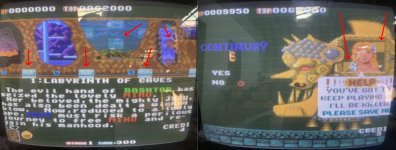
For the most part it appeared to be working ok, then I noticed that some tiles weren't quite right, not just on those screens but throughout gameplay too. But my issue was I didn't have a way to work on this board at home (my cab is currently at my mates warehouse until I have room at home) because it just won't sync with my supergun and 1084 Monitor. So it went back into the 'I'll come back to this later' pile and got on with other stuff ... for around 7 months until February this year.
Had seen/read a few Toki bootleg fixes in the meantime and they had sync issues too, but a small increase in value to one of the crystals had improved the sync signal so I dug this board out and found a 18Mhz crystal near the CPU which when divided by 2 gave a 9Mhz clock to the 68000 ... I thought this game board was meant to run at 10MHz so I swapped the 18Mhz crystal for a 20MHz and hoped this would not only boost the cpu clock to 10Mhz but also increase the woefully low 14KHz sync signal enough for my 1084 to be happy with. It worked for the CPU clock but unfortunately not quite enough for the sync and my monitor ... close but no cigar ...
Tried a 21Mhz crystal in case it need a little bit more, but that made it worse ... tried a jamma adaptor with sync cleaner too but that didn't work either .. so I've succumbed to using a scart - hdmi video converter with a LCD tv .... the picture sucks but at least I can see it to work on it. it works really well actually for bootleg boards with shit sync signals.

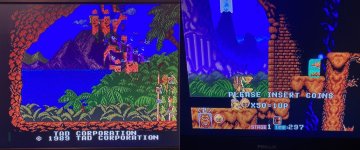
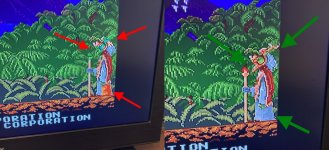
Text layer and BG / FG tiles layers seem to be fine, this graphical error looks to be confined to the sprites. It's quite hard to show with photo's but some sprite tiles are showing the wrong palette ... it's always the same tiles, but they're not always wrong. they flash in and out of being correct palette and wrong. so as tiles move around on the screen the palette changes .. sometimes they change when they're not moving though. and some tiles are ALWAYS perfect and some are ALWAYS wrong and some are ALWAYS switching
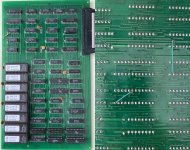
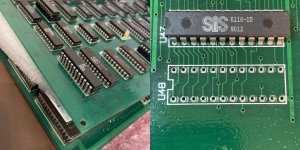
So sprites are generated by the smaller top board of this 2 board set ... and unlike the main board where the ROMs are all socketed, here they are directly soldered. As are the RAM chips.
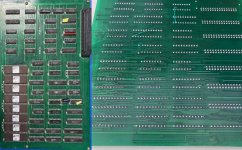
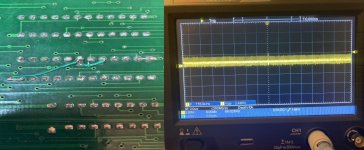
There was a couple of bodge wires on the underside which despite being a bit messy (I tidied them up) are actually factory and needed for this board to function properly so if you have one of these you need these wires !!
I figured the fault was due to bad sprite attribute data so found the RAM responsible (the 2x 6116 chips at the bottom corner of the board) and dug around looking for anything missing or sketchy on the scope .... thought I'd found the problem, D6 from one of the sprite attribute ram, going into a LS373 latch, the input looked clean but the output weak .. Bridging the clean LS373 input with the weak LS373 output I got stuck bad palette on all those effected sprite tiles. Swapped it out but no change. I now know that weak signal, despite not looking great, is normal here. I did then spend a while chasing this signal (D6) and D7 from the same sprite ram around, as it does seem one of these does carry sprite palette data ... but nothing obvious stood out. Did find a LS157 with outputs to the sprite ram, which failed the slice test so I changed it out and the new chip doesn't fail. But alas no change to the graphics fault.
( I'm usually wary of those small number fails on slice tests but with a minor graphics error like this, it was worth a shot)
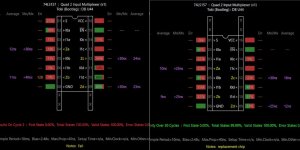
Found another couple of TTL's which aroused similar levels of suspicion which were also replaced to no avail. And at this point it was boiling down to removing the RAM and the ROM ...
I've been suspicious of a dodgy ROM all along because the errors are confined to certain sprites, and in my mind, if it was failing ram the errors would be more random. Whereas these sprite tile errors are the same, every single time, same tiles, same time ...
As I tend to do, if I'm not feeling a certain part of a repair I won't do it and will switch to working on something else I'm more in the mood for. Not ideal in a memory/continuity way, but just the way it is. And I wasn't feeling doing a bunch of de-soldering, so I didn't I parked it for the time being. Which turned out to be a good move I think, because then, another one of these exact boards popped up for sale so I grabbed it. Always helps having another (preferably working) board to help diagnose a boards problems ..This one is clearly a non worker though .. but it has socketed ROMs and RAM on the sprite board !!!
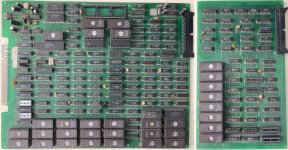
It was filthy as they usually are, main board missing a CPU, sprite board missing RAM. Interestingly has had a replacement crystal fitted - 20MHz!!
But with the board set I've got being almost 100% apart from the minor sprite tile palette issue, I think I can use this set to fix that set, and vice versa!
I popped in a CPU and RAM (on the sprite board) just to see if what state this new set was in and it just booted to garbage on the screen. OK so issues on the main pcb for sure. I'll come back to that ... So then I plugged this new sprite board into my good main board ... let's see what the sprite board is doing .....
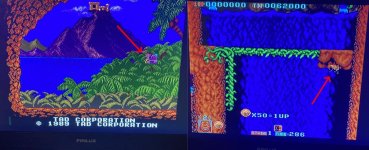
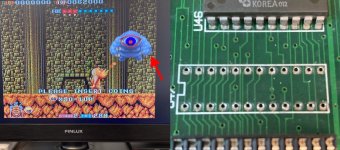
OK, so just one corrupted sprite tile on screen. First thing I noticed was this new sprite board did not have the same bodge wires on the back, it only had one of them .... so I made it match the other one ... (except I made a small mistake here)
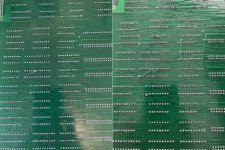
That 2nd wire I added , the vertical one, is vital. (I messed up the smaller diagonal one, hence the tiny wire next to it I added later when I fixed my mistake).
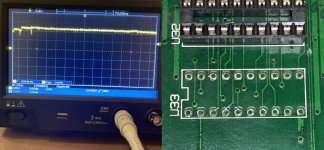
And this made no difference to the problem, but again looking at the signals in and out of the sprite attribute ram I quickly found an LS245 @ U45 with all its pins floating, obviously knackered I swapped that out and got some improvement .... (more to come)
It was the first ever pcb I bought with possible repair in mind, the thinking being even if I couldn't fix it, it has around 30 eproms, I could always re-use on other stuff .....
It was listed on ebay as an 'untested' Snow Bros ... and being new to all this at the time, I didn't realise until a while later it wasn't a Snow Bros, it was actually a Toki .... or the Japanese rom version in this case - Juju Densetsu ... The main reason I didn't know it wasn't Snow Bros was because when I received it and powered it up with my supergun all I got was this ...
Didn't have much of a clue what that was all about and where to even start, so it got put away for a few months I think, until I needed a some eproms for something else and thought I'd use some off this board ... by then I had gathered a few pieces of test equipment, one being a programmer, so before I wiped the eproms I thought I'd read one, and got surprised when it identified as Juju Densetsu
Had never heard of it !! So did a bit of research and realised what had happened and it felt like I had acquired a new game ! So I powered it up again and got the same as the picture above (which I'd learnt in the meantime was just bad sync) but also after about 60 seconds or so, music and sound effects kicked in so I knew the game was running ! Therefore the plan to use this board for spare parts was abandoned and I put the board back away until I had another way of viewing it .... which wasn't until last summer when I picked up a cheap Jamma cabinet with CRT which had no trouble handling this boards dodgy sync .... (excuse the screen glare/reflection and I hadn't properly dialed in the pic on the monitor yet)For the most part it appeared to be working ok, then I noticed that some tiles weren't quite right, not just on those screens but throughout gameplay too. But my issue was I didn't have a way to work on this board at home (my cab is currently at my mates warehouse until I have room at home) because it just won't sync with my supergun and 1084 Monitor. So it went back into the 'I'll come back to this later' pile and got on with other stuff ... for around 7 months until February this year.
Had seen/read a few Toki bootleg fixes in the meantime and they had sync issues too, but a small increase in value to one of the crystals had improved the sync signal so I dug this board out and found a 18Mhz crystal near the CPU which when divided by 2 gave a 9Mhz clock to the 68000 ... I thought this game board was meant to run at 10MHz so I swapped the 18Mhz crystal for a 20MHz and hoped this would not only boost the cpu clock to 10Mhz but also increase the woefully low 14KHz sync signal enough for my 1084 to be happy with. It worked for the CPU clock but unfortunately not quite enough for the sync and my monitor ... close but no cigar ...
Tried a 21Mhz crystal in case it need a little bit more, but that made it worse ... tried a jamma adaptor with sync cleaner too but that didn't work either .. so I've succumbed to using a scart - hdmi video converter with a LCD tv .... the picture sucks but at least I can see it to work on it. it works really well actually for bootleg boards with shit sync signals.
Text layer and BG / FG tiles layers seem to be fine, this graphical error looks to be confined to the sprites. It's quite hard to show with photo's but some sprite tiles are showing the wrong palette ... it's always the same tiles, but they're not always wrong. they flash in and out of being correct palette and wrong. so as tiles move around on the screen the palette changes .. sometimes they change when they're not moving though. and some tiles are ALWAYS perfect and some are ALWAYS wrong and some are ALWAYS switching
So sprites are generated by the smaller top board of this 2 board set ... and unlike the main board where the ROMs are all socketed, here they are directly soldered. As are the RAM chips.
There was a couple of bodge wires on the underside which despite being a bit messy (I tidied them up) are actually factory and needed for this board to function properly so if you have one of these you need these wires !!
I figured the fault was due to bad sprite attribute data so found the RAM responsible (the 2x 6116 chips at the bottom corner of the board) and dug around looking for anything missing or sketchy on the scope .... thought I'd found the problem, D6 from one of the sprite attribute ram, going into a LS373 latch, the input looked clean but the output weak .. Bridging the clean LS373 input with the weak LS373 output I got stuck bad palette on all those effected sprite tiles. Swapped it out but no change. I now know that weak signal, despite not looking great, is normal here. I did then spend a while chasing this signal (D6) and D7 from the same sprite ram around, as it does seem one of these does carry sprite palette data ... but nothing obvious stood out. Did find a LS157 with outputs to the sprite ram, which failed the slice test so I changed it out and the new chip doesn't fail. But alas no change to the graphics fault.
( I'm usually wary of those small number fails on slice tests but with a minor graphics error like this, it was worth a shot)
Found another couple of TTL's which aroused similar levels of suspicion which were also replaced to no avail. And at this point it was boiling down to removing the RAM and the ROM ...
I've been suspicious of a dodgy ROM all along because the errors are confined to certain sprites, and in my mind, if it was failing ram the errors would be more random. Whereas these sprite tile errors are the same, every single time, same tiles, same time ...
As I tend to do, if I'm not feeling a certain part of a repair I won't do it and will switch to working on something else I'm more in the mood for. Not ideal in a memory/continuity way, but just the way it is. And I wasn't feeling doing a bunch of de-soldering, so I didn't
I parked it for the time being. Which turned out to be a good move I think, because then, another one of these exact boards popped up for sale so I grabbed it. Always helps having another (preferably working) board to help diagnose a boards problems ..This one is clearly a non worker though .. but it has socketed ROMs and RAM on the sprite board !!! It was filthy as they usually are, main board missing a CPU, sprite board missing RAM. Interestingly has had a replacement crystal fitted - 20MHz!!
But with the board set I've got being almost 100% apart from the minor sprite tile palette issue, I think I can use this set to fix that set, and vice versa!
I popped in a CPU and RAM (on the sprite board) just to see if what state this new set was in and it just booted to garbage on the screen. OK so issues on the main pcb for sure. I'll come back to that ... So then I plugged this new sprite board into my good main board ... let's see what the sprite board is doing .....
OK, so just one corrupted sprite tile on screen. First thing I noticed was this new sprite board did not have the same bodge wires on the back, it only had one of them .... so I made it match the other one ... (except I made a small mistake here)
That 2nd wire I added , the vertical one, is vital. (I messed up the smaller diagonal one, hence the tiny wire next to it I added later when I fixed my mistake).
And this made no difference to the problem, but again looking at the signals in and out of the sprite attribute ram I quickly found an LS245 @ U45 with all its pins floating, obviously knackered I swapped that out and got some improvement .... (more to come)