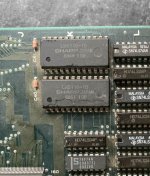
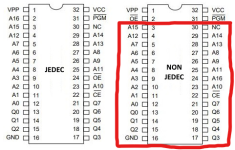
Bought this PCB from @Alpha1 last month (https://www.ukvac.com/forum/threads/zero-wing-pcb-with-colour-ram-error.84829/), as I felt like trying my hand at repairing a board, and I thought this one looked pretty fixable.
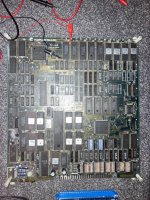
Gave it a test after it arrived, and it was booting up to a strangely coloured "COLOR RAM ERROR" screen as expected.
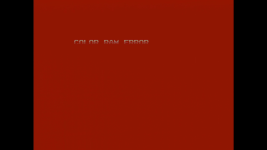
I'd been having a mess around with the game in MAME before the board arrived, and was able to trigger the same error by loading some randomised data into memory at address 0x40400 (fwiw, loading the same data in at 0x40600, which is the start of the foreground sprite memory, also triggers this error, but the screen and text won't turn a weird colour).
According to this website (http://www.arcaderestoration.com/memorymap/10624/Zero+Wing.aspx), that area is described as "bgpalette" memory.
Looking at the PCB, I could see there was one custom chip labeled "FCU-2" and another labeled "BCU-2", so I assumed that the FCU chip handled foreground sprites and the BCU chip handled background sprites.
I didn't really have a clue what chips did what, so I started by testing the nearby RAM chips with my logic probe.
Luckily I found something, one of the two 5116 chips near the BCU had most of its I/O pins stuck low, while its address and enable pins were normal.
After replacing it (with great difficulty), the board booted to the game! But all of the foreground sprites were all corrupt.
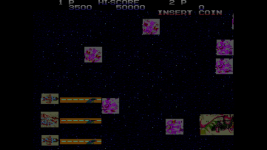
After some testing in MAME, I found out that roms 01 to 04 held the foreground sprite data (roms 05 to 08 hold the background sprite data), and that if they had failed, they could be affecting the sprites in this way.
So I went to remove and dump them, but when I took the 04 rom out, a few of its legs snapped off (I tried repairing them with some component legs, but the new legs weren't strong enough to fit into the socket on the PCB).
I had to ask you guys for help at this point, as I couldn't find any info on these chips, and I needed to dump these AND find a replacement for rom 04.
Thanks to the replies to this thread, I knew what I needed to get, so bought a 28-pin mask rom adapter for my tl866 and a replacement rom chip from Caius.
After dumping the three intact roms, I found that rom 01 was fine, but roms 02 and 03 were dead (interestingly, rom 01 was the only one out of the four that wasn't super rusty), I dumped them a few times and they kept giving me different files (none of which matched the MAME rom files).
Now I needed two more replacement chips, and Caius only had one more of his 28-pin repros in stock, so I just assumed I'd be stuck with this for a while.
I put the replacement 04 chip in the board, just to check that the board was still working fine, but to my surprise the sprites looked almost completely fine!

To be honest, I wasn't expecting the rom chips to be the issue, so this was a huge relief (no more logic probing needed!).
Testing the 02 and 03 dumps from my board in MAME gave me essentially the same graphics that I was getting from the board, so that all but confirmed that the 02 and 03 roms were the only remaining problems.
I thought this would be a good excuse to mess around with the EPROM bodge that I had learnt about in the rom chip thread, so I ordered a few chips from ebay.
Of course they weren't erased though (I guess that's why they were listed as used, duh), and I didn't have an eprom eraser, so I thought I'd leave them in the "sun" for a few weeks.
After a few days of absolutely zero progress I got impatient and found a cheap eprom eraser on ebay, which worked a charm.
I then took a closer look at the pcb to work out how I was going to connect up the extra pins on the chip (32-pin eprom vs 28-pin original rom) like I'd been told in that thread, but noticed that the board had spare pads for a 32-pin socket, and that the extra pads were already wired up exactly how I needed them! So I just needed to connect the 4 extra pins to those pads.
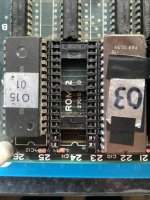 (ignore the overzealous window covering on the right eprom lol, just needed a way to label which chip was which)
I didn't want to remove the original socket and risk damaging the board (it's working fine, so I might as well keep it!), so I cut up another socket and bodged that in for the 4 extra pins.
The new socket was a bit shorter than the original, but still made good enough contact with the eprom's legs.
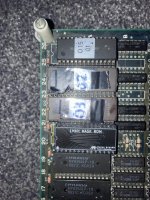
The three new chips in place ^
Powered up the board... and it's all fixed!
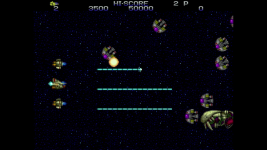
I'm considering converting the board to the 1P version of the game (it's the "main" version, a lot harder than the 2P version which I have here), I'd only have to swap two more roms out to do that, but I think I'll leave it as is for now.
Never worked on a "proper" repair like this before, and I have to say that it was really fun! (even if I did get quite lucky here, as the fixes were quite simple and I didn't have to do any extended troubleshooting.). It was like solving a weird little puzzle.
Thanks @TheDaddy @sukhbir and @caius for the help with the rom chips!
tl;dr
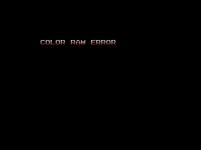
If your "COLOR RAM ERROR" screen looks normal (like this), it's probably an issue with the foreground sprite circuitry around FCU-2, but if it's a weird colour, it's probably to do with the background sprite circuitry around BCU-2. I'd say to check the pair of 5116 ram chips first, and then work your way through the circuit from there.
Gave it a test after it arrived, and it was booting up to a strangely coloured "COLOR RAM ERROR" screen as expected.
I'd been having a mess around with the game in MAME before the board arrived, and was able to trigger the same error by loading some randomised data into memory at address 0x40400 (fwiw, loading the same data in at 0x40600, which is the start of the foreground sprite memory, also triggers this error, but the screen and text won't turn a weird colour).
According to this website (http://www.arcaderestoration.com/memorymap/10624/Zero+Wing.aspx), that area is described as "bgpalette" memory.
Looking at the PCB, I could see there was one custom chip labeled "FCU-2" and another labeled "BCU-2", so I assumed that the FCU chip handled foreground sprites and the BCU chip handled background sprites.
I didn't really have a clue what chips did what, so I started by testing the nearby RAM chips with my logic probe.
Luckily I found something, one of the two 5116 chips near the BCU had most of its I/O pins stuck low, while its address and enable pins were normal.
After replacing it (with great difficulty), the board booted to the game! But all of the foreground sprites were all corrupt.
After some testing in MAME, I found out that roms 01 to 04 held the foreground sprite data (roms 05 to 08 hold the background sprite data), and that if they had failed, they could be affecting the sprites in this way.
So I went to remove and dump them, but when I took the 04 rom out, a few of its legs snapped off (I tried repairing them with some component legs, but the new legs weren't strong enough to fit into the socket on the PCB).
I had to ask you guys for help at this point, as I couldn't find any info on these chips, and I needed to dump these AND find a replacement for rom 04.
Toaplan Zero Wing rom chips
Hi, I'm working on a Zero Wing board atm, and I need to replace on of the sprite rom chips (it's pretty rusty looking underneath, and as I took it out of the socket to reseat it, a couple of the legs snapped clean in half) It's branded 15-F1, I've tried searching for that and 8921 E (even...
www.ukvac.com
After dumping the three intact roms, I found that rom 01 was fine, but roms 02 and 03 were dead (interestingly, rom 01 was the only one out of the four that wasn't super rusty), I dumped them a few times and they kept giving me different files (none of which matched the MAME rom files).
Now I needed two more replacement chips, and Caius only had one more of his 28-pin repros in stock, so I just assumed I'd be stuck with this for a while.
I put the replacement 04 chip in the board, just to check that the board was still working fine, but to my surprise the sprites looked almost completely fine!
To be honest, I wasn't expecting the rom chips to be the issue, so this was a huge relief (no more logic probing needed!).
Testing the 02 and 03 dumps from my board in MAME gave me essentially the same graphics that I was getting from the board, so that all but confirmed that the 02 and 03 roms were the only remaining problems.
I thought this would be a good excuse to mess around with the EPROM bodge that I had learnt about in the rom chip thread, so I ordered a few chips from ebay.
Of course they weren't erased though (I guess that's why they were listed as used, duh), and I didn't have an eprom eraser, so I thought I'd leave them in the "sun" for a few weeks.
After a few days of absolutely zero progress I got impatient and found a cheap eprom eraser on ebay, which worked a charm.
I then took a closer look at the pcb to work out how I was going to connect up the extra pins on the chip (32-pin eprom vs 28-pin original rom) like I'd been told in that thread, but noticed that the board had spare pads for a 32-pin socket, and that the extra pads were already wired up exactly how I needed them! So I just needed to connect the 4 extra pins to those pads.
(ignore the overzealous window covering on the right eprom lol, just needed a way to label which chip was which)I didn't want to remove the original socket and risk damaging the board (it's working fine, so I might as well keep it!), so I cut up another socket and bodged that in for the 4 extra pins.
The new socket was a bit shorter than the original, but still made good enough contact with the eprom's legs.
The three new chips in place ^
Powered up the board... and it's all fixed!
I'm considering converting the board to the 1P version of the game (it's the "main" version, a lot harder than the 2P version which I have here), I'd only have to swap two more roms out to do that, but I think I'll leave it as is for now.
Never worked on a "proper" repair like this before, and I have to say that it was really fun! (even if I did get quite lucky here, as the fixes were quite simple and I didn't have to do any extended troubleshooting.). It was like solving a weird little puzzle.
Thanks @TheDaddy @sukhbir and @caius for the help with the rom chips!
tl;dr
If your "COLOR RAM ERROR" screen looks normal (like this), it's probably an issue with the foreground sprite circuitry around FCU-2, but if it's a weird colour, it's probably to do with the background sprite circuitry around BCU-2. I'd say to check the pair of 5116 ram chips first, and then work your way through the circuit from there.