Cabinet Bolts

sapporo46

User
Feedback
2 (100%)
Credits
69CR
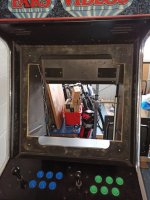
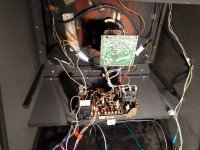
After seeing a cabinet like this one with the monitor vertical, I wondered if I could do the same. However the monitor bolts don't line up with the cutout here.
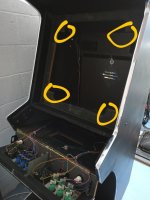
IMG_20230711_220914~2.jpg

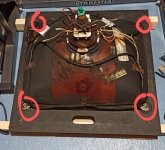
IMG_20230711_220919~2.jpg
The 'back board" highlighted in the first picture is bolted in from the sides, but the bolt heads are smooth and flush to the side panels. There is no obvious way to remove them from the inside.

Does anybody have any ideas, or am I stuck with horizontal in this cab?

Thanks
 

Mr20to5

Active member
vacBacker
Feedback
1 (100%)
Credits
1,360CR
Hi.

To be honest they're not the best photos and I'm struggling to understand exactly what you mean.

That said, as long as the monitor and neck can physically fit in the vertical orientation, then you should ok.

I cannot tell what make of cab that it from the photos

The bolts through the side usually hold the supports and the the frame mounts to these.

In the second photo you have already removed the monitor, so can you not just fit it back, vertically?

You don't want/need to remove the monitor from the wooden frame it is in (red circles), just rotate that whole piece.

I cannot see what you are trying to show in the yellow circles?

Also, there is a 'right' way to rotate the monitor so that you image is not upside down.

Hope that helps.
 

sapporo46

User
Feedback
2 (100%)
Credits
69CR
Sorry I will try again. I am not sure what type of cab it is, I've seen one or two others for sale before. I think it's quite generic - mine has a marquee which says "Pars Videos".

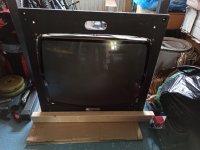
So, the monitor is bolted into this surround here, which is a square with the sides being 66cm:

monitor_in_frame.jpg
The outer holes in that frame go onto this piece here, you can see the holes in the corners. The monitor bolts sit snugly in the corners. Problem is, this piece is not perfectly symmetrical - so when I tried to fit the monitor frame vertically, the monitor bolts were stopping it from fitting perfectly, and thus being able to be bolted back on.

monitor_surround_front.jpg
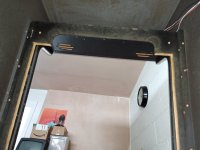
The piece above is screwed onto these other strips of wood here (left and right sides):

monitor_surround_back.jpg
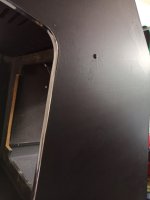
But it's also held in place by these bolts, and I cannot see how to get to them from the inside:

outside_bolt.jpg
It's removing the bolts which has me puzzled.

Hope I've explained a bit better...
 
Last edited:

sapporo46

User
Feedback
2 (100%)
Credits
69CR
Sorry I will try again. I am not sure what type of cab it is, I've seen one or two others for sale before. I think it's quite generic - mine has a marquee which says "Pars Videos".

So, the monitor is bolted into this surround here, which is a square with the sides being 66cm:

View attachment 6945
The outer holes in that frame go onto this piece here, you can see the holes in the corners. The monitor bolts sit snugly in the corners. Problem is, this piece is not perfectly symmetrical - so when I tried to fit the monitor frame vertically, the monitor bolts were stopping it from fitting perfectly, and thus being able to be bolted back on.

View attachment 6946
The piece above is screwed onto some these other strips of wood here (left and ride right sides):

View attachment 6947
But it's also held in place by these bolts, and I cannot see how to get to them from the inside:

View attachment 6948
It's removing the bolts which has me puzzled.

Hope I've explained a bit better...
Here's an older image with the monitor mounted horizontally, showing where the bolts sit.

monitor_horizontal.jpg
 

Mr20to5

Active member
vacBacker
Feedback
1 (100%)
Credits
1,360CR
Sorry pal, whilst I fully understand what you want to do, I don't see what the problem is, or why you want/need to remove the carriage bolts from the side panel?

I can see that your mount has been modified, where it has been cut freehand and the edge now bare, but I cannot understand or see what bolts are fouling in which piece?

This should be a really simple rotate and replace?
 

cools

I joined ages ago honest
Feedback
18 (95%)
Credits
716CR
I see. The cab has been modified with a larger monitor, but the internal mount has only been cut larger in the horizontal position.

Have you removed the internal strips the mount is screwed to?

I'd be tempted to cut it while in position, doesnt look like much needs taking off
 

sapporo46

User
Feedback
2 (100%)
Credits
69CR
I removed one of the strips to see if that would give any more play in the mount. This led me to realise that it was ultimately held in place by the bolts.

I didn't think of just cutting it whilst in place, duh!

I think you're right - only needs a bit taking off. However those bolts are attached, I don't think they're coming out without destroying the cab - there's nothing on the inside that I can see at all.

Cheers
 

cools

I joined ages ago honest
Feedback
18 (95%)
Credits
716CR
Another thought, are they really bolts or are they screws with head covers? They appear to have quite a dome, and have been painted over.
 
Top