Problem HOW? Sega model 2 -> vga? (Projector)

Sbdesign

SEGA collector
vacBacker
Feedback
16 (100%)
Credits
1,671CR
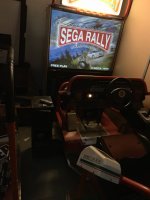
I’m looking to put projector in my sega rally dx.

When I did this on sr2 dx I used the 15pin from model 3 to vga on the multi sync projector and works.
Model 2 doesn’t have this output.

I can use the rgb cable straight from filter board or the bcn RGBS cables.

I was looking at the ossc
Amazon ossc
but unsure how I would connect into it, or if a cheaper better option….
Thanks
 

david656

User
Feedback
3 (100%)
Credits
218CR
Depending on the projector - if a NEC short throw for example, you'll find the VGA socket also does RGB (in the menus) I made a SCART to VGA passive adapter for mine which worked fine for 15khz stuff like PS1/PS2 etc etc but @John Bennett tested it with 24khz and that also works and is in range. so you might be able to do it natively depending on projector with a passive adapter
 

John Bennett

Senior Member
vacBacker
Feedback
10 (100%)
Credits
5,003CR
Yeah, I didn't use any of that scaler stuff, just wired it into the VGA 15-way D-SUB port - any decent projector will do 24kHz and also accept a composite sync on the HSYNC pin.
It's around 266s on here where I connected up a System24 PCB (same res as Model 2).
Oh and I'm trying to tell everyone, you want brighter than the UM280 in that video ideally - the UM361x is 30% brighter at 3600 lumens (I might flog on that projector if anyone wants something to mess with).
 

Sbdesign

SEGA collector
vacBacker
Feedback
16 (100%)
Credits
1,671CR
It’s a nec multisync I have
I have ordered some d-sub connectors

So from what you guys have said:
I’ll attach this to the rgbs cables that come out of the model 2.

The same projector works fine from the d-sub out of sega model 3 which I believe to be same resolution, unless that connector on model 3 does something different such as amplify the signal.

I am sure I have tried this with model 2 already,
It was at the start of lockdown, and I think my result was that the height was squished with black bars.

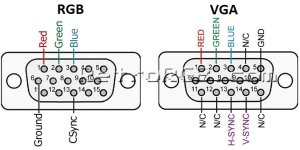
I guess I should wire to this diagram I found:
1708342463100.jpeg
Copy the rgb?
 

Sbdesign

SEGA collector
vacBacker
Feedback
16 (100%)
Credits
1,671CR
I revived a old thread because I ended up with a issue I had a model 2 4-5 years ago.

The issue was that all the colours were extremely bright.

But as jb said: I added pots inline to each of the r g b cables.

Typically during going back and forth with this the ffb stopped working!!
 

John Bennett

Senior Member
vacBacker
Feedback
10 (100%)
Credits
5,003CR
I'd imagine that's because it's the same effect as wiring a JAMMA board straight into a TV
Model2 puts out 'TTL' level RGB, so up to 5V, and only expects an approx 1kohm load from the monitor.
VGA is 0.7V levels and a 75ohm load.
I had an op-amp circuit on mine so I didn't have any issues (which would be extreme brightness and excessive currents).

If it's displaying a steady image, but a funny shape, then I think it's just the projector being confused with the resolution and needing adjusting.

That SR2 does look lovely.
edit: just seen the resurrected thread, hopefully I've just repeated myself :D
 

Sbdesign

SEGA collector
vacBacker
Feedback
16 (100%)
Credits
1,671CR
Haha,
well at the time I didn’t know what I was doing enough to jump at it.
but sorting some projects out finally.

i googled the issue earlier and this post sounded identical in my search.
suprise suprise, it was my post!
I was thinking it was a voltage issue, and this thread must be how I know that

anyhow I got lucky because in my solder storage box I had some mini volume pots from a earlier fix on a board. (Nothing else useful in the box so this is the best fluke I’ve had when needing a part to progress)
No idea the value, but on min it’s dark but visible and on max bright but visible, so they are ideal.

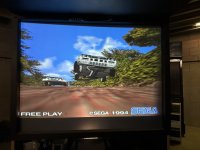
I also worked out how to adjust the aspect ratio, I forgot what the setting is called, but it was on 766, and i changed it much lower, maybe scan rate or something, I’ll confirm tomorrow. The screen would shrink in width making it 4:3, will have to physically measure it to adjust perfectly.

this was it before the width adjust..
IMG_0727.jpegIMG_0726.jpeg
 

Retroman839

Senior Member
vacBacker
Feedback
12 (100%)
Credits
7,335CR
Haha,
well at the time I didn’t know what I was doing enough to jump at it.
but sorting some projects out finally.

i googled the issue earlier and this post sounded identical in my search.
suprise suprise, it was my post!
I was thinking it was a voltage issue, and this thread must be how I know that

anyhow I got lucky because in my solder storage box I had some mini volume pots from a earlier fix on a board. (Nothing else useful in the box so this is the best fluke I’ve had when needing a part to progress)
No idea the value, but on min it’s dark but visible and on max bright but visible, so they are ideal.

I also worked out how to adjust the aspect ratio, I forgot what the setting is called, but it was on 766, and i changed it much lower, maybe scan rate or something, I’ll confirm tomorrow. The screen would shrink in width making it 4:3, will have to physically measure it to adjust perfectly.

this was it before the width adjust..
View attachment 16205View attachment 16206
It looks great 👍 good impov fix
Hoping to have a working driving cab this year .. that’s my goal
 
Top