How to bypass Money Controls mechanism

Hi, Thanks for letting me join this group.
I am looking for some help in this knowledgeable group.
I have been asked by a church youth group to see if I could get an old air Hockey table working that has been neglected for about 7 years.
It has a coin mechanism, but nothing works.
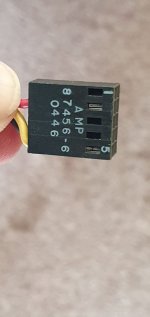
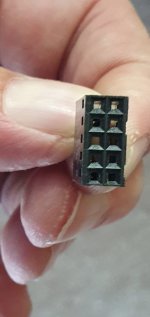
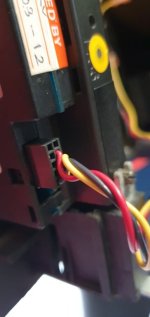
Looking at the coin mech it is a Money controls mechanism with 3 wires going into it, not sure what version as no label but looks similar to the SR3.
The group are not worried about using the coin mech, as it would be used only by the youth group.
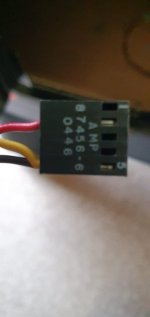
Is there a way to bypass the coin mechanism ? with something like a momentry push button wired in? I am presuming the 3 wires might be Red = Positive Black = Negative and Yellow = Switched live
Any help much appriciated
 

Attachments

  • AH1.jpeg
    AH1.jpeg
    32.5 KB · Views: 13
  • AH3.jpeg
    AH3.jpeg
    29.3 KB · Views: 12
  • AH4.jpeg
    AH4.jpeg
    34 KB · Views: 11
  • AH5.jpeg
    AH5.jpeg
    47.4 KB · Views: 11
  • AH6.jpeg
    AH6.jpeg
    43 KB · Views: 13

qjuk

Active member
vacBacker
Feedback
50 (98%)
Credits
1,821CR
Edit: I previously wrote that I thought the coin validator looked like a C120. I think that is not the case and it is actually an SR3.

There are a couple of different pinouts for the SR3 for the voltage so you will need check (ideally with a multimeter).

Have you got a photo of the front of the coin validator?

What brand/make is the air hockey? Is there currently any way of crediting up (giving a free game) at the moment?
The reason why I say this is that the coin mech might actually be fine and the main board in the air hockey itself might be faulty.
Also, is there a service/test switch on the main board that might give a free credit? (in which case it might be easier to simply run a couple of wires from the back of the main pcb where the test switch is to a momentary switch to the coin door).
 
Last edited:
Edit: I previously wrote that I thought the coin validator looked like a C120. I think that is not the case and it is actually an SR3.

There are a couple of different pinouts for the SR3 for the voltage so you will need check (ideally with a multimeter).

Have you got a photo of the front of the coin validator?

What brand/make is the air hockey? Is there currently any way of crediting up (giving a free game) at the moment?
The reason why I say this is that the coin mech might actually be fine and the main board in the air hockey itself might be faulty.
Also, is there a service/test switch on the main board that might give a free credit? (in which case it might be easier to simply run a couple of wires from the back of the main pcb where the test switch is to a momentary switch to the coin door).
Hi qjuk,
Many thanks for taking a look at this problem for me.
In reply to your questions
I don't have a picture of the front of the coin validator, do you mean the Money Controls block that can be removed by lifting 2 screws? I will take some more when I go over next.
I tried to check the voltage between the red wire and the black wire on the plug, but got no volts and also tried the red wire to earth but no volts (should I try between the yellow and black on the plug?)
will check the brand of Air Hockey table
The coin mech wouldn't work with current £1 coins or 2 x 50p coins, although we have no idea what it was set up to accept.
When I unplugged and plugged back in the plug on the coin mech, the table actually worked and we managed to have a game, so know the table can work, but when the game finished, it was hit and miss if it restarted again.
The main board is not accessible at the moment as the keys are missing for the locks, I will look at drilling the old locks out and take a look at the pcb board for a test switch.
Will be in touch when I have have taken another look
Regards for now
 

qjuk

Active member
vacBacker
Feedback
50 (98%)
Credits
1,821CR
I’m almost certain it will be the yellow wire that is the +voltage and the red wire is just the credit line. It will probably be +12v on the voltage line.
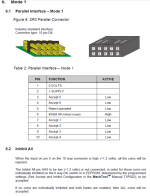
On most SR3‘s and all C120‘s, pin 1 is 0v, pin 2 is +voltage and the other pin 8 is coin accept 2.
There are a couple of odd exceptions on SR3 pinouts (mode 3 versions are reversed) and mode 7 uses +40v. Hence why it’s best to check with a mulitmeter if unsure.

When I said a picture of the front of the mech, I was hoping for a picture of the coin flap on the outside. You don’t need to unscrew anything. There’s usually a sticker on there. I know you said there was no label but I was hoping there might have been a remnant of a sticker that perhaps says “Mode 1”. It probably is as this was the most common type of SR3.

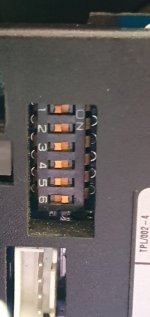
From your last posting saying the game credited when you disconnected and reconnected the coin mech. At least this sounds like the main air hockey pcb is probably fine. From your photo, It is only wired for coin accept 2 (pin 8j, so it might only accept one coin denomination anyway (probably the old £1 coin), hence why you are not getting any joy accepting any coins. The sticker on the coin mech flap lists the coin window configuration so it will tell you what coin is programmed into each accept line, however if this is missing then it will be trial and error.

A lot of these SR3 coin validators have a teach and run facility, so it’s possible you might be able to reach the new £1 coin into window 2 and get it work. The Money Controls SR3 manual explains how to do this and is easy to find online.

My feeling is that if you connect a momentary switch between the black wire (GND) and the red (credit line) then it will probably give the free credit. However, since I do not know what air hockey you have or how things are wired up, I’d strongly recommend checking things with a multimeter first.
 

Sbdesign

SEGA collector
vacBacker
Feedback
15 (100%)
Credits
1,667CR
I don’t know what damage can be done so this is not advice for you to do,
But on mine I jumpered different wires until it gave a credit and fitted a switch to the working combination.
I get lazy at times and probably risk damage.
 

qjuk

Active member
vacBacker
Feedback
50 (98%)
Credits
1,821CR
I don’t know what damage can be done so this is not advice for you to do,
But on mine I jumpered different wires until it gave a credit and fitted a switch to the working combination.
I get lazy at times and probably risk damage.
I think you are bring a bit over cautious.

It’s a very simple three wire circuit; Ground, +Voltage and credit line. He’s already measured the black and red wire and found no voltage, the chances are almost certain that the yellow wire is his voltage. All he needs to do is confirm with a multimeter. There could also be a break somewhere in the wiring going to the board, he just needs to check beforehand.
 
I’m almost certain it will be the yellow wire that is the +voltage and the red wire is just the credit line. It will probably be +12v on the voltage line.
On most SR3‘s and all C120‘s, pin 1 is 0v, pin 2 is +voltage and the other pin 8 is coin accept 2.
There are a couple of odd exceptions on SR3 pinouts (mode 3 versions are reversed) and mode 7 uses +40v. Hence why it’s best to check with a mulitmeter if unsure.

When I said a picture of the front of the mech, I was hoping for a picture of the coin flap on the outside. You don’t need to unscrew anything. There’s usually a sticker on there. I know you said there was no label but I was hoping there might have been a remnant of a sticker that perhaps says “Mode 1”. It probably is as this was the most common type of SR3.

From your last posting saying the game credited when you disconnected and reconnected the coin mech. At least this sounds like the main air hockey pcb is probably fine. From your photo, It is only wired for coin accept 2 (pin 8j, so it might only accept one coin denomination anyway (probably the old £1 coin), hence why you are not getting any joy accepting any coins. The sticker on the coin mech flap lists the coin window configuration so it will tell you what coin is programmed into each accept line, however if this is missing then it will be trial and error.

A lot of these SR3 coin validators have a teach and run facility, so it’s possible you might be able to reach the new £1 coin into window 2 and get it work. The Money Controls SR3 manual explains how to do this and is easy to find online.

My feeling is that if you connect a momentary switch between the black wire (GND) and the red (credit line) then it will probably give the free credit. However, since I do not know what air hockey you have or how things are wired up, I’d strongly recommend checking things with a multimeter first.
Many thanks for this, I love these groups that help each other out, Will be back over there sometime this week, so will hope to have more answers. I also found this attached information online, which confirms what you have told me, so just need to clarify the wires and colours to the plug.
 

Attachments

  • Screenshot 2026-06-06 155022.png
    Screenshot 2026-06-06 155022.png
    159.3 KB · Views: 4
Many thanks for this, I love these groups that help each other out, Will be back over there sometime this week, so will hope to have more answers. I also found this attached information online, which confirms what you have told me, so just need to clarify the wires and colours to the plug.
Hi qjuk,
Took an opportunity to pop over and have a look at the air Hockey table this afternoon while answers were still fresh in my mind.
You were absolutely correct, I tested the plug from yellow to black and got 12v
Connected a momentry push button between the red and the black on the plug and that was it, push the button and play the game.
This made no sense to the Money controls pin outs, as it looks like on the plug pin 2 is red - pin 5 is yellow and black is either 6 or 10, but that doesn't matter now.
I have attached the make just for information.
So a million thanks for helping me out, we have a very happy church youth group, and I have managed to learn some stuff along the way.

Cheers
Dave
 

Attachments

  • 1.jpeg
    1.jpeg
    59.3 KB · Views: 2
  • 2.jpeg
    2.jpeg
    22.3 KB · Views: 2
  • 3.jpeg
    3.jpeg
    98.6 KB · Views: 1
Top