
You are using an out of date browser. It may not display this or other websites correctly.
You should upgrade or use an alternative browser.
You should upgrade or use an alternative browser.
Linux Lindbergh issues
- Thread starter Retroman839
- Start date


If I run it just asLooks good, what happens when you try and run the emulator now?
dan@dan-deaktop I can’t open locked eeprom files ..
Shall I run as Sudo su again ?
Attachments
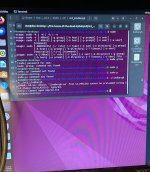
If I run it just as
dan@dan-deaktop I can’t open locked eeprom files ..
Shall I run as Sudo su again ?
( I tried to run as Sudo -g prob not even a thing 🫠)

So I need to run it as user dan.
Is that dan@dan desktop. With a $ sign not a #
Last edited:
That looks like a problem with the OS architecture. Which version of Ubuntu are you using? Did you download an ISO and install it new? If so, which ISO did you use, did you use a 64bit version? Looking at the Makefile it seems to want to run 32bit. Earlier did you run the 'make' commands OK?
Yeh it does say it’s ignoring the 32 bit error …That looks like a problem with the OS architecture. Which version of Ubuntu are you using? Did you download an ISO and install it new? If so, which ISO did you use, did you use a 64bit version? Looking at the Makefile it seems to want to run 32bit. Earlier did you run the 'make' commands OK?
Maybe I need to start again with 32 bit
I gave the correct recommended Ubuntu 2.44 but it’s 64 bit
I created a usb boot drive
will I need to scrap this 64 bit os
Or should I just install a 32 bit on a partition ?
Can I enable 32bit in Ubuntu
Ubuntu now supports 32-bit by default. Your first option is correct. with apt, add :i386 to the package name to install the 32-bit version. If you use Synaptic Package Manager, use the "Architecture" button to display 32-bit packages for selection.
Or should I just install a 32 bit on a partition ?
Can I enable 32bit in Ubuntu
Ubuntu now supports 32-bit by default. Your first option is correct. with apt, add :i386 to the package name to install the 32-bit version. If you use Synaptic Package Manager, use the "Architecture" button to display 32-bit packages for selection.
I think you're right and the first error message is ignored because the OS found the 32 bit version of the library it was looking for. Did you run the make command? It looks like that command will build the 'eprom.bin' file which it's saying is missing. If it's there then maybe we need it in a PATH or LIBPATH environment or else there might be permissions issues with it.
I did run the make file ..I think you're right and the first error message is ignored because the OS found the 32 bit version of the library it was looking for. Did you run the make command? It looks like that command will build the 'eprom.bin' file which it's saying is missing. If it's there then maybe we need it in a PATH or LIBPATH environment or else there might be permissions issues with it.
I think I read something about setting the correct path for the eprom.bin
EEPROM.bin
Is locked … with root privilege I can read it ..
but then I’m root rather than Dan .
So Dan@dan desktop doesn’t have privilege to read locked files ?
I need to set privileges ?
I don’t know how to do this
Is locked … with root privilege I can read it ..
but then I’m root rather than Dan .
So Dan@dan desktop doesn’t have privilege to read locked files ?
I need to set privileges ?
I don’t know how to do this
First we should check what the privileges are set to. Run command 'ls -pla eprom.bin' in the directory where eprom.bin is. You should see something like "-rwx------" on the left side. When you say 'locked' have you tried to read it with user dan and it says you can't?
Thanks Danp
Just at work will get back on this later 👍
Just at work will get back on this later 👍

Assuming you wanted me to use eeprom.bin
How do I become user dan ?
I don’t know how to ?
I can become root and I can read it with root
I don’t know how to ?
I can become root and I can read it with root

Outrun hangs at a drive board not connected to main board error
You already are user “dan”, you shouldn’t need to switch to it. If you have run an “sudo su” command and want to get back to user dan then enter command “exit” and it should end the root session and take you back.
So as user “dan” what happens when you try and edit eeprom.bin in the same way you can do it as root? How are you trying to edit it by the way? The permissions on the file look OK, you as user dan should have read access on that file.
I think your error with outrun is caused by you running the emulator as root and root isn’t allowed to open the serial port.
So as user “dan” what happens when you try and edit eeprom.bin in the same way you can do it as root? How are you trying to edit it by the way? The permissions on the file look OK, you as user dan should have read access on that file.
I think your error with outrun is caused by you running the emulator as root and root isn’t allowed to open the serial port.
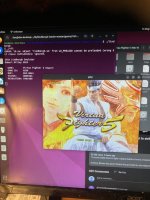
So vf5 is running
I have sound
But it won’t show graphics
I get intro but hangs on this image
But game sounds play in back ground ..
Then sega logo pops up and demo intro loops again ..
This is just as dan@dan-desktop

Ok .. I will exit…
I’m running vf5 as dan@dan desktop
I right click on file
Go to permission amd tick box
But these files have a lock symbol
And states that I don’t have permission as I am not the owner
I’m running vf5 as dan@dan desktop
I right click on file
Go to permission amd tick box
But these files have a lock symbol
And states that I don’t have permission as I am not the owner
There is an option in the configuration file to set the jvs output to tty/usb0
I have a usb Xbox Controll just to test if I can get anything on screen 😊There is an option in the configuration file to set the jvs output to tty/usb0
I’m just pulling down 2 more games to try

Outrun same error but it loads from Dan &dan I’m not sure how to test if I’m directing packets for controller to a usb socket