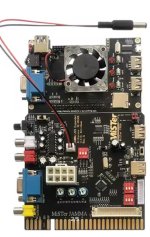
MiSTer > Jamma Options

Retroman839

Senior Member
vacBacker
Feedback
12 (100%)
Credits
7,305CR
yeh i will try again ..
Can’t belive it’s the second time as well I have done this,

I read the guide
It says to move jumper Thats close to the vga socket

It was on power and I moved it to the left onto vga,

Thing is why would it be set from factory to use the vga in as a power in ?
The turbo pack is to be powered normally só I’m sure I did thr correct thing by moving the jumper to the vga jumper !
I saw some smoke and it smelled bad!

I have emailed Antonio because no pics or anything detailing the jumper switch,

And I have already got another mister and Antonio jamma on way👍…. Just disappointing that I can just kill everything at a flick of a switch.


I have given it power from the
Official de10 psu .. no dice..

I ain’t going to try to use vga as power in again!
 
Last edited:

Karny

Newbie
vacBacker
Feedback
1 (100%)
Credits
22CR
Thought I would just bump this up with this info

I guess my current mister will stay in the lounge if I end up getting this. Which is fine as I'm running retroNAS anyway.
I can't wait for this!

I can't get Antonio's one to work in my Egret 3, and I think using the VGA power killed my Blast City :'(
 

pooman2084

Be Attitude For Gains!
vacBacker
Feedback
25 (100%)
Credits
1,868CR
I can't wait for this!

I can't get Antonio's one to work in my Egret 3, and I think using the VGA power killed my Blast City :'(
Hopefully my Founder’s Edition ships next week!

Fake news! It's my Superstation One that is shipping, sadly not this! I saw it this morning whilst out on a walk and misunderstood. Sorry folks!
 
Last edited:

Tobes

Newbie
Credits
16CR
Maybe getting confused with the multi system console? They haven't even released that specs of the jamma one yet which they said they were going to.
 

Retroman839

Senior Member
vacBacker
Feedback
12 (100%)
Credits
7,305CR
I can't wait for this!

I can't get Antonio's one to work in my Egret 3, and I think using the VGA power killed my Blast City :'(
Man regarding Antônios mister jamma ! his jumper info is só obscure ,, Regarding which jumper setting to use for allowing for the jamma harness to power the unit..
I have blown two up!


Your Egret 3 what monitor do you have installed ?
 

Copperband

User
Credits
56CR
Has anyone on here got experience of using a Mister Jamma (of some sort) with a high res monitor (31 not 15) found in Naomi Universal Cabs, Blast City or any others with this higher res display. I appreciate that some of a Tri Sync Toshiba. That is obviously more convenient, but I don't think the pic is as good as the Sanwa Tube and Chassis. I have heard of people taking the VGA and putting it through a line doubler. I'm not quite sure how easy that would be for someone like myself how is technically limited in these setting up skills.
Any experiences out there please?
 

pooman2084

Be Attitude For Gains!
vacBacker
Feedback
25 (100%)
Credits
1,868CR
Yeah. Mister can pretty much output anything you ask of it, but sometimes you need to play about.

The VGA can do line level or 5v so you need to make sure any dips are set right too.

I’ve used mine on a JAMMA, crt tv, consumer plasma and VGA PC monitor, all with the correct frequency and resolution. You can upscale to 1440p too I think.

Edit - download the mister remote app so you can change resolutions and outputs on the fly without needing the menu.
 

MrTrick

Newbie
vacBacker
Feedback
4 (100%)
Credits
69CR
Has anyone on here got experience of using a Mister Jamma (of some sort) with a high res monitor (31 not 15) found in Naomi Universal Cabs, Blast City or any others with this higher res display. I appreciate that some of a Tri Sync Toshiba. That is obviously more convenient, but I don't think the pic is as good as the Sanwa Tube and Chassis. I have heard of people taking the VGA and putting it through a line doubler. I'm not quite sure how easy that would be for someone like myself how is technically limited in these setting up skills.
Any experiences out there please?
I have a Mister in my Naomi Universal and it works fine. VGA from the Mister just goes straight into the 31khz monitor, you just need to configure the ini settings. You will only run into issues displaying vertical games when you try to squash them into a screen that is horizontal. I believe many vertical arcade games have unusual refresh rates or resolutions that are outside the standard VGA 31kHz range the monitor expects.

It's worth pointing out that when I started using a Mister in a NUC, I didn't use JVS to JAMMA, instead I used an Irkenlabs JVS-PAC2.

If you want a really simple solution for a Naomi Universal you can bypass the JVS IO entirely, and run controls through a Brook Gen 5x board. The video and sound can be taken directly from the Mister via VGA and audio cables. This is what I use now, and it feels pretty flawless.
 

Copperband

User
Credits
56CR
Yeah. Mister can pretty much output anything you ask of it, but sometimes you need to play about.

The VGA can do line level or 5v so you need to make sure any dips are set right too.

I’ve used mine on a JAMMA, crt tv, consumer plasma and VGA PC monitor, all with the correct frequency and resolution. You can upscale to 1440p too I think.

Edit - download the mister remote app so you can change resolutions and outputs on the fly without needing the menu.
Thanks, thats really interesting, I had thought that I needed additional equipment to get to the hi res output that the screen needs.
 

pooman2084

Be Attitude For Gains!
vacBacker
Feedback
25 (100%)
Credits
1,868CR
I’ve got a de-10 nano and a Mistercade to plug into my Jamma cab. I got these as they were the best (and pretty much only) solution at the time.

They are as plug and play as is possible to be on a hobbyist platform.

Lots of members on here have had success with Pis and various adapters. Our very own @Retroman839 has blown up more than I’ll ever own, so he might want chime in! ;)

If I was getting something for JAMMA I’d wait to see the new all in one board, UK made too. I’ve got a Superstation One Founders Edition on the way which will be perfect for lounge use and for taking to places. For £160 or whatever it was it’s an astonishing package.
 

Retroman839

Senior Member
vacBacker
Feedback
12 (100%)
Credits
7,305CR
Yeh vga mode then go to vídeo settings and enable scan lines built in scan line genarator on this mister creates closest imitation of 15khz soft image I have seen , it’s like your 31khz only monitor just became a 15khz monitor , definatly recommend you check that out ..
I think they have 3 scan lines levels .. just go through them seeing which you prefer most ..
But 2 is the best 😉

Disclaimer 🤯
blew 1 mister
2 mister jamma adaptors .

Funny I’m playing around trying to get sound out of my sound blaster pro on a 486 ..
And I just realized I got the dos on the mister .. I have a full mame set on pmame32 for dos .. I could just run it through mister dos mode ?


In my Naomis I run
X5 ( 3 tri sync, 1 31khz nanao
2 x tosh ms9
Naomi’s net dimms set ups
And Pc mame just because mame can use original perephirals such as ls32 snk rotary sticks and Taito spinner ,
Next up is steering and pedals for chase hq & ridge racer

My Naomi mame vga vid for you
 
Last edited:

kingtreelo

Active member
vacBacker
Feedback
18 (100%)
Credits
1,524CR
can i naively ask, i thought the Jamma connection was on the PCB, or is that the connection that connects to the monitor?

also, what is the herber thing, it doesnt seem to have anything on the board on the post, so is it a bare bones thing?

easily confused and trying to learn little bit each day
 

pooman2084

Be Attitude For Gains!
vacBacker
Feedback
25 (100%)
Credits
1,868CR
@Retroman839 is experimenting by trying lots of different mister combinations, official and knock off, with lots of different adapters into differently wired cabs. Sometimes they work great, sometimes they blow up. That’s the way he rolls!

I went for simple, bullet proof, plug and play, to concentrate on the games, not pissing about with settings and jumpers so I got this:


I got the v1 but use it pretty much everyday. They only issue I had was quickly solved with a firmware update.
 

Retroman839

Senior Member
vacBacker
Feedback
12 (100%)
Credits
7,305CR
can i naively ask, i thought the Jamma connection was on the PCB, or is that the connection that connects to the monitor?

also, what is the herber thing, it doesnt seem to have anything on the board on the post, so is it a bare bones thing?

easily confused and trying to learn little bit each day
jamma connection is on the pcbIMG_4588.jpeg
Compatible with de10 nano
& misterpi.

Cps2 Kick harness adaptor socket .
I use the small 8 pin for kicks though to right of the red /white dip switches
 
Last edited:
Top