Pac-man sync test

Shun

Active member
Feedback
1 (100%)
Credits
489CR
Hi,

I have an original pac-man/ms. pacman pcb that I bought off of ebay about 2 months ago.

I've hooked it up via scart to a TV and it plays blind ok, however the screen doesn't have any sync.

Now, it could be an issue with scart, however I have tried on two scart tvs and both produce the same result. Jamma pcbs work ok with the scart on these tvs.

I'm on the list to order a sync stabiliser from silverfox, however in the meantime I have managed to get hold of an oscilloscope. I have managed to figure out how the controls work on the oscilloscope and managed to get a test signal on screen.

However I need to know how to test the sync output from this board, so can anyone let me know where I connect the probes to the pcb to test the sync?

Screenshot of current monitor output below:

fr_2059.jpg
 

silverfox0786

Beware the Hillman
Feedback
47 (100%)
Credits
2,699CR
I would first check 74LS161 located @ 3S

and also check sync buss controller is connected the right way round and check on that board if its a daughter card 74LS13 located at U0
 

Shun

Active member
Feedback
1 (100%)
Credits
489CR
Thanks Silverfox.
Before I started probing the pcb (oo-er!) I had a thought. I hadn't even checked the output coming from the edge connector.

Here is a picture before I connected the oscilloscope to the sync wire:

scope_0.jpg


Connecting the sync wire up and with the Volts DIV set to 2 and Time Div set to .2 we get the following:

scope_1.jpg


And changing Time Div to .1 we get the following:

scope_2.jpg


So I am getting something from the sync wire. I'm not sure if this is what I should be getting or not. Interestingly I get no change in the signal if I have the ground probe connected to a ground on the edge connector or not.

So if the sync is ok (again not sure if it is or not) i'm not sure why it wouldn't be syncing with the scart tv.
 

Shun

Active member
Feedback
1 (100%)
Credits
489CR
OK, this is still frustrating me.
Checking the voltage from the pcb sync line, I am getting about 4.5v.

I've connected a 4.7k potentiometer on the sync line and I have a range of between 0 and 3.7v. However no matter how much I move the pot between this range I get no change in the picture on the TV.

Does anyone have any ideas how to get this working? Does the sync output on the scope look ok?

@Silverfox0786, do you have an ETA on the Arcade Sync Cleaner Kits? Even if I get this working I'll defo still want one for other pcbs.
 

silverfox0786

Beware the Hillman
Feedback
47 (100%)
Credits
2,699CR
i have a feeling there is a fault in the PCB somewhere

i have had a pac-man running on scart before as well as a CGA monitor

the PCBs have been made and shipped im just waiting for them to arrive
 

Shun

Active member
Feedback
1 (100%)
Credits
489CR
Cool, looking forward to the sync pcb.

Yeah perhaps there is an issue with the pac-man board.

When it arrived, the sync bus controller had actually fallen off in shipping and the brown ic socket that it plugs into before it plugs into the socket on the board had bent pins, one of which had broken off.

The pins on the sync bus controller itself were fine. The reason for the brown ic socket is that you can't plug the sync bus controller straight into the board as the pins are too big. So I managed to get a replacement ic socket from Maplin which fit fine and then plugs into the board. It seems to be the correct way around after checking pictures in the web. I can take a picture tomorrow and post it on the thread.

With regards to checking 74LS161 located @ 3S and 74LS13 located at U0, what pins am I probing and what result should I expect? I'm still learning how to troubleshoot arcade pcbs so apologies for the questions
smiley4.gif
.

One last question, out of interest, what does the sync bus controller actually do? I assume that it has something to do with the sync hence the name, however does it do anything else?
 

silverfox0786

Beware the Hillman
Feedback
47 (100%)
Credits
2,699CR
That's annoying when pins break glad you was able to sort it

you would need to look at the shematics for pacman and the datasheet for the ICS and look at the input pins and poutput pins and check theya re doing what they supposed to. and not stuck high or low or dead completely

im no expert at pac-man boards so i cant be of large help to you there and again as for the sync bus i assume its to do with the sync of the game
 

guddler

Busting vectors like it's 1982!
vacBacker
Feedback
10 (100%)
Credits
4,055CR
I just noticed this thread.

For the record, the Sync bus Controller has nothing to do with the video Sync of the game. It is like a more complex version of a 74LS245 (and not all that much more complex at that!). The "Sync" in the name comes from the fact that it sync's (and also buffers) data read / writes to certain timing and control lines on the board. I'd have to study the schematics for a while to tell you exactly what.

Bottom line, if the board is playing blind then there is nothing wrong with that custom chip (or daughterboard).

Now the VRAM addresser, the other custom chip / board could be a culprit. If it's missing or completely dead you will get no picture at all but I _THINK_ I've seen that one cause a similar picture to this.

However, what I would say is that a sync issue should be one of the simplest to track down. Just work your way back from the /CMPSYNC signal up through the individual /HSYNC and /VSYNC signals (or whatever they're labelled on Pacman) using something that can count frequency and you will eventually find something that is not producing the correct signal. I use either my Fluke 9100 or my DSO, both of which show me the frequency in easy to read digits.

Problem is, this assumes you have a PCB fault and I have no way to know on that one since I have no idea how fussy your TV may or may not be. If you were feeding things into a standard arcade monitor then sure, from your picture you have a sync fault of some sort. But there's no saying that maybe your TV is just not liking the output from the board?

Doesn't help right now that my manual / schematics are on the workbench not in the house because I fixed one of my own Pacman's yesterday. The PDF I was just looking at is barely readable.

guddler2015-03-17 02:38:49
 

Shun

Active member
Feedback
1 (100%)
Credits
489CR
Thanks for the replies guys.

Thats good news about the Sync controller board, as I was worried that it might have been damaged when it became loose.

The VRAM addresser seems to be present, however it may be worth removing and re-seating it. I've not had time today to get into the garage and so'll have a look at it tomorrow.

@Guddler, with regards to the tv being fussy with the sync, you maybe right. I really need to eliminate either a problem with the TV(s) or a problem with the board.

Unfortunately, I don't have a 15Khz arcade monitor to try it with
smiley19.gif


I'll see if I can trace the h sync and v sync back and somehow test with the scope.

Will post an update tomorrow.
 

Shun

Active member
Feedback
1 (100%)
Credits
489CR
Ok, I've removed the VRAM board and re-seated but still getting the same thing.
I have Friday free this week so I'm going to trace the sync back through the board to see if there are any issues. If not, then I'll wait for the sync cleaner pcb from Silverfox0786 to work its magic
smiley4.gif


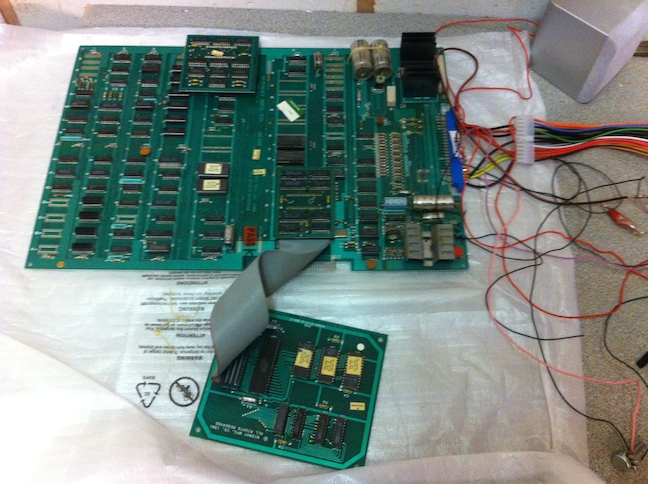
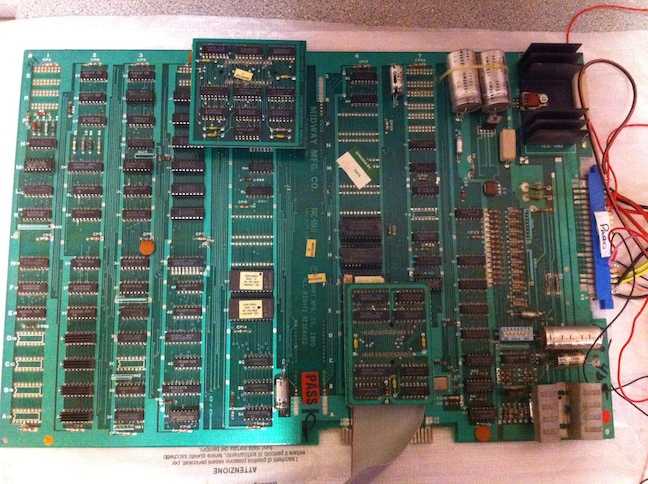
I took a couple of pics of the board. Everything seems to be correct and present, however if something doesn't look right, please let me know:

2082.jpg


2083.jpg
 

Shun

Active member
Feedback
1 (100%)
Credits
489CR
I've still been trying to get this Ms. Pac-Man pcb working. I received the sync cleaner a few weeks ago (thanks Sarj) got it hooked up, however it made no difference. This is nothing to do with the sync cleaner however and will be used on a Jamma pcb that is having sync issues. After fiddling with the wiring between the board and the scart connection I found that the sync ground wasn't hooked up correctly and the continuity to the scart pin was a bit flaky.

So, re-wired the sync ground and cleaned the scart cable pins and...

fr_2088.jpg


Its working at last! The maze is a bit wobbly in the pic but that was sorted by moving the wires away from each other. All ghosts are present and correct and other than the vertical and horizontal width needing adjustment everything seems to be working fine.

Now that its working I will probably want to get a high score save kit soon (if Sarj has any left
smiley1.gif
).

Also, I originally wanted an original pac-man board but managed to get hold of this Ms. Pac-man. Now I could convert it back by getting rid of the daughter board and changing the roms, however it seems a bit of a shame not to have Ms. Pac-Man as well. I have seen some mods around that will let you have both, however they require soldering on to parts of the board which I don't really want to do as I want to keep it as original as possible. Is there anyway to have both pac and ms pac playing on this board without having to heavily modify it?
 
Top