
If I leave the front door on my cabinet open they're in there before you can say "boo".. I was just thinking what my two morons would do with an open chassis CRT powered on and making interesting humming sounds!2 cats

You are using an out of date browser. It may not display this or other websites correctly.
You should upgrade or use an alternative browser.
You should upgrade or use an alternative browser.
Ali express Jamma/jvs de10 Nano
- Thread starter Retroman839
- Start date

Chjeeers pooman don’t I need to toggle it on ?There is a an option in the core menu to toggle the service switch. I’ve done it in all the Cave games.
You don’t define it, you just toggle it on, do your settings, and toggle it off.
Try having two babies as well..If I leave the front door on my cabinet open they're in there before you can say "boo".. I was just thinking what my two morons would do with an open chassis CRT powered on and making interesting humming sounds!
Cat pissed me off he slept on my clean clothes now they all hairy!

Open the menu and go to Service mode. Click

Exit menu, select configuration.
Select invert screen.
Go back to MiSTer menu and click service mode again.
Exit menu, select configuration.
Select invert screen.
Go back to MiSTer menu and click service mode again.
So I press f12 to menu up again?Open the menu and go to Service mode. Click
View attachment 27778
Exit menu, select configuration.
Select invert screen.
Go back to MiSTer menu and click service mode again.
(As since I have switched to analogue
Big toggle switch 0 up on de-10 nanao ).
My remote doesn’t allow for the pad buttons and osd to work
So I press f12 to menu up again?
(As since I have switched to analogue
Big toggle switch 0 up on de-10 nanao ).
My remote doesn’t allow for the pad buttons and osd to work
Trying to define player 2 now and it p2 isnt to be found any where in the configs for me yet!
Strangely all p2 buttons on the arcade are mirroring p1’
Would you know how I configure player 2 ?
Don’t worry I need to go back to changing the .ini file as I can’t configure wifi on crt ..
Last edited:
You don’t need to map p2. Map p1 and it will shadow 2p.
Honestly, a lot of your issues would be solved by reading the faq
Honestly, a lot of your issues would be solved by reading the faq
I don’t really understand what you are saying.So I press f12 to menu up again?
(As since I have switched to analogue
Big toggle switch 0 up on de-10 nanao ).
My remote doesn’t allow for the pad buttons and osd to work
What remote?
Just use your controls to go to the menu and use a controller to select the options.
The mobile remote appI don’t really understand what you are saying.
What remote?
Just use your controls to go to the menu and use a controller to select the options.
I have take. The mister to my brothers house to have a 2 player game session.
Player 2 just mirrors player 1 .
No player 2 appears in any of the define controlls in game configuration menu..
Just wondering my ai express has a 1 player 2 player toggle on it .. near the jvs io / It’s on 1p. Maybe it’s forcing the mirroring
Player 2 just mirrors player 1 .
No player 2 appears in any of the define controlls in game configuration menu..
Just wondering my ai express has a 1 player 2 player toggle on it .. near the jvs io / It’s on 1p. Maybe it’s forcing the mirroring
You don’t define player 2 controls in any game! This isn’t MAME.
MiSTer isn’t using a keyboard encoder like JPac.
You only need to define player one and assuming you’ve put in the correct PID VID in you .ini it will map p2 automatically.
I’ve never had to define P2 buttons in any MisTer arcade game.
MiSTer isn’t using a keyboard encoder like JPac.
You only need to define player one and assuming you’ve put in the correct PID VID in you .ini it will map p2 automatically.
I’ve never had to define P2 buttons in any MisTer arcade game.
You can’t move the menu with the remote app?The mobile remote app
I’m starting to think you haven’t mapped your controls properly in the main mister menu (not the game control menu)
To be honest your install is a bit of a mare with all the different devices you’ve been plugging in.
Again, half hour reading the FAQ should make all this stuff a bit clearer
You’re welcome to bring it to mine and we can get it sorted?
Cool ..You don’t define player 2 controls in any game! This isn’t MAME.
MiSTer isn’t using a keyboard encoder like JPac.
You only need to define player one and assuming you’ve put in the correct PID VID in you .ini it will map p2 automatically.
I’ve never had to define P2 buttons in any MisTer arcade game.
I need to modify the .ini any how for vid options so I can use .ini to change Wi-Fi settings in crt mode ( .ini splash I guess is 640x480 like bios screens so needs to be changed to low 15khz in the .ini also
I just use a 15hz for everything on my cab and everything displays.
Mine is just a vanilla install so I’m not entirely sure what you’ve done to arrive there.
Mine is just a vanilla install so I’m not entirely sure what you’ve done to arrive there.
If you can’t make it over I can send you my .ini files.
I guess you just change your controller IDs and you have it all setup.
You should setup file transfer so you can use your PC to change the .ini file text
I guess you just change your controller IDs and you have it all setup.
You should setup file transfer so you can use your PC to change the .ini file text
Yeh cool I wouldn’t mind doing that budIf you can’t make it over I can send you my .ini files.
I guess you just change your controller IDs and you have it all setup.
You should setup file transfer so you can use your PC to change the .ini file text
& a game of robotron 😉
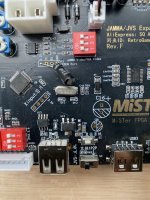
See 1p 2p switch ..
I get what your saying as the mister mimics the pcb so all controlls mapped directly in core
I haven’t look at the .ini regarding controllsIf you can’t make it over I can send you my .ini files.
I guess you just change your controller IDs and you have it all setup.
You should setup file transfer so you can use your PC to change the .ini file text
You MUST have the VID entry for your controls otherwise things won’t work as expected. I’m sure we found these somewhere near the beginning of this thread!
You just also setup every controller you use in the main mister menu, not the mister menu for that game. Then you can setup in each game if you need to but you might find it all just works.
You just also setup every controller you use in the main mister menu, not the mister menu for that game. Then you can setup in each game if you need to but you might find it all just works.

thegreathopper
Active member
Every game I have tried on my Mister was correctly configured, mine came from Invizm he makes some great stuff which just works.
Good luck getting yours working, I should add mines in a cab so just use the arcade and Neo cores.
Good luck getting yours working, I should add mines in a cab so just use the arcade and Neo cores.
Yeh I will take a look again later ./
I only have 1p set up on test bench but gives me an excuse to wire up player 2
I only have 1p set up on test bench but gives me an excuse to wire up player 2