2 cabs, 1 pcb. why does this not work?

vib_ribbon

Active member
Feedback
5 (100%)
Credits
488CR
I have 2 cabs sitting side by side, and recently I wondered if I could run the same pcb on both cabs but also have separate controls for the players, like a versus city cab.

I thought a cheap and cheerful adapter like the one in my drawing would work, but it doesn't? I hooked up a neogeo mv1c to cab 1, plugged in my little adapter.

Once RGB was connected to both cab 1 and cab 2, both cabs' picture lost all colour and became black and white. If I connected the video gnd and sync, from what I remember, one of the cab's picture starts to roll. Anyway, my adapter doesn't work and I wonder if this idea of 1 pcb in 2 cabs is possible, and if it's possible without going crazy on costs etc?

Anyone else tried this or can see the mistake straight away?

PXL_20230302_095153213.jpg
 

sferigan

User
vacBacker
Feedback
4 (100%)
Credits
172CR
Hopefully those with better technical knowledge will chip in but my layman’s understanding is that you’d need to amplify the video signal in order to drive more than the intended one display. You’d also likely incur some latency from the second cab due to the (likely) additional cable lengths compared with the “primary” cab. Whilst the latency may not be significant it could be enough to give player on the “primary” cab an advantage.

Maybe try searching for something like “CGA splitter” or “CGA amplifier” and see if that yields any useful results.
 

thegreathopper

Active member
Feedback
10 (100%)
Credits
1,248CR
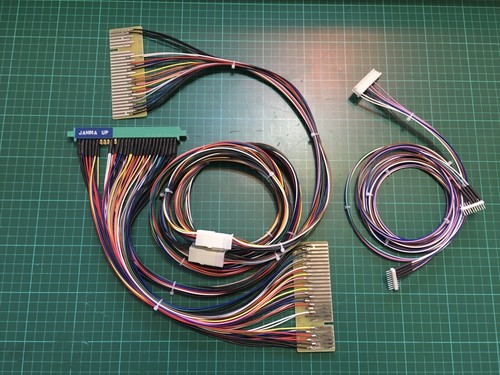
I have done this a few times and no problems, it’s how the Vs kits work and are sold in Japan. No amp needed.

I tried it with a Capcom Impress and a Neo 29, I currently have a B&O MX4000 and a Nanao MS9-29 connected the same method.

you need to check your wiring but your drawing is correct.
 

vib_ribbon

Active member
Feedback
5 (100%)
Credits
488CR
Thanks for the replies.

I will try shortening the wires going to the second cab and double check the soldering.

How long is the Vs city harness? Is it convenient for you to check? Ta.
 

Phils Arcade

Senior Member
vacBacker
Feedback
10 (100%)
Credits
1,529CR
Make sure you're not using very thin gauge cable as this can restrict the flow of current along its length. Heavier gauge is better. I'm not talking cooker cable though, lol.

I've seen people use very cheap speaker/bell cable when wiring up systems and causes all sorts of issues.

Cable lengths can cause slight latency due to the resistance in the cable itself. Again heavier cable should help with this.
 

geotrig

<_>
vacBacker
Feedback
1 (100%)
Credits
103CR
yeah nothing wrong with what yuou are doing many have done it, video amp is only needed normally for longer cable runs ....check your wiring again id say ,also what gauge wire you using as it might cause too much resistance and drop the feed maybe ?

edit infurious beat me too it ! :D
 

John Bennett

Senior Member
vacBacker
Feedback
10 (100%)
Credits
5,324CR
I'd say a simple amplifier is good practice as JAMMA boards aren't designed to take the load of two monitors. The signal load will vary with different monitor types, as will the output capabilities of the games - some won't give a crap, others you'll collapse the signal on.
Some interesting posts on here, https://forums.arcade-museum.com/threads/splitting-video-output.181028/
Sadly I don't know of a simple amplifier, there must be some out there - you just need a fast op-amp (£3). I did design one but never made a batch of boards, I should pick that up one day.

Cable length won't cause latency though. With the speed of light being 299 792 458 metres per second, you'd have to have the second player about 3,000 miles away to lag by one frame. Probably want some good wire for that too.
Edit: I got to the coffee machine and realised I'd forgotten about cable resistance-capacitance filter effects. So it won't actually be 3000 miles, but it'll be a LOT more than 1 metre to matter.
 
Last edited:

thegreathopper

Active member
Feedback
10 (100%)
Credits
1,248CR
Thanks for the replies.

I will try shortening the wires going to the second cab and double check the soldering.

How long is the Vs city harness? Is it convenient for you to check? Ta.

A couple of meters I think, I actually make mine out of IGS PGM link cable, those cables are made to link 1 PGM board to 2 x cabs without any boosters or amplification.

My cable I reckon is about 2 meters long, I have had no problems with CPS2, CPS3, PGM, MVS, not tried others but sure they would be fine.

If you don’t want to make one up a few of the JPN pcb shops sell them, pretty sure I have seen Capcom originals for sale too.
 
Last edited:

wigsplitta

Newbie
Feedback
9 (100%)
Credits
80CR
+1 to the above. It “should” work fine with what has been mentioned. I was able to link 4 cabs off one board with just straight through cabling.

I seem to remember someone else having a similar issue a few years back, will try and dig the info out and see how they resolved it.
 

Flinnster

The Dino King
vacBacker
Feedback
29 (100%)
Credits
2,566CR
Done pretty much this with 2 dino kings. MVS / PGM and CPS2 ran without issues.
The setup was used at one of the Revival shows.
Had it not worked out, I'd have tried a video amp!
 

ArcadePCB

User
vacBacker
Credits
509CR
It depends on the boards video amplifier and the monitors input stages. If your monitors have a high impedance inputs, it's not a problem. If your game board has got low impedance vdeo output stages, it shouldn't be a problem, too.
But if you have weak video output stages on your game board and the impedance of your monitors is low, the voltages of the video and sync signals will decrease and lead to malfunction.
To make it work in all circumstances, its necessary to use a distribution amplifier (one input, two or multiple outputs) for decoupling the monitors. So the amplifier will be the load for the arcade board and each output will be the source for one monitor.
Standard video equipment (non arcade) is using 75 ohms impedances for inut and output, so connecting two monitors to one source would cause a voltage drop to half of the volage required at the video inputs.
 

vib_ribbon

Active member
Feedback
5 (100%)
Credits
488CR
Thanks everyone for their comments. When I have the time I'll take another look but I don't think my cable is much longer than 2m so I must be doing something else wrong. It's reassuring that so many of you have done this already and it works no probs. 👍
 

strykr

Active member
vacBacker
Feedback
11 (100%)
Credits
1,351CR
I'd say a simple amplifier is good practice as JAMMA boards aren't designed to take the load of two monitors. The signal load will vary with different monitor types, as will the output capabilities of the games - some won't give a crap, others you'll collapse the signal on.
Some interesting posts on here, https://forums.arcade-museum.com/threads/splitting-video-output.181028/
Sadly I don't know of a simple amplifier, there must be some out there - you just need a fast op-amp (£3). I did design one but never made a batch of boards, I should pick that up one day.

Cable length won't cause latency though. With the speed of light being 299 792 458 metres per second, you'd have to have the second player about 3,000 miles away to lag by one frame. Probably want some good wire for that too.
Edit: I got to the coffee machine and realised I'd forgotten about cable resistance-capacitance filter effects. So it won't actually be 3000 miles, but it'll be a LOT more than 1 metre to matter.
Id still blame the controls if i lost a round on sf2 😙
 

ArcadePCB

User
vacBacker
Credits
509CR
1678481837436.png

I would suggest doing it like this. This is the way which avoids interference between the monitors. If it is a composite sync game board, 4 channels are required only.
The requirements to the operational amplifiers are:
- Unity gain stable
- Input and output rail-to-rail
- GBW not too low (>= 10MHz for standard resolution monitors)
- Good (stable / no hum) supply for the operational amplifiers (not drawn)
- enough drive capatibility
Using an amplifier type especially made for video purposes, you can assume driving capatibility and bandwith are fine.

Place the video amplifier next to the game board. When using rail-to-rail opertional amplifiers, single supply 5V is OK for this.
 

John Bennett

Senior Member
vacBacker
Feedback
10 (100%)
Credits
5,324CR
Have you had success with something as low as 10MHz?
I had 50MHz amps in and they were slewing to hell on the pixel edges and causing horrible colour bleed-like effects, so I'm on 100MHz now, which is a pain for many to make circuits up with as you have to go SMT.
 

ArcadePCB

User
vacBacker
Credits
509CR
You're right, the slew rate is important as well. No, I haven't tested it, because I don't have this problem. It's just a concept how I would try to solve the problem.
My thoughts were: we have a gain of 1. So the whole bandwith can be used. 10 MHz is twice the bandwidth of a standard TV signal. Using amplifiers much faster than required, you may become more and more problems. The faster they are, the more they tend to oscillate, the more you have to watch RF design rules etc.
OK, use faster ones to get more crisper edges (e.g. dedicated video signal amplifiers), but I think 100MHz is way too much for a low resolution video signal. Maybe there is another problem with your setup: what kind of output stage uses the amplifier that causes the problems? Is it able to source and sink currents? Is it strong enough to drive a low impedance video input? There are operational amplifiers which can't drive currents beyound a few mA. has your 100MHz amplifier just a stronger output stage? I don't know, these are just suggestions, but I wonder about this issue.
 
Last edited:

John Bennett

Senior Member
vacBacker
Feedback
10 (100%)
Credits
5,324CR
Irritatingly, I can't remember which amps they were as I pulled them long ago. Got me wondering if I screwed up a drive-current calc now, as I have had 50MHz work in the past, thinking about it (even into 75ohm loads).
I'll do a test with some slower amps, I had it in my head that you'd have to have a bandwidth way beyond the typical 6MHz pixel clock to resolve pixel edges nicely, but happy (ish :D) to be wrong if it increases the amount of options.
 
Top