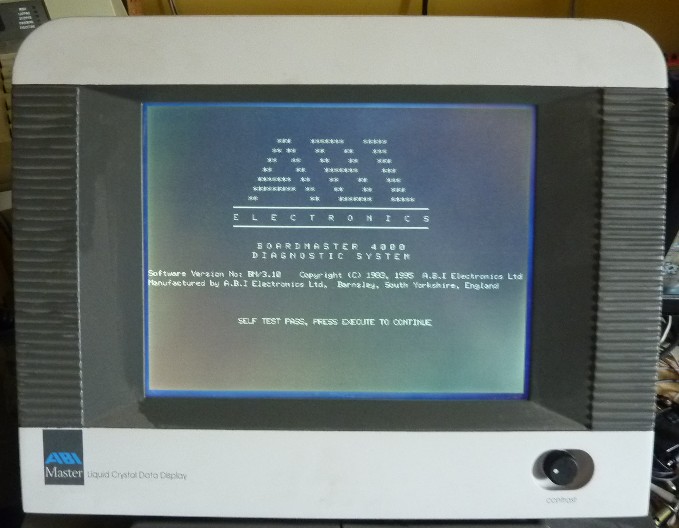
ABI Screen Info

Macro

Active member
vacBacker
Feedback
4 (100%)
Credits
2,010CR
I know a few people on here have dismantled these in the past, the backlight on my ABI 4000 has decided it doesn't want to work any more. I checked the setting (reflective / backlit) but thats OK.

so, does anyone have knowledge of the inverters used in these or other things I should be checking for ?

or does anyone know the connections for the external video connection - what type of monitor does that need ?

I know Tim did some work on these in the past, but cannot find the thread, so thought I'd kick of a new one!
 

Equites

Chief Sheesher®
vacBacker
Feedback
35 (100%)
Credits
3,329CR
Hi Mike

My BM4000 backlight is a bit dodgy too, when cold sometimes it does not fire up. Once the machine has warmed up though upon reboot it is fine.

I would think check the usual, like caps and transistors on the invertor circuit, I've not actually looked at mine yet. They do seem to be a common failing component though and well worth investigating.

Having said that, surely replacing the invertor circuit and tubes with LEDs is a possible option?
 

DanP

Administrator
Staff member
vacBacker
Feedback
5 (100%)
Credits
2,232CR
The one on mine has died too. It seems to try and start each time but doesn't stay on. It did work once a couple of months back but is pretty much consistently dead. I thought the external monitor relied on the unobtainium software?

Dan
 

Macro

Active member
vacBacker
Feedback
4 (100%)
Credits
2,010CR
I think thats the PC masterlink that needs that, and the just as much of a pain to get PAL to replace the one in there.

Hopefully it outputs some usable signal that I can feed to something else, or if its the inverter then see if one of the chinese jobs will do the job instead, although I can't imagine ABI made them, they must be a bought in one anyway

oh well, this pcb is nearly working, so will rip that apart next!
 

porchy

Active member
Feedback
5 (100%)
Credits
994CR
The external video connector is listed on page 8 of the operators manual.
It also states That the output facility was discontinued from December 1993.
 

trm

Who loves you, and who do you love?
Feedback
2 (100%)
Credits
2,877CR
Hi Mike,

All the dodgy backlights I've seen on these have been down to dead inverters - some quite crispy - bar one where the brightness pot had self-immolated. I was trying to help one of the guys identify a nuked component for an inverter fix he was doing (iirc I found different inverters in pretty much every unit I checked which didn't help much!) and will ask him to have a look at the thread.

As for the external video, I believe it is close to an early PC spec. There was some discussion about the h-freq being weird à la Hercules but in the end I think it came out much more sane. P-man may even have wired his up to an external.

Cheers
 

DanP

Administrator
Staff member
vacBacker
Feedback
5 (100%)
Credits
2,232CR
Tim, do you have any more info on this invertermajig? What/where is it? Might look at replacing mine if I can, see if it fixes the problem.

Dan
 

Macro

Active member
vacBacker
Feedback
4 (100%)
Credits
2,010CR
porchy said:
It also states That the output facility was discontinued from December 1993.

yes, due to lack of video controller chips from memory - however, I am hoping that since they put the socket on the back, they still had the controllers when they built mine

otherwise, you assume that they would not bother installing the connector

still, who knows - will try and wire it up sometime after I have pulled the existing screen apart to see how fixable it is likely to be.

must have an old PC monitor around i could nick the inverter from ... or just get a generic one instead - something like

http://www.ebay.com/itm/Universal-Single-output-LCD-Panel-Backlight-Inverter-USS-/120939299015

Dan - it's normally mounted on the back or beside the monitor - will let you know as hopefully I will get around to pulling my one apart tonight / tomorrow

Macro2012-06-27 13:37:14
 

trm

Who loves you, and who do you love?
Feedback
2 (100%)
Credits
2,877CR
I have one late-model ABI that doesn't have the video port and it's the only one which is absent the video controller. I reckon it's a safe bet that if you have the external connector, you can use an external screen.

All the inverters I've seen have been in the top half of the screen clamshell as Macro says.
 

Macro

Active member
vacBacker
Feedback
4 (100%)
Credits
2,010CR
pulled it apart, and the inverter is a INC158

the light flashes once when you power the ABI up, and again when you power it down. whether that means it's the inverter or the tube I have no idea.

you tube has some video's on how to test (i.e. you can't with a multimeter) so just pulling apart a 14" dell LCD to see if I can use anything from that to test - but it's bound to have different connections!
 

Macro

Active member
vacBacker
Feedback
4 (100%)
Credits
2,010CR
it would seem to be the inverter

I tried a different CCFL tube on the existing one, and that does exactly the same - flashes on switch on and switch off.

I couldn't try the ABI ccfl with the dismembered Dell screen since the plug didn't fit the inverter board in the Dell. (although the dell tube fitted the plug on the ABI - go figure!)

I have at least one dead laptop hiding away, so may rip that apart to get the inverter out to try, but laptop ones sometimes have weird brightness controls (pwm control)

still, plenty on ebay (from China a Czech republic!), and found a web site that flogs an industrial one that only needs a 12v supply (same as the one in there) - so will report back on how it goes.
 
  • Like
Reactions: trm

cliff_poole

Active member
vacBacker
Feedback
6 (100%)
Credits
1,069CR
I guess another approach would be to shotgun all the components in the inverter, if you can figure out the values.

Maybe get an idea of how inverter circuits commonly work by looking at any circuit diagrams you can find (maybe datasheets of the controller chip), see if the transformer in yours matches a common layout so that you can check the continuity of the windings.

How about the supply to the inverter circuit, does it have it's own feed from the PSU ?.

An ESR meter would be a handy thing to check any caps in circuit.
 

Macro

Active member
vacBacker
Feedback
4 (100%)
Credits
2,010CR
when a generic inverter is only £4 from China (including postage) I'll just bung one of those in. (if there isn't a suitable one in one of my scrap laptops)

I did also consider replacing the CFFL with a strip of LED's, since it doesn't matter too much if the backlight is not totally even across the screen (but the only ones I have handy are blue at the moment!)

I do have an ESR meter, if I ever get around to putting it together (one of those australian kits)
 

Equites

Chief Sheesher®
vacBacker
Feedback
35 (100%)
Credits
3,329CR
Macro said:
when a generic inverter is only £4 from China (including postage) I'll just bung one of those in. (if there isn't a suitable one in one of my scrap laptops)

I did also consider replacing the CFFL with a strip of LED's, since it doesn't matter too much if the backlight is not totally even across the screen (but the only ones I have handy are blue at the moment!)

I do have an ESR meter, if I ever get around to putting it together (one of those australian kits)

The last tempermental invertor I repaired on a LCD TV was a few leaking caps.
 

Macro

Active member
vacBacker
Feedback
4 (100%)
Credits
2,010CR
well, I tried replacing the 2 caps on the board just in case, since I had the right values sitting around - made no difference

so, just ordered one from China to stick in - tube worked fine hooked up to the inverter from my portable TV, but I can't nick that one (not because I don't want to trash the TV, it's too big to fit into the gap in the ABI!)
 

Macro

Active member
vacBacker
Feedback
4 (100%)
Credits
2,010CR
inverter board arrived from Hong Kong - much smaller than the one already there, but wired it up, used the existing cables for 12v, GND and the connections to the tube. had to add one extra cable from the 4th pin up on the screen connector (5v) to link to the 'ENABLE' connection on the generic inverter - and - success, screen is now backlit again

so, for whoever else had a duff inverter try one of these
 
  • Like
Reactions: trm

DanP

Administrator
Staff member
vacBacker
Feedback
5 (100%)
Credits
2,232CR
Kewl, nice find Macro. I've ordered one to give it a try. Might ping you for a bit more info on what to connect to what :)

Dan
 

Macro

Active member
vacBacker
Feedback
4 (100%)
Credits
2,010CR
well, if I can find my camera lead I have some pictures of it, but for some reason it didn't put them on the memory card but in the internal memory.
 

Macro

Active member
vacBacker
Feedback
4 (100%)
Credits
2,010CR
Instructions

Carefully remove the two pins from the connector to the tube, these then fit directly into the socket on the new card.

remove the black and red wires from the original inverter, red is 12v,
black is ground. These can then be soldered to the pads on the new
inverter, red to VIN and black to GND

finally, you need an 'ON' signal, so for this we need 5v - I got this
from the 4th pin up on the monitor plug (see pic) and connected this
direct to the 'ON' pad.

finally, to mount the board and make sure the tube connections didn't fall out, I used hot melt glue at each end. (picture of screen just to show it actually works!)

inverter.jpg
screen.jpg
 
Top