Ali express Jamma/jvs de10 Nano

Fantazia2

Active member
vacBacker
Feedback
13 (100%)
Credits
2,207CR
Thanks for that fantasia
Only thing I don’t get is
The jvs switch between
P1 p2?

I've already explained that.

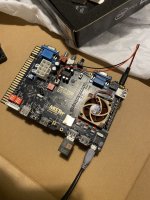
The JVS label is referring to the USB socket next to it that is for connecting a JVS I/O to.

The switch is so that you can control player 2 using the player 1 controls (Not sure if swaps P1/P2 or just remaps P1 controls on Jamma edge to P2 in game)

No idea what the little button above the switch labelled s2 does, it may be a onboard service/test button instead of using the Jamma button.
 

Retroman839

Senior Member
vacBacker
Feedback
12 (100%)
Credits
7,335CR
Power Jack goes to the DE10 Nano.
Supplied SD card goes in the DE10 Nano.
Supplied USB cable goes between the Jamma card and the DE10 Nano.


Rgb switches Jamma , vga - Based on the Silkscreen I would say ON is for Jamma Video and OFF is for VGA connection

Kick 4,5,6 switches ? ^ small jvs button & switch ? - These switches I believe configure if buttons 4,5,6 are connected to the Jamma connector or the Kick Harness,
thats not a JVS button, not sure of its function but the JVS silkscreen is referring to the USB connector which is JVS, Switch is for switching the controls for Player 1 and Player 2

OVR/AUTO switch I believe is for video settings, see Mister CRT information linked above by another forum member, it references this switch in the settings.

Power Jumper is for the User Port, if your not using the DB15 SNAC Jamma edge adapter then leave it as is.

There is a but of information on the Acade Projects forum here, but it appears the board has been revised since the original information.

Weirdly mine is a different variant from yours, Rev E, although checking a 2nd one that just arrived it is the same Rev F.

It’s the switching of p1 & p2 that I don’t get ..,

Anyway I got my driverless wife dongle
:) now
 

pooman2084

Be Attitude For Gains!
vacBacker
Feedback
25 (100%)
Credits
1,870CR
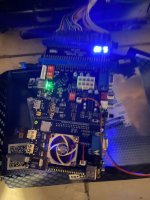
I would imagine those 3 LEDs should be lit on the Jamma board. Does the fan spin? Can you plug a monitor into VGA or HDMI outs?

Mister won’t boot without a valid memory card but you should get an output from the de-10 alone with the stock card that came with the de-10.
 

pooman2084

Be Attitude For Gains!
vacBacker
Feedback
25 (100%)
Credits
1,870CR
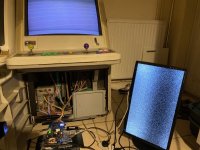
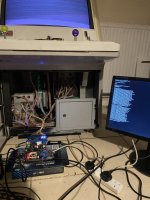
You’ve got a picture on your cab though? Looks like it just needs syncing.

Try and start a game and see what happens.

Connect your mister to the network with the wifi script then download the extender thingy so you can change settings on a phone.
 

pooman2084

Be Attitude For Gains!
vacBacker
Feedback
25 (100%)
Credits
1,870CR
Update all won’t get you a picture on the CRT.

Scroll back and read the instructions I linked to to setup SSH file transfer and you can do it without needing to take the card out.
 

pooman2084

Be Attitude For Gains!
vacBacker
Feedback
25 (100%)
Credits
1,870CR
It’s possible. It may just be a setting in the .ini file but you need to get WiFi and the remote script I’ve referred to to mess about with it.
 

pooman2084

Be Attitude For Gains!
vacBacker
Feedback
25 (100%)
Credits
1,870CR
There were instructions to follow to toggle things on the nano. Maybe look those up and replicate.

Forget plugging your card in. Get WiFi working and use your phone to try diff setting for analogue video. For all we know it could be some gimped resolution.
 
Top