Atari Star Wars trips house?

Tony

User
vacBacker
Feedback
1 (100%)
Credits
51CR
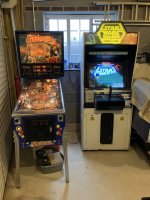
Good morning could anyone suggest where to start? I finally dug out my Atari Star Wars upright and set it up for a party on Friday to my amazement it started up got sound and display and started a game half way through it tripped the house fusebord? Turned it off and checked the fuses etc all appeared ok, then did the same thing?
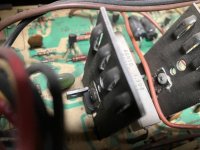
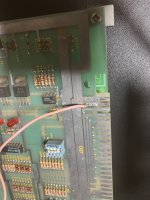
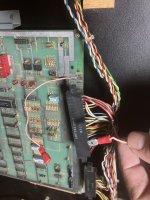
I noticed a burnt connector pic attached but I haven’t taken anything out?
Also I “Think” I saw a bit of smoke coming from a transistor on the monitor board but it still appears to work ok?
Any starters of where to look appreciated
Thanks Tony
 

Attachments

  • BA7EAF60-3052-41CE-846A-3D207E62E552.jpeg
    BA7EAF60-3052-41CE-846A-3D207E62E552.jpeg
    147.7 KB · Views: 35
  • 963E6810-14EA-4905-9656-B5321B4F7C48.jpeg
    963E6810-14EA-4905-9656-B5321B4F7C48.jpeg
    123.1 KB · Views: 31
  • 72D84604-B7AB-4DD6-9A80-A0E4FC0A1301.jpeg
    72D84604-B7AB-4DD6-9A80-A0E4FC0A1301.jpeg
    153.2 KB · Views: 29
  • DEB49A21-AC38-4542-BC6C-DEFA5180DD17.jpeg
    DEB49A21-AC38-4542-BC6C-DEFA5180DD17.jpeg
    119.1 KB · Views: 28

1bradders

User
vacBacker
Credits
132CR
Make sure you have good contact on the edge connector and good voltage feeding back on the sense wire. Long story short, the sense line on the AR-II "returns" the voltage from the main PCB back to the AR-II board. If there is a difference between the +5v on the board and voltage being returned, the AR-II cranks things up to make up the difference. Many times the edge connector on an Atari PCB doesn't make a good connection and returns low voltage on the sense line in which the AR-II ramps things up causing R29 to burn. I'd suggest inspecting the edge connector first, checking that resistor then disconnect everything and check all voltages and fuses starting with power brick.
 

Tony

User
vacBacker
Feedback
1 (100%)
Credits
51CR
I’ve run out of time on the Atari Star Wars! Cleaning the connectors didn’t solve the issue unfortunately, I’ve had the board out and the burn mark is from an old repair? So looks ok?
45BACDA2-2E48-48AA-A355-2E0516F8D86E.jpeg559125A6-C3A9-4C3B-8619-4D04A691271E.jpeg53461853-EAA3-412A-BF67-8EB4A949CAC8.jpegB14A4E1E-B517-423F-92AF-BB7547D01FCA.jpeg
I’ve run out of time but Funhouse and Star Wars trilogy made it!!
7378D8AD-A1A4-41B1-ADC5-7037F8D82AB2.jpeg
Could anyone point me in the right direction for an idiots guide to testing voltages on the Atari Star Wars?
Thanks Tony
 
Last edited:

1bradders

User
vacBacker
Credits
132CR
What is the condition of the edge connector pins? At least one must be damaged since someone's done a work around repair. Do you have a multimeter? Try checking the continuity of your fuses on the power- brick. Check for any obvious shorts on the mains cable coming into the cab. Make sure you do this with the cab off/unplugged. Also check the fuse values are correct.

If this checks out then disconnect the AR/PCB/Monitor and test the brick voltages. The below link is an example for how to do this for atari centipede.


Same process but different voltages and fuse values for star wars. See below schematic.


1681499536714.png

If that's ok and doesn't trip your breaker then the AR and monitor are next to check.
 

1bradders

User
vacBacker
Credits
132CR
No problem. Also if you are using an extension cable check the condition of that as well as that could well be causing the short.
 

Tony

User
vacBacker
Feedback
1 (100%)
Credits
51CR
It’s a good idea re which socket or extension I hadn’t thought of that!
I’m pretty sure it’s the machine as it’s in a newish extension I.e. newish wiring newish board etc and other games work of that particular socket I did try an extension but it was the same? But I’ll give it a go it’s a good point worth checking to tick it off the list
Thanks Tony
 

1bradders

User
vacBacker
Credits
132CR
It’s a good idea re which socket or extension I hadn’t thought of that!
I’m pretty sure it’s the machine as it’s in a newish extension I.e. newish wiring newish board etc and other games work of that particular socket I did try an extension but it was the same? But I’ll give it a go it’s a good point worth checking to tick it off the list
Thanks Tony
Yep, Essentially you want to work from the wall forwards and rule out a short at each step. 👍
 

karlcdoe

Active member
vacBacker
Feedback
7 (100%)
Credits
864CR
Start with the obvious. Most games I have had trip the circuit breaker, including a star wars cockpit were caused by bad ballast on the marquee tube light and once a bad emi filter on a power supply brick. It depends on what type of fuse box you have eg an old mains trip to earth or a bank of RCDs for each circuit. If you have a multimeter then measure the resistance between the earth pin of the plug and the other two pins -with power off of course and all usual safety warnings apply.

But like others suggest start with the basics and work back. Unless it's been hacked about it should be possible to unplug everything from the psu brick apart from the inputs, inlcluding the power feed for the tube light.
 
Top