Being a bit dumb - Video Question

Sk4zZi0uS

Newbie
Credits
1CR
I recently got quite badly burned (I would say it was a rip off) on a MAME cab. I really hoped that it had something like a J-Pac, retaining a JAMMA harness so that I could just hook up some of the arcade boards I've picked up from various folk here... no such luck.

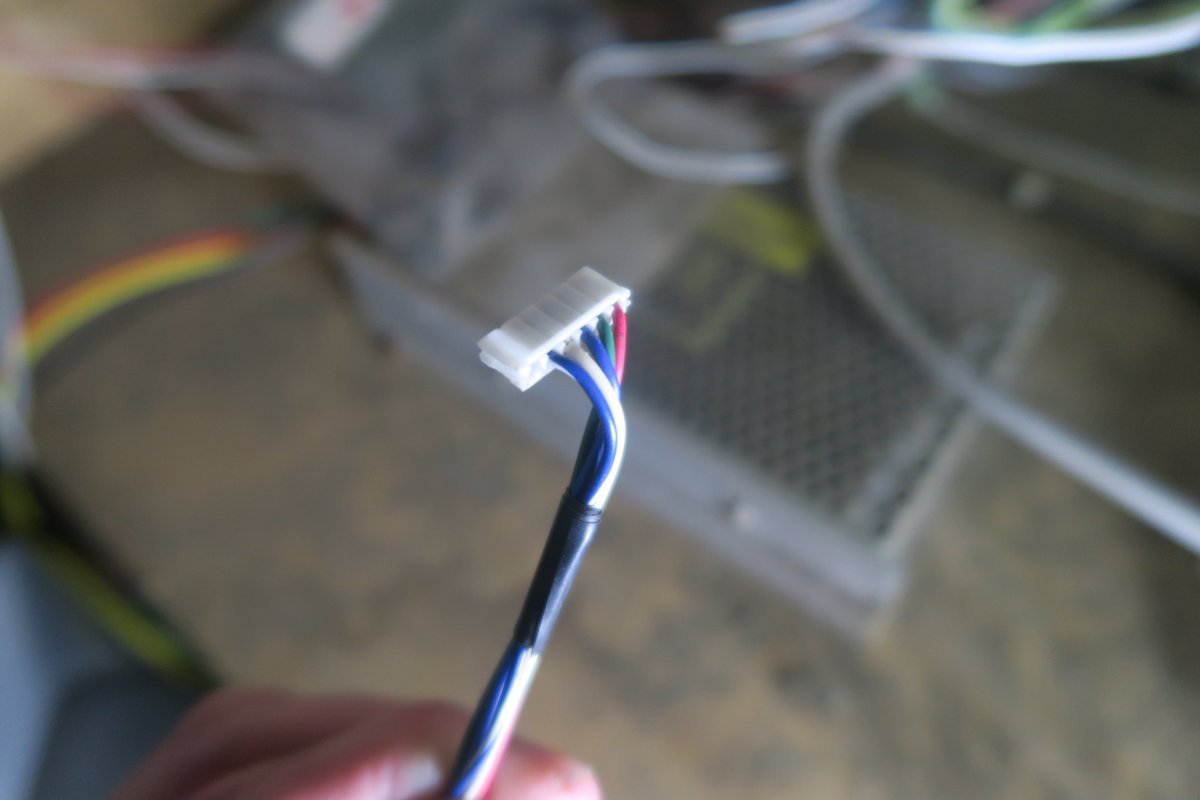
The cab has some funky VGA hack job done to the cable coming off the monitor that allows it to take 15k over VGA... but I don't want to use VGA, I want to go directly off of my arcade boards using a new JAMMA harness. The wires are all chocblocked everywhere, I've not no idea where to connect the cables at this point and I'm only really making a guess that I've found the correct place to splice.

Not really sure how to explain what's going on in text so here is a video I put up for some folks on twitter who have been trying to help.


I've never quite seen anything like this before and I'm very new to repairing arcades. The only other machine I've worked on is a Golden Tee that I picked up in 2014 :/ I've still not finished that one either.

Kind of wish I had asked if foolks on here if they had a cab or 2 locally. Excitement/desperation kicked in when we got a nice box of boards through the post that my kids and I couldn't wait to get started on...now I have this rat to work on :D

its a learning experience... I don't mind if I totally wreck this one. Would rather not... but its already pretty beat up.

Any help would be appreciated
 

Lurch666

Active member
Feedback
21 (100%)
Credits
4,519CR
It looks to me like you have a red,green and blue+sync input into your monitor.

If you wire a jamma connector up it will have red,green,blue and sync outputs so connect them to your monitor inputs (white will be sync).

Wire +5,+12 -5(if your psu has that one) from the psu into the jamma,bung your multi board in,power the psu and screen and see if anything comes up on the monitor.
 

Sk4zZi0uS

Newbie
Credits
1CR
Lurch666 said:
If you wire a jamma connector up it will have red,green,blue and sync outputs so connect them to your monitor inputs (white will be sync).

Much thanks Lurch :) I will take a look into this one tomorrow. I did try hooking up the colours to their respective partner and white to white... but I also connected ground to the blue/white stripe wire which gave me an odd result, also tried flipping sink and the ground and that gave the same result...
L7MfpS9.jpg


so could I/should I not use the ground on the video? Assuming everything else is grounded.

Anything is good at this point :D learning is fun.

Fantazia2 said:
Monitor is possibly a Nanao ms8-26 with it being a Sega Cab and going by the tube part number.

Thanks for the info Fantazia2, I had/have no idea what was in it. There were so many monitors and to me a tube is a tube... I had no idea where to even start looking for information :D

Shinydaz said:
These wires coming from your monitor? They look like the video connections.

IMG_20190411_26250.jpg

Those are the ones Shinydaz :) can't quite figure out how to wire them up as yet. Going to try what Lurch has suggested tomorrow. Hopefully better than my attempt. Its the blue and white stripe wire that has me puzzled...I thought it was ground at first but I don't get a picture when I pair them up.
Sk4zZi0uS2019-04-11 20:14:20
 

Shinydaz

Active member
vacBacker
Feedback
6 (100%)
Credits
814CR
I know some monitors need the video ground and sync connecting together and others dont. I'm sure others that have this monitor can help a bit more.

Good question below !Shinydaz2019-04-11 20:25:32
 

Sk4zZi0uS

Newbie
Credits
1CR
Shinydaz said:
I know some monitors need the video ground and sync
connecting together and others dont. I'm sure others that have this
monitor can help a bit more.

Good question below !
Ah, maybe I should try splicing them together? They do separate on the board at the end though but I can try that too :)

D3034cbW4AEjsfs.jpg


D3036_xWkAIFolX.jpg


Is the ground absolutely required on the video side or could the ground be obtained from elsewhere?

Fingers crossed thanks to Fantazia2 we may now know what the monitor actually is :) to me... its a tube with a ton of power in it :/ so many brands and pin outs.

Fantazia2 said:
Are you sure the Multi board is set to 15KHz/CGA and not 31Khz/VGA.

Its on DIP2 and it needs to be off for 15KHz
I tried the DIP switches, connected the VGA out to a VGA monitor to see if the board was ok. Also turned off the switch which is what displayed when I connected up to the screen in the picture above... but when I connected the board to my golden tee it worked fine so I figured there is a wiring issue between the harness and the screen.

I've also tried SVC Chaos in the machine and that didn't display an image either... I was feeling a tad brave (would be devastated if that board died.
 

big10p

Coins detected in pocket!
vacBacker
Feedback
13 (100%)
Credits
6,093CR
Is that not a 'Virtua' cab? Virtua Striker, I think. If so, that's a mid res game with a 25khz monitor, which would explain the probs with 15/31khz.
 

Sk4zZi0uS

Newbie
Credits
1CR
big10p said:
Is that not a 'Virtua' cab? Virtua Striker, I think. If so, that's a mid res game with a 25khz monitor, which would explain the probs with 15/31khz.
That could be the case, Interesting. I've just looked up the cab and they look similar at least. That said, When it was able to run as a MAME cab with the hacked up VGA (The PC died the day we picked it up) the machine did work when plugged into a soft15k graphics card.

So many things I didn't know,so many more things I need to look into. This is more complicated than I first expected :D
 

big10p

Coins detected in pocket!
vacBacker
Feedback
13 (100%)
Credits
6,093CR
Think there's a few versions of the cab. It looks like this one to me:
20120921-061943.jpg


My guess is the PC hooked up to it was using CRT_emudriver/GroovyMAME, which (when set up properly) will only provide video modes the monitor is capable of displaying.
 

big10p

Coins detected in pocket!
vacBacker
Feedback
13 (100%)
Credits
6,093CR
BTW, I *think* the monitors in these are 15/25khz switchable, but someone with more knowledge than me would need to ID the monitor.
 

Lurch666

Active member
Feedback
21 (100%)
Credits
4,519CR
The video ground just needs to be connected to GND on your jamma connector.

If it's missing it can cause the colours to be dark or missing but it shouldn't cause the problems you are seeing on your monitor.
 

Sk4zZi0uS

Newbie
Credits
1CR
This is turning out to be one hell of a ride :D It may sound crazy but this has been the most fun I have had tinkering with a project in a long time.

Big10p I would like to issue you a congrats, you may have very well identified the game as Virtua Striker 2. The cabs look pretty much identical AND after looking around on the interwebnet for a bit today I found a harness for Sega Model 2 hardware with amp that also contains the service switches board, identical to what is behind my coin door.

Fantazia2 also gets a congrats for helping me narrow down the monitor. I will edit in a picture of what I believe it to be when I get back to my other laptop with all of the information on it. I've been digging around looking for people converting Model 2 Sega cabs to MAME and talk of the monitor and the same VGA splice technique have been mentioned. Still not entirely sure how its wired together but I'm getting there.

Apparently the monitor is switchable Big10p BUT I looks like all of the pots and potentially the jumper/switch I need to change are on the end of the monitor that I want to go nowhere near :D I would have to take the monitors board out to gain access to, find and flip the switch which means I will have to for safety discharge the monitor which (from past events) is quite a terrifying thought having never done it before personally.

Also learned that 25k is possible on GPUs modified with soft15 which could also explain why it worked for the MAME machine. I've been told it could my video issue, 3 images duplicated and split over a horizontal axis could be adjusted using one of the pots on the front side of the machine.

Need to figure out where that switch/pot/jumper is... and see if I can drum up the bravery/stupidity to try and discharge the monitor to take out the board.

FUN adventure :D really enjoying this.
 

deano76

Active member
Feedback
7 (100%)
Credits
91CR
Is this the cab that was on eBay for sale a good few times ?

IIRC then I'm sure it was pictured running Double Dragon in MAME so possibly the jumper has already been moved from 25khz to 15khz

Defo been a SEGA Virtua Striker cab in a former life, I owned one of these cabs a few years ago and it had been converted to run NAOMI hardware with a JVS board and the video dip switch on the NAOMI was set at 15khz. The monitor in it was a Nanao MS8-26 and I managed to connect up a PC running the 15khz video drivers and had no problems

The adjustment board for this is at the front of the monitor, remove the glass and plastic bezel, not sure if you have to pull out the control panel ? Was a while back so I can't remember 100%

If the monitor chassis needs a service then get it sent off to Gunblade the monitor man. I was a bit dubious too about discharging monitors for years but I finally managed it last year after putting off for a long while, even managed to connect it back up with no problems too!

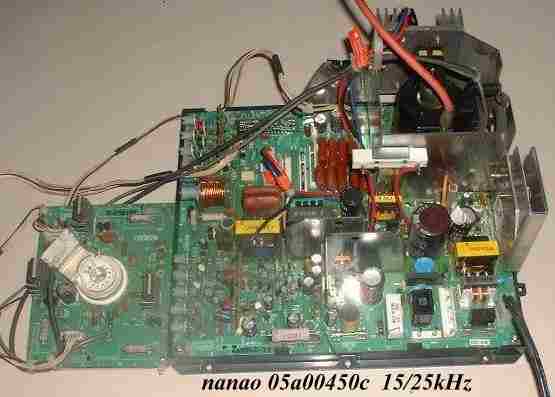
EDIT : got this off BYOAC this is a pic of the monitor chassis

MS8-26A-SU.jpg


deano762019-04-12 20:27:44
 

Sk4zZi0uS

Newbie
Credits
1CR
deano76 you are a champion :D that looks to be the one. I was then about to hop on and update my post when you put up that image.

This is the image I found

nanao_05a00450c.jpg


Hopefully I can get the front glass off easily... the control panel seems to have been stapled or nailed to the main body of the cab something as if to give it the ability to be lifted slightly to get to the underside of the buttons but not fully take it off :/

I'm not sure if it was on ebay multiple times, my wife found it and then after we grabbed some arcade boards form here we wanted to snap up a cab reasonably nearby (as I can't drive to be able to pick up a machine) and play some games with the kids. I overpaid by a mile for sure...some folks here had entire cabs ready to go for 250 :/ I would have taken 2 if it meant I could just sit and play,,, my quest for my sons holy grail boards continues but it would be real nice to have a machine up and running until I get the good stuff lol

Feel kinda bad that the game has been stripped out and turned into this Frankenstein.

Just got the wires connected up to the JAMMA harness. Will take a picture of what is shown on screen. I really hope its as simple as getting to that switch... wherever it is :D

EDIT

Oh wait... is it that ENTIRE CONNECTOR :O blimey... Looks like a discharge is going to have to be a thing :/

-LATE UPDATE-

I don't want to double post so I will update this one again.

I believe I started work on this cab properly on Wednesday, I've only ever worked on a cab once or twice before and that was mainly connecting up new power supplies... I discharged my first monitor yesterday and have to confirm I'm not updating this post from the grave. It went well. I pulled out the monitor chassis and change from 25k to 15k which solved our video issues.

I've also learned about H-Size adjustments on the board... and they get extremely hot :D

I had heard adjusting the Horizontal doobry would get hot, I didn't expect it to make my tools come out smoking though... and like a Muppet I ended up, after seeing how hot it was, tried to remove the bit from the end of my driver with my hands... and now I have a nice burn stripe across my finger print :D

Lesson learned... H-Size adjustments are bloody hot... very bloody hot. BE CAREFUL.

I've removed the marquee which was epoxied in place by the previous owner. I wanted to remove the PC speakers that had been put in there and replace them with something closer to standard... but the speakers had pretty much been snotted in place along with part of the marquee to keep them in place. I've spent part of the day removing those while trying not to damage the cab.

Now that I've removed the marquee... I can sadly confirm that the machine was once a Virtua Striker cab.

X5nsFuV.jpg


I've cut the buttons out of the control panel, I'm probably going to ask a neighbour to cut a new panel out as the way this one has been drilled has annoyed me a bit and my OCD goes mental when I look at it.

I removed most of the Sega harness and I've boxed it up.

I've pulled as much crap out of the machine as possible... its not a dedi sega cab anymore but its getting closer to becoming a raw arcade cab rather than a MAME hack job.

tV7CpVa.jpg


I have no idea how to wire up my JAMMA harness up to the service switches and things that were already in the cab, I really want to get the coin mech working at the very least.

I can't thank you all enough at this point. Still things that need to be done but I'm waiting on parts... so most things are now on hold.

Sk4zZi0uS2019-04-13 17:24:35
 
Top