
You are using an out of date browser. It may not display this or other websites correctly.
You should upgrade or use an alternative browser.
You should upgrade or use an alternative browser.
Control panel 4th 5th 6th buttons not working
- Thread starter ali710
- Start date


SUPERSPRINT
Active member
Depending on the game and set up, as Dave mentions, jamma/jvs etc, you’ll need to attach the 4/5/6 button harness to the pcb.
Most jamma pcbs that need 4/5/6 buttons have an additional connection for these buttons.
Most jamma pcbs that need 4/5/6 buttons have an additional connection for these buttons.

It looks like you've got the control panel end extra button harness, but you'll need a kick harness that fits your board for 4, 5 and 6. Is that board one of the Sony ZN-2 boards? It looks like it has a 34 pin Hirose connector on it.
For CAVE games you need a 4th button from the 12 pin connector. That connects from the JAMMA harness rather than a kick harness.
For CAVE games you need a 4th button from the 12 pin connector. That connects from the JAMMA harness rather than a kick harness.
If you want to use 4th button on cave games it will be through the 1p harness. You will need a 1p harness under your control panel that has wiring for the 4th button.
Not all games are wired up the same for all buttons, so you will have to swap wiring about depending on the game.
some examples:
Standard jamma is button 1,2,3
Neo Geo - button 1,2,3,4 are on the 1player harness
Capcom 6button fighters use 1,2,3 on 1player harness and 4,5,6 through kick harness
Namco Tekken fighters use 1,2 on 1player harness and 3,4 through kick harness

ali710 said:Yes it’s sony ZN 2 board.
But right now I just want 4th button to use on my Espgaluda game.
I’m really noob when it come to wiring
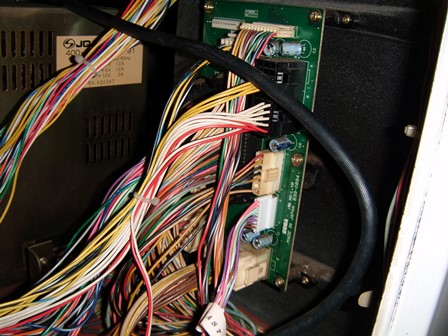
under your control panel you have 3x wiring harness.
Player1
Player2
Player1+Player2 extra buttons
At the moment your Player 1 harness is only wired for b1,b2,b3. you will need to add an extra wire for B4 to this harness.
link below is the pinout for the harnesses for Naomi universal, but in sure the Player1 harness is the same
https://wiki.arcadeotaku.com/w/Sega_Naomi_Universal

So here's what I did with my Blast City. There's an I/O PCB in the cabinet and one port is used for the extra kick button harness. I linked up a harness to the port and placed a 12 way molex connector on the end. That way I can just unhook whatever connector I need in seconds and swap it with another. You need to make each relevant kick harness with a 12 way molex on the end. Very easy interchanging once done. The one in the picture is for CPS1 Street Fighter 2 PCBs.
If you can find the opposite connector to the one you have you can make any harness plug in and play.
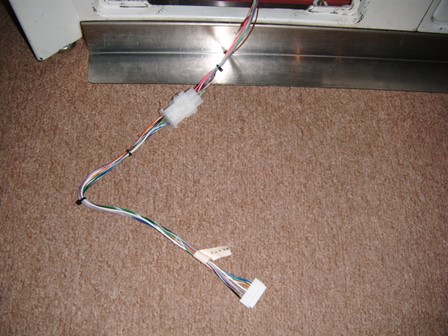
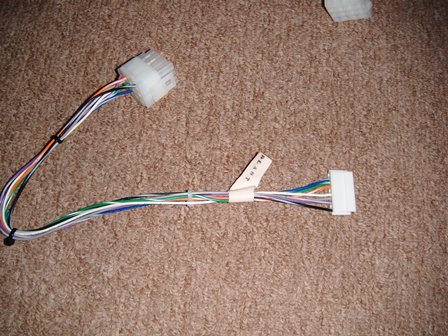
If you can find the opposite connector to the one you have you can make any harness plug in and play.
For the 4th button in this case you'd need to put a wire with the correct pin crimped on into position 9 on the white 12 pin connector. That wire would go to button 4. You'd also need to get a ground on the corresponding terminal on the button. If you don't mind swapping wires around, you should be able to borrow one from the P2 connector assuming you're not planning any 2p CAVE action. If you can't use the P2 grounds, then you can make a little wire duplicator with 2 wires terminating in female spade terminals at one end, and linked together with a male spade terminal at the other.
Other options are buying a 4 or 5 button 12 pin loom already made up, or getting all the kit to make your own.
Other options are buying a 4 or 5 button 12 pin loom already made up, or getting all the kit to make your own.
I can make them if you can't find any for sale. If you fancy giving it a go yourself I can get you a list of a the kit you'll need, although if you only plan to stick to one or two cabs you might not want to end up with a loft full of parts and obscure tools like me

ali710 said:Do you have that loom for sale sir?
I don't have a New Astro City cabinet. If Phil has the relevant connector it's is best that he makes a harness for you. I was giving you ideas on what is possible, more than anything.
phillv85 said:I can make them if you can't find any for sale. If you fancy giving it a go yourself I can get you a list of a the kit you'll need, although if you only plan to stick to one or two cabs you might not want to end up with a loft full of parts and obscure tools like me
Yes please, ur a life saver, just dm the price with shipping, I will send u address.
Just show me after all is done how to connect, hope no soldering work for me.
It was a big letdown, I thought just plug and play, but what do I know about cabinets, I’m only starting with arcade.