Hey guys,
I'm still trying to work out and understand how my machine is wired up, I showed a picture the other week and it was suggested I needed JNX CPS2 adapter which I've now got.
Unfortunately the adapter hasn't just worked perfectly and now I'm learning and discovering some weird things.
It seems that there are 4 buttons wired to my Jamma harness, I thought the 4th button was only for Neo Geo? Anyways, the 4 buttons do work when testing in the Pandora's box.
When my CPS2 kick harness is plugged in on player 1 I get 5 working buttons, 1 button just doesn't work regardless, could just be dodgy wiring.
On Player 2 all 6 buttons do something, but 2 of the buttons are being used for the same 4th button if that makes sense? And none of the buttons are used for 6th button. Which I'm assuming means the 4th button is wired to the Jamma and the 6th button is mixed up somewhere in the wiring and is connected to the 4th button pin on the kick harness?
What makes it confusing for me and hard to work out is that the wiring is hard to follow, wires go into chop blocks, then sections wrapped up in electric tape and the wires come out different colours. Obviously with a bit of a headache I could unwrap bits and work out where each wire goes.
I know the guy I bought this machine from was running some non Jamma games with adapters, would he have had it wired up differently for certain games?
Should I disconnect the 4th button from the Jamma Harness and make sure it's wired to the kick harness? I'm also considering buying a new kick harness with all nicely crimped wires and just connecting it up to the buttons myself.
I'm still tempted to buy a new Jamma harness and wire the whole thing up myself, then I would learn it and know exactly how my machine works.
Here's the original picture:
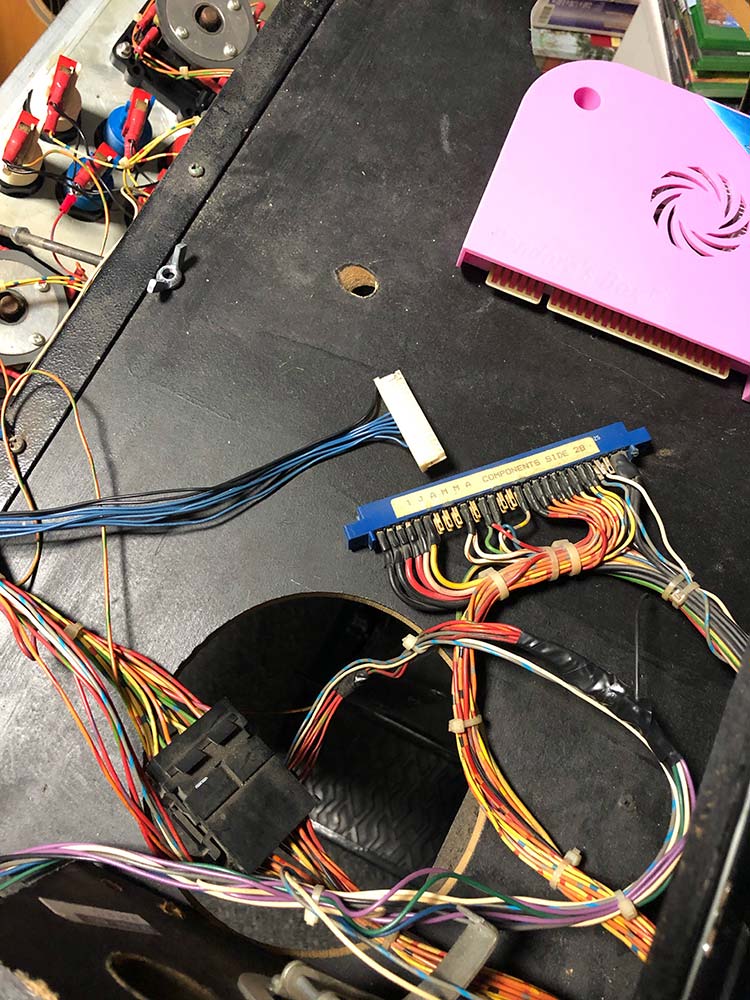
And here's a new picture showing the JNX adapter, the chop block and dodgy wiring:

susnet2019-05-30 05:53:23
I'm still trying to work out and understand how my machine is wired up, I showed a picture the other week and it was suggested I needed JNX CPS2 adapter which I've now got.
Unfortunately the adapter hasn't just worked perfectly and now I'm learning and discovering some weird things.
It seems that there are 4 buttons wired to my Jamma harness, I thought the 4th button was only for Neo Geo? Anyways, the 4 buttons do work when testing in the Pandora's box.
When my CPS2 kick harness is plugged in on player 1 I get 5 working buttons, 1 button just doesn't work regardless, could just be dodgy wiring.
On Player 2 all 6 buttons do something, but 2 of the buttons are being used for the same 4th button if that makes sense? And none of the buttons are used for 6th button. Which I'm assuming means the 4th button is wired to the Jamma and the 6th button is mixed up somewhere in the wiring and is connected to the 4th button pin on the kick harness?
What makes it confusing for me and hard to work out is that the wiring is hard to follow, wires go into chop blocks, then sections wrapped up in electric tape and the wires come out different colours. Obviously with a bit of a headache I could unwrap bits and work out where each wire goes.
I know the guy I bought this machine from was running some non Jamma games with adapters, would he have had it wired up differently for certain games?
Should I disconnect the 4th button from the Jamma Harness and make sure it's wired to the kick harness? I'm also considering buying a new kick harness with all nicely crimped wires and just connecting it up to the buttons myself.
I'm still tempted to buy a new Jamma harness and wire the whole thing up myself, then I would learn it and know exactly how my machine works.
Here's the original picture:
And here's a new picture showing the JNX adapter, the chop block and dodgy wiring:
susnet2019-05-30 05:53:23