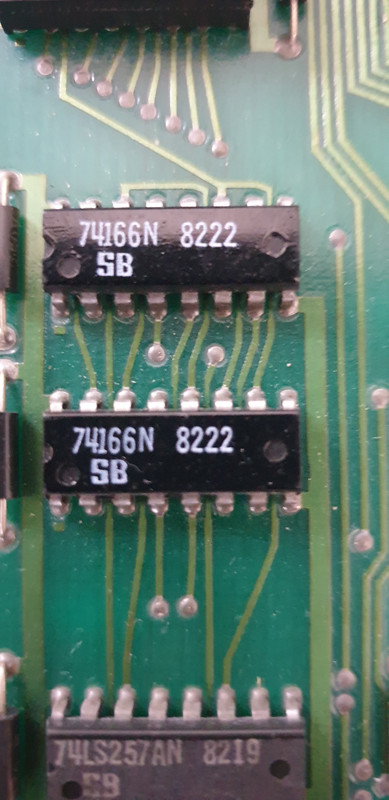
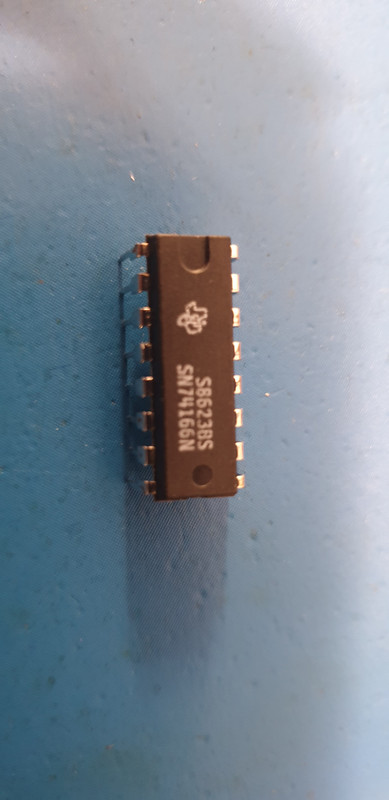
Difference in these chips

Monstermug

Active member
Feedback
23 (100%)
Credits
1,807CR
Is there a difference between these chips except for the manufacturer and date stamp? It's top picture vs bottom picture.

20190326-102429.jpg


and

20190326-102329.jpg


From what I can tell they are both 8 bit counter shift registers? both TTL?
 

Monstermug

Active member
Feedback
23 (100%)
Credits
1,807CR
Equites said:
I've seen some odd results when substituting LS series on some William's stuff, but they are like for like.

Well spotted. It is a williams board. I threw in the new chip and now it's giving me ram error. Do you know where I can get the right chip? Trying to search for 74166N and nothing comes up apart from the LS series.
 

Equites

Chief Sheesher®
vacBacker
Feedback
35 (100%)
Credits
3,329CR
Monstermug said:
Equites said:
I've seen some odd results when substituting LS series on some William's stuff, but they are like for like.
?

Well spotted.  It is a williams board.  I threw in the new chip and now it's giving me ram error.  Do you know where I can get the right chip?  Trying to search for 74166N and nothing comes up apart from the LS series.

Was the new IC a 74166 or a 74LS166?
 

philmurr

Active member
vacBacker
Feedback
48 (100%)
Credits
2,378CR
That problem is usually only the 74153’s which drive a lot of RAM chips so can’t be the LS version

The 166 you have there is exactly the right part, so either it or something else on the board is faulty
 

Monstermug

Active member
Feedback
23 (100%)
Credits
1,807CR
Equites said:
Monstermug said:
Equites said:
I've seen some odd results when substituting LS series on some William's stuff, but they are like for like.

Well spotted. It is a williams board. I threw in the new chip and now it's giving me ram error. Do you know where I can get the right chip? Trying to search for 74166N and nothing comes up apart from the LS series.

Was the new IC a 74166 or a 74LS166?

I replaced it with the SN74166N as I was assuming the 74LS166N were different.

There's nothing wrong with the RAM and according to the schematics they do drive the rams so I guess I have to dig a bit deeper to see what the problem is. Some of the via's were badly corroded so I will start there first. Thanks for the help.
 

Monstermug

Active member
Feedback
23 (100%)
Credits
1,807CR
Okay so I had some time to have a look at this problem again. This board was a Joust board I just purchased. It was temperamental and when pressing down on chip 4J the board boots up fine. But occasionally it would boot up with ram error 134.

Ram error 134 indicates 1 = Ram and 3 = Ram bank 3 and 4 = Ram chip 4 on bank 3. I had already tested this ram chip and it was fine.

On closer inspection, of IC 4J some legs were badly corroded and wasn't making good contact with the solder traces. I decided to pull this chip out. As the legs were badly corroded, I ended up having to cut the legs off to get the chip out as the iron was having problem melting the rusty solder.

So I replaced old 74166N with suitable replacement. Powered it on and was getting full on RAM error all the time. Checking continuity with my work seemed fine at the time so I thought it must have been a wrong chip as mentioned above.

Now using logic probe showed me that pins 5 of 4J was floating. This should be connected to pins 4 of 4I and pin 3 of 4H which it was. All pins along these lines were floating. Looking at the schematics showed me that these pins should be connected to pins 14 of the Ram Chip location 34. Tested it and there was a break.

Removed the new chip and found trace damaged under the chip which bridges pin 5 of 4J to pin 14 of RAM location 34. Using a thin wire I fixed the traced and put the chip back in.

This did the trick. Sorry no photos because I thought it was a simple pull and replace job. Didn't know I had to break out schematics for this lol.

 
Top