
You are using an out of date browser. It may not display this or other websites correctly.
You should upgrade or use an alternative browser.
You should upgrade or use an alternative browser.
Dos mame , sound blaster issue
- Thread starter Retroman839
- Start date


Yeh my card is wavableCrikey, old memories.
Doesn't P&P mean the card automatically picks an address (or you set it via some .exe tool) and you've got to make sure what's in the autoexec.bat matches it?
It was usually 5 or 7 as said.
I remember getting furious at various analogue controllers as they would always start drifting.
Wavetable music was much better for most games - I had a DB50XG plugged into my card..
I’m about to wave goodbye to it out the window 😉.
my games run with sound for around 5 seconds ..
Then freeze ..
I can disable card and run games without sound fine.
It did all work fine
I have image of drive backed up and made a fresh ssd ,
It is something in bios ..
I have reset to factory settings
And just trying to figure this out and return bios back to correct settings to no avail.
Last edited:
Thanks Dave ..Uded to gave .bak files and they were backup.
Dave.
Im Stuck with this ..
It wants to use irQ 10 ?
5 & 7 are the normal irQ lines ,
I have all the windows drivers , test suit etc, for this sound card
I can still try running a sound blaster test Command line ?
And will try irQ 5 and 7 again
But it seems arcade os maybe stopping it Só I also need to try to run mame.exe away from the front end

Thanks Dave ..
Im Stuck with this ..
It wants to use irQ 10 ?
5 & 7 are the normal irQ lines ,
I have all the windows drivers , test suit etc, for this sound card
I can still try running a sound blaster test Command line ?
And will try irQ 5 and 7 again
But it seems arcade os maybe stopping it Só I also need to try to run mame.exe away from the front end
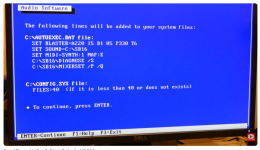
It's trying to use IRQ10 because that's what you must have in your autoexec.bat file. It's the only place it's set. Have you definitely commented out the line with "I10" in it and uncommented one of the lines with I5 or I7? That's what sets it to use IRQ 5 or 7. Remember to comment it out - start a line with "rem". To uncomment it, delete "rem". Also note that if you have multiple lines, the last line in the file will be used as the values for the sound card. If you're not sure post a photo of the contents of your autoexec.bat file (ignore the autoexec.bak file - it's a backup copy someone made).
ArcadeOS will not do anything to stop this running. It will just try and use whatever is set in autoexec.bat, pretty sure the same goes for MAME. IRQ 10 was typically used for things like network cards or scsi controllers, not sound cards.
Ignore the windows drivers - they are not really useful here.
The DOS command line utils (depending on your card) can be used to test the card but I think they will use whatever settings you have in autoexec.bat. I think (it's been a very long time) if you don't have anything set for the sound card in autoexec.bat it can be used to get the values you need for that card. As I say it's an old memory and depends on your card and whether the DOS utilities are installed on the file system.
Also you mentioned your CMOS battery was at 2.8v? It should be 3.3v so it's somewhat low, anything below 3v is suspect imo. I would defo replace that once you get this working.
Eternally greatfull will check again tonight
I tried Deleting rem last night
And I also tried enabling irQ 10 to match with the bottom line
But no luck
I tried Deleting rem last night
And I also tried enabling irQ 10 to match with the bottom line
But no luck
Last edited:
Got me thinking, First card I bought for Alone in the Dark was Soundblaster but not sure which model now, did it have jumpers to set the card up, yes I think it did, then PNP came out to make things easier lol
Sure the first one had built in Amp with the wheel volume on back, think it must have been Soundblaster 2.0 as it wasn't 16bit and don't think these were stereo which sounds right but it was damn good compared to using speaker driver lol
think this is what I had, cost me £130 I remember that bit clearly

So going on that I thought the later cards don't have jumpers with pnp so you need to setup with config programme, so unlike onboard sound on mainboards where you would setup the interrupts etc in bios you need to do it on the sound card, you need to see what the card is set too and setup then config.sys / autoexec.bat the same settings
The CT2940 Sound Blaster is a Plug and Play (PnP) card, so it does not use jumpers for resource configuration like older models. Instead, it uses software to set resources like IRQ and DMA, which are configured through the SBCONFIG.EXE or DIAGNOSE.EXE utilities and stored in CONFIG.SYS and AUTOEXEC.BAT files.
also from youtube
I needed a sound card for my Compaq 486. So I got a #soundblaster 16 from Ebay. Stupidly I just thought that all ISA SoundBlaster cards work just by setting jumpers and making a tweak to your AUTOEXEC.BAT. Not in this case, it's a Plug n' Play card from 1995, more designed for Windows 95 or better. This video shows you how to physically install the card into a PC, as well as configure the card with the Creative CTCM tool in DOS to make the card work in Plug n' Play mode. Then there's a demo. Where I play DooM. Of course!
Sure the first one had built in Amp with the wheel volume on back, think it must have been Soundblaster 2.0 as it wasn't 16bit and don't think these were stereo which sounds right but it was damn good compared to using speaker driver lol
think this is what I had, cost me £130 I remember that bit clearly
So going on that I thought the later cards don't have jumpers with pnp so you need to setup with config programme, so unlike onboard sound on mainboards where you would setup the interrupts etc in bios you need to do it on the sound card, you need to see what the card is set too and setup then config.sys / autoexec.bat the same settings
The CT2940 Sound Blaster is a Plug and Play (PnP) card, so it does not use jumpers for resource configuration like older models. Instead, it uses software to set resources like IRQ and DMA, which are configured through the SBCONFIG.EXE or DIAGNOSE.EXE utilities and stored in CONFIG.SYS and AUTOEXEC.BAT files.
also from youtube
I needed a sound card for my Compaq 486. So I got a #soundblaster 16 from Ebay. Stupidly I just thought that all ISA SoundBlaster cards work just by setting jumpers and making a tweak to your AUTOEXEC.BAT. Not in this case, it's a Plug n' Play card from 1995, more designed for Windows 95 or better. This video shows you how to physically install the card into a PC, as well as configure the card with the Creative CTCM tool in DOS to make the card work in Plug n' Play mode. Then there's a demo. Where I play DooM. Of course!
Last edited:
Yeh mine is pnp ct1470
But if I enable pnp in bios
It won’t enitialize
This I understand is because it
Needs to be in a windows enviromemt to use pnp
And I’m in a dos enviromemt
But if I enable pnp in bios
It won’t enitialize
This I understand is because it
Needs to be in a windows enviromemt to use pnp
And I’m in a dos enviromemt
Setup card manual and forget pnpYeh mine is pnp ct1470
But if I enable pnp in bios
It won’t enitialize
This I understand is because it
Needs to be in a windows enviromemt to use pnp
And I’m in a dos enviromemt
YT comment lol
I remember Plug and Pray! People kept buying them thinking you just plugged something PnP in and it would work with no drivers or software at all! I’d have to spend so much time explaining that it meant it was jumper free and that’s pretty much what it meant!


I will pop a pic of my card jumpers here as soon as home ..
I did look at them last night what jumpers did what.
I have purchased another sound blaster as well ct1480
As a spare
I did look at them last night what jumpers did what.
I have purchased another sound blaster as well ct1480
As a spare

Do you want me to root around for old sound cards?
I've kept literally EVERYTHING from my 'old' days ... might even have an OG PCI card. 😲
I've kept literally EVERYTHING from my 'old' days ... might even have an OG PCI card. 😲
Sound blaster cuts out after couple seconds and ...
Cheers but It’s config Thats tripping me upDo you want me to root around for old sound cards?
I've kept literally EVERYTHING from my 'old' days ... might even have an OG PCI card. 😲
Riiight, right ... soz ... ... GOOD LUCK!
Cheers but It’s config Thats tripping me up
Setup card manual and forget pnp
YT comment lol
I remember Plug and Pray! People kept buying them thinking you just plugged something PnP in and it would work with no drivers or software at all! I’d have to spend so much time explaining that it meant it was jumper free and that’s pretty much what
This is what I’m dealing withIt's trying to use IRQ10 because that's what you must have in your autoexec.bat file. It's the only place it's set. Have you definitely commented out the line with "I10" in it and uncommented one of the lines with I5 or I7? That's what sets it to use IRQ 5 or 7. Remember to comment it out - start a line with "rem". To uncomment it, delete "rem". Also note that if you have multiple lines, the last line in the file will be used as the values for the sound card. If you're not sure post a photo of the contents of your autoexec.bat file (ignore the autoexec.bak file - it's a backup copy someone made).
ArcadeOS will not do anything to stop this running. It will just try and use whatever is set in autoexec.bat, pretty sure the same goes for MAME. IRQ 10 was typically used for things like network cards or scsi controllers, not sound cards.
Ignore the windows drivers - they are not really useful here.
The DOS command line utils (depending on your card) can be used to test the card but I think they will use whatever settings you have in autoexec.bat. I think (it's been a very long time) if you don't have anything set for the sound card in autoexec.bat it can be used to get the values you need for that card. As I say it's an old memory and depends on your card and whether the DOS utilities are installed on the file system.
Also you mentioned your CMOS battery was at 2.8v? It should be 3.3v so it's somewhat low, anything below 3v is suspect imo. I would defo replace that once you get this working.


Serial port
Parallel port
And importation mode

IrQ is configured here
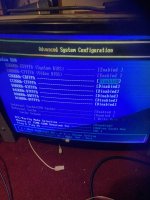

Here my card & jumpersI got awe64 in one of mine, I used to have Awe32 back in the day which sounded great with reverb on Duke Nukem 3D and the Raine Emu running Ninja Warriors sounded epic

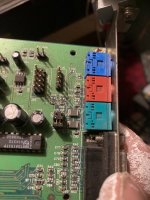
Jumpers only for sound out options ,
This is a plug and play card for windows but needs autoexc.bat in dos if I understand it correctly
Last edited:
100% you need to disable onboard audio, I assumed it was old PC without Audio onboard
Thats what I was saying, the later cards have no jumpers, you need to run sound blaster programme to see what its set too or just try after the onboard is disabled which should help
Thats what I was saying, the later cards have no jumpers, you need to run sound blaster programme to see what its set too or just try after the onboard is disabled which should help
awsome100% you need to disable onboard audio, I assumed it was old PC without Audio onboard
Thats what I was saying, the later cards have no jumpers, you need to run sound blaster programme to see what its set too or just try after the onboard is disabled which should help
Will try this when home little100% you need to disable onboard audio, I assumed it was old PC without Audio onboard
Thats what I was saying, the later cards have no jumpers, you need to run sound blaster programme to see what its set too or just try after the onboard is disabled which should help
Later 😉👍
When I disable Crystal sound ..
Shall I change my irQ from 10 to 7 or 5 first in my autoexc.bat file first ?
Shall I change my irQ from 10 to 7 or 5 first in my autoexc.bat file first ?