Fresh from the recent resurrection of another Final Fight bootleg (Link Here) I grabbed this one from the fix pile while the events of other one were still fresh (ish) in my mind.
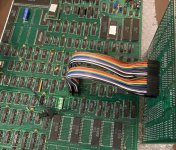
This one is different to that Soon Hwa one in that it has less PAL's and GAL's dotted around and has a daughter board with a 84 pin PLCC which I'm guessing handles graphics addressing, but other than that the layout isn't too dissimilar ... lot less ROMs too but they are all directly soldered as are all the RAM ... Sound section has many more components than the Single OKI Soon Hwa board does, which hopefully will mean the sound quality on this one is better, it surely can't be any worse ...
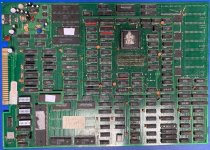
A few visible issues caught the eye on first look ... with most probably due to poor storage/handling at some point in it's life ... components half hanging off etc
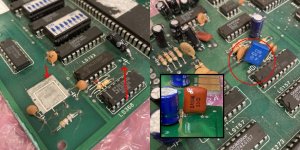
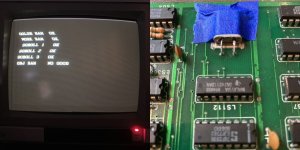
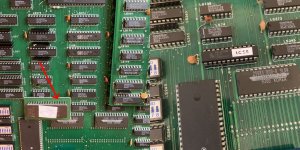
Board won't boot without a crystal providing a cpu clock, or solid reset signal (pic above left) so first up was a bit of research ... This board should have 2 crystals - a 24Mhz crystal and a 10Mhz crystal. The missing one near the cpu is the 24 Mhz so that's an easy enough fix - in went one of those. The blown cap is 10uf, again easy swap. but the missing capacitor I have no idea what it's value is so I tried looking for images of this board online and I found a few that are similar layout but none the exact same. Some versions have the PLCC on the main board and no daughter board, and I can see there should be 2 capacitors in that area but none are high enough resolutions to read any cap values. On most the pictures I looked at the 'missing' cap was a bit larger in physical size than the other. The 10uF cap is connected to the nearby LS132 (and GND) and the missing cap connects to the nearby diode (and GND). Haven't come across this dual reset capacitor setup before so asked chatGPT about it and it thinks Cap 1 (missing bigger one) creates the main power-on reset delay, whereas Cap 2 (10µF) filters / stabilises shaped reset. So recommends a 22uF or 47uF for the missing cap. Went with a 47uF ...
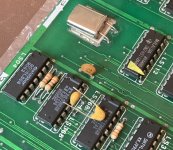
The resonator and film capacitor that are both hanging on by one leg (above right pic) are in the sound section so are not on the priority list. Usually tackle sound last.
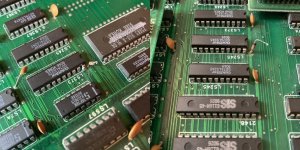
Next up ... crushed pins everywhere on the solder side of the main pcb, (see below) plenty touching where they shouldn't. Despite this, hardly any scratches to the pcb (a few superficial ones) and cant see any obvious trace damage at first glance. Spent a while straightening them all up and making sure nothing was shorting ...
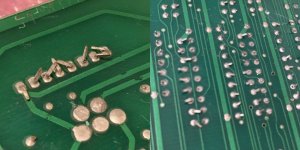
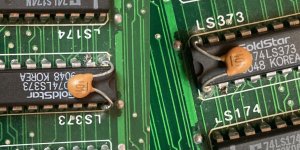
Last thing before first switch on .... corrosion and/or excess dried flux on the daughter board connector pins, this is present on both the daughter board and the main pcb socket soldering. PLCC socket on the daughter board has seen better days too .. scratched and scuffed, some pins in it look to be tarnished or corroded ... see below ...
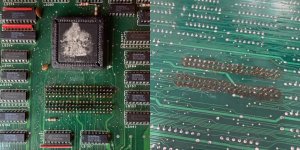
Did my best to clean this up and most of it did clean off in the end. Not 100% convinced this still wouldn't be an issue but it looked a lot better and worth a go to see what we'd get on screen when powered up.. Which was absolutely NOTHING not a sausage, screen didn't even blink ..
A quick probe of the CPU did show signs of life, replacement 24Mhz crystal must be all good as have a nice (50%) 12Mhz clock on pin 15 of the 68000 CPU Halt and Reset both HIGH Voltage on the pcb was also fine
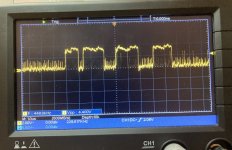
But with literally no acknowledgement by the monitor that the board was powered up I suspected a video timing issue, so checked the 10Mhz crystal and got some pretty crazy readings on the scope. Frequency jumping all over the place (see below) anywhere between around 50 - 70 MHz ... weird. OK but if the other crystal was knocked off completely and there are signs other components have been knocked loose or off all together, then it's not out of the realm of possibility this crystal has taken a few knocks and it's damaged inside.
With no new ones to hand, had to take a 10Mhz crystal off another board to put on this, and typically it's 40 year old legs just fell off during the transplant 😣 I've eventually managed to solder it back together but had to tape it down, it's connections are so fragile, it's broke off a few times. Just need it to last until some new ones arrive!
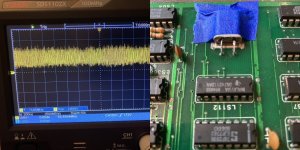
But this didn't change much, other than now the monitor was reacting to power on, a flicker, a slight change in the tone of black on the screen. Scope now measuring 30MHz on the crystal. Still weird. But it felt like there was now sync. Thinking now I'm not sure why I didn't just check the sync signal at the Jamma edge at that time (probably because my setup doesn't allow for easy board flip overs to access the underside of boards), but I didn't. Just went back to checking the CPU....
No activity on the address and data bus, but DTACK did show 3 little pulses of signal on power up, then would get stuck high. So seems like the CPU starts, attempts its first few bus cycles… then gets stuck waiting forever. Same was happening on A1 and ROM /enable pins. Bad ROM or data bus behaviour?
What I realised at this point was during this probing I didn't have the daughter board connected (I'd needed access under it, tracing signals /CE's, etc) ... and when I plugged it back in I was getting more activity, some data lines had signal, A1 and A2 had signal ... still nothing on screen. But then I did see a flicker, and it was when moving the daughterboard, it's not got the most secure connection. the pins are in the middle of the board so it can rock around on all corners if you press it. Yes small flickers on the screen when pressing the daughter board.
So I take it off and look at the PLCC, remove it from the socket, there is some tarnishing on some pins and some look a bit pushed back into the rear of the socket. So give it a clean best I can and ease out all the pins to try and get better contact to the chip.
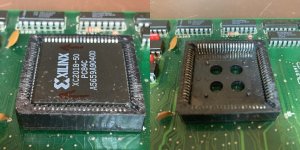
This is after I've cleaned it up best I can, you can't see it as well on these pictures but the tarnishing/light corrosion on the pins on the middle of the row is still present. Chip back in the socket and daughter board back plugged in and lo and behold the screen comes to life .....
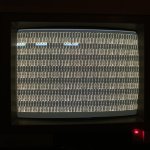
Rocking the daughter board around gently, varied the garbage on the screen but here in this position I can see the word 'COLOR' and I now have a good idea what's going on... The boot is stalling on the startup RAM tests. I saw this on the other board I fixed. That's why bus activity is minimal and the CPU is hanging shortly after power on.
I just couldn't see it because this daughter board is dodgy as hell with it's connection to the main board and its PLCC socket.
I'm guessing the boot is hanging on WORK RAM test (which comes straight after COLOR RAM) but I don't know for sure, and there's no point chasing a WORK RAM fault if it's not that.
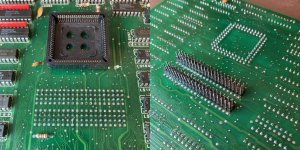
So I decide the best course of action is to sort out the connection issues on the daughter board in the hope that if that's all sorted I will be able to see exactly which RAM is failing the boot test. And when I looked properly at the connection pins and socket I realise I need to just remove it all and replace with new. Which means de-soldering 80 pins from the daughter board a 84 pin PLCC socket. A couple of the pins were loose already. You could tell someone else had identified the connection issues at some point before me and had tried to reflow the PLCC socket, as well as the connection pins, but a few of the via's had already gone so some traces weren't connected. They probably spent a load of time on it and when it didn't work got pissed off so didn't bother cleaning off the 20 gallons of flux they used which is why it looked so bad.
I took everything off, took ages 🙂 repaired broken via's and tiny traces. put in a new PLCC socket and a new connection socket on the main board (Another 80 pins!). Looked quite tidy in the end though ... And thankfully (or I may have not cleaned my flux off either!!) it worked, cleaned up the picture on screen 👊
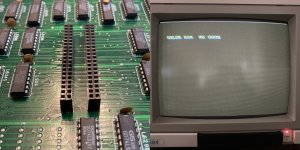
So ... COLOR RAM - NO GOOD ... or is it ... tbc
This one is different to that Soon Hwa one in that it has less PAL's and GAL's dotted around and has a daughter board with a 84 pin PLCC which I'm guessing handles graphics addressing, but other than that the layout isn't too dissimilar ... lot less ROMs too but they are all directly soldered as are all the RAM
... Sound section has many more components than the Single OKI Soon Hwa board does, which hopefully will mean the sound quality on this one is better, it surely can't be any worse ...A few visible issues caught the eye on first look ... with most probably due to poor storage/handling at some point in it's life ... components half hanging off etc
Board won't boot without a crystal providing a cpu clock, or solid reset signal (pic above left) so first up was a bit of research ... This board should have 2 crystals - a 24Mhz crystal and a 10Mhz crystal. The missing one near the cpu is the 24 Mhz so that's an easy enough fix - in went one of those. The blown cap is 10uf, again easy swap. but the missing capacitor I have no idea what it's value is so I tried looking for images of this board online and I found a few that are similar layout but none the exact same. Some versions have the PLCC on the main board and no daughter board, and I can see there should be 2 capacitors in that area but none are high enough resolutions to read any cap values. On most the pictures I looked at the 'missing' cap was a bit larger in physical size than the other. The 10uF cap is connected to the nearby LS132 (and GND) and the missing cap connects to the nearby diode (and GND). Haven't come across this dual reset capacitor setup before so asked chatGPT about it and it thinks Cap 1 (missing bigger one) creates the main power-on reset delay, whereas Cap 2 (10µF) filters / stabilises shaped reset. So recommends a 22uF or 47uF for the missing cap. Went with a 47uF ...
The resonator and film capacitor that are both hanging on by one leg (above right pic) are in the sound section so are not on the priority list. Usually tackle sound last.
Next up ... crushed pins everywhere on the solder side of the main pcb, (see below) plenty touching where they shouldn't. Despite this, hardly any scratches to the pcb (a few superficial ones) and cant see any obvious trace damage at first glance. Spent a while straightening them all up and making sure nothing was shorting ...
Last thing before first switch on .... corrosion and/or excess dried flux on the daughter board connector pins, this is present on both the daughter board and the main pcb socket soldering. PLCC socket on the daughter board has seen better days too .. scratched and scuffed, some pins in it look to be tarnished or corroded ... see below ...
Did my best to clean this up and most of it did clean off in the end. Not 100% convinced this still wouldn't be an issue but it looked a lot better and worth a go to see what we'd get on screen when powered up.. Which was absolutely NOTHING
not a sausage, screen didn't even blink ..A quick probe of the CPU did show signs of life, replacement 24Mhz crystal must be all good as have a nice (50%) 12Mhz clock on pin 15 of the 68000 CPU
Halt and Reset both HIGH Voltage on the pcb was also fine But with literally no acknowledgement by the monitor that the board was powered up I suspected a video timing issue, so checked the 10Mhz crystal and got some pretty crazy readings on the scope. Frequency jumping all over the place (see below) anywhere between around 50 - 70 MHz ... weird. OK but if the other crystal was knocked off completely and there are signs other components have been knocked loose or off all together, then it's not out of the realm of possibility this crystal has taken a few knocks and it's damaged inside.
With no new ones to hand, had to take a 10Mhz crystal off another board to put on this, and typically it's 40 year old legs just fell off during the transplant 😣 I've eventually managed to solder it back together but had to tape it down, it's connections are so fragile, it's broke off a few times. Just need it to last until some new ones arrive!
But this didn't change much, other than now the monitor was reacting to power on, a flicker, a slight change in the tone of black on the screen. Scope now measuring 30MHz on the crystal. Still weird. But it felt like there was now sync. Thinking now I'm not sure why I didn't just check the sync signal at the Jamma edge at that time (probably because my setup doesn't allow for easy board flip overs to access the underside of boards), but I didn't. Just went back to checking the CPU....
No activity on the address and data bus, but DTACK did show 3 little pulses of signal on power up, then would get stuck high. So seems like the CPU starts, attempts its first few bus cycles… then gets stuck waiting forever. Same was happening on A1 and ROM /enable pins. Bad ROM or data bus behaviour?
What I realised at this point was during this probing I didn't have the daughter board connected (I'd needed access under it, tracing signals /CE's, etc) ... and when I plugged it back in I was getting more activity, some data lines had signal, A1 and A2 had signal ... still nothing on screen. But then I did see a flicker, and it was when moving the daughterboard, it's not got the most secure connection. the pins are in the middle of the board so it can rock around on all corners if you press it. Yes small flickers on the screen when pressing the daughter board.
So I take it off and look at the PLCC, remove it from the socket, there is some tarnishing on some pins and some look a bit pushed back into the rear of the socket. So give it a clean best I can and ease out all the pins to try and get better contact to the chip.
This is after I've cleaned it up best I can, you can't see it as well on these pictures but the tarnishing/light corrosion on the pins on the middle of the row is still present. Chip back in the socket and daughter board back plugged in and lo and behold the screen comes to life .....
Rocking the daughter board around gently, varied the garbage on the screen but here in this position I can see the word 'COLOR' and I now have a good idea what's going on... The boot is stalling on the startup RAM tests. I saw this on the other board I fixed. That's why bus activity is minimal and the CPU is hanging shortly after power on.
I just couldn't see it because this daughter board is dodgy as hell with it's connection to the main board and its PLCC socket.
I'm guessing the boot is hanging on WORK RAM test (which comes straight after COLOR RAM) but I don't know for sure, and there's no point chasing a WORK RAM fault if it's not that.
So I decide the best course of action is to sort out the connection issues on the daughter board in the hope that if that's all sorted I will be able to see exactly which RAM is failing the boot test. And when I looked properly at the connection pins and socket I realise I need to just remove it all and replace with new. Which means de-soldering 80 pins from the daughter board a 84 pin PLCC socket. A couple of the pins were loose already. You could tell someone else had identified the connection issues at some point before me and had tried to reflow the PLCC socket, as well as the connection pins, but a few of the via's had already gone so some traces weren't connected. They probably spent a load of time on it and when it didn't work got pissed off so didn't bother cleaning off the 20 gallons of flux they used which is why it looked so bad.
I took everything off, took ages 🙂 repaired broken via's and tiny traces. put in a new PLCC socket and a new connection socket on the main board (Another 80 pins!). Looked quite tidy in the end though ... And thankfully (or I may have not cleaned my flux off either!!) it worked, cleaned up the picture on screen 👊
So ... COLOR RAM - NO GOOD ... or is it ... tbc
Last edited: