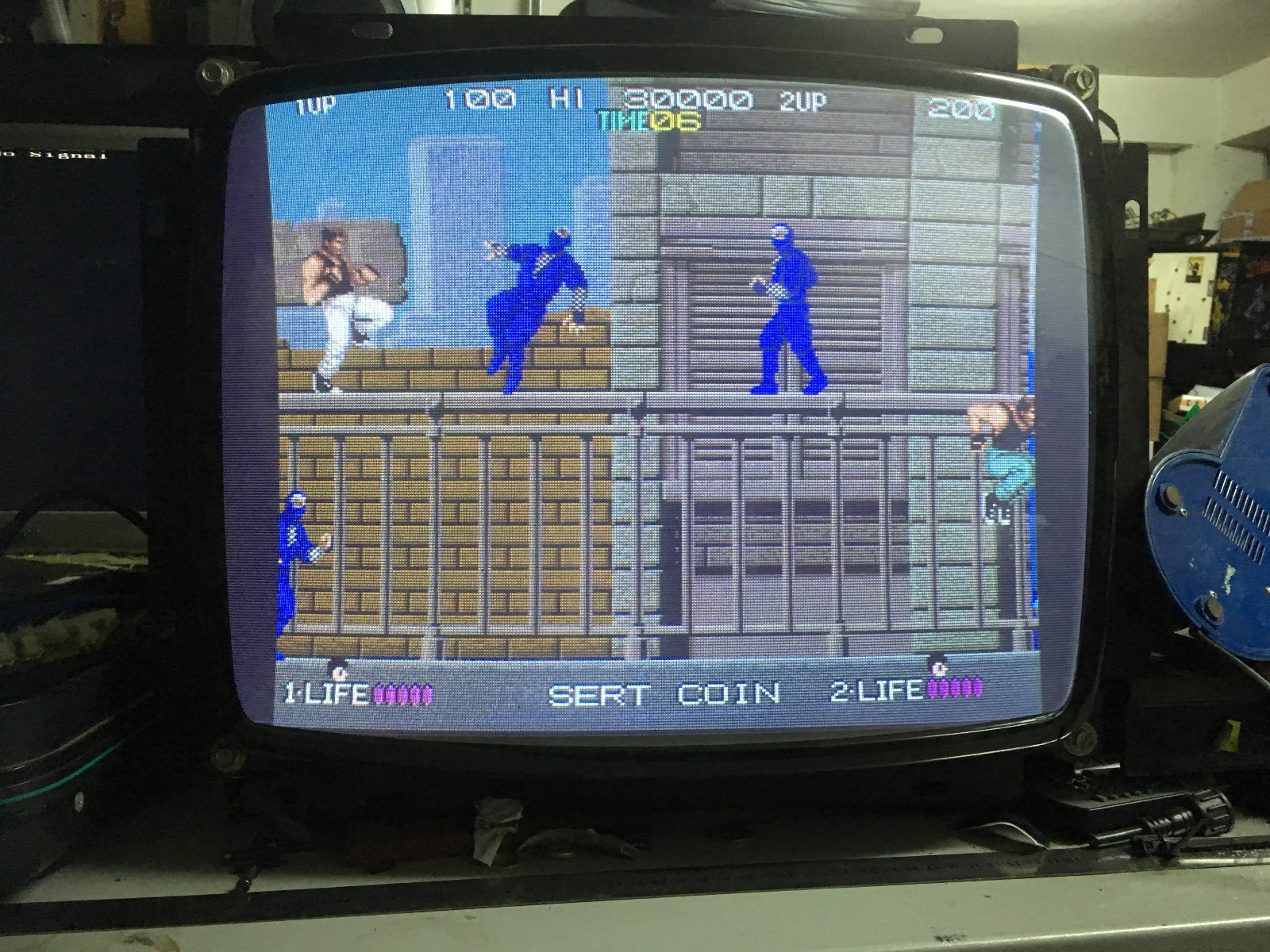
FIXED-Dragonninja missing background

Lurch666

Active member
Feedback
21 (100%)
Credits
4,519CR
Just bought a few boards to fix off AlexK (thanks dude) and the first I'm looking at is a dragon ninja boot.

As stated by Alex it's running with sound but had no graphics.

Turned the power up a bit and now I have all the sprites but no background.

Game plays fine.

Looking around the net I can't find any schematics but have found mention of them on a repair log.

Anyone know where I could find the schematics-they will probably be for the original boards but hoping it will give me some pointers for fixing this bootleg.

Lurch6662019-01-14 19:15:52
 

patloz

Active member
vacBacker
Feedback
12 (100%)
Credits
844CR
If the worst comes to the worst and you are struggling I have a bootleg working DN PCB with JAMMA adapter if you want to borrow it to do some comparison checks.

Just need to check if my hookey board is the same as yours.
 

TheDaddy

Senior Member
vacBacker
Feedback
14 (93%)
Credits
7,230CR
I think there is scematics for them but i cant look till tomoz when i am back on a pc (phone is useless for searching ! Lol ) what voltage are you throwing througb it to get sprites ? Bootlegs Always need more to run. Poss its a voltage issue, would check caps maybe.

Hope this helps,

Dave.
 

Lurch666

Active member
Feedback
21 (100%)
Credits
4,519CR
I have searched the usual places including the list of sites on the forum and google but came up blank.

There is a manual and a two page pinout and dipswitch diagram but no schematics.

Hopefully it's my googlefu letting me down.

As for voltage I just messed with the 5V adjust on my jamma psu.A lot of boards with sprite problems can be fixed with a slight voltage rise but to me the missing backgrounds are something else.

The colours change on different screens but I think it's something missing that actually draws the background.

Will check the voltage at the chips though.

Ifthat doesn't turn up anything and I can't get schematics for it will have to go round the board looking for a missing signal.
 

John Bennett

Senior Member
vacBacker
Feedback
10 (100%)
Credits
5,332CR
It's not a board I know much about, but I would expect the original PCB uses custom ICs for graphics, whereas the bootleg would use off-the-shelf components.
If so, they tend to use similar circuits - ROM SRAM, counters, adders...
Maybe find the background/tile ROMs and scope them to see if they're active and work from there.
 

Lurch666

Active member
Feedback
21 (100%)
Credits
4,519CR
Will have a look around the roms but if it's not the roms at fault I will be getting a signal from every rom on the board so won't be able to eliminate them that way.

Will check on mame and see if that gives me some hints on which roms are background.

Also all the chips are soldered in including the roms.

I have shorted some pins on the memory chips and on most the sprites become corrupted but on three in a group I didn't get the sprites messing up so they are maybe the ones that hold the background.

Just want to hold off removing anything till I have found out if the schematics are available first.
 

John Bennett

Senior Member
vacBacker
Feedback
10 (100%)
Credits
5,332CR
May be of use - bootlegs are listed amongst the ROMs at the bottom:
https://github.com/mamedev/mame/blob/master/src/mame/drivers/dec0.cpp

Would seem unlucky to lose all tile ROMs, but maybe the RAM/decoding driving them or the palette handling after them.
 

Lurch666

Active member
Feedback
21 (100%)
Credits
4,519CR
Looked at this again today.

Noticed that the first time
the gameplay demo starts there is a sliver of background on the
right of the screen (bottom of my screenshot as I can't be bothered to
turn the monitor).

2019-01-11_15.50.04.jpg


Shorting pins on some of the roms causes changes to the tiny bit of background showing so it looks like the background is working but not being displayed properly.

Noticed
some proms on the board that seem to have something to do with sprites
so I'm wondering if they are affecting the background as well.

EDIT:Have found out that hippodrome is compatible with dragon ninja so I'm hoping those schematics could shine some light on this.

Lurch6662019-01-11 18:07:41
 

TheDaddy

Senior Member
vacBacker
Feedback
14 (93%)
Credits
7,230CR
Yeh robocop bootleg is a big 2 set board and takes some voltage. I have got to do a mod on the psu as i can only get 4.5v at the board and the psu only goes up to 6.2v Pain in the arse to diagnose and repair as slightly different than the original.mine was in the worse condition ever, but after many hours i now have it running with audio and sprites. Have a background issue though so thats next.

Dave.

Dave.
 

Lurch666

Active member
Feedback
21 (100%)
Credits
4,519CR
After messing around trying to find this fault I've made a little progress.

This is a two board set with three connectors.

As part of troubleshooting I always swap connectors around to see if it makes any difference and it didn't but I just tried it with one of the connectors disconnected.

With connector 1 or 3 disconnected the game doesn't run but with connector 2 missing it runs.

The sprites are still ok but the background has a few garbage characters in it BUT that garbage scrolls as it should do when a player moves.

I have checked the signals and they are getting through the connector fine so something is missing either in the signal getting to the connector or after it.

A lot of the connections on that one seem to do with audio but the other connections go off and are hard to follow so some tracing is going to have to be done but at least it's narrowed things down a bit.
 

John Bennett

Senior Member
vacBacker
Feedback
10 (100%)
Credits
5,332CR
I’d be wary of shorting out things though - likely to kill devices - TTL drives micro Amps and isn’t short-circuit proof
However if running you finger over things makes stuff change, that’s a sign of a broken device somewhere on that bus.
 

Lurch666

Active member
Feedback
21 (100%)
Credits
4,519CR
I just short out address or data pins on chips I know the pinout for.

Never had any problems doing it but maybe I've been lucky.

Anyway looking around to see if my board might be missing chips I found some pictures on ebay.

s-l1600.jpg


The blue to the right of the image matches mine and it looks like bootlegs (and maybe originals) always have that stripe on the right that has nothing to do with the background.Another dead end.

Anyway the circuit tracing continues.
 

Lurch666

Active member
Feedback
21 (100%)
Credits
4,519CR
OK.Remembered I have a video probe.Should of thought of this earlier.

Using it I easily found the eproms that hold the background and can see data coming from them.

Also when the player moves I can see the data move as if it were the background.

I noticed the EO is stuck low on those eproms even though it isn't tied to ground so followed that to some 2018 memory and a couple of ls245 chips.Swapped a couple but no difference so might be a dead end.

Going to see if I can follow the data to the point it stops appearing and hopefully find the fault that way.
 

TheDaddy

Senior Member
vacBacker
Feedback
14 (93%)
Credits
7,230CR
There should be some LS157's somewhere that merge video data. I have had a few of these die and cock backgrounds up. Maybe worth a look ??

Dave.
 

Lurch666

Active member
Feedback
21 (100%)
Credits
4,519CR
Just might have had a breakthrough.

Looking on the CPU board I could find no sign of the background data so I started to look at the edge connectors.

I realised that my earlier assumption about it being something to do with the 2nd connector was possibly wrong as even though the game still ran the data could still be going through one of the other connectors but since the game wasn't running with the other connectors off I wouldn't know.

Anyway checked ALL the edge connectors on the graphics pcb and still couldn't find the background data so I now knew it wasn't making it to the CPU pcb.

Looked for chips connected to the connectors and found a LS273 at 12U (bottom right corner) that had the background data on it and that had traces seemed to eventually go near one of the connectors.

Piggybacked a good chip on the back and got fuzzy backgrounds.

Hopefully replacing the chip will fix this but if not I must be close now.

EDIT:That was it.PCB is fully working now.

Thanks for all the suggestions-they helped me narrow it down a lot.

Lurch6662019-01-14 19:17:08
 
Top