

Evening All,
I've just posted about this in another thread, but in the interests of belts and braces, thought I'd leave it here too.
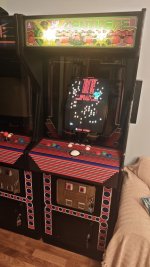
Earlier on today, I finished wiring a trackball panel for my Goliath. It's a bespoke effort. Part of the group buy organised by EddieC, and has turned out very well.
The buttons all work fine. And it's obvious when I 'tab out' into the Groovymame UI that the trackball works too. You can use it like a mouse to move the pointer round the screen. Unfortunately, it doesn't seem to work in-game. I've loaded up Centipede. I can credit up, start a game, and fire. But can I move the wee can-on? I can-not.
Any ideas as to how to sort it out? Could it be a .ini thing? It's been a very long time since I messed about with those. Not even sure I can remember how to disable to the 'nosave' mode and boot back into Windows :-(
Any tips greatly appreciated!
Cheers!
I've just posted about this in another thread, but in the interests of belts and braces, thought I'd leave it here too.
Earlier on today, I finished wiring a trackball panel for my Goliath. It's a bespoke effort. Part of the group buy organised by EddieC, and has turned out very well.
The buttons all work fine. And it's obvious when I 'tab out' into the Groovymame UI that the trackball works too. You can use it like a mouse to move the pointer round the screen. Unfortunately, it doesn't seem to work in-game. I've loaded up Centipede. I can credit up, start a game, and fire. But can I move the wee can-on? I can-not.
Any ideas as to how to sort it out? Could it be a .ini thing? It's been a very long time since I messed about with those. Not even sure I can remember how to disable to the 'nosave' mode and boot back into Windows :-(
Any tips greatly appreciated!
Cheers!
