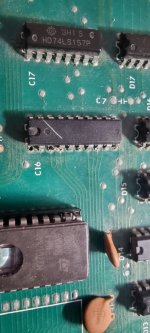
Got an original hyper sports that was booting to a blank screen. The customs on the video PCB were corroded so I took them out and put them into turned pin sockets to preserve the legs.
Will also replace the corroded sockets with turned pin sockets in the PCB instead of normal sockets so I can plug these sockets into the ones in the PCB without damaging the socket.
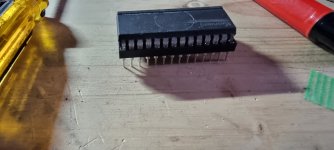
Thanks to @Vamino I already have a Konami road blasters which has a near exact PCB so for testing I could use the customs from that PCB knowing they all work.
Once I have the hyper sports working I will swap back the original customs to see which ones are still fine.
Once I had known good customs in there I got a screen full of 0s but no other sign of life.
Next was testing the clock and reset and neither of these were present.
The Q and E clock signals that are required by the konami-1 CPU are generated on the video PCB from the custom at D1 but the reset is generated on the CPU PCB but passes to the video PCB then back to the CPU PCB. These signals go through the 244 at A1 and this is where they we failing so it looked like A1 was bad.
Now for some reason (either they had a surplus of 241s or a shortage of 244s) they used 241s to replace quite a few 244s on this PCB.
The main difference is the second enable on pin 19 is active high on a 241 where it's active low on a 244.
To cover this they cut pin 19 of the 241 so it wouldn't be held to GND and soldered it to pin 20 to hold it high.
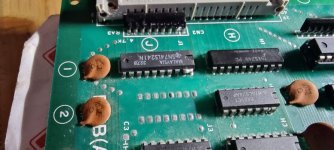
Now if I wanted to replace this with a socket I would have a problem since I wanted to use 421s to keep things he same.
I ended up removing the bad chip,cutting the trace that connected pin 19 to pin 1 (pin 1 was connected to GND to hold it low) then after I had fitted the socket I connected pin 19 to pin 20 on the underside of the PCB. I could then drop an unmodified 241 into the socket and have it work normally.
Doing this I got reset and clock. but still wasn't getting any activity.
CPU roms checked out good but then I discovered the W/R were constantly high on the CPU ram.
Now the read/write signal is generated by the konami-1 CPU and also goes to the video PCB via another 244 at G1 on the video PCB and looking with the scope showed the signal was making to to G1 but not leaving it.
And since after the video PCB the read/write goes back to the CPU as write enable (Wren) that was the reason the ram wasn't active.
So that was another 241 instead of a 244 and replacing that got some activity.
The game was now booting but the screen was still all 0s. Sound was working though.
You can see the name entry screen here and the colours are moving but no proper graphics are showing:
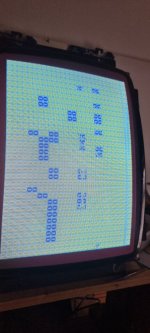
So searching around I found little to no data activity on the rams at G9 and G10 on the video PCB.
This data comes via the 245 at H1 then goes to four chips (E9,E10,H10 and J10) and one was pulling the data signals down.
Since I had most issues with the chips buffering the connections between the PCBs I swapped out H1 first and this improved the signal but it was now squashed for some reason so I figured one of the other chips were affecting it.
Not wanting to shotgun all four chips I cut the D0 pin from H10 and J10 and checked the signal again.
No change so I soldered the legs back together.
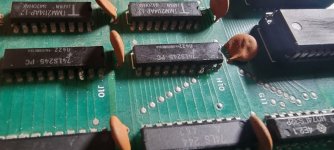
And then tried cutting the D0 leg on E9 and that sorted the signal out.
Replacing that gave me this:
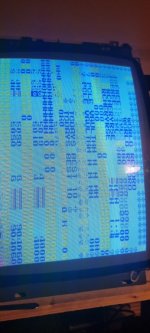
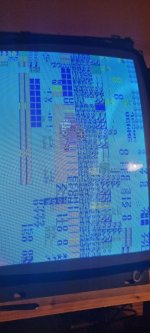
Getting there.
So now I hoped I could use the hypersports test rom to see if I could get any useful info from that.
It showed enough to tell me the G9 and G10 ram was bad.
I had already socketed these thinking they might be the cause of the data issue so I knew they were both good.
Then I found a poor address signal on pin 2.
This was down to a floating pin on the 157 at G6.
I piggybacked that and that cleared the doubled/garbled text.
Colours still bad and the background is still blue but I'm near to fixing this.
Need to replace the sockets for the customs and the graphics roms,replace the bad graphics roms (some have broken or badly corroded legs) and sort out the few remaining issues.
This has been an entertaining fix so far.
Thanks to @TheDaddy for sorting me out with a good deal for this PCB.
Will also replace the corroded sockets with turned pin sockets in the PCB instead of normal sockets so I can plug these sockets into the ones in the PCB without damaging the socket.
Thanks to @Vamino I already have a Konami road blasters which has a near exact PCB so for testing I could use the customs from that PCB knowing they all work.
Once I have the hyper sports working I will swap back the original customs to see which ones are still fine.
Once I had known good customs in there I got a screen full of 0s but no other sign of life.
Next was testing the clock and reset and neither of these were present.
The Q and E clock signals that are required by the konami-1 CPU are generated on the video PCB from the custom at D1 but the reset is generated on the CPU PCB but passes to the video PCB then back to the CPU PCB. These signals go through the 244 at A1 and this is where they we failing so it looked like A1 was bad.
Now for some reason (either they had a surplus of 241s or a shortage of 244s) they used 241s to replace quite a few 244s on this PCB.
The main difference is the second enable on pin 19 is active high on a 241 where it's active low on a 244.
To cover this they cut pin 19 of the 241 so it wouldn't be held to GND and soldered it to pin 20 to hold it high.
Now if I wanted to replace this with a socket I would have a problem since I wanted to use 421s to keep things he same.
I ended up removing the bad chip,cutting the trace that connected pin 19 to pin 1 (pin 1 was connected to GND to hold it low) then after I had fitted the socket I connected pin 19 to pin 20 on the underside of the PCB. I could then drop an unmodified 241 into the socket and have it work normally.
Doing this I got reset and clock. but still wasn't getting any activity.
CPU roms checked out good but then I discovered the W/R were constantly high on the CPU ram.
Now the read/write signal is generated by the konami-1 CPU and also goes to the video PCB via another 244 at G1 on the video PCB and looking with the scope showed the signal was making to to G1 but not leaving it.
And since after the video PCB the read/write goes back to the CPU as write enable (Wren) that was the reason the ram wasn't active.
So that was another 241 instead of a 244 and replacing that got some activity.
The game was now booting but the screen was still all 0s. Sound was working though.
You can see the name entry screen here and the colours are moving but no proper graphics are showing:
So searching around I found little to no data activity on the rams at G9 and G10 on the video PCB.
This data comes via the 245 at H1 then goes to four chips (E9,E10,H10 and J10) and one was pulling the data signals down.
Since I had most issues with the chips buffering the connections between the PCBs I swapped out H1 first and this improved the signal but it was now squashed for some reason so I figured one of the other chips were affecting it.
Not wanting to shotgun all four chips I cut the D0 pin from H10 and J10 and checked the signal again.
No change so I soldered the legs back together.
And then tried cutting the D0 leg on E9 and that sorted the signal out.
Replacing that gave me this:
Getting there.
So now I hoped I could use the hypersports test rom to see if I could get any useful info from that.
It showed enough to tell me the G9 and G10 ram was bad.
I had already socketed these thinking they might be the cause of the data issue so I knew they were both good.
Then I found a poor address signal on pin 2.
This was down to a floating pin on the 157 at G6.
I piggybacked that and that cleared the doubled/garbled text.
Colours still bad and the background is still blue but I'm near to fixing this.
Need to replace the sockets for the customs and the graphics roms,replace the bad graphics roms (some have broken or badly corroded legs) and sort out the few remaining issues.
This has been an entertaining fix so far.
Thanks to @TheDaddy for sorting me out with a good deal for this PCB.