
You are using an out of date browser. It may not display this or other websites correctly.
You should upgrade or use an alternative browser.
You should upgrade or use an alternative browser.
Imgur site blocked so background doesn't load anymore
- Thread starter N10248
- Start date



I know, I saw it here: https://x.com/Pirat_Nation/status/1973025541159817374 earlier
It started last night, looks like thats the only image that this site is loading from there.
It started last night, looks like thats the only image that this site is loading from there.

switching to default is a work around for now


Cheers @Hurray Banana thought it was just me.


It *ONLY* just started happening to me today ... which tells me that my smart DNS has been doing its very best up until this point. 🤔
I've whipped up the following User Style for those in non-FF browsers ...

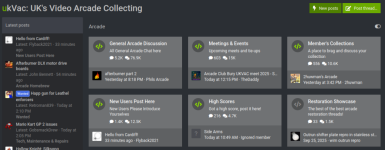
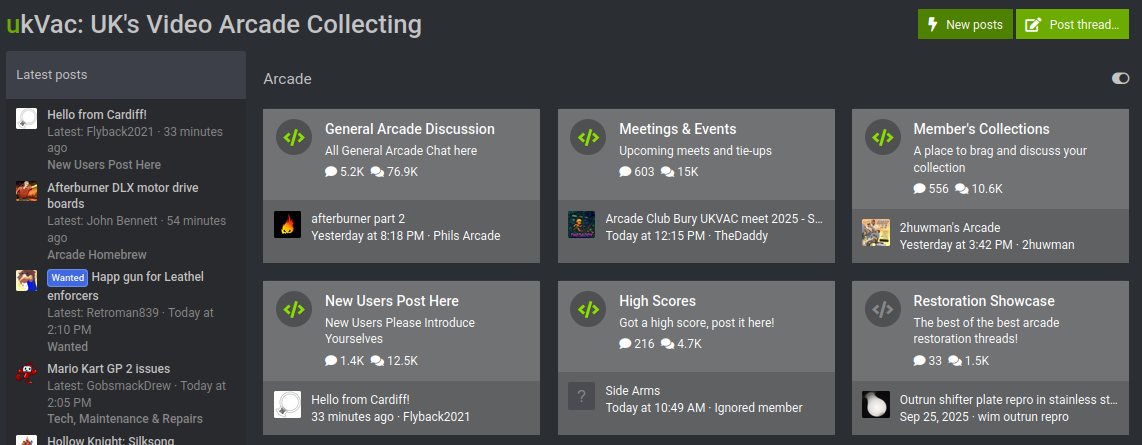
Should endup looking like this:
I've whipped up the following User Style for those in non-FF browsers ...
uKvAc - Imgur Fixur (Transparent Background)
 greasyfork.org
... but if you're in FF you can just paste the following into your UserContent.css file.
uKvAc - Imgur Fixur (Transparent Background)
Removes the error, replacing with nothing and making the background colour transparent.
greasyfork.org
CSS:
@-moz-document domain(ukvac.com) {
  .nodeImgPreview {
    background-color: transparent !important;
    background-image: none !important;
  }
}
Should endup looking like this:
You can also use my 'transparent avatar' thing to ensure that your transparent avatar works (at least for you), too ...
greasyfork.org
uKvAc - Avatar - Transparent Background
This removes the xenforo php enacted style which colours the background of the avatar image to the same as the block-container class for a given theme
greasyfork.org
Last edited:

i think its due to some of the content it hosts and legalities surrounding adult content in this country

Imgur blocking access from the UK is down to the new Age Verification rules, easier for them to block access than setup age verification just for a single country.
The issue with the missing background pic is surely something the site admins should be fixing by hosting the image elsewhere?
The issue with the missing background pic is surely something the site admins should be fixing by hosting the image elsewhere?


Is it that critical? Can't you just use your imagination?
Looks shit and as its light its hard to see the text.
Dave.
D
Deleted member 7540
Guest
I've had this for some time. i wondered what it was. Got to love the UK gov and their dumb ideas.
I just live with it as im very much a "dark mode" kinda guy especially when it comes to text.
I just live with it as im very much a "dark mode" kinda guy especially when it comes to text.
not an issue for me on my PC but on mobile it looks dreadful
i very rarely do anything other than watch....never mind
i very rarely do anything other than watch....never mind

Well as per my unintentially cheeky post in site announcements 'me too'. UK blocks itself in a flawed and stupid manner from the rest of the English speaking world (and more) shocker. The so called internet should really be rebranded nimbynet: Tim Berners-Lee saw this shambolic mess coming some years back!

Happens on default skin, too.
Reminder to others that you can either use:
( sorry to admins that we're bringing this up ... )I use the default skin, @Hurray Banana , and it started happening to me ...
... so (as you can see in @karlcdoe's link, above, and specifically, here) ... I just patched it out myself ... still ... it's happened in the default skin.
Reminder to others that you can either use:
- User Styles - You can either modify your userContent.CSS or use a browser extension/add-on:
- userContent.CSS (Mozilla Based Browsers Only)- I personally prefer this as it's less things slowing up my browser:
- Understand - Lookup 'userContent.css' online to get some basic knowledge ( optional 😏 )
- Locate - Find your
userContent.cssfile - Modify- Either:
- Add To userContent.css - Add a section to
userContent.csswith the code in the spoiler, below - Import Local CSS File - If you have (or intend to have) a lot of restyling then put an 'import' line at the top of userContent.css ... something like
@import url("PATH_FROM_YOUR_USERCONTENT_FILE/ukvac.css");
- Add To userContent.css - Add a section to
- Extension / Add-on - Lookup 'Stylish' in your browser's extension/add-on store and get used to that (I don't use them, so cannot help)
- userContent.CSS (Mozilla Based Browsers Only)- I personally prefer this as it's less things slowing up my browser:
- User Scripts - Install a 'User Script' extension/add-on, I prefer Violent Monkey (links to browser app stores are here) and add the script linked above.
CSS:
@-moz-document domain(ukvac.com) {
  .nodeImgPreview {
    background-color: transparent !important;
    background-image: none !important;
  }
}
Last edited: