J-Pac Controls Problem

owen.global

Newbie
Credits
7CR
Hi Guys,

Newbie here, so be forgiving :)

I got myself an awesome Jamma Cab last week, with a J-Pac.

after fiddling with soft 15kHZ and a fresh install of XP the monitor is working perfectly.

Unfortunately the controls are not working at all, not in Mame and not with 'notepad' (as someone pointed out should work)

The guy who sold me the Cab is a long time member oft he forum here and says the controls worked fine with the jamma boards he was using.

My instincts tell me its got to be a grounding issue since the problem affects all the controls not just 1 or 2. the insides of the cab are pretty neat and the loom looks ok.

I am a bit flummoxed as to what's wrong and all i can think of is to open up the control panel and check all the connections.

ONE MORE THING, the sound card on the pc isnt working yet since i didnt install the driver yet. i know the sound card can often manage the joystick etc in the old days. is it possible that that's what the problem is?

Also does anyone know how to open the front control panel on a cab like this:

Fairground.jpg


Thanks

Owen
 

DanP

Administrator
Staff member
vacBacker
Feedback
5 (100%)
Credits
2,232CR
Do you have a regular jamma board to test the cab/controls with? Be good to verify they are working first (for yourself).

What type of J-Pac is it? Is it PS/2 or USB? If the latter, can you see any USB devices installed? I've only ever used PS/2 J-Pacs but the install has always been seamless into an already working Jamma cab. Maybe worth showing us some more pix of how it's all wired up?

Dan
 

owen.global

Newbie
Credits
7CR
DanP said:
Do you have a regular jamma board to test the cab/controls with? Be good to verify they are working first (for yourself).

What type of J-Pac is it? Is it PS/2 or USB? If the latter, can you see any USB devices installed? I've only ever used PS/2 J-Pacs but the install has always been seamless into an already working Jamma cab. Maybe worth showing us some more pix of how it's all wired up?

Dan

I don't have a Jamma board unfortunately, but the guy i got the cab from has and said thay all worked fine, he is a regular poster here and a very nice guy, no reason to doubt him, he has been very helpful so far.

the Jpac is USB, test lights are on and green. usb is connected to the left hand ps/2 slot and the keyboard is connected directly to the pc.
 

taito6581

User
Feedback
2 (100%)
Credits
64CR
on the jpac should be a few leds. if they are off you have no usb connection. aditionally you can also download the config program from ultimarc and see if the jpac is detected correctly. (some older (2y+) jpacs need an older software version btw in order to be detected properly but lets assume that this is not the case here)

when you have leds but no feedback/input then its the jamma cable
 

owen.global

Newbie
Credits
7CR
taito6581 said:
on the jpac should be a few leds. if they are off you have no usb connection. aditionally you can also download the config program from ultimarc and see if the jpac is detected correctly. (some older (2y+) jpacs need an older software version btw in order to be detected properly but lets assume that this is not the case here)

when you have leds but no feedback/input then its the jamma cable

Hi, the led's are all on, the self test is on green (constant) the top led over the VGa is constant green, the below led by the vga is contstant red (but this doesnt affect controls i heard)

i have the jamma software from ultimarc and nothing from the controls. my Jamma is new so using current software. how do i tell id the software is detecting the JPAC

Cheers

owen.global2013-10-31 12:06:10
 

DanP

Administrator
Staff member
vacBacker
Feedback
5 (100%)
Credits
2,232CR
Can you not test the J-Pac is getting control input by just grounding a contact just to see if the PC is getting something from it that it can interpret?
 

owen.global

Newbie
Credits
7CR
DanP said:
Can you not test the J-Pac is getting control input by just grounding a contact just to see if the PC is getting something from it that it can interpret?

Im pretty good with electronics but can you explain abit more. im an amateur. :)

once i have the control panel open i should be able to do this, but can u explain exactly how?
 

Purity

The Oracle
vacBacker
Feedback
17 (100%)
Credits
2,999CR
Open the coin door at the front, put your hand in to the left and the right of the control panel and there should be some clips that you can undo on either side to release the front of the control panel, to get access to the joystick, button wiresPurity2013-10-31 12:30:02
 
  • Like
Reactions: trm

jonhughes

Active member
vacBacker
Feedback
52 (100%)
Credits
1,156CR
I have one of these J-Pac boards that no longer functions after accidentally pulling out the PS2 cable while it's powered up. It instantly kills the 'keyboard' chip (for a better word for it). The video output on it still works fine but there are no controls. That might well be your problem
smiley6.gif
 

Purity

The Oracle
vacBacker
Feedback
17 (100%)
Credits
2,999CR
I'm not massively familiar with J-Pacs, but could you not test this outside of the cab?

e.g. Connect it to a PC with the usual connections - keyboard, usb, vga etc

Then wire up an button to one of the screw terminals. If it fails to register anything (and you can try all the screw terminals out) then that would indicate a problem with the J-Pac.

If there working then something is going wrong between the Jamma loom and the J-Pac

EDIT: Here's a helpful diagram:

MicroSwitch1.jpg

Purity2013-10-31 19:51:37
 

Purity

The Oracle
vacBacker
Feedback
17 (100%)
Credits
2,999CR
Also what does the self-test do?

Using
the Self-Test LED


The self-test LED indicates status and errors by using flash patterns.

This is the sequence of events
on power-up:
Power applied: One short flash
Then
PS/2 Interface detected: a second short flash and then if switch test
passed: LED stays lit
Or
USB Interface detected
Then
USB Interface initialized by PC and switch test passed: LED stays lit
Or
If inputs test fails: LED flashes a number of times to indicate which
switch is shorted or faulty. LED then stays off. This does not
necessarily mean the board will not work, but indicates a switch wiring
or other problem which should be investigated. Check the table below
for the failing input. Check switch wiring. Try disconnecting this wire
and see if the flash pattern changes.

Error Conditions:

LED never lights:
Board faulty, cable faulty, PC not powering up correctly.
LED
gives two short flashes and
the I-PAC is connected via
USB:
The board has mis-detected a PS/2 interface. Check USB controller is
enabled and working on the PC. Try another USB device as a test.
LED
gives one short flash then
stays off:
I-PAC has detected a USB controller but the PC is not detecting the
device as having been connected. Check USB drivers on PC.
LED
flashes 3 or more times
after initially lighting:
Switch test failed. Check chart below for failing input. Check switch
wiring. Try disconnecting this wire and see if the flash pattern
changes.
 

owen.global

Newbie
Credits
7CR
jonhughes said:
I have one of these J-Pac boards that no longer functions after accidentally pulling out the PS2 cable while it's powered up. It instantly kills the 'keyboard' chip (for a better word for it). The video output on it still works fine but there are no controls. That might well be your problem
smiley6.gif

I really hope not :(
Did your self test led light up after it stopped working, Mine still does.
 

jonhughes

Active member
vacBacker
Feedback
52 (100%)
Credits
1,156CR
I'm not sure. I remember putting all MAME things away for quite a while, then building a substantial board collection, only to sell all my boards (now regrettably) and go back to MAME. I now have a manageable collection. It pains me to think what I sold - Ghouls & Ghosts, Golden Axe 2, Willow, Bubble Bobble, Flicky and more classics.....OUCH!
smiley13.gif


I set the whole thing up again after being stored away for quite a while and plugged in the PS2 cable to the J-PAC while the PC/POWER was on. No good - killed the 'keyboard' convertor chip. I remember it being in the instructions at the time, telling me not to do that.

Anyway, I just bought another J-PAC and everything is back to normal. I didn't troubleshoot it because I hadn't followed the instructions (and knew I'd fried it at that point).

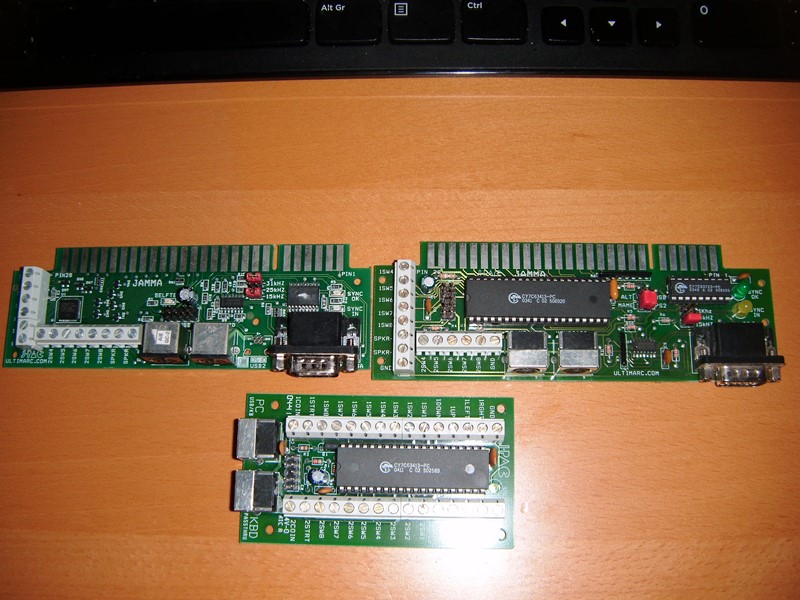
Which version do you have? The older version to the right or the newer version to the left. The version to the right (old) is the one I killed. The one below is the I-PAC - note the big 'keyboard' chip on the I-PAC & (older) J-PAC. I wonder if the chip from the I-PAC is compatible with the chip from the J-PAC and better still could be re-programmed to another chip to get it going again.

DSCF7053.JPG


jonhughes2013-11-01 07:31:27
 
Top