
JPAC Repair?

JonnyG

Active member
Credits
140CR
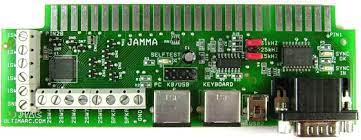
Is anyone set up to troubleshoot and hopefully repair a JPAC for me? It's the version shown here...
jpac.jpg


It works fine when connected to my cab's PC, but shows a yellow triangle in device manager and is not programmable in WinIPAC. Tested it on another PC and same result. IIRC, the sync went around a year ago and I had to remove all the jumpers and solder the sync pins on the VGA header to get a stable pic.

This is my 2nd JPAC after replacing another faulty one (original version with large IC) and I know I could just purchase the newer version but would really like to get to the bottom of why they keep failing on me.

Many thanks for any assistance.
 

Fantazia2

Active member
vacBacker
Feedback
13 (100%)
Credits
2,246CR
Not sure if its would be worth fixing it unless you could do yourself or find someone willing to do it with their time for free due to the price of buying a new one being cheaper that paying someone to look at it.

With it being the older version are you using it with a USB cable or PS/2 cable as they have the option for both, and have you tired with the other type if you have it avaiolable, also not sure what powers the IC for the controls but would guess it came from the PS/2 or USB cable.

Dont know if you would get any reply from Ultimarc if you asked about it considering 2 of them have failed but them being the old version.
 

big10p

Coins detected in pocket!
vacBacker
Feedback
13 (100%)
Credits
6,086CR
When you say it works, does that include control inputs? I've killed the keyboard controller on a couple (my fault) so that video works fine but control input is dead. I did email Ultimarc about getting them repaired, but it wasn't viable.
 

Retroman839

Senior Member
vacBacker
Feedback
13 (100%)
Credits
8,288CR
I got a new chip from andy
Still got it unused
As Jpac worked again

I once was checking my Jpac and it wouldt work
( picture no controlls )
Then some time later it worked

I’m sure it was me
I was doing something wrong
Often wonderd if it was my ps2 to usb connectors
The usb lead or the pc usb socket faulty
 

JonnyG

Active member
Credits
140CR
So to answer everyone's questions, not necessarily in order...

It's powered with a USB to PS2 lead, trying another one is a decent shout, however it is functional for the display and inputs so I would guess it's OK otherwise I would expect just display and no controls.

As I say the only indicator that there is something amiss is the yellow alert icon in device manager and the fact I can't reprogram it in WinIPAC.

I guess the only real thing I can do is ask the question to Andy and see if he has any advice.

I know these things aren't prohibitively expensive, just irks me a bit when things go wrong after not being messed with, but that's arcade machines innit!
 

Fantazia2

Active member
vacBacker
Feedback
13 (100%)
Credits
2,246CR
If its one of the USB to PS/2 converters supplied by Ultimarc I have read on other problems that they are a bit rubbish and could be causing the issues, other people with similar issues with controls and nought another JPAC only to find out that it was the USB to PS/2 converter that is an issue, and it wasn mentioned that it was a known issue by Ultimarc as well.
 

Retroman839

Senior Member
vacBacker
Feedback
13 (100%)
Credits
8,288CR
I used to get an issue of

Kbd 66666666666666

But that was the keyboard not being liked by the pc
Just saying try swapping usb leads around in your pc
Try another keyboard

But also sound like you pc isn’t recognising the built on
firmware
Possible the firmare chip is faulty
 
Top