Monitor problems (WG 19K7203)

DaveAS

User
Credits
336CR
Hi,

I recently bought a Wells Gardner 19K7203 to replace a worn out Kortek beasty in my Firefox. It's virtually brand new, although it may have been in storage for 5-6 years. All dreams of a lovely, pristine picture were dashed pretty quickly on power up when the monitor showed a number of faults...

- Any full-level colour filling the screen appears on the top few lines
only and is cut from the remainder. For example, white text on a solid
blue background will appear as yellow text on a black background.
Colour bars are displayed correctly and a problem only occurs when
there's a large amount of a single colour.
- Dark, horizontal bands appear across some areas of the picture. These are content dependant and don't move when the display is static.
- There is a high pitched squeel when the display is
predominantly dark. Volume depends on brightness level, starting as a ticking sound at mid brightness and developing to a full-on screaming
noise when dark. The same sound can be heard at full volume on startup
and lasts until the monitor warms up.

The Wells Gardner troubleshooting guide is not particularly useful. I
did randomly swap out C013 as one of the suggested squeel cures with no
change.

There are no obvious signs of cracked solder joints, which I've heard can be a problem with the later WGs.

Any ideas from the local monitor gurus?

I'm looking for possible diagnostics rather than suggestions to shotgun
the caps. The seller has offered a refund and I'll be taking him up on it if it looks like a repair will be expensive and/or time consuming.

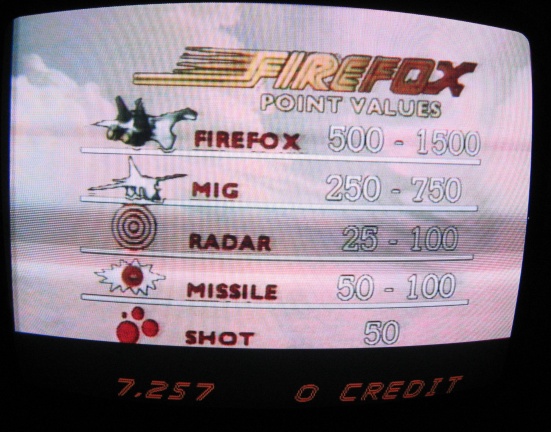
Here's what the banding looks like:

wg_logo.jpg


wg_points.jpg


..and here's a screen which should have white text on a blue background:

wg_tribute.jpg


Firefox also has simple, primary-colour text screens with red and green which are affected in the same way.

--
Dave

davespicer2011-04-04 00:59:11
 

DanP

Administrator
Staff member
vacBacker
Feedback
5 (100%)
Credits
2,232CR
Hi Dave, couple of quick questions. How are you powering the monitor and what voltage are you using? I assume being a newer WG it's free voltage, I'm pretty sure people have had problems (bloodf?) with one voltage over another similar to what you're describing. Secondly, have you measured the B+ voltage? Is it what it should be?

Dan
 

system11

Active member
Feedback
9 (100%)
Credits
345CR
I had a free voltage WG and when I put 240v near it, it made a horrendous whining sound bad enough that I immediately switched it off. Fortunately no damage was done.
 

DaveAS

User
Credits
336CR
B+ droops a bit when the display is brighter. We're talking a drop from 125V down to about 123. I've not had a scope on it yet, only a DVM. TBH, I'm not sure what I'd expect to see here.

Yes, it is a free voltage monitor and I am driving it with 240V. I'll have a dig around and see if I can turn up enough connectors to wire it into the 120V from the power brick.

Bloodflowers will at least appreciate the annoyance level caused by the bloody noise!

The colour problem bothers me more than the rest I think. I've not found anyone reporting a similar issue when trawling the various forums.

--
Dave

davespicer2011-04-04 19:35:00
 

DaveAS

User
Credits
336CR
Good call on the power supply. 240VAC = scream, 120AC = blissful silence.

Interestingly the horizontal lines appear in different places now too. Really crappy power supply?

--
Dave
 

DaveAS

User
Credits
336CR
I sussed out the colour problem.

Unusually for an arcade monitor, the 7203 has AC coupled inputs. There's no horizontal blanking on the output from Firefox and a single colour background will therefore have no black reference for DC restoration. Net result - a burst of colour after vertical blanking which then decays away to black.

AC coupled video is the work of the devil and I don't know why WG have used it in an arcade monitor.

A fix will involving modifying either the monitor chassis or the Firefox graphics board. Oh joy.

--
Dave

davespicer2011-04-06 10:16:00
 

trm

Who loves you, and who do you love?
Feedback
2 (100%)
Credits
2,877CR
Hi Dave,

I hope you don't mind me tagging onto the end of this - pleased to see you've got it understood.

I'm a bit iffy about how video signals work - I think I understand RGB, but have never been sure if things such as the front & back porch are present on an RGB feed or just on PAL/NTSC/Composite/etc - I thought they're only present on the more complex encoding methods, and RGB is basically the colour amplitude along with h and v sync pulses?

I wondered whether the Firefox PCB was outputting something other than pure RGBS, such as composite video? I think I understand why the lack of horizontal blanking means there's no black reference (there's no back porch, so nowhere to pickup the black level?) but I thought that was only relevant for non-RGB sources?

Is the AC coupling nasty because they're using capacitors to remove the DC offset which would in this case be providing the black level or for some other reason?

As you can tell, I don't do monitors (yet)
smiley4.gif
.

cheers

tim
 

DaveAS

User
Credits
336CR
RGB just has blanking, no front porch, back porch, patio or driveway.
smiley2.gif
Blanking is mandatory for consumer gear because you can bet on TV inputs being AC coupled. Arcade games may not bother and would still work perfectly well with a DC coupled input.

As you said, the AC coupling blocks the DC component of the input signal. It's restored later by clamping the lowest point to a known voltage, which will be black for simple RGB (no embedded syncs). The nice thing about this approach is a consistent black level regardless of input. The downside is a slow drift towards black across any line of solid colour, with the amount of variation dependant on the time constant of the input R+C. Effectively the RGB inputs are going through a high pass filter.

I think you can see where this is going... If the screen is filled with one colour, the RGB inputs will be DC between blanking intervals. Take away the horizontal blanking and you have DC from the top of the screen to the bottom. Take away the vertical too and the inputs won't change at all. Now clamping the lowest part of the signal to black will just give.... black. Ooops.

Firefox has vertical blanking which is why I see a bit of colour at the top of the screen. The initial high frequency step from black to colour gets through and then the level fades away.

Fortunately the character display covers the entire screen, including blanking, allowing for a software fix. Even better, the rev 2 ROMs already have a fix in place. Time to fire up the EPROM burner!

--
Dave

davespicer2011-04-06 21:09:32
 

trm

Who loves you, and who do you love?
Feedback
2 (100%)
Credits
2,877CR
Excellent - many thanks. That's cleared up the uncertainty I had about RGBS versus the encoded systems and it all now makes sense, especially why you were getting initial colour which was soon fading to black.

Thank you very much
smiley4.gif
. I might have had a crappo day at work, but I've learnt something so the day is good!
 

DaveAS

User
Credits
336CR
I learnt something too... never listen to the "you should recap the monitor" brigade without some hard evidence to say it needs doing.

One ROM upgrade later and... ta da...

wg_blue.jpg


The dark bands have gone too (the one on the pic above is just a sampling artefact). The black level was set slightly too high for the laserdisc input and it was pulling the picture down. Not 100% sure why it was banded rather than consistent, but don't care now it's working. I wasn't comparing like with like when I assumed the behaviour had changed after switching the supply voltage.

At last... now I can get back to doing some real work on the Firefox cab.

Thanks for the input guys.
smiley1.gif


--
Dave

davespicer2011-04-07 00:31:54
 

guddler

Busting vectors like it's 1982!
vacBacker
Feedback
10 (100%)
Credits
4,058CR
davespicer said:
I learnt something too... never listen to the "you should recap the monitor" brigade without some hard evidence to say it needs doing.

That's a given! Waste of time and effort and just indicates a lack of knowledge.

Only replace caps that are obviously bulging / pooped or potentially related to the problem at hand. And even that's a level of guessing but unless you're someone that's fixed loads of monitors and has built up a good amount of "Problem X = Cap Y" knowledge (I'm not) then there's going to be a certain level of trial and error. Hopefully though the amount is as small as possible.

Glad you fixed the problem. That's a sweet picture now.
 

DaveAS

User
Credits
336CR
trm said:
Nice result. Is that some kind of easter egg screen there or an actual part of the credits?

Dunno. I yanked the yoke to go through the high score + tribute screen cycle and the "Star Wars crew" credits came up instead.

Maybe rev 2 ROMs alternate the 2 screens? I've never seen the credits on rev 1.

--
Dave

davespicer2011-04-08 14:32:06
 
Top