

ataridude74
Active member
Help!!!!


No matter what I try I cannot get sync in my Pacman cab, it rolls, blue saturation etc (see screenshot). In fact, there is no difference whether the sync cable is in or out, pot adjustments do very little at all.
What I have already tried and ruled out:
Monitor - original G07. been serviced and tested. Also, perfect sync and picture when receiving input across from another PCB in another cab
Isolation transformer - monitor worked fine when used with the PCB in another cab, using this same transformer
PCB - original Midway. Also tried with a bootleg Ms Pac. Both PCBs work on test bench/JAMMA cab but not in this cab
Power supply - using a switcher. But have also fed power from a switcher in another cab and a linear supply in another cab. Same result, no sync.
Interference from light - disconnected, no change
Interference from speaker - disconnected, no change
Interference from control panel, coin door - disconnected, no change
AC filter - disconnected, no change
Fuse - used a different fuse holder in case of corrosion, no change
Wiring from edge connector to monitor - completely rewired, no change
Sync wires - every permutation tried, tied, H sync only, V sync only, no change
Voltage - set to 5.00v at the edge connector, tried 5.10v, no change
I would ordinarily look at this and conclude there must be bad joints on the chassis PCB, but I have checked those also, plus it works with a different PCB.
It is a Galaxian cab with a G07 and Midway Pacman board, basically an original set up. A previous owner had hacked the loom, but I have continuity tested each and every wire plus rewired the monitor wires.
I have spent hours on this and it is driving me mad!!!
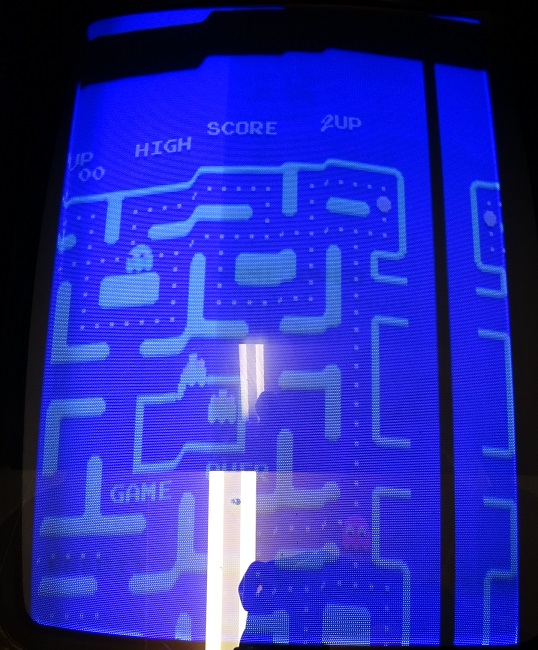
(the current image is actually worse than that, but the pots were set fine for the other game)
No matter what I try I cannot get sync in my Pacman cab, it rolls, blue saturation etc (see screenshot). In fact, there is no difference whether the sync cable is in or out, pot adjustments do very little at all.
What I have already tried and ruled out:
Monitor - original G07. been serviced and tested. Also, perfect sync and picture when receiving input across from another PCB in another cab
Isolation transformer - monitor worked fine when used with the PCB in another cab, using this same transformer
PCB - original Midway. Also tried with a bootleg Ms Pac. Both PCBs work on test bench/JAMMA cab but not in this cab
Power supply - using a switcher. But have also fed power from a switcher in another cab and a linear supply in another cab. Same result, no sync.
Interference from light - disconnected, no change
Interference from speaker - disconnected, no change
Interference from control panel, coin door - disconnected, no change
AC filter - disconnected, no change
Fuse - used a different fuse holder in case of corrosion, no change
Wiring from edge connector to monitor - completely rewired, no change
Sync wires - every permutation tried, tied, H sync only, V sync only, no change
Voltage - set to 5.00v at the edge connector, tried 5.10v, no change
I would ordinarily look at this and conclude there must be bad joints on the chassis PCB, but I have checked those also, plus it works with a different PCB.
It is a Galaxian cab with a G07 and Midway Pacman board, basically an original set up. A previous owner had hacked the loom, but I have continuity tested each and every wire plus rewired the monitor wires.
I have spent hours on this and it is driving me mad!!!
(the current image is actually worse than that, but the pots were set fine for the other game)


