Outrun - Dead

Ace`

PlanB contributor #1
Feedback
36 (100%)
Credits
3,789CR
I decided to take a break from the first Outrun board I was looking at that has sky / road problems as it's kicking my arse.

This one was stripped of all eproms and marked dead. After reburning and fitting all the missing roms I power it up and sure enough dead. First thing I did was check the clock on the main 68000 cpu and it was stuck low.

I looked at the schematics to see where the clock signal is created, which was a challenge of its very own (the schematics are pretty low quality).

74S04 @ IC85 pin 5 is the input and 6 the output, pin 5 was pulsing away nicely but just like at the cpu the output was stuck low.

outrun.jpg

The only fujitsu ttl on the board and it's used to create the clock signal.
smiley36.gif


outrun2.jpg

Socket and 74LS04 fitted.

outrun3.jpg


Oh yes that's what I want to see.
smiley4.gif


Unfortunately it doesn't end here, there are some sound issues. It looks like the previous owner had worked on it when it was in its current state and they have socketed both the Yamaha chips.

I am hoping it's just a bad ram and not the surface mount custom.
smiley11.gif
I noticed the self test only checks one of the three rams in the sound section. That's all for now as I ran out of time, to be continued...
smiley1.gif
 

smarty

Ready Player One
vacBacker
Feedback
12 (100%)
Credits
1,290CR
Great start. I bet you had a massive smile seeing it boot after swapping the 7404. Good luck with the sounds. Chris's test rom might handy for this.
 

dj_yt

Active member
Feedback
3 (100%)
Credits
787CR
I can't believe you have an outrun PCB with only one Fujitsu! The sound ram cannot be accessed from the main cpu. The internal tests do not test it either so I think you're mistaken about the self tests.

Also bear in mind there is separate ram for the pcm circuitry.

Are you getting FM sounds, pcm or neither?
 

Bods

Senior Member
vacBacker
Feedback
3 (100%)
Credits
4,677CR
I always start with the Op Amps now, fixes half the sound faults and easy job

Thats a great start though, could of worked after initial fix and have the same fault as the other one or other gfx issues, so I'd be well happy with that
smiley4.gif
 

Ace`

PlanB contributor #1
Feedback
36 (100%)
Credits
3,789CR
I knew the bottom board was good as I'd already fixed that but yes it was very nice to see the game boot right up without any graphics issues.
smiley1.gif


I see I assumed the ram @ IC92 was for audio, only because of its location on the board.

I am getting FM sounds only. The pcm sounds are either completely silent or a bit of staticy noise.
 

dj_yt

Active member
Feedback
3 (100%)
Credits
787CR
IC 92 is part of the pcm audio ram. But it's not tested by the internal tests as it can only be accessed by the pcm custom.

I would check IC 91 and 92 which are both used for sampled sounds. Also worth verifying the PCM EPROMs (although I doubt these are at fault if all samples fail).

Like Bods suggests, the op amps are a good easy target. But from your description if you're hearing some crunching from the samples they may be fine.

I find the PCM circuitry tricky to work on so good luck and well done so far.
 

Ace`

PlanB contributor #1
Feedback
36 (100%)
Credits
3,789CR
Thanks for the advice I'll get back to it as soon as I can and let you all know how I get on.
smiley1.gif


I just checked in mame to make sure I didn't imagine it but IC92 does shown up in the ram tests. So I guess it's a mistake or a ram on the bottom board? I do remember reading about a mistake on the ram test screen that's fixed in the enhanced edition.
 

dj_yt

Active member
Feedback
3 (100%)
Credits
787CR
Yep it's on the bottom board. Nothing to do with the audio circuit. :)

Good luck - report back and keep saving those outrun boards.
 

Ace`

PlanB contributor #1
Feedback
36 (100%)
Credits
3,789CR
I replaced all three 6116 rams today as they were the shiny / gloss tmm2015 type which apparently are known to have a high failure rate. All sounds have returned to normal.
smiley20.gif
 

Ace`

PlanB contributor #1
Feedback
36 (100%)
Credits
3,789CR
I've made a bit of progress today with the other board that has the
road / sky graphics issue. I wanted to try the new test rom out but then
remembered I've run out of 68000 cpus. So after desoldering two from
scrap sf2 bootlegs I was finally able to try it.

Anyway it
reported all four road rams as bad, the rams have already been checked
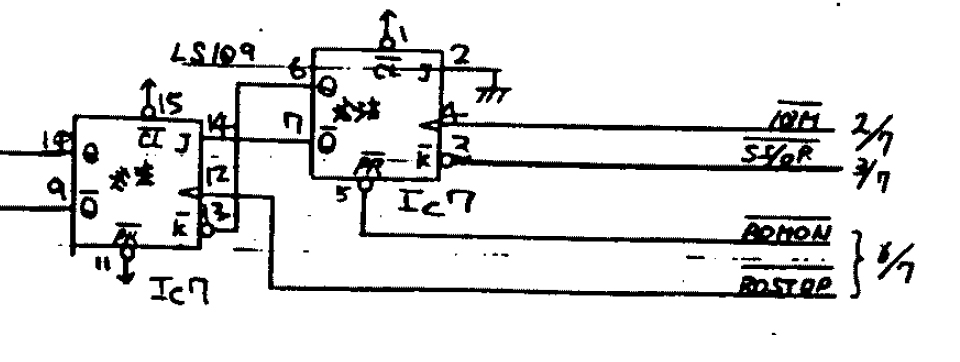
but after probing around a bit in the area I found a floating input pin (3) on the 74LS109 @IC7. It doesn't look like it's a broken trace as I
am getting 600mv on it but I cannot for the life of me find where this
pin is connected. I can follow it until it goes under a eprom socket but then lose it and I'm not finding it with the multi meter either.

ic7.jpg


I found IC7 in the schematics but cannot find where pin 3 goes (the one that looks like a 2)
smiley36.gif
Could someone with better eyes than me see where it goes? I thought it was IC99 at first but that doesn't seem to add up with the pcb.
 

tin

Active member
vacBacker
Feedback
3 (100%)
Credits
649CR
Looks to me to go to pin 6 on IC99 like you say. Looking at the rear of the board, it does pop up under an EPROM socket, but I can't see it has anywhere to go.

I took a complete complete random guess that it does that to cross the two traces immediately above, and then comes back down onto the rear of the board, and goes to... pin 6 on IC99. But I don't have anything better than a guess.

tin2017-06-23 13:56:48
 

Ace`

PlanB contributor #1
Feedback
36 (100%)
Credits
3,789CR
Thanks for the reply tin, I checked pin 6 of IC99 and it's got a healthy signal and no continuity to pin 3 of IC7. I think if the trace was broken I'd be getting nothing but as I am getting 600mv I don't know what's going on, I'll have to dig out my worker board and see what's going on.
 

Ace`

PlanB contributor #1
Feedback
36 (100%)
Credits
3,789CR
I just checked my good board and pin 6 of ic99 should indeed be connected to ic7 pin 3. I've ran a wire for now and this has improved thing but unfortunately not fixed it, two out four road rams pass now. Slowly getting there.
smiley1.gif
 

Ace`

PlanB contributor #1
Feedback
36 (100%)
Credits
3,789CR
I spent a bit more time on this today and found another floating pin. After fixing that trace I have a fully working Outrun pcb.
smiley4.gif
No more Outrun boards to tinker with now though.
smiley6.gif


outruntest.jpg
 

Ace`

PlanB contributor #1
Feedback
36 (100%)
Credits
3,789CR
It was a huge help, I thought I was making things worse at one point because everything looked so much worse but the test rom confirmed it was actually an improvement.
smiley1.gif


The only thing that would have helped more would be a list of chips and locations that could cause each error, but I guess that would be a long list and a lot of work to compile.
 
Top