Solved PC to 15khz CRT (Dino King)

dannywrayuk

Newbie
Credits
54CR
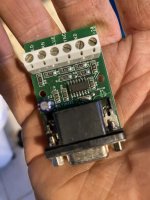
Some good news! My VGA amp arrived this morning (Amazing speed from Ultimarc!) and I've just finished setting it up. Had to wire up the 5v line as I wasn't getting 5v on pin9 from my GPU.
I'm getting a stable image! Shoutout to whoever suggested the amp, it was definitely the main issue.
This is what I'm getting now

IMG_1794.jpg

Some pretty weird horizontal distortion going on
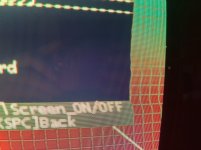
IMG_1795.jpg
Not really sure whats causing that. It seems to be dependent on the content on the screen - if I move up or down in the menu then the distortion follows the selection. Could be something to do with the amp only using Hsync.

(Also ignore the weird colours, the blue channel likes to cut out every now and again.. a different problem for a different time)
 

Venom

Active member
Feedback
15 (100%)
Credits
708CR
Nice to see you are getting there. Is it worth though trying another GPU as should be cheap as chips unless doing more modern games.

More out of curiosity !
 

Brettster

Arcade, and the Chuck Norris effect
vacBacker
Feedback
20 (100%)
Credits
1,225CR
Have you tried the HV sync options on the Video amp board?
it might be a case of cut the trace so that H and V are seperated, and only H is actually required
Amost there !!
 

dannywrayuk

Newbie
Credits
54CR
I’ve been away for a few weeks but I finally got chance to look at this again today.

After quite a bit of messing around with the pots and the settings in ArcadeOSD I couldn’t get the distortion to change. Then, just as I was about to give up, I turned down the brightness of the display and the distortion was gone! Really weird, the distortion seems to be connected to the brightness of the screen. The only problem is that when I turn the brightness down enough to remove the distortion, I can barely see the content.

Has anyone seen anything like this before? I’m wondering if there is some other pot on the back of the monitor I can adjust to bring the brightness back up but without the distortion? Idk

Anyway, I seem to be making progress in the right direction, thanks for the help so far everyone!
 

Retroman839

Senior Member
vacBacker
Feedback
12 (100%)
Credits
7,246CR
2 brightness pots
One is on the controller pcb .
The other is one of the two small pots
On the flyback.
You could try adjusting flyback up a bit .

This is a rgb to vga with video amp
IMG_1135.jpeg
You could try one like this also
 

Flinnster

The Dino King
vacBacker
Feedback
29 (100%)
Credits
2,566CR
I’ve been away for a few weeks but I finally got chance to look at this again today.

After quite a bit of messing around with the pots and the settings in ArcadeOSD I couldn’t get the distortion to change. Then, just as I was about to give up, I turned down the brightness of the display and the distortion was gone! Really weird, the distortion seems to be connected to the brightness of the screen. The only problem is that when I turn the brightness down enough to remove the distortion, I can barely see the content.

Has anyone seen anything like this before? I’m wondering if there is some other pot on the back of the monitor I can adjust to bring the brightness back up but without the distortion? Idk

Anyway, I seem to be making progress in the right direction, thanks for the help so far everyone!
I have the same on my Pang dino king conversion cab. You need to balance the brightness / contrast and screen pots (screen is at the rear of the monitor on the black box - you'll need to have the monitor out of the cab to adjust it sanely). If you crank up the brightness and contrast, you'll get the horizontal warping on bright areas.
 

dannywrayuk

Newbie
Credits
54CR
I have the same on my Pang dino king conversion cab. You need to balance the brightness / contrast and screen pots (screen is at the rear of the monitor on the black box - you'll need to have the monitor out of the cab to adjust it sanely). If you crank up the brightness and contrast, you'll get the horizontal warping on bright areas.
Yeah I think it's 100% this, I've turned down the contrast all the way and it's a huge improvement. Do you know if it's safe to adjust the flyback pots while the display is on?
 

Flinnster

The Dino King
vacBacker
Feedback
29 (100%)
Credits
2,566CR
Yeah I think it's 100% this, I've turned down the contrast all the way and it's a huge improvement. Do you know if it's safe to adjust the flyback pots while the display is on?
It is but it's very faffy trying to do it with the monitor inside the cab.
If you can pop the monitor onto a table next to the cabinet it should be easy enough to bring the wires out and run it live on a table where you can adjust the screen pot without having to reach round the live chassis to get to the flyback. If you have any plastic / resin trim tools or screwdrivers then you can use those too rather than running the risk of having a metal screwdriver slip and zzttttbzzzz... shit.
 

dannywrayuk

Newbie
Credits
54CR
I think I've got the monitor to a place that I'm pretty happy with now. The answer seemed to be a combination of a VGA amplifier and adjusting all of the pots - especially lowering the contrast. I'll probably make small adjustments over time but the picture is at least now in an acceptable state.

387578276_891366919330936_8837915875165226814_n.jpg


Huuuge thank you to everyone who helped in this thread, I couldn't have gotten this far without your advice :)
 

Retroman839

Senior Member
vacBacker
Feedback
12 (100%)
Credits
7,246CR
I think I've got the monitor to a place that I'm pretty happy with now. The answer seemed to be a combination of a VGA amplifier and adjusting all of the pots - especially lowering the contrast. I'll probably make small adjustments over time but the picture is at least now in an acceptable state.

387578276_891366919330936_8837915875165226814_n.jpg


Huuuge thank you to everyone who helped in this thread, I couldn't have gotten this far without your advice :)😊 looks cool
 
Top