Pi2jamma Advice

Retrojedi74

Active member
Feedback
1 (100%)
Credits
86CR
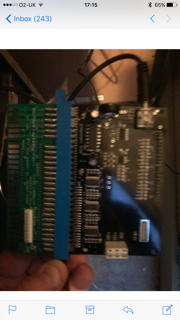
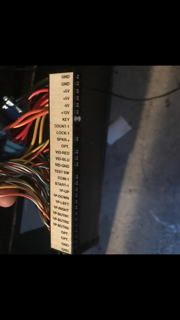
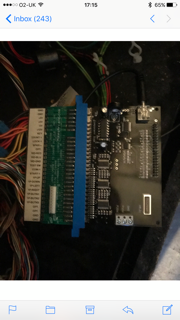
Hi all, I was wondering if someone could give us some advice on pi2jamma adapter I just purchased from arcadeforge.de. The pictures I've added shows I've had to use a mikes arcade chamma adapter because on my Jamma harness I have a little white block in the key slot that I can't seem to pull out? But when I have plugged it in via the adapter I'm getting brilliant sound from my machine but no picture. I'm quite a novice to Jamma harnesses as you can probably tell. Thanks in advance for any advice..??
IMG_4186.PNG
IMG_4187.PNG
IMG_4188.PNG
 

Flinnster

The Dino King
vacBacker
Feedback
29 (100%)
Credits
2,566CR
Possibly higher res photos would help to see what you are up to.
Sometimes you can pull the key pin out of the edge connector with a pair of thin nosed tweezers.

But the video signals are usually unaffected by by a chamma adaptor - that just deals with button inputs if they are needed.

So I reckon your issue is likely with the pi2jamma board's video out, presuming your cab video worked OK with other boards beforehand.
 

Retrojedi74

Active member
Feedback
1 (100%)
Credits
86CR
Sorry I should of said I have a 19 in 1 board that works fine and Pandora's box which runs fine too, I will sort out clearer pics. So taking out the key pin out wont solve my problem?
 

TWB

Active member
vacBacker
Feedback
11 (100%)
Credits
318CR
First try the official image from HERE

That’s Jochens (arcadeforge.net) site.

The Regamebox image will work with an 8gb card so you should be good, follow the instructions on the link above. You will also need a 16gb pen drive to store your roms.

And you will need a copy of Mame 1.06 roms to use with advancemame once you write the image above, I’m not sure if links to roms are permitted here so to be on the safe side google is your friend.TWB2017-11-02 19:45:58
 

Flinnster

The Dino King
vacBacker
Feedback
29 (100%)
Credits
2,566CR
Yep unfortunately I don't have a pi2jamma board so I can't twiddle stuff here to replicate what you are seeing.
However it does seem like your pi image is set to output video on hdmi and audio out of the headphone jack, and the headphone part is working (hence the audio you get), but the video needs to be configured (on the pi itself) to output to the pi2jamma board, rather than the HDMI.

To test this theory you'd need to:
- Unplug the headphone lead, see if the audio goes completely quiet
- Plug an HDMI cable in and see if you get an image on a TV or PC monitor

Regardless of the above..... yes, using the official images is totally the way to go
smiley20.gif
 

Flinnster

The Dino King
vacBacker
Feedback
29 (100%)
Credits
2,566CR
Retrojedi74 said:
Oh right I see what you mean, so what would I need to change my video output setting on my pi too then? Would you know? Thanks

So this depends entirely on what software is on the image you are using!
This is why using the official / generic jamma2pi supplied image is a good starting point.

On the card you'll find a file called config.txt - it's readable on any pc.
It will contain a load of lines relating to hdmi, so you can attach that here and people who are familiar with the pi setup can take a look at it.

Unfortunately it's also then possible for different pi software to do additional things after that initial config (so I understand). Then you need to know what's actually being run - that's when you need assistance from someone who is -very- familiar with the various emulators and systems like retroarch :)
 

Retrojedi74

Active member
Feedback
1 (100%)
Credits
86CR
Ok I think I will start again using the advised software, I'm struggling to find the volume control on the pi2jamma. Could you show us using a pic if possible. Thanks
 

Fantazia2

Active member
vacBacker
Feedback
13 (100%)
Credits
2,246CR
You will need to use the Pi image supplied by the Pi2Jamma suppliers and not some other Pi Image for a couple of reasons.

1. They use the GPIO to output an RGB signal which needs configuring on the PI to be used instead of the default HDMI output, but as long as they have used the Gert666 standard this can be done on any PI setup by editing the config.txt as mentioned above.

2. The Pi2Jamma board is setup to use a custom PiKeyD program to get button inputs via the GPIO, that the Pi2Jamma creators have made themselves, without this custom program I doubt you would get any inputs from the controls.

So without a lot of custom work in Linux on the PI you wont be able to use anything but the Pi2Jamma software.

The volume control is the pot on the left hand side if you are looking at it from the jamma edge connector, the red arrow is pointing to it in the picture below. It may be vertical like the picture or flat as I have seen in other pictures. You will need a little screwdriver to rotate the central part.

pi2jamma_enc_4_05.jpg
 

Retrojedi74

Active member
Feedback
1 (100%)
Credits
86CR
Thank you, I'll go down the route of using the recommended software and take it from there. I was wondering what that circular thing was on the board. Mine is a bit too loud ??
 
Top