Point Blank cab power issue

Rothiseph

Newbie
Credits
1CR
Heya folks! I've had a PB cabinet for a couple years now, but it's sadly remained non functional since the day I picked it up.

When putting power through the unit, there's a definite hum but the power doesn't even seem to reach the marquee light. I even replaced the light with a new bulb to no avail. No audio or screen image either, BUT when switching the power off there's a brief display of a thin line before it goes off entirely.

I'm no electronics guy, so my buddy tried some basic troubleshooting a couple years back. Think it was a voltmeter he used to check power was going to the fuses, and they seemed intact but there's a chance a capacitor wasn't pulling power. Not sure if the capacitor could cause the issue but it's likely a good starting point.

Trouble with all this is that I've no idea what I'm doing, so would need a total idiot's guide in terms of pics to post and other standard things to check out.
smiley17.gif
Any help would be much appreciated - and sorry if this is all super vague, it's my first post..
smiley36.gif
Rothiseph2022-02-15 19:33:59
 

TheDaddy

Senior Member
vacBacker
Feedback
14 (93%)
Credits
7,230CR
If you know nothing about electric then stay away !! High voltage can hurt. The only way you would get help is if someone had one and could help you.

Dave.
 

Rothiseph

Newbie
Credits
1CR
Cheers Dave - yeah I'm fully aware the dangers of high voltage, hence why it's sat for so long! My friend was clued in which is why he was able to take a look, but having no knowledge here I've been unable to do anything on it since...
 

Retroman839

Senior Member
vacBacker
Feedback
13 (100%)
Credits
8,292CR
connections come loose
you would after transportation need to check for any loose connections

jamma connection. etc…

you might have power to the monitor chassi

but not correct power to the pcb / jamma game board..

check your 12v & 5v at the jamma connection

game could be dead
or not getting correct power

try another jamma game

make sure the jamma connection is on tightly all the way

thin line on power off seems ok

you would normally have 110v isolation for the monitor

and another power source for the 12v & 5v

i would recommend you check this as seems your not getting an image or sound..

post pics here of inside of your point blank cab

fun game
i have a spare point blank japanese pcb if yours is dead
 

Alpha1

Do the Shake and 'VAC
Staff member
vacBacker
Feedback
95 (99%)
Credits
5,658CR
Literally learn how to measure +5v and +12v in various places on the cabinet such as

At PSU
At game PCB

And if brave the power to the monitor. However if you see a white flash when turning the cabinet off sounds like the monitor is probably getting power and okay.
 

TheDaddy

Senior Member
vacBacker
Feedback
14 (93%)
Credits
7,230CR
Where in the UK are you ?? Maybe if someone is close and has knowledge they may offer to take a look for you ? As alpha said its easy with the low volts stuff but you dont wanna be poking at thinks you dont understand. Even getting settings wrong on the multimeter can cause loud bangs !

Youtube is good for information and you can visually see what they are doing. I learned lots this way.

Dave.

P.S There is a ' new users post here ' to introduce yourself as well. Just lets you say hello to users.

New Users Post Here - UK-VAC : UK Video Arcade Collectors Forum - Page 1 (ukvac.com)

TheDaddy2022-02-15 20:03:49
 

Rothiseph

Newbie
Credits
1CR
Cheers all for the starter tips, very cool of you to offer advice! Afraid I've been out this eve but I'll take some system pics tomorrow and upload once organised.

For reference I'm also based in Aberdeen, Scotland.. so perhaps a bit remote for most.
smiley9.gif
 

Rothiseph

Newbie
Credits
1CR
Actually managed to get some snaps when getting home! Afraid the board is locked away in its case so can't get immediate access to it, but perhaps the below can give some instant clues as to whether there's anything immediately obviously wrong. Believe it's the big blue capacitor which was failing to give a reading on the voltmeter - hopefully something easyish to replace to try as a starter?

IMG20220215232758.jpg

IMG20220215232817__01.jpg

IMG20220215233205__01.jpg

IMG20220215233211__01.jpg

IMG20220215233221__01.jpg

IMG20220215233234.jpg

IMG20220215233308__01.jpg

IMG20220215233315.jpg

IMG20220215233326__01.jpg

IMG20220215233338__01.jpg
 

qjuk

Active member
vacBacker
Feedback
51 (98%)
Credits
2,134CR
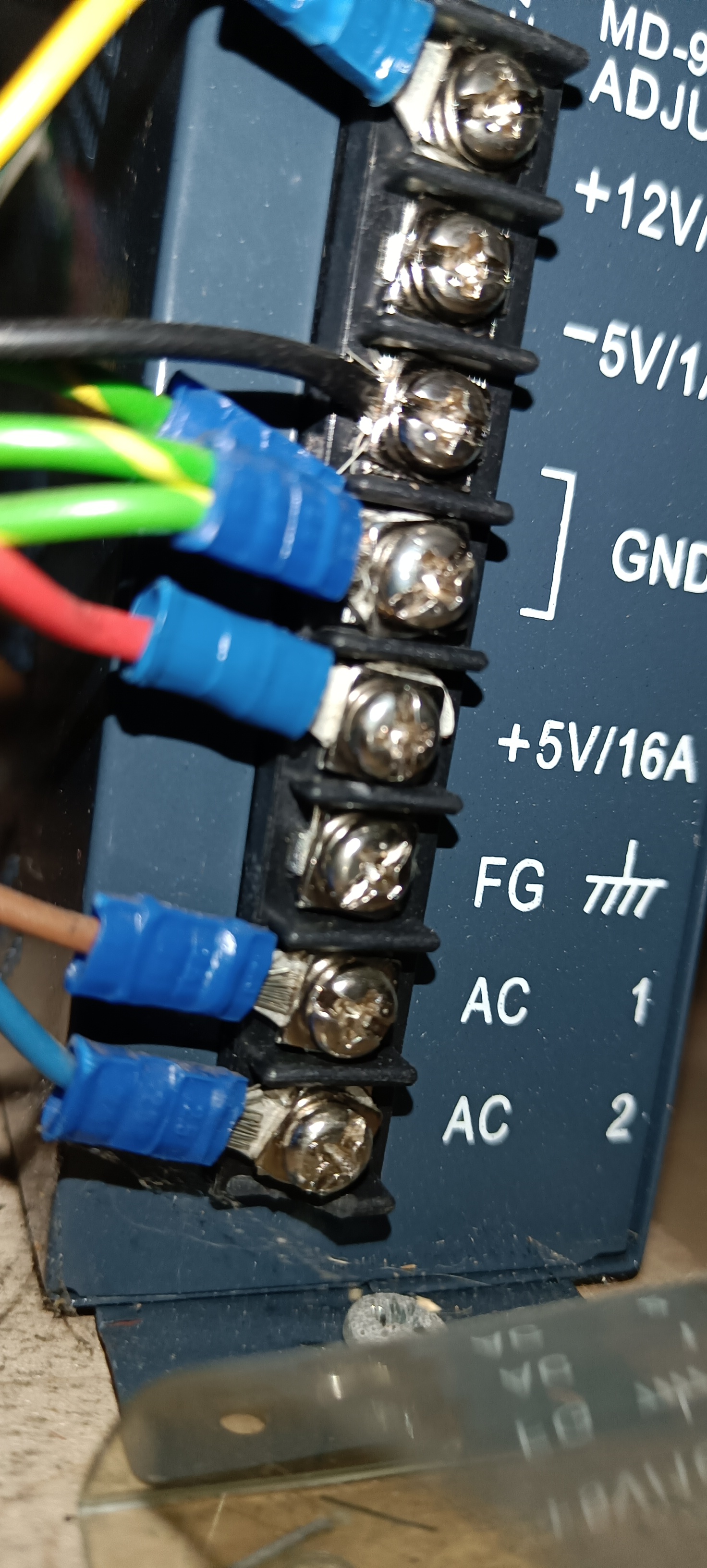
I would start at that Ming Dong power supply. It’s one of those cheap Chinese PSU’s which is not an original part. It looks like some green Earth wires are connected to the +5V terminal on it and a red wire connected to Field Ground, this doesn’t look right to me, how ever it might be some hack job and warrants investigation.
 

TheDaddy

Senior Member
vacBacker
Feedback
14 (93%)
Credits
7,230CR
Does the green light come on ?? The wiring seems correct on psu to me i think ? , i did have to count the pins as the angle of the picture makes it look wrong.

Dave.
 

Rothiseph

Newbie
Credits
1CR
Thanks guys - the unit hasn't been switched on for a good several months since I've had no need to, plus figured it would help dissipate any residual charge for when I next had someone able to check things out. What's the best means to get rid of leftover voltage if I was to switch on the cab to check for the green light? Think my friend previously used a thick screwdriver on a specific area of the machine to do this.
 

TheDaddy

Senior Member
vacBacker
Feedback
14 (93%)
Credits
7,230CR
The only voltage will be stored in the caps if power is unplugged - Oh and the HV on the monitor, There should be a discharge circuit in the PSU so an hour is plenty on them - Not sure on the big blue cap though. You realy need someone who can test all the voltages , You need to start with the main input and work your way up to monitor and board. Could be a faulty door switch or anything (Very easy to bypass to check).

Dave.

P.S Way to far from me or I would come over.

TheDaddy2022-02-16 13:13:41
 

Rothiseph

Newbie
Credits
1CR
I've tried to get a couple closer shots of the PSU connections, though afraid parts are still a little blurry as the camera was so close and was somewhat restricted by the plastic cover in front of the PSU. Hopefully shows the connections better though!

PSU1.jpg

PSU2.jpg


Also just tried to switch on the unit briefly and the green light does indeed come on for the PSU, so appears to receive power. The screen also pings like it's getting power but I don't believe any picture comes up.

!
IMG20220216143507__01.jpg


Also very kind of you to even consider a visit Dave, thanks for the thought
 

RaveN

Active member
vacBacker
Feedback
1 (100%)
Credits
1,325CR
You really do need a multimeter. Just buy a cheap £20 one and we can guide you through everything, you're more than capable of doing it with some guidance.

Don't worry too much about the large blue capacitor. It won't cause the issues you're having. It just creates the 24v for the solenoids in the guns afaik.

What I'm more concerned about is why someone has linked all of the safety earth connections to the GND point on the PSU... and if they've done that, then what else have they messed up.

All of the earth wires from metal points in the cabinet, the monitor, psu (from the FG point) and mains filter (if it has one) should all meet up at a star point in the cab somewhere, and connect to the mains earth cable.

For now, you could make the star point the "FG" terminal on the PSU. So I would power it down and move every green/yellow cable from "GND" to "FG", and make sure the black GND cable is well secured in GND as it looks a bit frayed and the poor single cable is having to carry all of the return current for 5v and 12v on its own. Because of that you'll probably find a pretty big voltage drop on the game PCB, so maybe the board is underpowered.

You really need that multimeter to check the 5v and 12v, as that's probably the issue.

Andy
 

Rothiseph

Newbie
Credits
1CR
Ah star, thanks Andy! I think my pal used a multimeter before so I'll see if I can borrow it from him to run through the checks. I'd first want to be 100% sure of removing all leftover charge though, since I'm aware it's high voltage and wouldn't want to begin without being certain there was no current.

But that sounds a promising start if it might well be down to incorrect wiring, so long as that won't have borked anything up so far. Already stoked with having a general idea of what to do, so thanks very much everyone so far - pretty exciting prospect to actually get this back up and running.
smiley4.gif
 

Rothiseph

Newbie
Credits
1CR
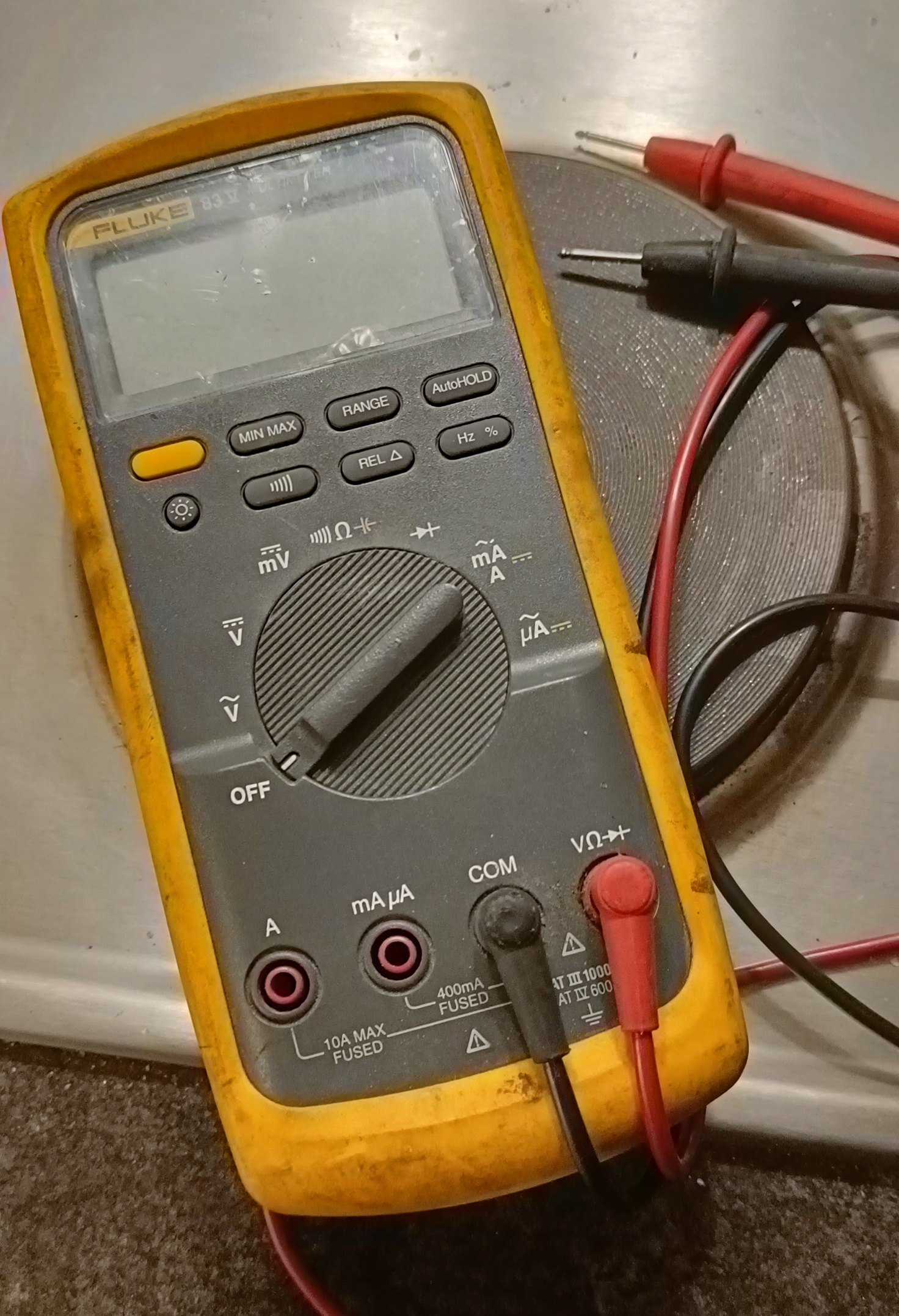
Following up on the multimeter - I've now got one from my friend so should be able to run any diagnostics as needed:

mm.jpg


Trouble is, I don't know which settings to use or even how to use it. Not sure if the cab needs to be on / off when doing so etc, so I really need my hand held here...

Can someone please put together an idiot's guide shortlist of the areas I should check with the meter, and any steps I need to take before to get rid of any leftover charge? Plus whether I'm safe to rewire the ground bits as outlined in Andy's previous post. Not wanting to blast myself or the cab!

I can make a note of all readings and feed back here once I've been through and sorted.
smiley1.gif
Rothiseph2022-03-01 21:02:46
 

Rothiseph

Newbie
Credits
1CR
Triple post, wahoo! Just updated the above - would be hella grateful if a kind soul could please lay out my next steps, cheers!
 
Top