
You are using an out of date browser. It may not display this or other websites correctly.
You should upgrade or use an alternative browser.
You should upgrade or use an alternative browser.
Sammy Atomiswave SD Restoration
- Thread starter mourix
- Start date


Make the Atomiswave great again !
After your project Mega-tech I know you have got this 😊
Good Luck my friend!
After your project Mega-tech I know you have got this 😊
Good Luck my friend!
The Sammy Atomiswave uses the Egret 3 body but with a Chinese Wei-Ya monitor chassis instead of the Egret's Toshiba.Seems like a good purchase to me!
I don't know much about these, same body as the egret 2 but 31 khz only? Looks like it's wired up for VGA..
The monitor still is a tri-sync though. Just less reliable, which will come up in this restoration soon...
Thanks, friendMake the Atomiswave great again !
After your project Mega-tech I know you have got this 😊
Good Luck my friend!


adammoogle
Newbie
I like the atomiswave, is fairly slim and much easier to access the monitor with the bonnet style hinge than my New Net City. Build quality not up to the egrets but still has a lot going for it. Following with interest!The Sammy Atomiswave uses the Egret 3 body but with a Chinese Wei-Ya monitor chassis instead of the Egret's Toshiba.
The monitor still is a tri-sync though. Just less reliable, which will come up in this restoration soon...
Thanks, friend
Coming from the insanely deep Astro City 2, this compact cab is a breeze to work on especially with it being on four castor wheels to boot.I like the atomiswave, is fairly slim and much easier to access the monitor with the bonnet style hinge than my New Net City. Build quality not up to the egrets but still has a lot going for it. Following with interest!
Diagnosis time.
You know, all in it does not look that bad. Just little bits of rust around the entire thing.


Some missing stickers and bonus grime, but the CPO does not even need to be replaced really.

I actually got this machine after a tip from a discord member who went to look but did not take the machine. He got the monitor working during his visit but said it had sync issues and the neck board was loose before it worked. When I tried the cab at home, the monitor had the famous click of death with the monitor trying to start but failing. The power supply rails did seem fine but I guess I can not make any assumptions there.
Time to take it apart. Looking inside shows remarkable a remarkably clean machine, not counting the obvious rust.


Again, the PCBs do not look high hour really. I guess the coin counter at 10933 confirms that.


Some investigation found the two most probable causes for my monitor issues.
First off, the plastic of the CRT neck is loose. Secondly, it was a miracle the flyback even started once with those solder joints...


Status right now:
You know, all in it does not look that bad. Just little bits of rust around the entire thing.
Some missing stickers and bonus grime, but the CPO does not even need to be replaced really.
I actually got this machine after a tip from a discord member who went to look but did not take the machine. He got the monitor working during his visit but said it had sync issues and the neck board was loose before it worked. When I tried the cab at home, the monitor had the famous click of death with the monitor trying to start but failing. The power supply rails did seem fine but I guess I can not make any assumptions there.
Time to take it apart. Looking inside shows remarkable a remarkably clean machine, not counting the obvious rust.
Again, the PCBs do not look high hour really. I guess the coin counter at 10933 confirms that.
Some investigation found the two most probable causes for my monitor issues.
First off, the plastic of the CRT neck is loose. Secondly, it was a miracle the flyback even started once with those solder joints...
Status right now:
- Ordered electronics safe silicone glue for the CRT.
- Added some first stuff to the monitor wiki and started the PSU wiki.
- Began making cap lists/maps for the monitor/PSU.
- Am approaching some contacts for a possible complete automotive respray for this thing.
adammoogle
Newbie
On the Atomiswave I had, the convergence rings were pretty much loose (spinning freely) I think it happened in transport though.Diagnosis time.
You know, all in it does not look that bad. Just little bits of rust around the entire thing.
Some missing stickers and bonus grime, but the CPO does not even need to be replaced really.
I actually got this machine after a tip from a discord member who went to look but did not take the machine. He got the monitor working during his visit but said it had sync issues and the neck board was loose before it worked. When I tried the cab at home, the monitor had the famous click of death with the monitor trying to start but failing. The power supply rails did seem fine but I guess I can not make any assumptions there.
Time to take it apart. Looking inside shows remarkable a remarkably clean machine, not counting the obvious rust.
Again, the PCBs do not look high hour really. I guess the coin counter at 10933 confirms that.
Some investigation found the two most probable causes for my monitor issues.
First off, the plastic of the CRT neck is loose. Secondly, it was a miracle the flyback even started once with those solder joints...
Status right now:
- Ordered electronics safe silicone glue for the CRT.
- Added some first stuff to the monitor wiki and started the PSU wiki.
- Began making cap lists/maps for the monitor/PSU.
- Am approaching some contacts for a possible complete automotive respray for this thing.
81 euros worth of caps from Mouser came in, so let's get start with the PSU.
The Wei-Ya P271 came with "quality" caps from the likes of Giant, TK and S. Replaced them all with good 105C Panasonic, Nichicon and Wima.
Also resoldered everything while I was at it.

It came right back to life, even though it technically was not broken in the first place. I also made this wiki page with everything I learned plus a cap map.
The Wei-Ya P271 came with "quality" caps from the likes of Giant, TK and S. Replaced them all with good 105C Panasonic, Nichicon and Wima.
Also resoldered everything while I was at it.
It came right back to life, even though it technically was not broken in the first place. I also made this wiki page with everything I learned plus a cap map.
So you want to recap a Wei-Ya M3129D, huh?
Let this be a first warning. This marvel of tri-sync engineering is made from mostly analog circuits, which means the sheer amount of caps is nuts.
I spent around 4 afternoons soldering and the thing is not even 100% working yet.
To begin, I made this cap guide for the project.
On your path, you will encounter hilariously broken solders joints and caps in barely reachable places.

Also inspect glue corrosion and replace toasted resistors.

When done, reflow EVERY solder joint and fix the few solder pads you'll inevitably have torn off.

And then I turned it on...Click.Click..Click...and no picture. Not a single CGA source worked.
Eventually I tried my new VGA tester and looked up:


After dialing it in, I did get an amazing VGA picture.


So it seems I have created a perfect VGA monitor here, but all my standard res boards just keep the monitor in a 1Hz relay click loop.
Can anyone confirm the monitor is always in this relay click loop in case of no signal? Or is this the problem already?
I did not replace a few caps due to availability but I am going to order them just in case.
Let this be a first warning. This marvel of tri-sync engineering is made from mostly analog circuits, which means the sheer amount of caps is nuts.
I spent around 4 afternoons soldering and the thing is not even 100% working yet.
To begin, I made this cap guide for the project.
On your path, you will encounter hilariously broken solders joints and caps in barely reachable places.
Also inspect glue corrosion and replace toasted resistors.
When done, reflow EVERY solder joint and fix the few solder pads you'll inevitably have torn off.
And then I turned it on...Click.Click..Click...and no picture. Not a single CGA source worked.
Eventually I tried my new VGA tester and looked up:
After dialing it in, I did get an amazing VGA picture.
So it seems I have created a perfect VGA monitor here, but all my standard res boards just keep the monitor in a 1Hz relay click loop.
Can anyone confirm the monitor is always in this relay click loop in case of no signal? Or is this the problem already?
I did not replace a few caps due to availability but I am going to order them just in case.
Last edited:

Developments and monitor frustrations..
Still trying to get 15KHz working on the Wei Ya monitor. Thought I had it when I found out the daughterboard relay measured 5 ohms terminal resistance. Put in a new relay but no cigar..

As for the developments. I happened to own a Japanese VA1 Dreamcast, and the Atomiswave has a dual Japanese power outlet on the inside. Are you thinking what I'm thinking?...
One Aliexpress GDEMU, battery holder and PTC fuse later:


To get it going in the cab, I am designing some some custom open source PCB's though.
First off, this great project turns any raspberry Pico into a Dreamcast controller. Annoyingly enough it seems no one made open source PCBs for it as his license is very kind/permissive. Let's change that:

Secondly, the stereo amp for Egret 3 / Atomiswave is unobtainium at this point. Lets make a converter PCB for an Aliexpress TPA3110 module with the same power output as the original:

Still trying to get 15KHz working on the Wei Ya monitor. Thought I had it when I found out the daughterboard relay measured 5 ohms terminal resistance. Put in a new relay but no cigar..
As for the developments. I happened to own a Japanese VA1 Dreamcast, and the Atomiswave has a dual Japanese power outlet on the inside. Are you thinking what I'm thinking?...
One Aliexpress GDEMU, battery holder and PTC fuse later:
To get it going in the cab, I am designing some some custom open source PCB's though.
First off, this great project turns any raspberry Pico into a Dreamcast controller. Annoyingly enough it seems no one made open source PCBs for it as his license is very kind/permissive. Let's change that:
Secondly, the stereo amp for Egret 3 / Atomiswave is unobtainium at this point. Lets make a converter PCB for an Aliexpress TPA3110 module with the same power output as the original:
Last edited:
Oh my gosh, the monitor issue was a royal pain in the rear.....
I must have spent 50 hours on this troubleshooting and even ended up in a crisis as I had put my step down transformer in the wrong setting
(but only blew up the transformer itself in the end, phew).
Even invested in new test gear like an LCR meter. Eventually Grant was a great help in getting it going, see here.
I also may or may not have reproduced IC5 and IC9 modules for the Wei-Ya 3129 / Rodotron 666.
So what was the issue? This frigging thing:

This monitor changes the B+ voltage depending on 15k, 24k, or 31k input. Q12 was shorted, which is part of this switching. Basically, we were stuck at 31k voltage. Hence it going in protection on 15k.
You have no idea how happy I was to see my faulty Neo Geo on this monitor...

On with the restoration.
I must have spent 50 hours on this troubleshooting and even ended up in a crisis as I had put my step down transformer in the wrong setting
(but only blew up the transformer itself in the end, phew).
Even invested in new test gear like an LCR meter. Eventually Grant was a great help in getting it going, see here.
I also may or may not have reproduced IC5 and IC9 modules for the Wei-Ya 3129 / Rodotron 666.
So what was the issue? This frigging thing:
This monitor changes the B+ voltage depending on 15k, 24k, or 31k input. Q12 was shorted, which is part of this switching. Basically, we were stuck at 31k voltage. Hence it going in protection on 15k.
You have no idea how happy I was to see my faulty Neo Geo on this monitor...
On with the restoration.
Last edited:
Well done on fixing the monitor, that is a fantastic result !
Your documentation of process and cap kit will undoubtedly help others in the future.
Your documentation of process and cap kit will undoubtedly help others in the future.
Removing decals and prep for reproduction
Before respraying a candy cab, it's important to make sure there are replacement stickers for everything you rip off.
In the case of the Atomiswave SD, side art and control panel art are well available, but all the small decals are hard to come by. Today is step one of changing that.
Step 1: Heat the decal with a hair dryer for about half a minute or more. You want it to be hot enough to hurt your fingers when touching the panel.

Step 2: Using a razor blade, slice through the molten glue. DO NOT PULL on the sticker as you'll stretch it..

Step 3: Flatten the stickers onto a friendly material. I used CD sleeve plastic.

Now scan it all on at least 600 DPI in full color. After all this effort you want as much usable pixel data as you can. Also look around if there already is any vector data available.
Here is my collection so far, so feel free to use this in any way possible.
Before respraying a candy cab, it's important to make sure there are replacement stickers for everything you rip off.
In the case of the Atomiswave SD, side art and control panel art are well available, but all the small decals are hard to come by. Today is step one of changing that.
Step 1: Heat the decal with a hair dryer for about half a minute or more. You want it to be hot enough to hurt your fingers when touching the panel.
Step 2: Using a razor blade, slice through the molten glue. DO NOT PULL on the sticker as you'll stretch it..
Step 3: Flatten the stickers onto a friendly material. I used CD sleeve plastic.
Now scan it all on at least 600 DPI in full color. After all this effort you want as much usable pixel data as you can. Also look around if there already is any vector data available.
Here is my collection so far, so feel free to use this in any way possible.
Last edited:
Time to get back to the audio part. I assembled the custom TPA3110 class D amp.

It actually sounds great!...But keeping up with the theme, Mr Wei Ya is unhappy

I had put extra filtering on the class D amp but its clearly too noisy. Sound is 10/10, but all my games have snow-like distortion.
Time for me to design a class AB amp I guess..
It actually sounds great!...But keeping up with the theme, Mr Wei Ya is unhappy
I had put extra filtering on the class D amp but its clearly too noisy. Sound is 10/10, but all my games have snow-like distortion.
Time for me to design a class AB amp I guess..

The decal you see destroyed is the "Commercial Use Warning Sticker" (TAITO).
"Commercial Use Warning Sticker" (SAMMY) arcade file in Zona Arcade.
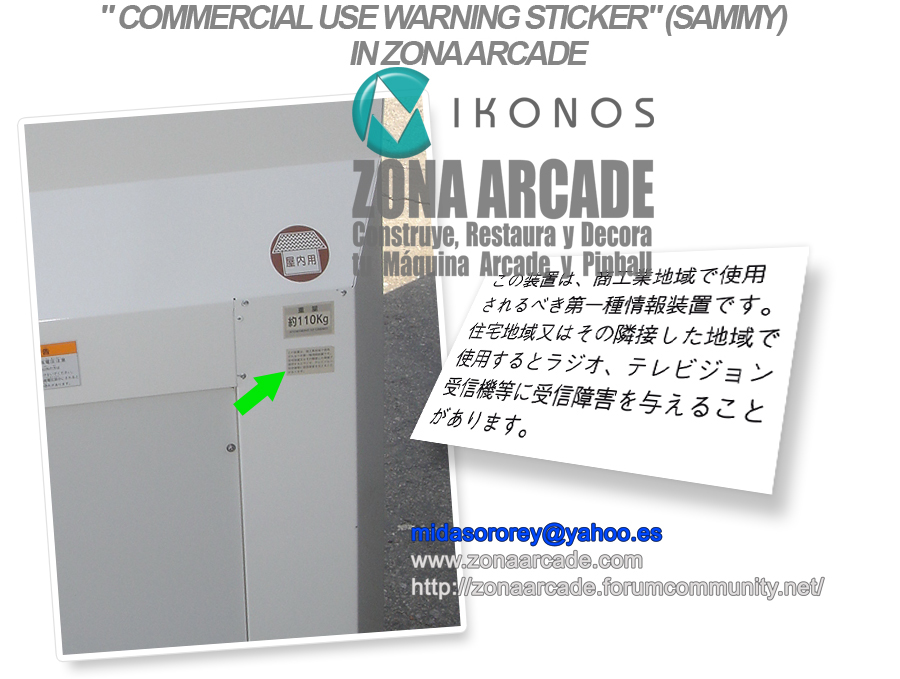
Regarding the weight decal, it appears to be a variant of the one I have, with some areas shaded, or it may simply be damaged.
Although I haven't spent much time restoring all the material I have from this arcade cabinet, a few years ago I created a compilation thread to show everything I have (everything you see is not everything I have). This thread will help you find out where certain decals are located.
https://zonaarcade.forumcommunity.net/?t=63024441#entry465400540
A little secret: some decals are the same as those on the Egret II and Egret 3 cabinets.
Cheers!
"Commercial Use Warning Sticker" (SAMMY) arcade file in Zona Arcade.
Regarding the weight decal, it appears to be a variant of the one I have, with some areas shaded, or it may simply be damaged.
Although I haven't spent much time restoring all the material I have from this arcade cabinet, a few years ago I created a compilation thread to show everything I have (everything you see is not everything I have). This thread will help you find out where certain decals are located.
https://zonaarcade.forumcommunity.net/?t=63024441#entry465400540
A little secret: some decals are the same as those on the Egret II and Egret 3 cabinets.
Cheers!
Great save with those stickers ! AwesomeRemoving decals and prep for reproduction
Before respraying a candy cab, it's important to make sure there are replacement stickers for everything you rip off.
In the case of the Atomiswave SD, side art and control panel art are well available, but all the small decals are hard to come by. Today is step one of changing that.
Step 1: Heat the decal with a hair dryer for about half a minute or more. You want it to be hot enough to hurt your fingers when touching the panel.
Step 2: Using a razor blade, slice through the molten glue. DO NOT PULL on the sticker as you'll stretch it..
Step 3: Flatten the stickers onto a friendly material. I used CD sleeve plastic.
Now scan it all on at least 600 DPI in full color. After all this effort you want as much usable pixel data as you can. Also look around if there already is any vector data available.
Here is my collection so far, so feel free to use this in any way possible.

Great job ,, thanks for the in depth info on the monitor …
Would your re designed AB- 1 class amp work on egret 2?
Would your re designed AB- 1 class amp work on egret 2?
Unfortunately there are no class AB modules you can just solder onto a breakout PCB.Great job ,, thanks for the in depth info on the monitor …
Would your re designed AB- 1 class amp work on egret 2?
The current plan is to make a wiring loom for this Ali TDA7297 module:
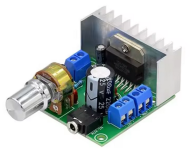
It would not be too hard to figure out the pinout for the Egret 2 if you want that.